
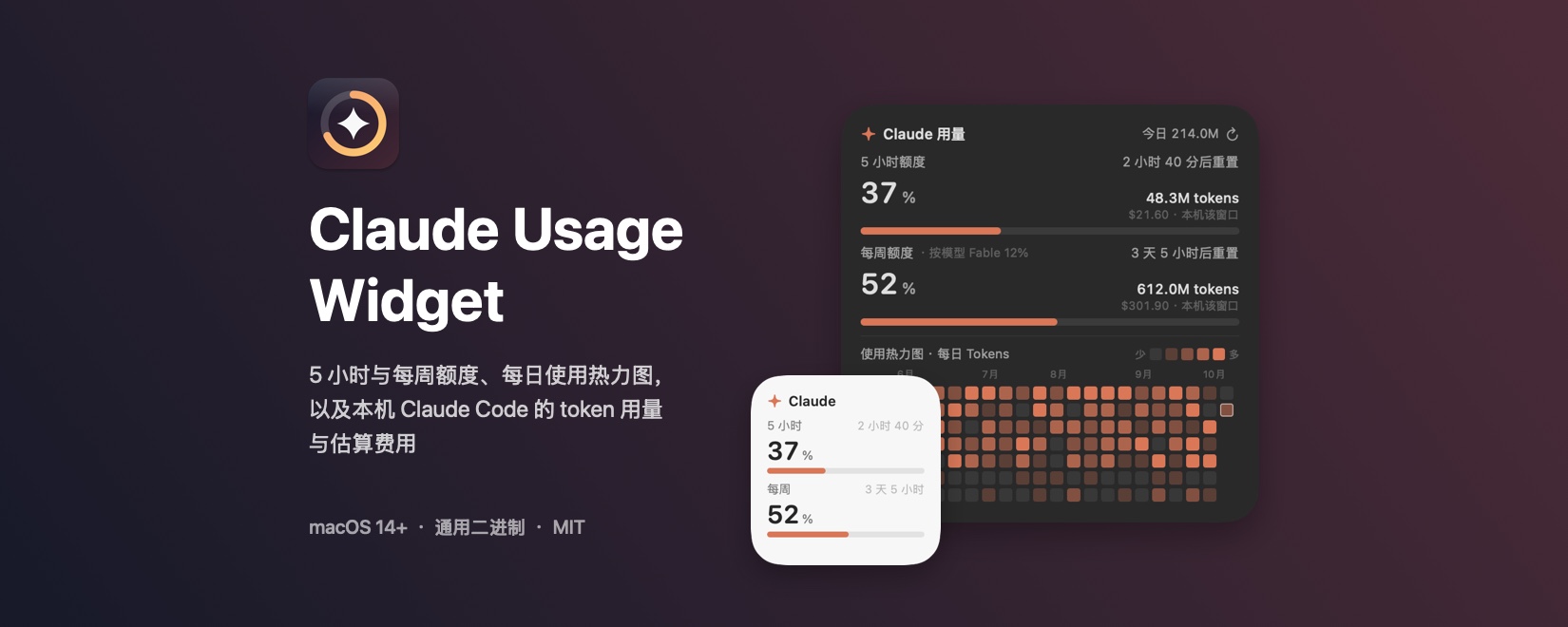
The 5-hour and weekly quotas of a Claude subscription are presented only on the usage page of claude.ai. Claude Usage Widget is a native macOS desktop widget (Swift / SwiftUI) that keeps both quotas (percentage used and reset countdown), the per-model weekly quota, a GitHub-style daily usage heatmap, and the token usage and estimated cost of the local Claude Code installation permanently on the desktop. Across its four sizes, the card dimensions, corner radius and grid snapping match those of the system widgets. The latest release is v1.0.0 (2026-10-13), open-sourced under the MIT License: Yu-Xiang-Yang/claude-usage-widget. The project is independent and not affiliated with Anthropic; it was developed with the assistance of Claude Code.
1 Background and Motivation
When working with Claude Code, the user needs to know the state of the current quota window: how much of the 5-hour window remains, how much of the weekly quota has been consumed, and when each resets. Obtaining this information is inconvenient in three respects:
- Visibility: the quota percentages and reset times appear only on the usage page, so reading them requires leaving the current working window;
- Separated data sources: the quota percentages are computed server-side and are absent from local logs, whereas token counts and costs can be derived only from local logs. The two kinds of data must be obtained separately and then merged for display;
- Non-recoverable history: Claude Code purges old session logs, so long-term usage trends cannot be preserved from the logs alone; the widget must store its own daily aggregates.
The aim of Claude Usage Widget is to merge these data into a single card that resides on the desktop, with an appearance and interaction model that follow the conventions of system widgets.
2 Feature Overview
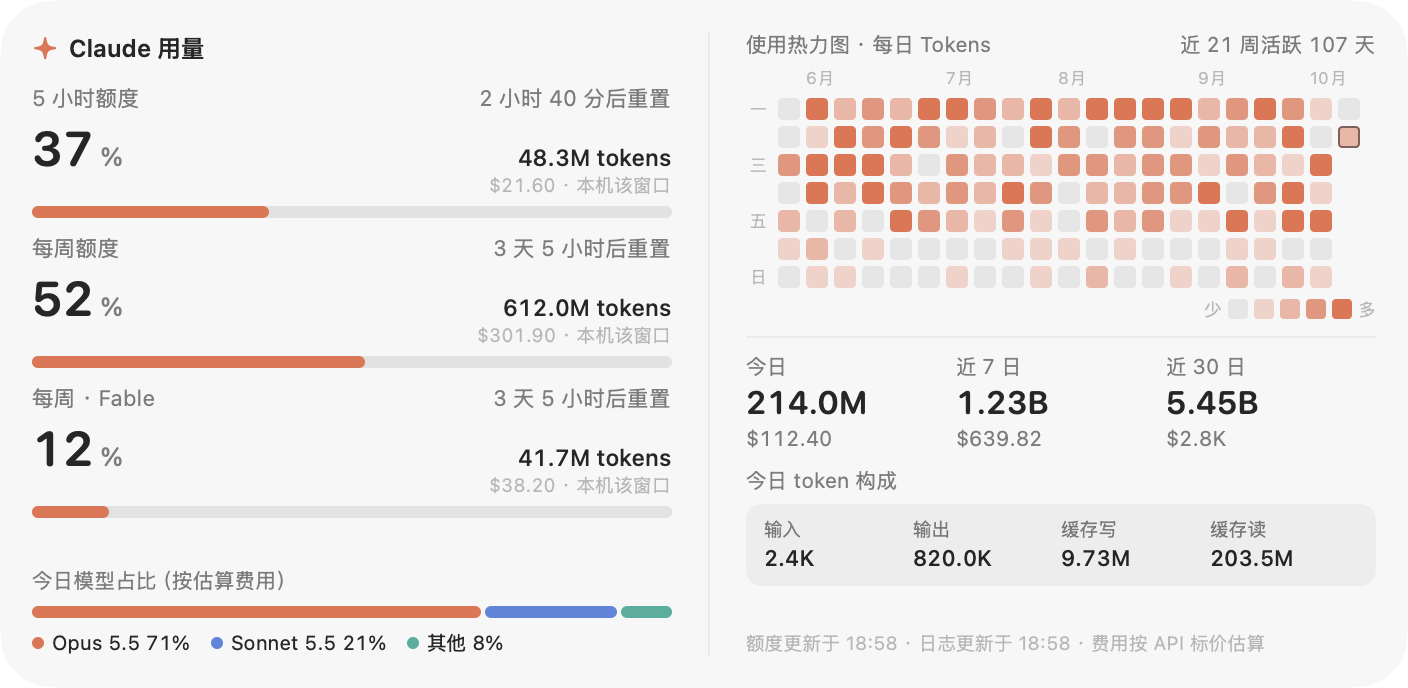
Figure 1 Extra-large size (704 × 344 pt) interface (simulated data rendered in --demo mode; it does not correspond to a real account). The left column shows the 5-hour, weekly and per-model (Fable) weekly quotas, each accompanied by the local token count and estimated cost within that window; the right column shows the daily token heatmap (107 active days in the last 21 weeks), the today / last 7 days / last 30 days summaries, today’s token composition and the model shares.
The main features are as follows:
| Feature | Description |
|---|---|
| Subscription quotas | Percentage used and reset countdown of the 5-hour and weekly quotas, together with the local log usage within each window; per-model weekly quotas are also shown when the plan includes them. The progress bar turns yellow at ≥ 70 % used and red at ≥ 90 % |
| Usage heatmap | One cell per day, 5 colour levels, Monday as the first day of the week, coloured by tokens or by message count; the history is stored by the widget itself |
| Usage summaries | Tokens and estimated cost for today, the last 7 days and the last 30 days; today’s token composition (input, output, cache write, cache read) and model shares |
| Native sizes | Small, medium, large and extra-large, matching the size, corner radius and grid snapping of system widgets; Liquid Glass material on macOS 26, with a fallback to a frosted-glass background on earlier systems |
| Chinese and English interface | The language follows the system and can be switched from the context menu |
| Login item | Optional “Launch at Login”, registering the current path as a system login item |
In the simulated data of Figure 1, today’s total is 214.0 M tokens, of which cache reads account for 203.5 M (95.1 %) and output for 820.0 K (0.38 %). This composition indicates that the total token count is dominated by cache reads. According to the price table in the source code, the cache-read unit price of Opus 5.5 is 5 % of the input price (0.20 / 4); the total token count is therefore not proportional to the estimated cost, and the widget displays both side by side.
3 Sizes and Interface
3.1 Widget Sizes
| Size | Card (pt) | Content |
|---|---|---|
| Small | 164 × 164 | 5-hour and weekly quotas |
| Medium | 344 × 164 | Both quotas, heatmap, today’s usage |
| Large (default) | 344 × 344 | Both quotas (including local window usage and per-model quotas), heatmap |
| Extra-large | 704 × 344 | All content of the large size; each per-model weekly quota occupies its own row with the corresponding local usage within that window; additionally the 7- / 30-day summaries, today’s token composition and model shares |
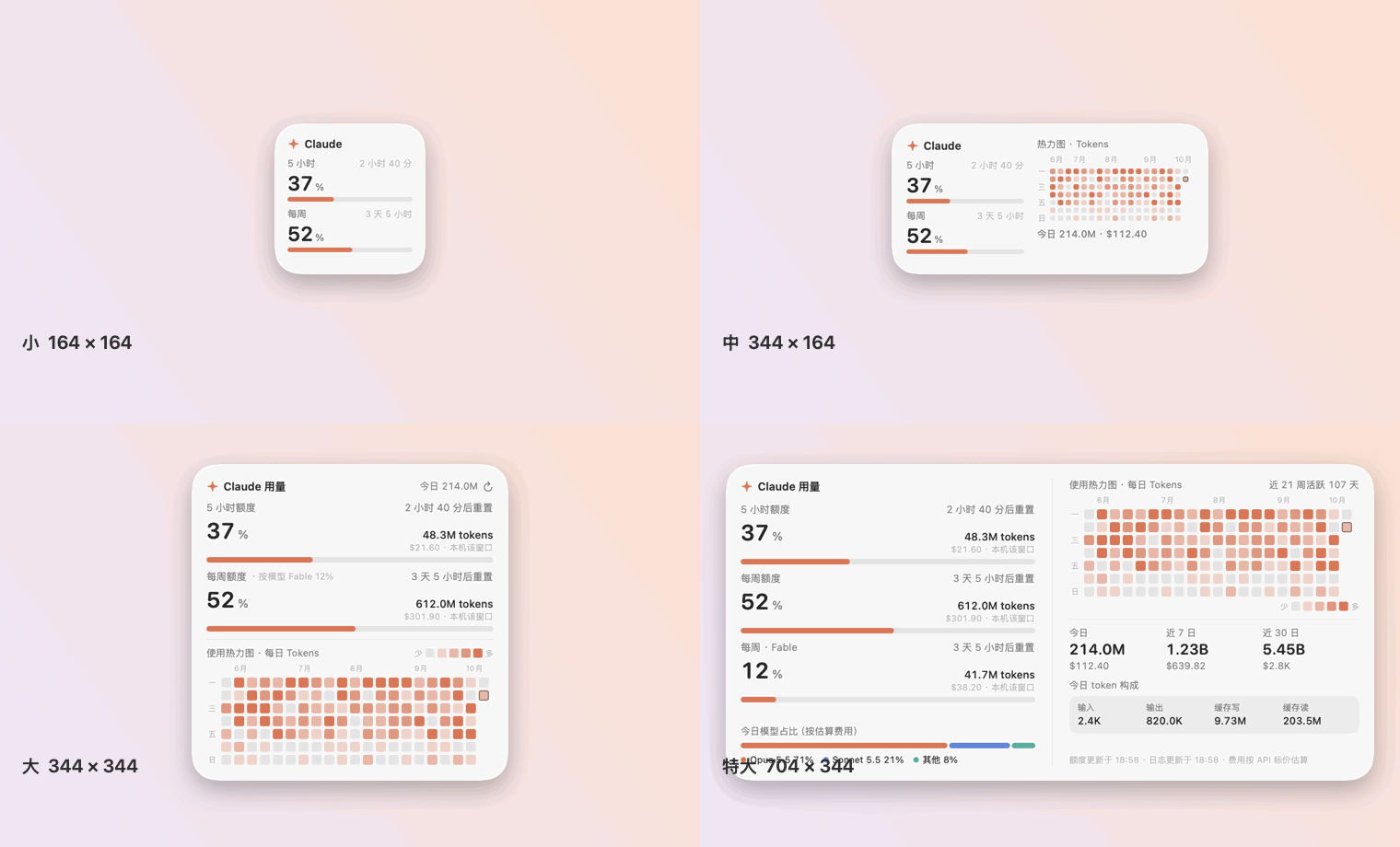
Figure 2 The four sizes (simulated data).
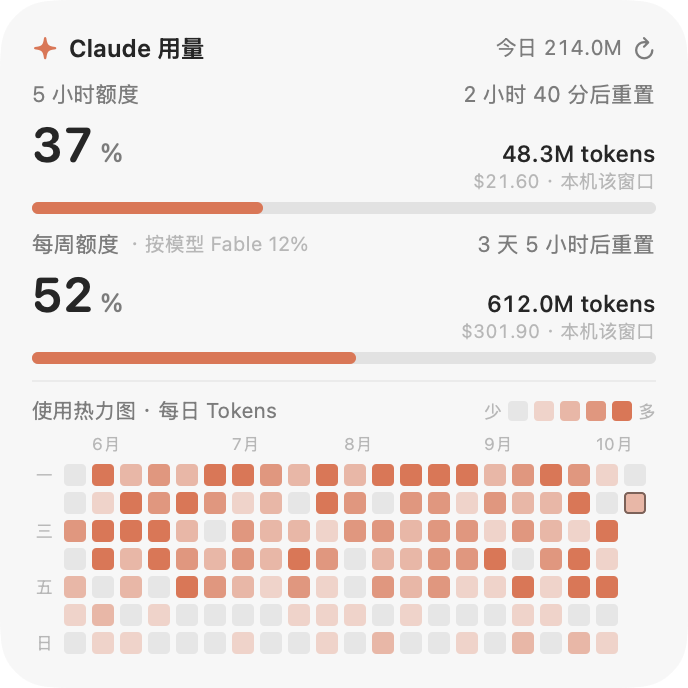
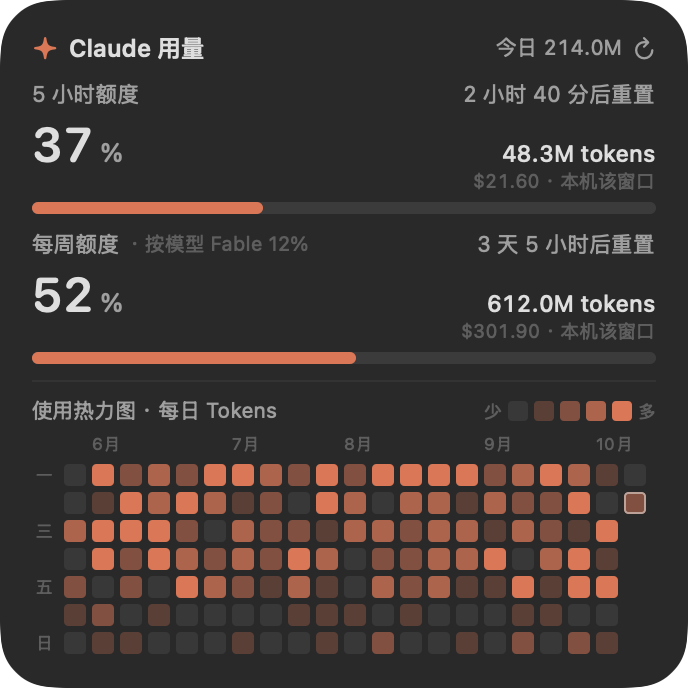
Figure 3 Light and dark appearances of the large size (simulated data).
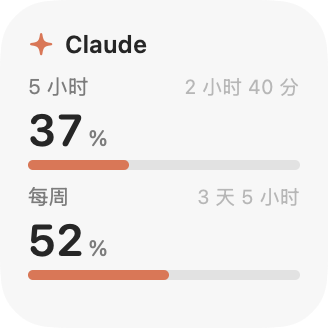
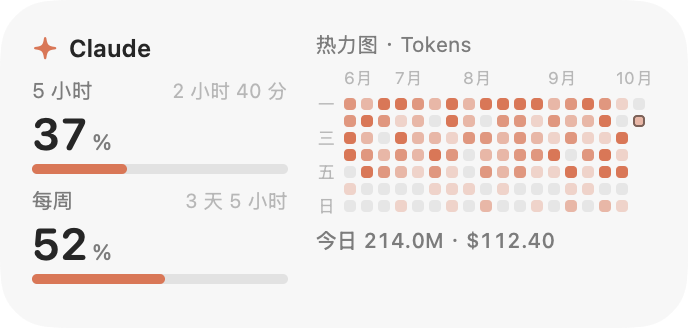
Figure 4 Small size (left) and medium size (right) (simulated data).
3.2 Application Icon

Figure 5 Application icon (512 × 512 px).
The icon is drawn from geometric primitives by scripts/make-icon.swift and contains no third-party or brand assets: on a dark rounded square, an orange ring represents the usage gauge, with a four-pointed star inside the ring. The icon is displayed in Finder, Launchpad, Spotlight and the Login Items list. The icon resides in the main branch (Resources/AppIcon.icns, written into the app bundle by build.sh); the changelog lists it as an addition in 1.0.1, which has not yet been released, so the v1.0.0 release package does not contain it.
4 System Architecture
The complete source of v1.0.0 consists of 9 Swift files totalling 2 389 lines, compiled together by build.sh, without a Swift Package or an Xcode project. The data flow is as follows:
Claude Code logs (*.jsonl) ─▶ UsageScanner (incremental scan every 30 s, per-message dedup)
                                   │
                                   └─▶ HistoryStore (daily aggregates, history.json) ─┐
                                                                                      ├─▶ Snapshot ─▶ WidgetView (SwiftUI, four sizes)
claude.ai usage endpoint ─▶ QuotaFetcher (embedded WebKit, at most once per minute) ─▶ QuotaInfo ─┘
└─ quota.json (shown immediately after restart)| File | Role |
|---|---|
Sources/main.swift |
Entry point and command-line modes |
Sources/AppController.swift |
Panel, sizes, snapping, status-bar icon, login item |
Sources/WidgetView.swift |
SwiftUI layouts for the four sizes |
Sources/UsageStore.swift |
Log scanning, pricing, aggregation |
Sources/UsageModel.swift |
Refresh scheduling and published state |
Sources/QuotaFetcher.swift |
WebKit data retrieval and sign-in window |
Sources/Support.swift |
Quota parsing and caching, daily history, size definitions |
Sources/Localization.swift |
Language preference and formatting |
Sources/Demo.swift |
Synthetic data for screenshots |
Resources/AppIcon.icns |
Application icon, generated by scripts/make-icon.swift (main branch; listed as 1.0.1 in the changelog, not yet released) |
Snapshot serves as the interface between collection and presentation: log scanning and quota retrieval each complete in the background, and their results are merged and published to the view layer. A failure in quota retrieval does not affect the updating of local statistics or the heatmap.
5 Local Usage Statistics
The widget reads the Claude Code session logs (~/.claude/projects/**/*.jsonl, together with ~/.config/claude/projects and the directory specified by CLAUDE_CONFIG_DIR) and accumulates the usage field of each assistant message.
5.1 Definition of Tokens
The total token count is defined as the sum of four terms: input, output, cache write and cache read. Cache writes are recorded separately for the 5-minute and 1-hour TTLs in cache_creation; when the sum of the two is smaller than cache_creation_input_tokens, the difference is attributed to the 5-minute TTL. Records whose model identifier is <synthetic> are excluded.
5.2 Deduplication of Streamed Messages
A single streamed message is written to the log multiple times, with the output token count of successive records increasing as generation proceeds. The widget uses the combination of message.id and requestId as a key and retains, for each key, only the record with the largest output token count (the final entry). When both the message and request identifiers are missing, the record’s uuid is used instead. Measurements show that without deduplication the total token count is approximately doubled.
5.3 Cost Estimation
Costs are estimated from published API list prices. The price table is Pricing in the source code (Sources/UsageStore.swift), in US dollars per million tokens, matched by the longest prefix of the model identifier; unmatched models are priced as claude-opus-5-5. The cost of a single record is
$$ C = 10^{-6} \left( p_{\mathrm{in}} N_{\mathrm{in}} + p_{\mathrm{out}} N_{\mathrm{out}} + 1.25 \cdot p_{\mathrm{in}} N_{\mathrm{w5m}} + 2 \cdot p_{\mathrm{in}} N_{\mathrm{w1h}} + p_{\mathrm{cr}} N_{\mathrm{cr}} \right) $$
where $N_{\mathrm{in}}$, $N_{\mathrm{out}}$, $N_{\mathrm{w5m}}$, $N_{\mathrm{w1h}}$ and $N_{\mathrm{cr}}$ are the token counts of input, output, 5-minute cache write, 1-hour cache write and cache read respectively, and $p_{\mathrm{in}}$, $p_{\mathrm{out}}$ and $p_{\mathrm{cr}}$ are the corresponding input, output and cache-read prices. Cache writes are charged at 1.25 times (5-minute TTL) or 2 times (1-hour TTL) the input price. Subscription plans are not billed per token, so this value serves only for relative comparison; the price table must be updated manually when prices change.
5.4 Scanning Overhead
The logs are scanned incrementally every 30 s; the initial full scan of 700 MB of logs takes approximately 2 s. The statistics cover only the local Claude Code; conversations in the claude.ai web interface and usage on other devices are not included.
5.5 Heatmap
The heatmap has one cell per day, with Monday as the first day of the week, and its metric is either tokens or message count. There are 5 colour levels: days with no recorded usage take the lightest level, and the boundaries of the remaining 4 levels are the 25 %, 50 % and 75 % quantiles of the active days. Daily aggregates are stored in history.json, so the recorded history is retained after Claude Code purges old session logs.
6 Retrieval of Subscription Quotas
The quota percentages are computed server-side and are absent from local logs. The widget therefore uses the same data as the claude.ai usage page, retrieved as follows:
- The sign-in window is an embedded WebKit view, and the sign-in state is stored in the widget’s own WebKit data store;
- At most once per minute, the widget loads
/api/organizations/<org_id>/usagewithin that store. Thelimitslist in the response contains three window types,session(5 hours),weekly_allandweekly_scoped(per model), each with a percentage and a reset time; the legacy fieldsfive_hourandseven_dayserve as fallbacks; - The parsed result is cached in
quota.jsonand shown immediately after a restart.
This endpoint is not a public API. When the endpoint changes or the sign-in expires, the widget falls back to a 5-hour window estimated from local logs and displays the reason, rather than a fabricated percentage.
6.1 The Passkey Issue in the Sign-In Window
A locally built application lacks the passkey entitlement held by browser-class applications. When the sign-in page detects that WebAuthn is available, it offers a passkey first, after which the flow stalls. The widget injects a script into the sign-in window before the document loads, handled as follows:
| Object | Handling |
|---|---|
window.PublicKeyCredential |
Set to undefined |
navigator.credentials.get / create |
Replaced with functions that return NotSupportedError |
| Injection scope | All frames (forMainFrameOnly: false) |
With WebAuthn blocked, Google and claude.ai fall back to password, device confirmation or an email verification code. Google and Apple sign-in take place in pop-up windows, and the sign-in window has been permitted to open windows via script. Sign-in links in emails open in the default browser and the resulting sign-in state does not reach the widget; the verification code should be used instead.
6.2 Credentials and Network Scope
- The widget does not read, copy or transmit passwords, cookies or tokens; it reads only the response of the usage endpoint;
- The only network destination is
claude.ai; - “Clear Sign-In” in the context menu deletes the WebKit data, the saved organisation identifier and
quota.json.
Because the endpoint is not public, its use should be checked against Anthropic’s Terms of Service in advance.
6.3 Stored Files
| Path | Content |
|---|---|
~/Library/Application Support/ClaudeUsageWidget/history.json |
Daily aggregates (tokens, message count, cost) |
~/Library/Application Support/ClaudeUsageWidget/quota.json |
Most recent quota reading |
~/Library/WebKit/local.claude-usage-widget/ |
WebKit data holding the claude.ai sign-in state |
7 Reproducing the Geometry of System Widgets
System widgets are WidgetKit extensions that must be signed with a developer certificate, and building them requires the full Xcode. This project does not use WidgetKit; the widget is therefore an independent borderless panel and does not appear in the system widget gallery. Its geometric parameters are taken from measurements of system widgets on macOS 26, obtained through the window list.
| Item | Measured value |
|---|---|
| Widget window | 180 × 180, 360 × 180, 360 × 360 pt |
| Card inset | 8 pt on each side within the window |
| Card size | 164 × 164, 344 × 164, 344 × 344 pt |
| Corner radius | 27 pt (fitted to the arc of the system card; contour inset difference no greater than 3 px) |
| Distance to screen edges and menu bar | 16 pt |
| Grid pitch | 180 pt (one widget plus a 16 pt gap on each side) |
The card side lengths above satisfy $180n - 16$ ($n$ being the number of grid cells occupied): for $n = 1, 2$ they are 164 and 344 pt respectively. The extra-large size is derived from the same grid, with width at $n = 4$, giving 704 pt, and height at $n = 2$, giving 344 pt; this size has not been measured.
The window behaviour is as follows:
- Snapping: during dragging the panel snaps to the screen margins, the screen centre lines and the 180 pt grid lines, with a threshold of 14 pt, and always remains within the screen; it is likewise placed on the grid at launch and after a size change;
- Level: the panel lies above the desktop icons and below ordinary windows, is visible in all Spaces, and is covered by maximised windows; enabling “Keep on Top” changes this behaviour;
- Shadow: no drop shadow is drawn, consistent with system widgets on the desktop.
8 Installation and Usage
8.1 Installation
Option 1: release package (recommended). Download ClaudeUsageWidget-<version>-macos.zip from the latest release page (universal binary supporting Apple silicon and Intel, requiring macOS 14 or later), extract it, and move ClaudeUsageWidget.app into /Applications. The application is ad-hoc signed and not notarised, so the system blocks the first launch; run the following command once to remove the quarantine attribute:
xattr -dr com.apple.quarantine /Applications/ClaudeUsageWidget.appAlternatively, choose “Open Anyway” in “System Settings → Privacy & Security”. The release page provides SHA256SUMS.txt for verifying the downloaded files.
Option 2: build from source. Only the Xcode Command Line Tools (xcode-select --install) are required, not the full Xcode:
git clone https://github.com/Yu-Xiang-Yang/claude-usage-widget.git
cd claude-usage-widget
./build.sh install          # build and install into /Applications (into ~/Applications when not writable)
open /Applications/ClaudeUsageWidget.app
Running ./build.sh alone only produces build/ClaudeUsageWidget.app. The default SDK of the Command Line Tools may be newer than the installed compiler (error this SDK is not supported by the compiler); the script therefore prefers the macOS 26 SDK when it is present.
8.2 First Use
- Right-click the widget, choose “Sign In to claude.ai…”, and sign in within the window that opens; the window closes automatically once the quota has been read.
- “Launch at Login” can be enabled from the same menu; it must be re-enabled after the application is moved.
When not signed in, the widget shows a 5-hour window estimated from local logs together with a “Sign In” button; the heatmap and local statistics do not depend on sign-in. The quotas require a Claude Pro or Max subscription and a claude.ai sign-in; the local statistics and heatmap require Claude Code.
8.3 Command-Line Modes
| Argument | Effect |
|---|---|
--dump |
Output the aggregated results as JSON |
--snapshot out.png [--size …] [--lang zh|en] [--appearance light|dark] [--demo] |
Render the interface image at the specified size; --demo uses synthetic data, and all screenshots in this article were generated this way |
--parse-usage |
Parse a quota response from standard input, for checking the parsing result |
--show-login |
Open the sign-in window at launch |
--login-item on|off|status |
Register, remove or query the login item |
--probe-webauthn |
Show the effect of blocking WebAuthn |
CLAUDE_USAGE_WIDGET_DIR=/path |
Use a different data directory |
9 Build, Verification and Release
The project currently has no test suite; verification relies on the command-line modes:
| Type of change | Verification method |
|---|---|
| Layout and text | Render all sizes in both languages with --snapshot --demo and compare the images; no text may be truncated |
| Quota endpoint parsing | Feed a sample response to --parse-usage and inspect the fields extracted by the parser |
| Log aggregation | Compare the output of --dump with an independent calculation |
Continuous integration comprises two GitHub Actions workflows, both running on the macos-26 image (the Liquid Glass material requires the macOS 26 SDK):
| Workflow | Trigger | Steps |
|---|---|---|
build.yml |
Push to main, pull requests |
Run ./build.sh; codesign --verify; smoke test by invoking --parse-usage with sample JSON |
release.yml |
Push of a v* tag |
Build a universal binary with ARCHS="arm64 x86_64"; verify with lipo -info and codesign --verify; package with ditto and generate SHA256SUMS.txt; publish with gh release create |
10 Design Trade-offs
| Design | Rationale |
|---|---|
| Independent panel instead of a WidgetKit extension | WidgetKit requires the full Xcode and a developer certificate; the cost is absence from the system widget gallery |
| Reproduction of the measured system widget geometry | Makes the card size, corner radius and grid snapping consistent with system widgets on the desktop |
| Quota retrieval via embedded WebKit with user sign-in | The percentages are computed server-side and are absent from local logs; the widget does not handle passwords, cookies or tokens |
| Quota retrieval at most once per minute, with cached results | Limits the request rate and allows immediate display after a restart |
| Fallback to local estimation with a stated reason when the endpoint fails | Avoids displaying percentages that cannot be verified |
| Per-message deduplication retaining the record with the largest output | Streamed messages are recorded multiple times; without deduplication the total token count is approximately doubled |
| Daily aggregates stored by the widget | The heatmap history is not lost after Claude Code purges old logs |
| Blocking WebAuthn | A locally built application has no passkey entitlement; leaving the interface exposed stalls the sign-in flow |
| Manually maintained price table | Subscriptions are not billed per token; the estimated cost serves only for relative comparison, and unmatched models are priced as claude-opus-5-5 |
| Ad-hoc signing without notarisation | No paid developer account is required; the cost is that the quarantine attribute must be removed before the first launch |
11 Limitations and Caveats
- The local statistics cover only the local Claude Code and exclude conversations in the claude.ai web interface and usage on other devices;
- The subscription quotas depend on an undocumented web endpoint and a valid sign-in state; the endpoint may change or cease to work;
- The extra-large size is derived from the system grid and has not been measured;
- When menu-bar space is insufficient (e.g. on displays with a notch), the system may hide the menu-bar icon; all functions remain available from the widget’s context menu;
- The price table must be updated manually when prices change;
- The widget does not appear in the system widget gallery and is covered by maximised windows (“Keep on Top” can be enabled).
12 Disclaimer and Project Repository
This project is independent and is not affiliated with, endorsed by or sponsored by Anthropic; “Claude” is a trademark of Anthropic. The project was developed with the assistance of Claude Code.
GitHub: https://github.com/Yu-Xiang-Yang/claude-usage-widget (MIT License, with Chinese and English READMEs, a changelog and a security policy).