
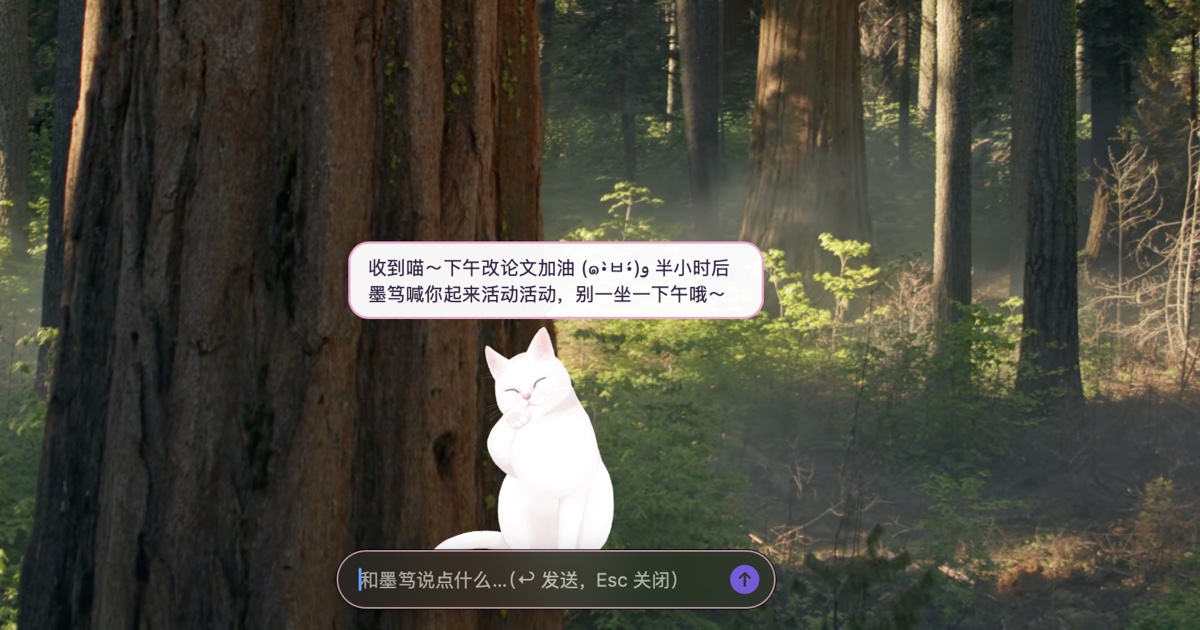
DeskPet is a native macOS desktop pet application (Swift / AppKit + WKWebView). A Live2D character resides on the desktop in a transparent window and provides idle motions, gaze tracking, swaying to the beat of music, and speech bubbles above its head; the dialogue content and motion changes are generated by a large language model (LLM) as structured JSON. The application additionally integrates routine reminders, weather-change alerts, a memory store, a daily task briefing, and a research mode that supports literature, news, market and weather retrieval and renders Markdown and LaTeX. The source code is open-sourced under the MIT License: Yu-Xiang-Yang/deskpet. All screenshots in this article were taken from DeskPet running on the author’s machine (the character is Tororo, an official Live2D sample model); none were composited or rendered from simulated data.
1 Background and Motivation
Existing desktop pet applications mostly loop predefined animations, and interaction with the user is limited to clicks that trigger fixed motions; LLM chat tools, on the other hand, exist as separate windows and require a context switch to use. The design goal of DeskPet is to combine the two:
- Persistent yet unobtrusive: the character window is transparent; only the opaque pixels of the character itself respond to the mouse, and clicks on all other regions pass through to the windows below;
- Consistent language and motion: the model supplies both the line of dialogue and a motion tag in the same reply, so the character’s expression, motion and tone of speech remain consistent;
- Oriented towards research workflows: the same character can switch to a research mode in which answers are rendered in Markdown and LaTeX and retrieval tools such as arXiv and Semantic Scholar can be invoked;
- Lightweight build: the only dependency is the Xcode Command Line Tools (
swiftc); no Xcode project is used.
2 Feature Overview
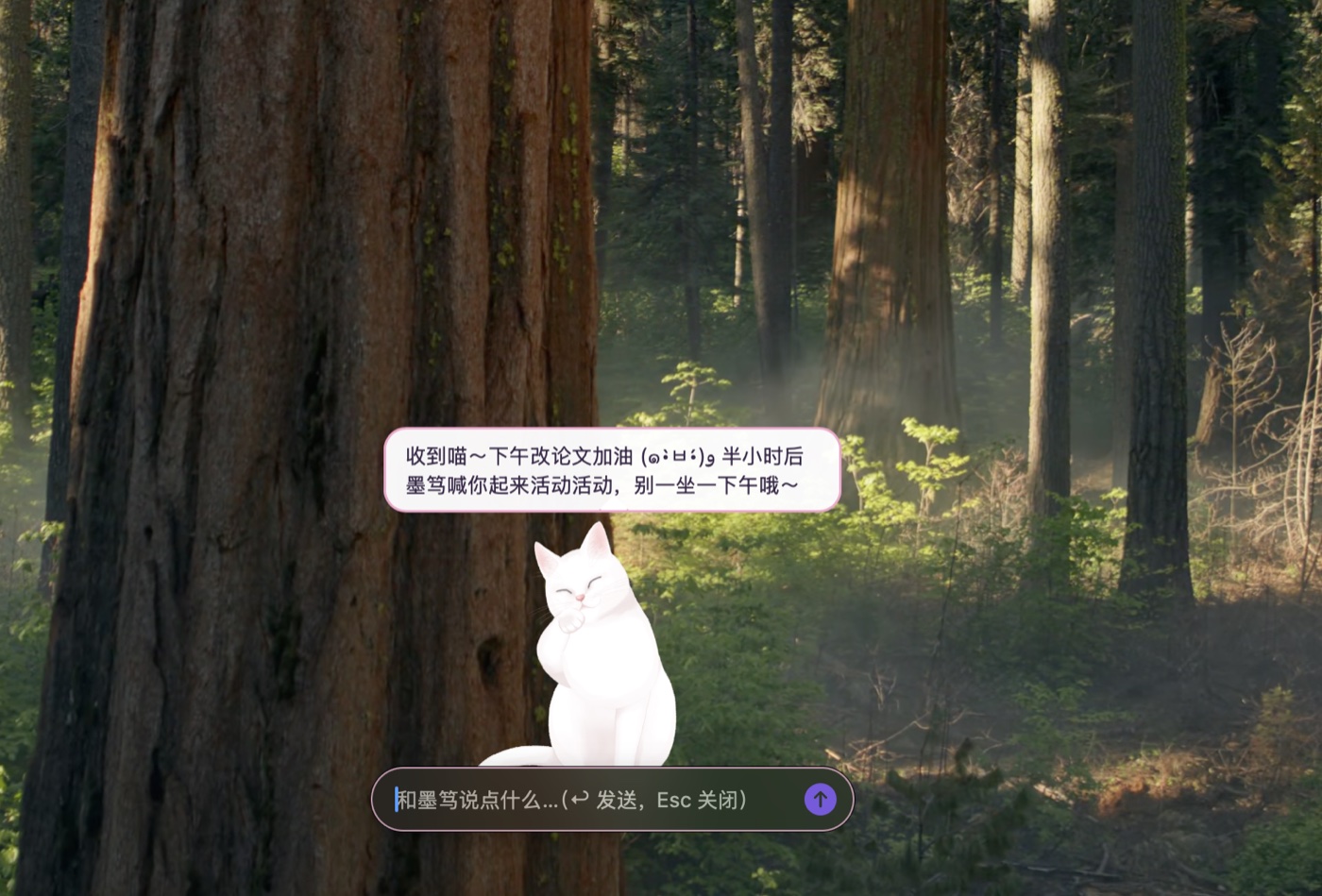
Figure 1 DeskPet running on the macOS desktop (screenshot from a running instance, 2026-10-14). The character is Tororo, named “墨笃” (Modu); the model service is DeepSeek (deepseek-flash, OpenAI-compatible endpoint). The bubble above the head is the model’s reply to “I have to revise a paper this afternoon; remind me to get up and move in half an hour”. The remind field of the same reply created a reminder 30 min later, and the motion field triggered a paw-licking motion; the chat input box is at the bottom.
| Module | Description |
|---|---|
| Character rendering | Live2D models (Cubism 3/4 runtime format), rendered with PixiJS WebGL; the character can be switched in Settings |
| Interaction | Drag to move, with the position remembered; click-through on transparent regions; clicking the head triggers a head-pat reaction, clicking the body opens the chat input box; a global shortcut (default ⌥Space) summons the input box |
| Speech bubbles | Up to 3 stacked bubbles, with the newest at the bottom; older bubbles move up and decrease in opacity, and each fades out on its own timer; the timers pause while the pointer hovers |
| Structured replies | The model returns six fields, reply, motion, remind, weather_city, remember and forget, which drive the dialogue line, motion, reminders, weather lookup and memory store reads/writes respectively |
| Music rhythm | Detects audio output from other applications, estimates the beat via system audio monitoring, and drives the character to sway from side to side |
| Proactive behaviour | Scheduled small talk, free wandering, random idle motions; the character enters a sleep state after the user has been away for 5 min |
| Reminders | Meals, start and end of work, prolonged sitting, drinking water, and a 25 min focus timer, presented simultaneously as bubbles, motions and system notifications |
| Weather-change alerts | Fetches the Open-Meteo hourly forecast every 20 min and, according to rules, advises carrying an umbrella, warns of severe weather and of abrupt temperature changes on the following day |
| Memory store | The model automatically records long-lived information about the user, which is appended to the system prompt of subsequent conversations |
| Research mode | Answers are rendered with Markdown and KaTeX, and 6 client-side retrieval tools can be invoked |
| Daily tasks | On the first use each day, preset tasks are executed in sequence and the results are saved as a “Daily Briefing” |
3 User Interface
3.1 Chat
Clicking the character’s body or pressing ⌥Space opens the chat input box. User messages and character replies are both stacked as bubbles above the head, and when a reply arrives the character simultaneously plays the motion selected by the model.
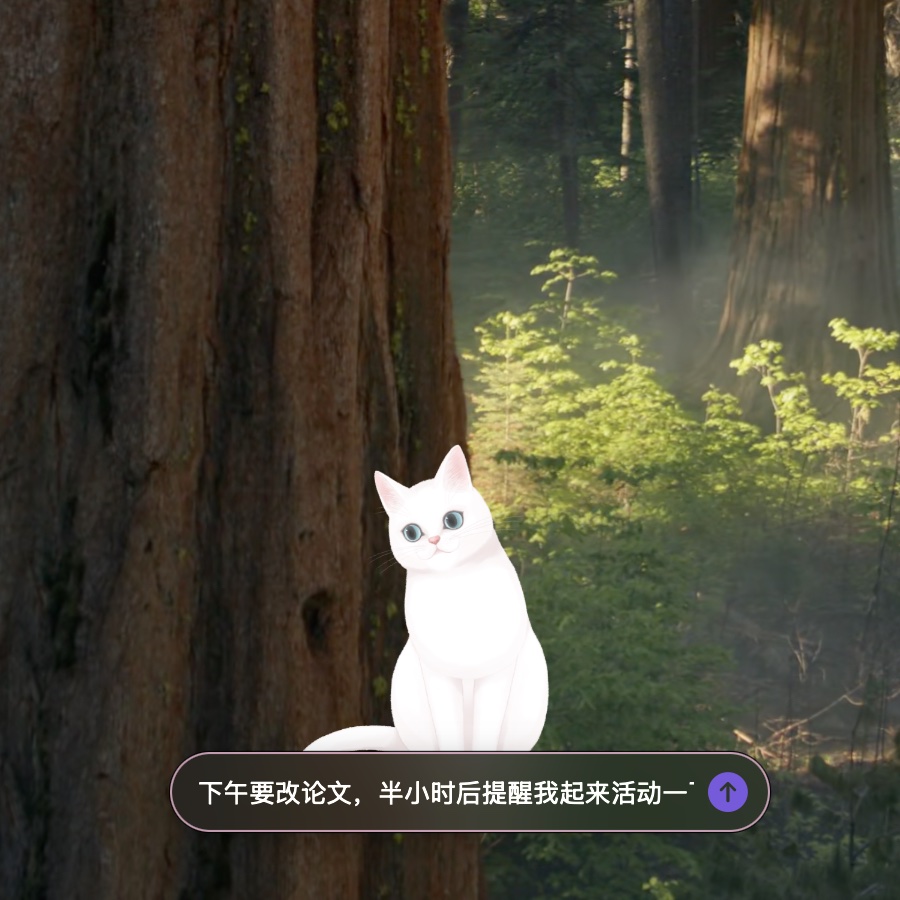
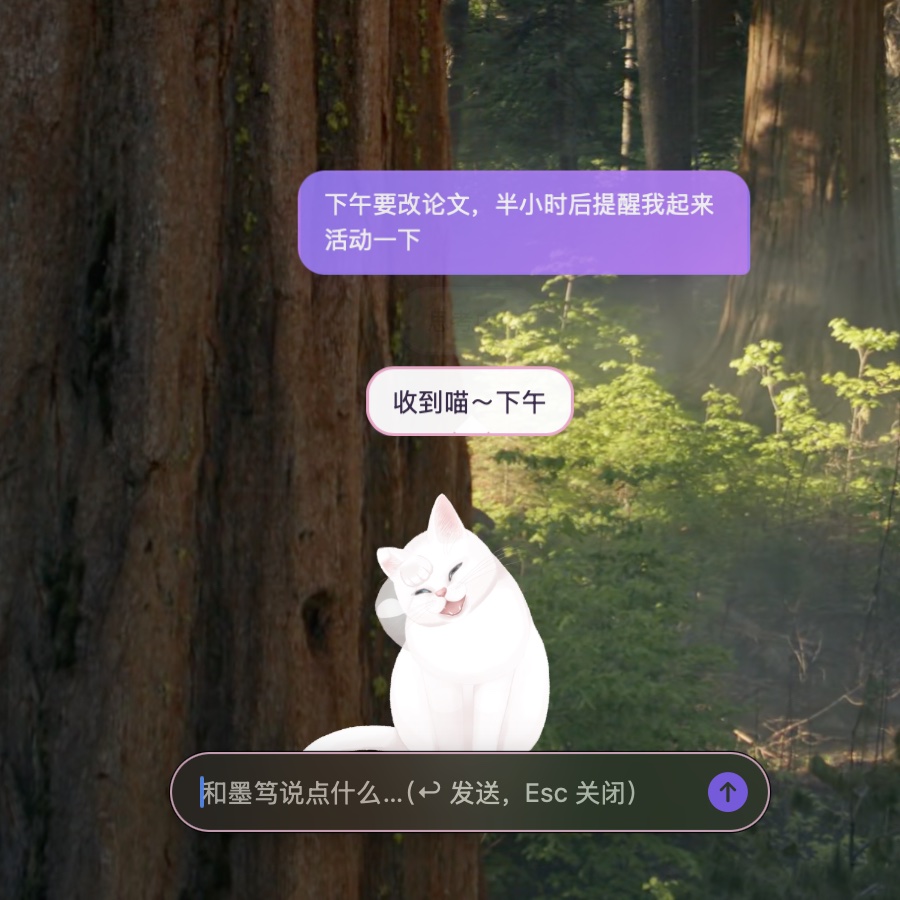
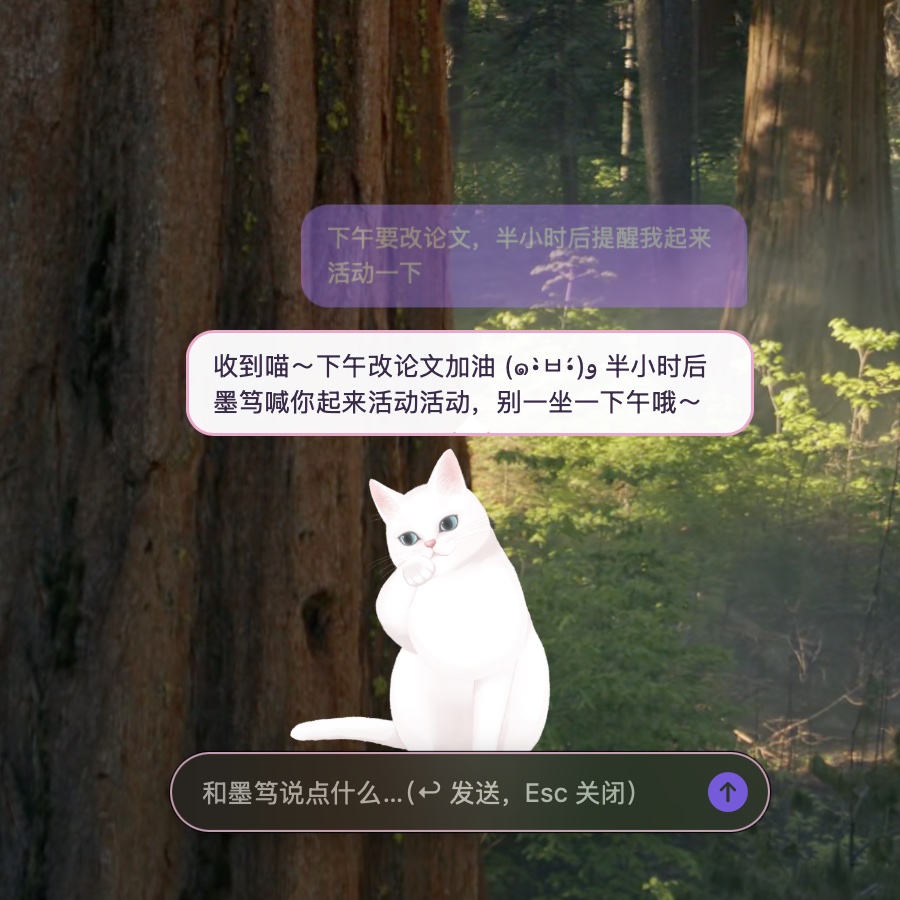
Figure 2 Three frames of a single conversation (screenshots from a running instance; times measured from the moment Send was clicked). Left: typing the message; middle: at 1.5 s, the user message is shown in a purple bubble at the top, the reply has begun streaming into the bubble below, and the character is playing a motion; right: at 7.5 s, the reply is fully displayed, and the earlier user bubble has moved up with reduced opacity.
In the JSON returned by the model, reply is displayed as a bubble, motion is mapped to a Live2D motion via pet-map.json, and remind is passed to the reminder scheduler; all three are completed within a single request, without a separate intent-recognition step.
3.2 Menu-Bar Menu and Context Menu
The menu-bar icon (a paw print) and the character’s context menu are generated by the same function, addItems(to:), and contain identical items: Chat, Research mode, Run daily tasks, Messages, Focus for 25 minutes, Reminders, Settings, Window layer, and others. When research mode is on, “New research topic” and “Search the web (slower)” additionally appear, and “Hop somewhere else” is hidden. On displays with a notch the menu-bar icon may be obscured, so the context menu retains all entries.
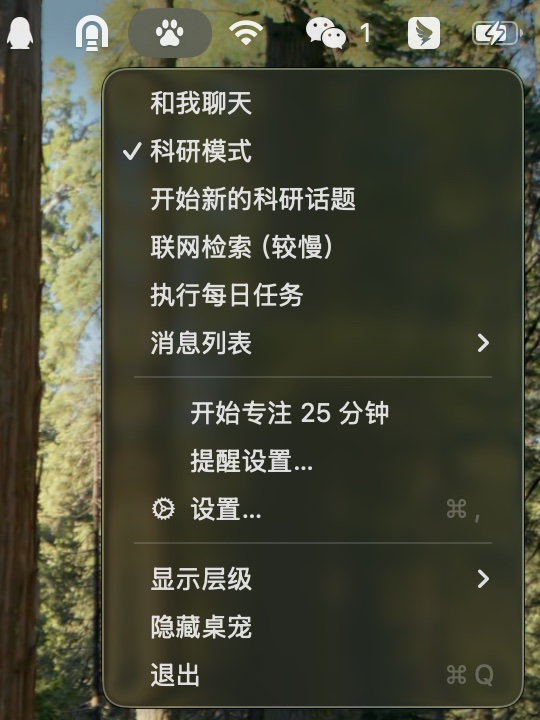
Figure 3 Menu-bar menu with research mode on (screenshot from a running instance).
The window layer offers three options:
| Layer | Window level | Behaviour |
|---|---|---|
| Always on top | NSWindow.Level.floating |
Above all ordinary windows |
| Like a normal window | NSWindow.Level.normal |
Can be covered by other windows |
| Desktop only | Desktop-icon level + 1 | Above the desktop icons and below all application windows; the bubbles are covered as well, and reminders are delivered via system notifications instead |
3.3 Research Mode
Research mode is a state of the character; when it is on, questions entered in the input box are answered by the research assistant. The answer bubble supports Markdown, KaTeX formulae and code highlighting and is scrollable; clicking the bubble opens the full conversation window.
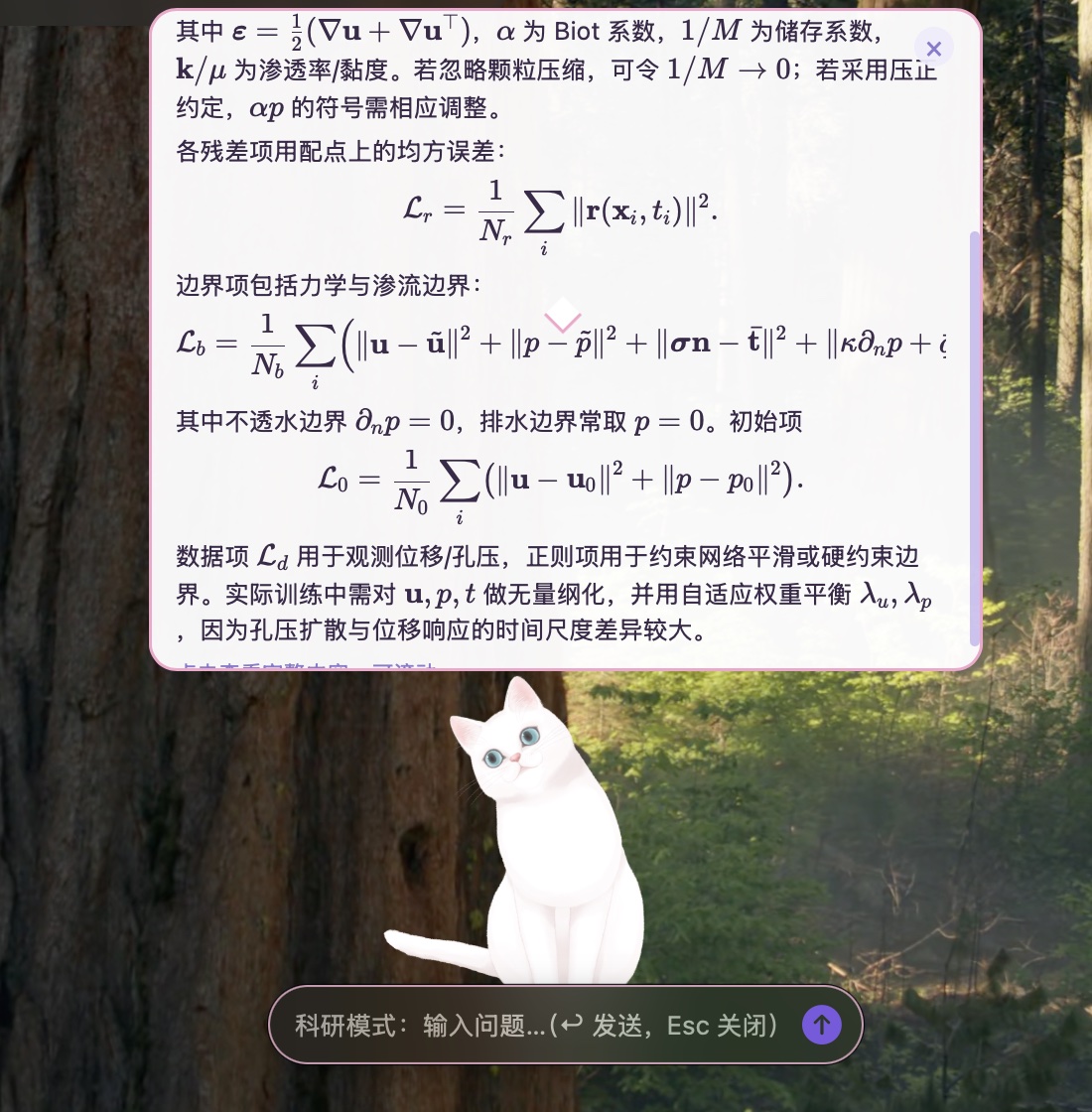
Figure 4 Answer bubble in research mode (screenshot from a running instance). The question was “Briefly explain the composition of the loss function when a PINN solves the Biot consolidation problem, and give the formulae”, with web retrieval disabled. At 12 s after sending, the bubble still showed “Thinking.”; at 18 s the complete answer was displayed. Inside the bubble, KaTeX renders the residual term $\mathcal{L}_r$, the boundary term $\mathcal{L}_b$ and the initial term $\mathcal{L}_0$; the content is scrollable when it exceeds the bubble height, the “×” at the top right closes it immediately, and the input box at the bottom indicates that research mode is active.
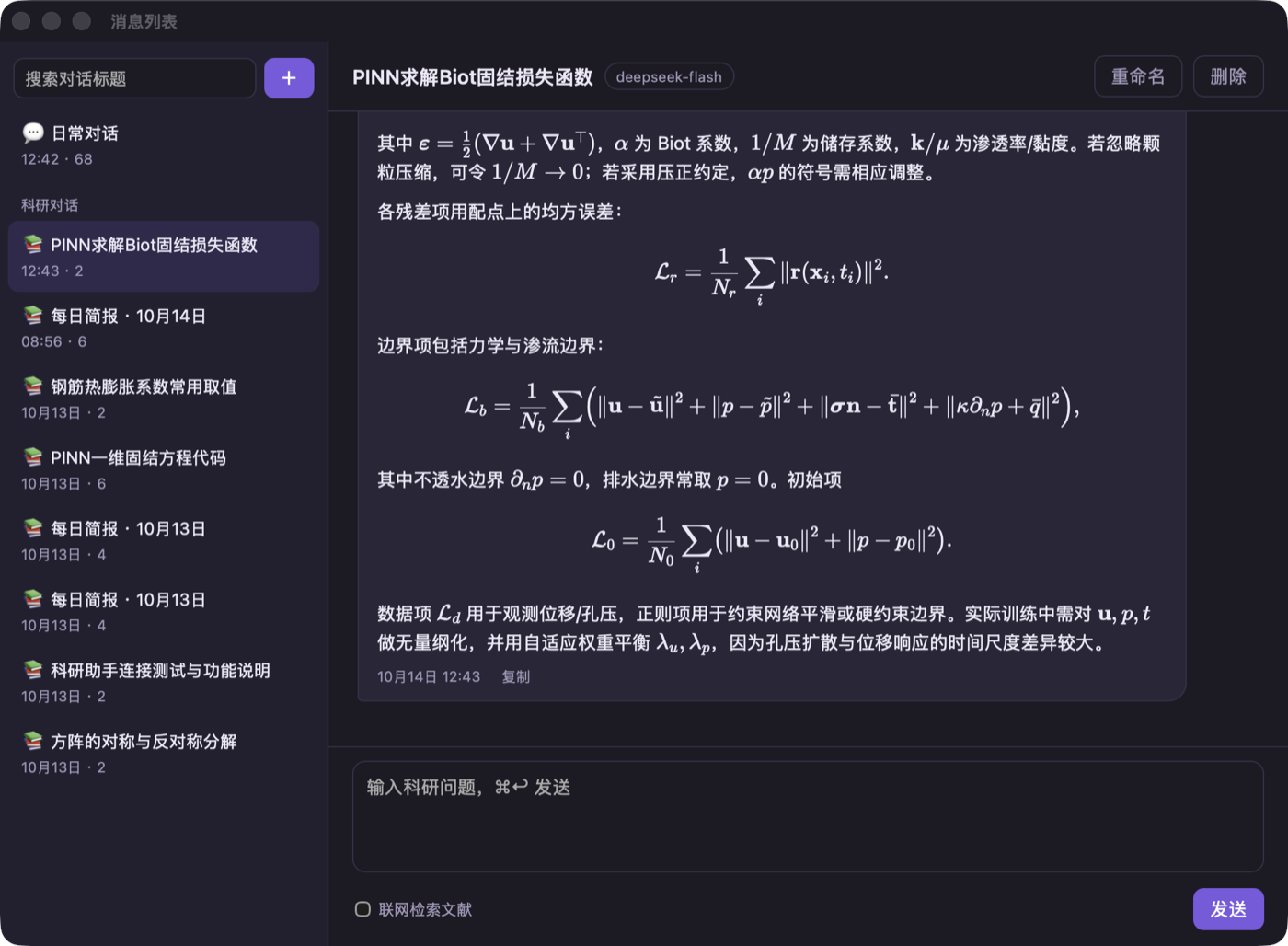
Figure 5 Messages window (screenshot from a running instance). The left column groups conversations into “Daily chat” and “Research chat”, showing the title, time and message count, and includes the “Daily Briefing” generated by the daily tasks; the right column shows the full record of the conversation in Figure 4, with the model used noted beside the title. The conversation can be renamed, deleted or continued, and “Search literature online” can be ticked.
3.4 Settings
The Settings window is divided into six tabs: General, About me, Model, Reminders, Daily tasks and Memory. Figure 6 shows four of them; “About me” and “Memory” contain personal information and are not shown.
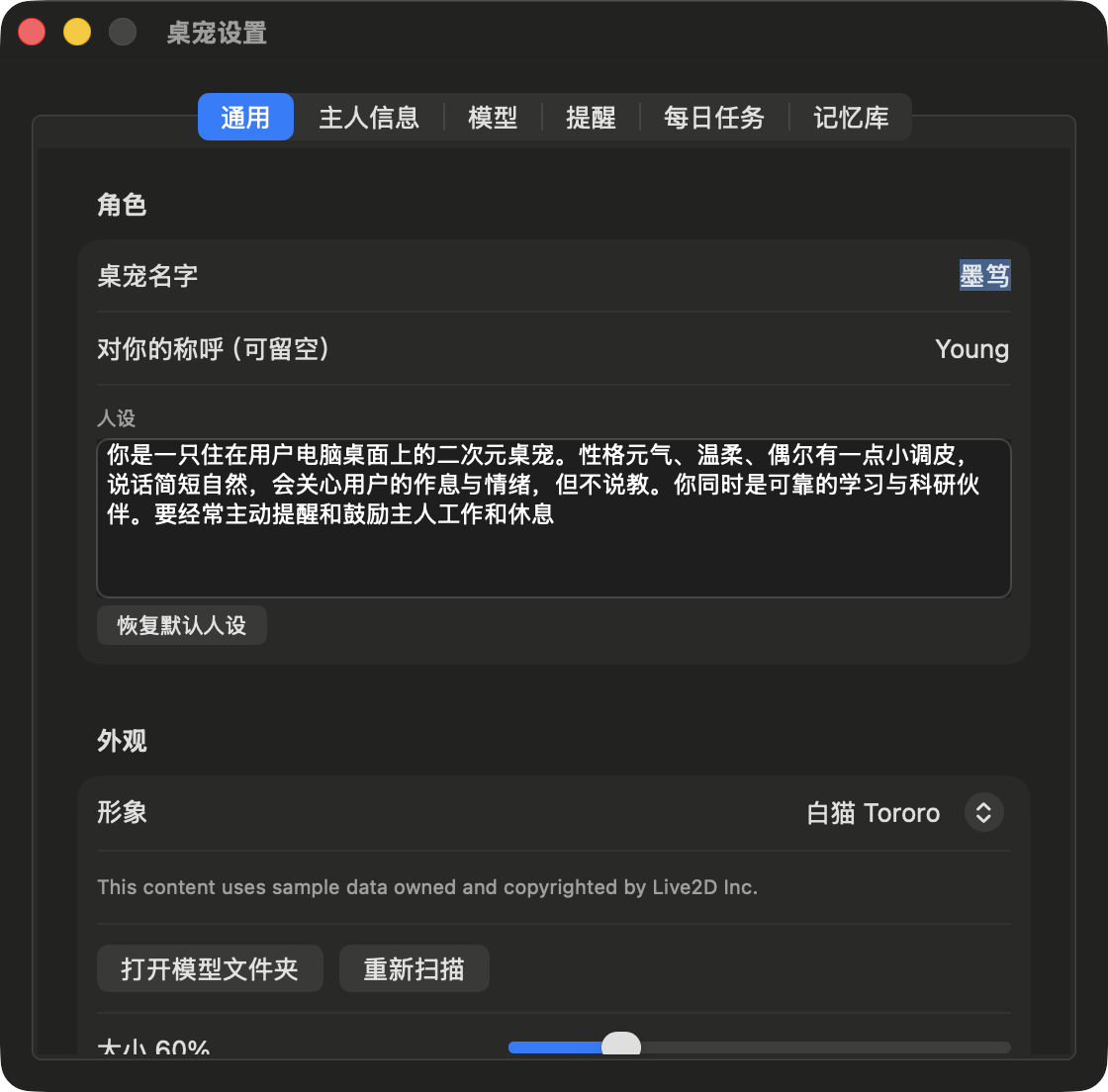
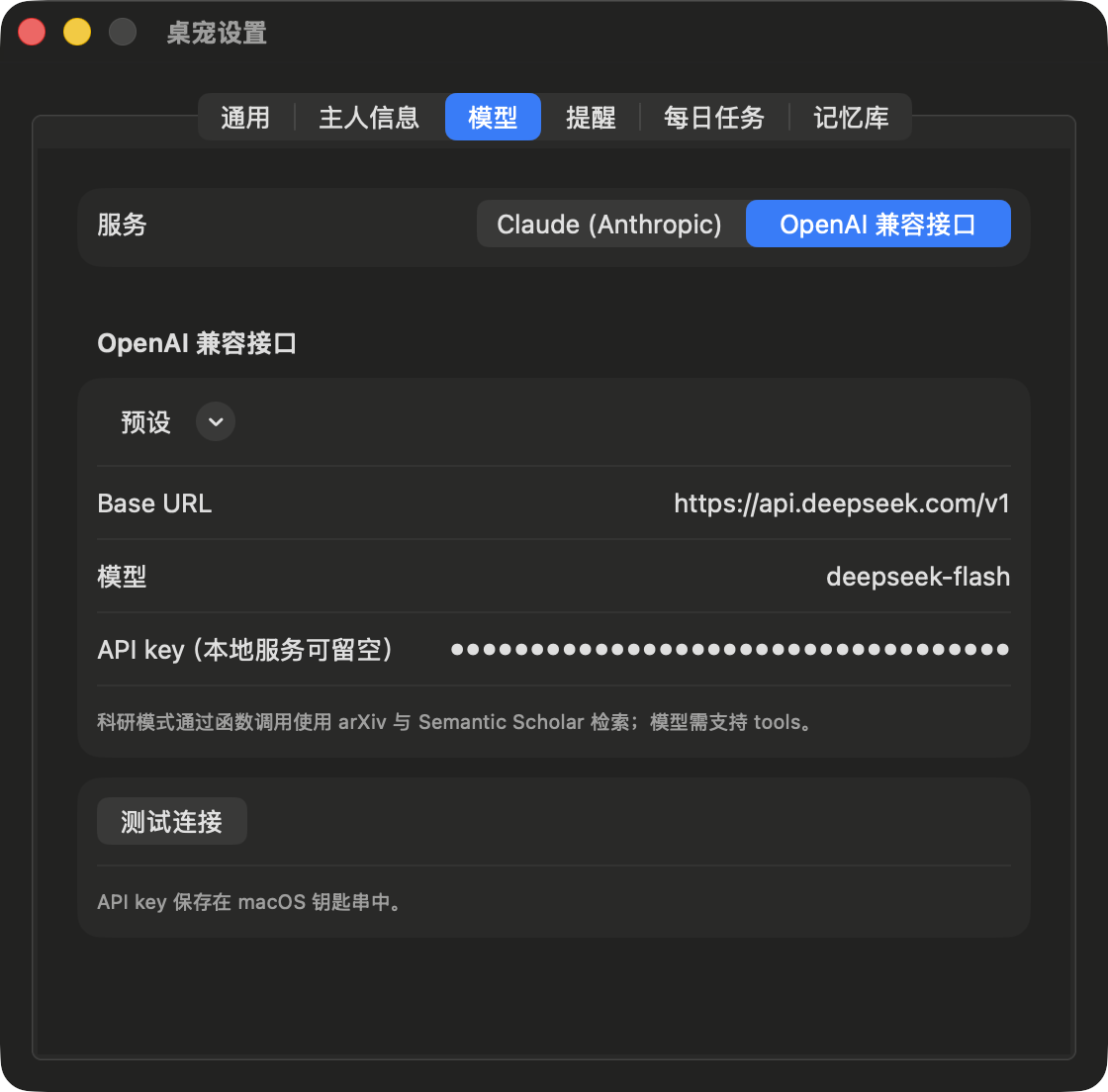
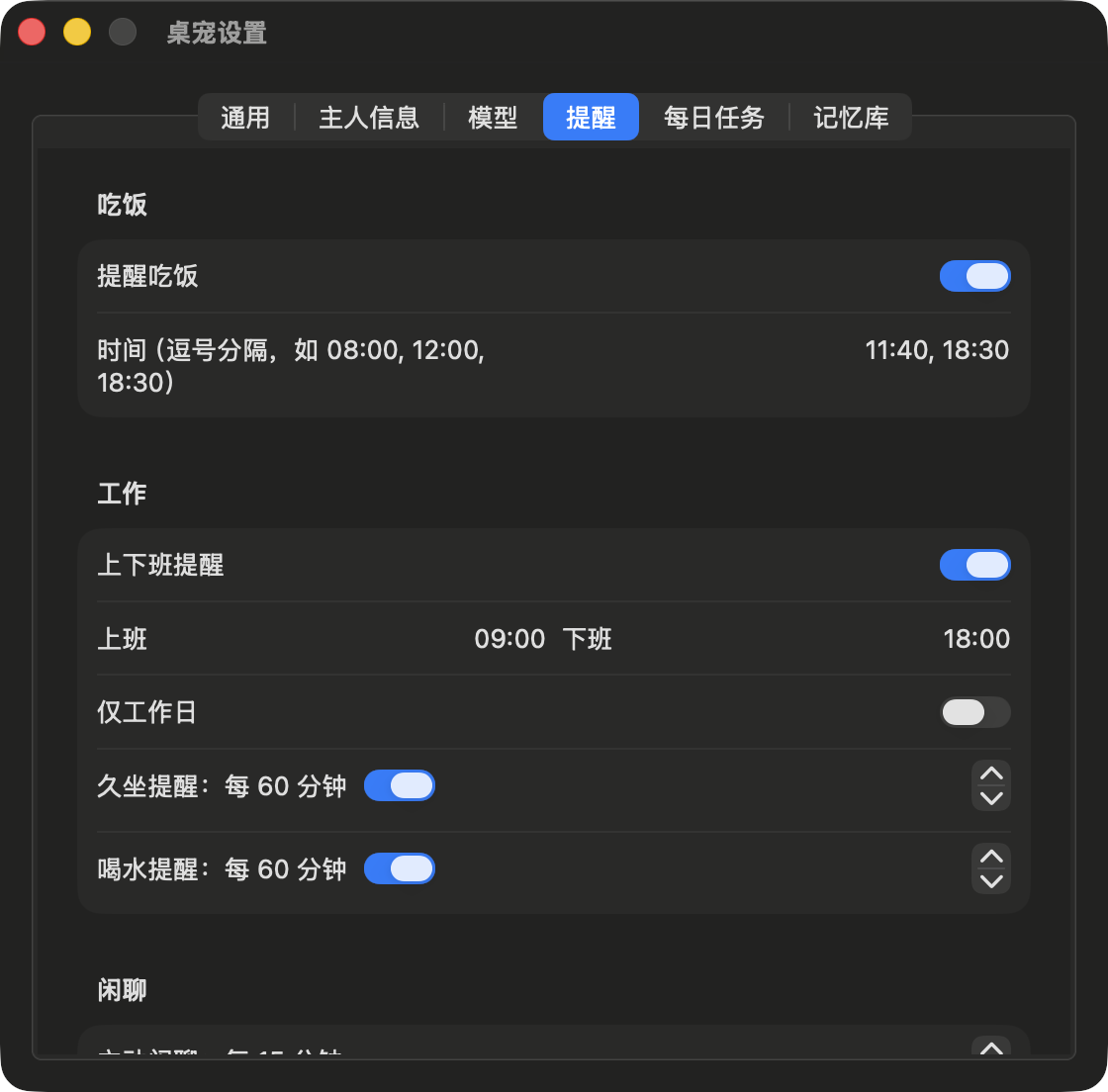
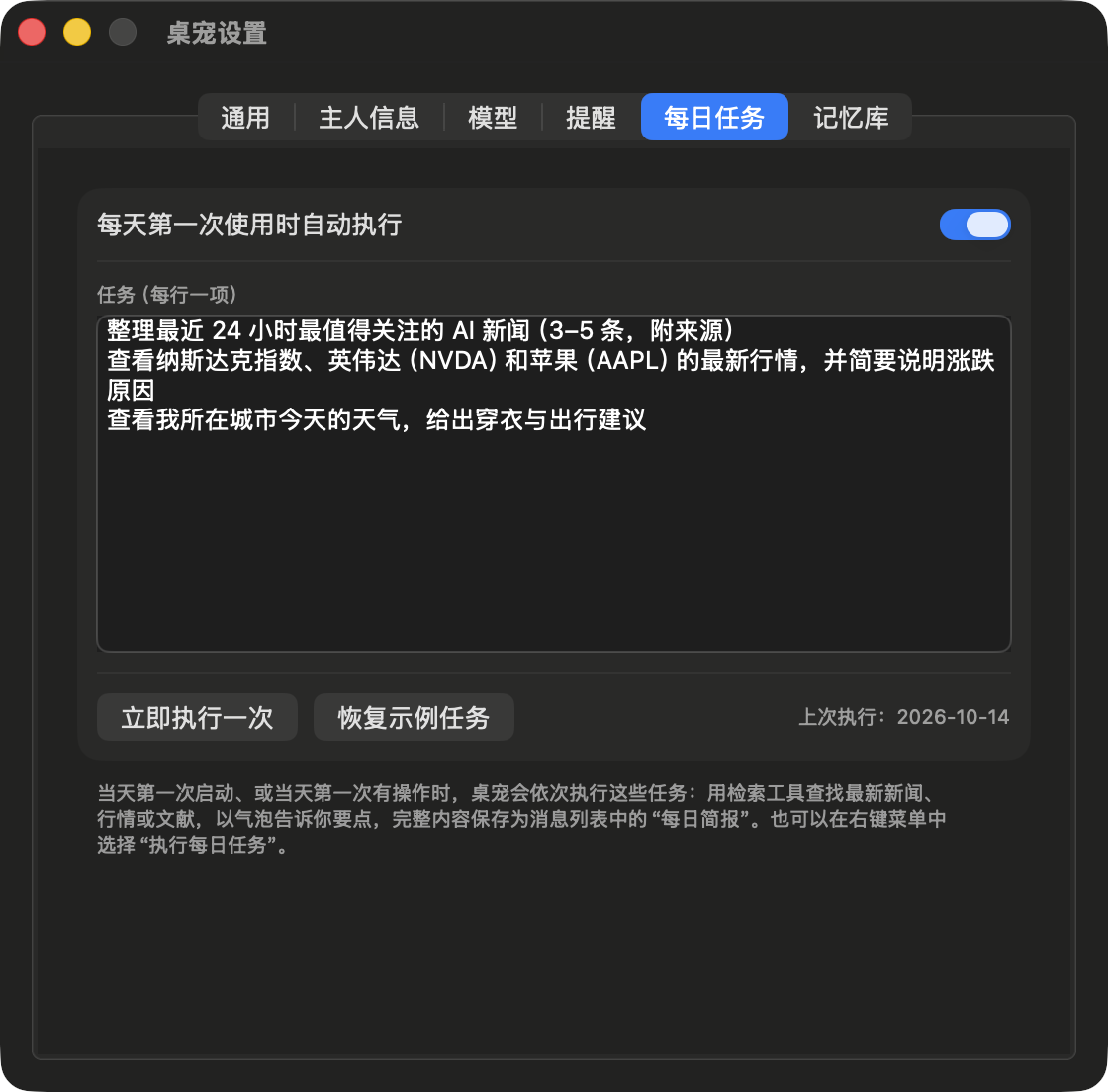
Figure 6 Settings window (screenshots from a running instance). Top left: the General tab, containing the name, form of address, persona and character selection, with the copyright notice required by the model shown below the character; top right: the Model tab, which switches between Claude (Anthropic) and OpenAI-compatible endpoints, with the API key displayed masked and stored in the Keychain; bottom left: the Reminders tab, containing meal, work start/end, prolonged-sitting and drinking-water reminders; bottom right: the Daily tasks tab, with one task per line and an option to run them once immediately.
4 System Architecture
The source code comprises 27 Swift files (5 192 lines) and 7 front-end files (1 428 lines), compiled by build.sh invoking swiftc directly, without a Swift Package or an Xcode project. The code is organised in three layers:
| Directory | Content |
|---|---|
Sources/Core/ |
UI-independent logic: JSON, SSE parsing, pet reply parsing, reminder rules, weather alert rules, localisation |
Sources/LLM/ |
The LLMProvider protocol, Anthropic and OpenAI-compatible implementations, retrieval tools and weather service |
Sources/App/ |
AppKit / SwiftUI: pet window, chat input box, message list, research engine, settings, reminders, memory store, weather monitoring, music monitoring |
Resources/web/ |
pet.html/js/css (character and bubbles), research.html/js/css (message list), md.js (Markdown and formulae) |
The data flow is as follows:
User input (input box / ⌥Space) ─▶ PetBrain ──┬─ System prompt: persona + user info + memory store + reply format
                                              ├─ Context: current time + local weather (cached 30 min)
                                              ▼
                                  LLMProvider (Anthropic / OpenAI-compatible, SSE streaming)
                                              ▼
                                  PetReply.parse ─▶ reply   → bubble (pet.js)
                                                  ├─ motion  → pet-map.json → Live2D motion group / expression
                                                  ├─ remind  → ReminderScheduler
                                                  ├─ weather_city → fetch weather, then request again
                                                  └─ remember / forget → MemoryStore
Character rendering and bubbles reside in a WKWebView, and the native layer and web layer communicate bidirectionally via WKScriptMessageHandler and evaluateJavaScript. The native layer is responsible for the window, mouse pass-through, gaze coordinates, reminders and model calls; the web layer is responsible for Live2D drawing, hit testing and bubble layout.
5 Key Implementation Details
5.1 Structured Replies
Pet conversations require the model to output a single JSON object, whose JSON Schema is given by PetReply.schema, with additionalProperties: false set on all objects. motion is drawn from 11 semantic motions: idle, happy, wave, nod, shake, think, surprised, sleepy, shy, eat and sad. Claude guarantees the format through structured outputs; OpenAI-compatible endpoints use JSON mode.
The parser adopts a fault-tolerant strategy towards the model output: it attempts, in order, the entire text, the text inside a Markdown code block, and the substring between the first { and the last }; unknown motion names fall back to idle; if all attempts fail, the entire text is used as the dialogue line. This strategy makes models that do not support strict structured output (such as some OpenAI-compatible services) equally usable.
5.2 Mapping Semantic Motions to Model Motions
Different Live2D models name their motion groups and expressions differently. The pet-map.json in each model directory maps the 11 semantic motions to that model’s motion group (group), index within the group (index) and expression (expression); an entry may contain params, which smoothly override model parameters for the duration of the motion and serve for expressions the model does not provide. Taking shake of the sample model Tororo as an example:
"shake": {
  "group": "Idle", "index": 1,
  "params": { "PARAM_EAR_L": -0.7, "PARAM_EAR_R": -0.7, "PARAM_TAIL_ANGRY": 1 }
}
This entry plays an idle motion while lowering both ears and setting the tail to an angry pose. While speaking, the application sets the parameters of the LipSync group frame by frame (default ParamMouthOpenY) to drive the mouth shape.
5.3 Click-Through on Transparent Regions
On macOS, ignoresMouseEvents of an NSPanel can only be set for the window as a whole and cannot distinguish individual pixels. DeskPet adopts a “web-side sampling + native-side query” approach:
- Every 200 ms, the web side draws the WebGL canvas (
preserveDrawingBuffer: true) at reduced scale onto a probe canvas and reads the alpha channel in units of 10 × 10 CSS pixels; units with alpha > 24 are marked solid, and the resulting bitmap is passed to the native layer through the message channel; - The native layer reads the pointer position at 30 Hz, converts it to page coordinates and queries the bitmap; when the pointer lies on a solid unit the window receives mouse events, otherwise the events pass through.
The same timer passes the pointer coordinates to the web side to drive the character’s gaze tracking.
5.4 Following the Music Beat
The music rhythm feature consists of two steps, playback detection and beat estimation:
- Playback detection: every 0.5 s, Core Audio process objects are queried to determine whether other applications are outputting audio; this query requires no authorisation. Output lasting ≥ 1.5 s is regarded as the start of playback (to exclude notification sounds), and silence lasting ≥ 2 s is regarded as a stop;
- Beat estimation: on macOS 14.2 and later, system audio is obtained through a Core Audio process tap (requiring the “System Audio Recording” permission); the energy envelope of the low-pass band at approximately 150 Hz is computed and onsets are detected, the tempo is estimated from the median of the inter-beat intervals, and the character is driven to sway from side to side at half-beat tempo. Without the permission, a fixed rhythm of approximately 112 BPM is used instead.
Audio is analysed in real time on the local machine only; it is not recorded, stored or uploaded.
5.5 Memory Store
Long-lived information that appears in conversation (preferences, allergies, important dates, long-term plans, etc.) is written by the model via the remember field, and the interface indicates this with a “📝 Noted” bubble; the forget field deletes entries by keyword. Entries are appended, from newest to oldest, to the system prompts of small talk, research and daily tasks, up to a limit of 2 400 characters. The deduplication rules are as follows:
| Case | Handling |
|---|---|
| Identical after normalisation, or one contains the other | The old entry is replaced with the new wording |
| Only a few characters inserted (the shorter text is retained in order within the longer text, with a length ratio ≥ 0.7) | The old entry is replaced with the new wording |
| Word substitution | Treated as distinct facts; both are retained |
5.6 Tool Loop in Research Mode
The research engine calls the model at most 3 times per turn: the first 2 calls permit tool use, and the 3rd prohibits tools and forces an answer. All tool calls in the same round are executed in parallel, and their results are merged into a single message returned to the model. The available client-side tools are as follows:
| Tool | Data source | Description |
|---|---|---|
search_arxiv |
arXiv API | Preprint search |
search_semantic_scholar |
Semantic Scholar API | Search of published papers |
search_news |
Bing News RSS, falling back to Google News RSS on failure | News in reverse chronological order |
get_stock_quotes |
Yahoo Finance | Quotes for stocks, indices and ETFs; 6-digit A-share codes are automatically converted to .SS / .SZ |
get_weather |
Open-Meteo | Current weather and 1–7 day forecasts, supporting Chinese place names |
fetch_webpage |
Public web pages | Only public http/https addresses are permitted; the body text is truncated to approximately 6 000 characters |
Stability measures: a single request times out after 12 s; HTTP 429 / 503 is retried only once, after which requests to the same host return an error directly for 60 s so that the model switches to another source; identical searches within 10 min reuse the cache. When Claude is used, the server-side web_search can additionally be invoked; Claude’s assistant messages are saved as raw content blocks and returned verbatim, keeping the conversation history append-only to benefit prompt caching.
Some OpenAI-compatible models (such as DeepSeek) occasionally write tool calls into the body text using their native markup. The application hides such markup in the streaming output and parses it into tool calls for execution.
5.7 Weather-Change Alerts
Based on the city in “About me”, the hourly forecast is fetched every 20 min and compared with the current weather:
| Category | Trigger condition | Frequency |
|---|---|---|
| Umbrella | No current precipitation, while the probability of precipitation within 3 h is ≥ 60 % (or a precipitation weather code appears with probability ≥ 40 %) | At most once per 6 h |
| Severe weather | Thunderstorm, heavy rain or heavy snow within 6 h, or wind speed ≥ 45 km/h | At most once per 6 h |
| Next-day change | After 17:00, tomorrow’s maximum temperature differs from today’s by ≥ 6 °C, or tomorrow’s probability of precipitation is ≥ 70 % | Once per day |
6 Model Services
| Service | Configuration | Description |
|---|---|---|
| Claude (Anthropic) | API key, model name (default claude-opus-5-5), refusal-fallback switch |
Streaming calls to the Messages API; pet conversations use effort: low with structured outputs, and research conversations use effort: high |
| OpenAI-compatible endpoint | Base URL, model name, API key | Presets for OpenAI, DeepSeek, Qwen (Tongyi Qianwen), Moonshot and Ollama; the key may be left empty for local services |
API keys are stored in the macOS Keychain (service local.deskpet) and are never written to disk or UserDefaults in plain text.
7 Build and Installation
7.1 Build
macOS 14 or later (14.2 or later for beat following) and the Xcode Command Line Tools are required:
git clone https://github.com/Yu-Xiang-Yang/deskpet.git
cd deskpet
./build.sh install
On the first build, scripts/fetch-vendor.sh downloads pinned versions of the front-end libraries (pixi.js 6.5.10, pixi-live2d-display 0.4.0, marked 12.0.2, DOMPurify 3.1.6, KaTeX 0.16.11, highlight.js 11.10.0) and verifies the SHA-256 of each; no CDN is accessed at run time.
When no signing certificate is configured, the application is signed ad hoc; the signature changes with every rebuild, and the system requests the Keychain and “System Audio Recording” permissions again. After a self-signed code-signing certificate named DeskPet Code Signing is created in Keychain Access, build.sh signs with it and the permissions remain valid across rebuilds.
7.2 Live2D Components
Redistribution of both Live2D Cubism Core and the sample models is prohibited, so the repository contains no Live2D files. Users must download the Cubism SDK for Web and the Tororo & Hijiki sample models from the official Live2D website themselves, and then run:
scripts/install-live2d.sh ~/Downloads/CubismSdkForWeb-5-r.5.zip ~/Downloads/tororo_hijiki_ja.zipThe script copies Cubism Core and the two models into ~/Library/Application Support/DeskPet/models/ and adds the corresponding pet-map.json. The drawing-order interface changed starting with Cubism Core 5.1; pet.js registers a compatibility mapping after loading Core, which allows pixi-live2d-display 0.4.0 to work with Cubism SDK for Web 5-r.5 (Core 6.0.1).
8 Testing
| Script | Content |
|---|---|
scripts/selftest.sh |
Compiles the Core, LLM and memory store sources together with Tests/main.swift; 88 checks in total, covering SSE parsing, the two streaming accumulators, request body fields, pet reply parsing, reminder rules, memory deduplication and persistence, weather alert rules and retrieval tool helper functions |
scripts/integration-test.sh |
Starts Tests/mock_server.py, which writes the streaming responses of both APIs in 7-byte chunks, and verifies over real HTTP streams the tool loop, thinking-block replay, fallback request headers, HTTP error messages and JSON mode; the retrieval tools call the real endpoints |
9 Data Storage and Network Access
| Content | Location |
|---|---|
| Conversation records | ~/Library/Application Support/DeskPet/conversations/*.json |
| Memory store | ~/Library/Application Support/DeskPet/memories.json |
| Live2D models and Cubism Core | ~/Library/Application Support/DeskPet/models/ |
| Settings, window position, reminder state | UserDefaults (domain io.github.yu-xiang-yang.deskpet) |
| API key | Keychain (service local.deskpet) |
The application accesses only the API address of the selected model service, the data sources of the retrieval tools listed above, and public web pages specified by the model via fetch_webpage.
10 Design Trade-offs
| Design | Rationale |
|---|---|
| Native window + WKWebView rendering | The mature Live2D web runtime can be reused directly; window level, pass-through, shortcuts and notifications are handled by AppKit |
Semantic motions + pet-map.json |
The model only needs to choose one of 11 semantic motions, decoupled from any specific Live2D model; switching models requires only writing a mapping file |
| Click-through based on an alpha bitmap | NSPanel does not support per-pixel pass-through; the overhead of 200 ms sampling and 30 Hz querying is negligible |
| Low effort for pet conversations, high effort for research conversations | Small talk requires low latency, whereas research answers require reasoning depth |
| Tool loop limited to 3 calls | Limits the latency and cost introduced by retrieval and guarantees that an answer is always produced |
| Live2D files not distributed with the repository | Complies with the Live2D licence terms; users obtain the models themselves |
| API key stored in the Keychain | Avoids writing it to disk in plain text |
11 Limitations and Caveats
- The Live2D components must be obtained by users themselves; before publicly distributing a prebuilt application that can load arbitrary models, the Live2D publication licence terms must be confirmed (such an application may fall under the “expandable application” category);
- Under ad-hoc signing, the Keychain and System Audio Recording permissions must be granted again after every rebuild;
- News and market data rely on unofficial endpoints and may stop working when the providers make changes;
- Under the “Desktop only” layer, the bubbles are covered by application windows, and reminders are visible only as system notifications.
12 Project Repository
GitHub: https://github.com/Yu-Xiang-Yang/deskpet (MIT License, with Chinese and English READMEs and third-party licence notices).
The screenshots in this article use the Live2D sample model Tororo. This content uses sample data owned and copyrighted by Live2D Inc. Live2D and Cubism are trademarks or registered trademarks of Live2D Inc.; this project is not affiliated with Live2D Inc.