
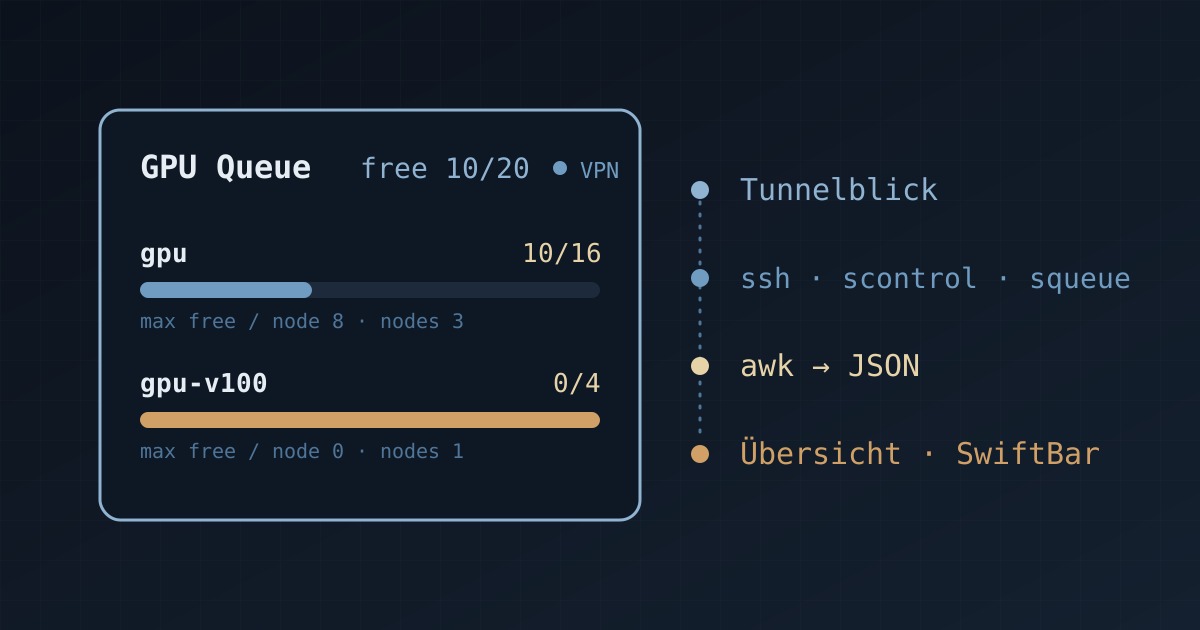
Before a GPU job is submitted, the number of idle GPUs in each partition must be confirmed. The conventional procedure consists of connecting to the VPN, logging in via SSH, running scontrol and squeue, and tallying the output by hand. Slurm GPU Widget encapsulates this procedure in a background collection script and keeps the occupancy of each partition permanently on display in two forms, an Übersicht desktop card and a SwiftBar menu-bar item; a single refresh takes approximately 0.7–1.3 s, and the default refresh period is 15 s. The project is open-sourced under the MIT License: Yu-Xiang-Yang/slurm-gpu-widget.
1 Background and Motivation
GPU clusters typically organise resources by partition, and partitions differ substantially in GPU model, node count and load. Before submitting a job, the following three questions must be answered:
- which partitions still have idle GPUs;
- the maximum number of idle GPUs on a single node, which determines whether a multi-GPU job can start immediately;
- the elapsed run time, time limit and queue status of the user’s own jobs.
For clusters accessed through a VPN, the conventional procedure for obtaining this information is inconvenient in three respects:
- Lengthy procedure: the three steps of VPN connection, SSH login and command execution must be completed in sequence and repeated for every query;
- Raw output lacks aggregate values:
scontrol show nodeprints one line per node, with the total GPU count in theGresfield and the allocated count in theAllocTRESfield, which must be parsed and summed; - Node states must be filtered: nodes in states such as
DOWNandDRAINcannot be scheduled, and counting them in the total overestimates the available resources.
The aim of Slurm GPU Widget is to automate this procedure and present the results in a persistent interface, so that the resource state can be read without logging in to the cluster.
2 Feature Overview
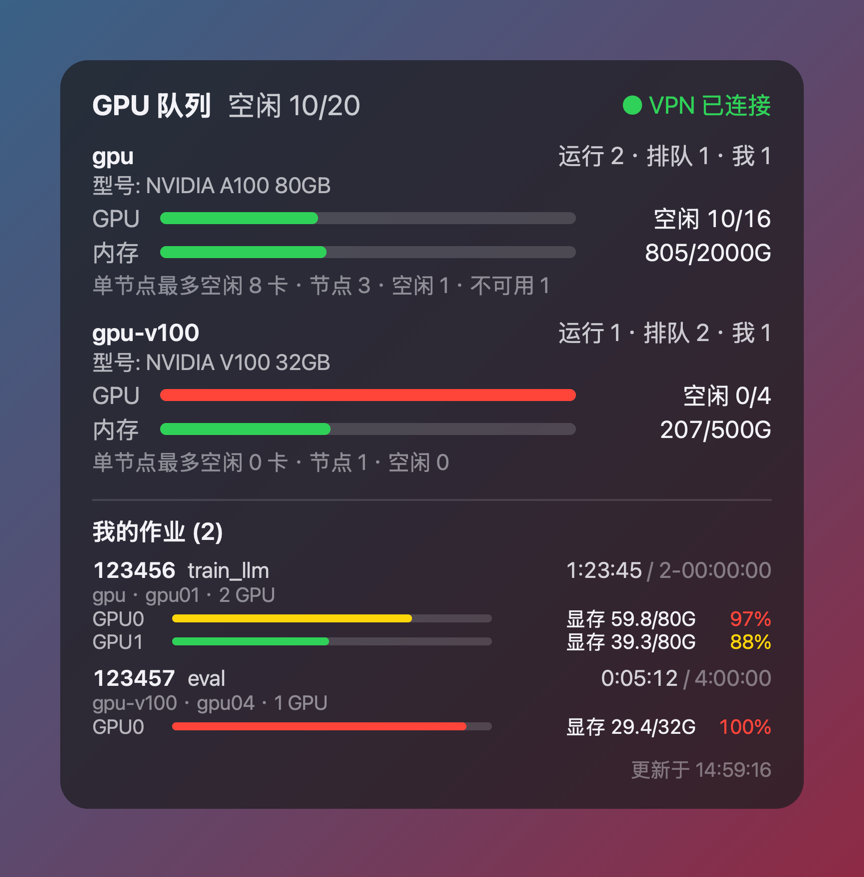
Figure 1 Übersicht desktop card interface (simulated data, rendered from the repository’s mock/ data and front-end source with SHOW_MY_JOBS=1 and JOB_GPU_USAGE=1 enabled). The upper part shows, for each partition, the numbers of running, pending and own jobs, GPU and memory occupancy bars, and the maximum number of idle GPUs on a single node; the lower part, “My jobs”, lists the job ID, name, elapsed time / time limit, and the memory usage and utilisation of each GPU.
The main features are as follows:
| Feature | Description |
|---|---|
| VPN detection and automatic connection | Reads the state of the specified Tunnelblick configuration via AppleScript; when it is not CONNECTED, initiates a connection and polls for at most CONNECT_TIMEOUT seconds |
| Single SSH round trip | scontrol show node -o and squeue are executed in the same non-interactive session, reusing a persistent connection |
| Partition-level aggregation | GPUs used/total, CPUs used/total, numbers of idle and unavailable nodes, numbers of running and pending jobs, number of own jobs |
| MIG recognition | MIG-partitioned GPUs (e.g. gpu:2g.20gb:12) are counted by MIG instances rather than physical cards and are labelled accordingly |
| Memory and model | Partition- and node-level host memory, configurable GPU model labels; optionally, the model, memory and utilisation of each GPU read via nvidia-smi |
| Own job list | Job ID, name, elapsed time / time limit, partition, nodes and GPU count; with JOB_GPU_USAGE=1, the memory usage and utilisation of each GPU are appended |
| Node list (optional) | Lists, under each partition, the node names, states and per-node GPU/CPU occupancy |
| Bilingual interface | Chinese or English, either specified explicitly or following the macOS system language |
| Draggable card | The desktop card can be dragged by its title, its position persists across refreshes, and double-clicking restores the default position |
3 System Architecture
The project consists of one collection script and two front ends; the data flow is as follows:
Tunnelblick (VPN state detection / automatic connection)
        │
        ▼
cluster-status.sh ── ssh (BatchMode, ControlMaster) ──▶ login node: scontrol / squeue
        │  local awk aggregation
        ├──── JSON ─────────────▶ Übersicht desktop card
└──── --swiftbar-stream ▶ SwiftBar menu bar| Front end | Display location | Installation |
|---|---|---|
| Übersicht | Translucent desktop cards, one per partition | brew install --cask ubersicht |
| SwiftBar | Menu-bar item (e.g. GPU free 14/32), with a drop-down menu expanded by partition |
brew install --cask swiftbar |
Both front ends call the same collection script, cluster-status.sh, and they can be installed individually or together. The collection script supports four invocation modes:
| Argument | Output |
|---|---|
| (none) | A single JSON object, parsed by Übersicht |
--swiftbar |
SwiftBar plugin format |
--swiftbar-stream |
As above, with the elapsed job time encoded as placeholders that the SwiftBar streaming plugin replaces every second; this is the mode the plugin actually invokes |
--connect |
Only triggers a Tunnelblick connection; corresponds to the manual connect item in the SwiftBar menu |
The JSON structure is the interface contract between the collection layer and the presentation layer; replacing either side does not affect the other.
4 Data Collection Method
The collection procedure comprises five steps:
- VPN state:
osascript -e 'tell application "Tunnelblick" to get state of first configuration where name = "…"'. - Data retrieval:
ssh -o BatchMode=yes $SSH_HOST "scontrol show node -o; squeue -h -o '%P|%T|%u'"; the two commands share a single SSH round trip. - GPU details (optional,
GPU_DETAIL=1): the login node runsnvidia-smi --query-gpu=index,name,memory.used,memory.total,utilization.gpuon each GPU node in parallel, with the per-node timeout bounded byGPU_DETAIL_TIMEOUT. On clusters withpam_slurm_adoptenabled, only nodes on which the user has running jobs accept connections; the remaining nodes fall back to the statistics reported by Slurm. - Own jobs:
squeue -u $USER -t Rprovides the job ID, name, elapsed time, time limit, nodes and GPUs per node. - Local aggregation: performed by
awk, according to the rules below.
Aggregation rules:
- CPU usage is taken from
CPUAlloc/CPUTot; - The total GPU count is parsed from the
Gresfield, supporting formats such asgpu:a100:8(S:0-1),gpu:4andgpu:2g.20gb:12,gpu:1g.20gb:4; the allocated count is taken fromgres/gpu=NinAllocTRES(the field is omitted when the count is zero); - The
Partitionsfield is split on commas; a node belonging to multiple partitions is counted separately in each partition but only once in the global GPU total; - Nodes in the
DOWN,DRAIN,FAIL,MAINTorNOT_RESPONDINGstates are excluded from the available capacity; - Host memory usage is computed as
RealMemory − FreeMem, becauseAllocMemis always 0 on clusters that do not schedule memory.
4.1 Maximum Idle GPUs per Node
The gpu_max_free_node field in the output is the maximum number of idle GPUs (or MIG instances) on a single node; this value gives the upper bound on the size of a single-node job that can start immediately. In Figure 1, the gpu partition has 10/16 idle, but at most 8 idle GPUs on a single node; the gpu-v100 partition has 0/4 idle and at most 0 idle GPUs on a single node. The global idle count and the per-node idle count must be interpreted together: the former reflects the total, whereas the latter determines whether a multi-GPU job can obtain the required node at once.
4.2 GPU Usage of Jobs
With JOB_GPU_USAGE=1, srun --jobid=<id> --overlap -N1 -n1 nvidia-smi … is executed for each running job (up to 8) within its existing resource allocation. On clusters with ConstrainDevices=yes, this command sees only the GPUs held by the job, so no additional index mapping is required and no new resources are requested. This path is not restricted by pam_slurm_adopt, but each query is recorded in sacct as a job step (<jobid>.0, <jobid>.1, etc.); it is therefore disabled by default, and its query frequency is limited by JOB_GPU_INTERVAL (default 30 s), which keeps the number of job steps generated by the widget bounded.
The lower part of Figure 1 shows the display of this feature: job 123456 (train_llm, 2 GPUs) has been running for 1:23:45 with a time limit of 2 days; GPU0 uses 59.8/80 GB of memory at 97% utilisation, and GPU1 uses 39.3/80 GB at 88% utilisation. The memory bars are coloured by proportion (green below 60%, yellow for 60%–90%, red at 90% and above), and the elapsed time is incremented locally every second between two cluster queries.
5 Refresh Mechanism and Performance
| Component | Period | Description |
|---|---|---|
| Übersicht, cluster data | 15 s | Set by REFRESH_SECONDS at the top of index.jsx |
| SwiftBar, cluster data | 15 s | Set by REFRESH_SECONDS in swiftbar/cluster.sh (a streaming plugin, so the file name does not contain the period) |
| Elapsed job time | 1 s | Incremented locally as elapsed_s + (now − epoch) and capped at limit_s, without generating cluster queries |
| Per-job GPU memory/utilisation | 30 s | Effective only with JOB_GPU_USAGE=1 |
Three measures are taken with respect to performance:
- Connection reuse: SSH enables
ControlMaster=autoandControlPersist=300; reusing the connection eliminates the handshake overhead, which the source comments quantify as a reduction from approximately 1 s to approximately 0.3 s; a complete refresh takes approximately 0.7–1.3 s. - Query merging: node and queue information are retrieved together within the same session.
- Overlap suppression: the collection script uses a directory lock (
mkdir) to prevent concurrent runs; if the previous collection has not yet finished (for example, because of a slow VPN or SSH response), the previous result is returned directly. A lock that has persisted for more than 90 s is regarded as the result of an abnormal process exit and is removed.
6 Installation and Configuration
6.1 Prerequisites
- Password-less SSH: the widget runs in the background and cannot respond to interactive prompts, so key-based authentication is mandatory. If the key has a passphrase,
UseKeychain yesandAddKeysToAgent yesmust be added to~/.ssh/config; a jump host can be declared viaProxyJump. - Non-interactive VPN: the Tunnelblick credentials must be stored in the macOS Keychain. VPNs that require a one-time password cannot be connected automatically; in that case
AUTO_CONNECT=0should be set. - Automation permission: on the first run, macOS asks whether Übersicht or SwiftBar may control Tunnelblick; this permission must be granted for automatic reconnection.
6.2 Installation Steps
Install either front end and launch it once (to create its plugin directory), then run:
git clone https://github.com/Yu-Xiang-Yang/slurm-gpu-widget.git
cd slurm-gpu-widget
bash install.sh
open -e ~/.config/cluster-widget/config
After editing the configuration, verify the collection script; JSON output indicates that the configuration is valid:
~/.config/cluster-widget/cluster-status.sh
~/.config/cluster-widget/cluster-status.sh --swiftbar
Running install.sh again updates the scripts and widgets but does not overwrite an existing configuration file.
6.3 Configuration Options
The configuration file is located at ~/.config/cluster-widget/config (template config.example); environment variables given on the command line take precedence over the file settings. The commonly used options are as follows:
| Option | Default | Description |
|---|---|---|
CLUSTER_NAME |
empty | Cluster name shown in the title and the menu bar |
TB_CONFIG |
empty | Tunnelblick configuration name; when empty, VPN detection is skipped and SSH connects directly |
SSH_HOST |
empty | SSH target; a Host alias from ~/.ssh/config is recommended |
AUTO_CONNECT |
1 |
Whether to initiate a connection automatically when the VPN is disconnected |
CONNECT_TIMEOUT |
30 |
Maximum time to wait for the VPN connection (s) |
SSH_TIMEOUT |
8 |
SSH connection timeout (s) |
PARTITIONS |
empty | Partition whitelist (comma-separated); when empty, all partitions are shown |
GPU_ONLY |
1 |
1 shows only GPU partitions; 0 adds CPU partitions and CPU occupancy bars |
SHOW_NODES |
0 |
1 lists the nodes under each partition |
GPU_MODELS |
empty | GPU model labels per partition, e.g. gpu=NVIDIA A100 80GB;compute2=NVIDIA V100 32GB; required when Gres does not contain the model |
GPU_DETAIL |
0 |
1 reads the model, memory and utilisation of each GPU via nvidia-smi |
SHOW_MY_JOBS |
1 |
1 lists the user’s running jobs, using only squeue and generating no job steps |
JOB_GPU_USAGE |
0 |
1 reads the GPU memory and utilisation of each job via srun --overlap |
UI_LANG |
auto |
Interface language: zh, en or auto |
To view all partitions and node details temporarily, the configuration can be overridden on the command line without affecting the configuration file:
GPU_ONLY=0 SHOW_NODES=1 PARTITIONS=gpu,compute ~/.config/cluster-widget/cluster-status.sh --swiftbarFor large partitions (approximately 100 nodes), SHOW_NODES=1 should be combined with PARTITIONS to limit the card height.
7 Output Format
The JSON object output in the default mode has the following structure (excerpt):
{
  "lang": "en", "cluster": "Demo", "time": "13:58:32",
  "vpn": "CONNECTED", "error": "",
  "gpu_used": 10, "gpu_total": 20,
  "partitions": [{
    "name": "gpu", "nodes": 3, "idle_nodes": 1, "down_nodes": 1,
    "cpu_used": 48, "cpu_total": 128, "gpu_used": 6, "gpu_total": 16,
    "gpu_max_free_node": 8, "running": 2, "pending": 1, "mine": 0, "mig": false,
    "model": "NVIDIA A100-SXM4-80GB", "mem_used": 1236992, "mem_total": 3072000
  }]
}
The field conventions are as follows:
- Memory values are in MiB;
node_listappears only withSHOW_NODES=1;- The
gpusarray of each node is non-empty only withGPU_DETAIL=1and when the node accepts the query; - With
SHOW_MY_JOBS=1, amy_jobsarray is appended to the top-level object, with each job containingelapsed_sandlimit_s(UNLIMITEDis recorded as −1); the top-levelepochrecords the collection time for local timekeeping.
8 Testing Without a Cluster
The repository’s mock/ directory provides synthetic scontrol and squeue output, allowing collection and front-end rendering to be verified in an environment without a cluster:
MOCK_DIR=mock bash cluster-status.sh
MOCK_DIR=mock SHOW_NODES=1 CLUSTER_NAME=Demo bash cluster-status.sh --swiftbar
Figure 1 was rendered from simulated data: the collection script was run with MOCK_DIR=mock, USER=testuser, SHOW_MY_JOBS=1, JOB_GPU_USAGE=1 and PARTITIONS=gpu,gpu-v100, and the resulting JSON was rendered by the Übersicht front-end source in the repository. The job names, memory figures and times in the figure are therefore synthetic values from the mock/ directory and do not correspond to a real cluster.
9 Design Trade-offs
| Design | Rationale |
|---|---|
Fully non-interactive (BatchMode=yes) |
Background processes cannot respond to passphrase prompts, so key-based authentication is a prerequisite |
| Single SSH round trip with connection reuse | Reduces the duration of each refresh and the load on the login node |
| Heavy queries disabled by default | GPU_DETAIL and JOB_GPU_USAGE are comparatively expensive, and the latter also leaves job steps in sacct; both must therefore be enabled explicitly and are rate-limited |
| Local incrementing of job timers | Updates the display every second without additional cluster queries |
| Single collection script with JSON as the interface | Both front ends share the same data source, avoiding duplicated parsing logic |
| Installer does not overwrite the configuration | User settings are preserved when the scripts are upgraded |
| Exclusion of unavailable nodes and global deduplication of multi-partition nodes | Makes the idle count reflect the capacity that can actually be scheduled |
10 Frequently Asked Questions
| Symptom | Cause and remedy |
|---|---|
install.sh reports that no front end was found |
The application has never been launched, so its plugin directory has not been created; launch it once and rerun the installer |
| Nothing appears on the Übersicht desktop | Its rendering server (port 41416) has not started; quit and reopen Übersicht, and verify with curl http://127.0.0.1:41416/ |
ssh failed is shown |
Key-based login is not configured or the host alias is incorrect; reproduce with ssh -o BatchMode=yes $SSH_HOST true |
| The VPN remains disconnected | No credentials in the Keychain, or the automation permission was denied (System Settings → Privacy & Security → Automation) |
11 Extension to Other Schedulers
Only the remote commands and the awk parsing in the collection script are specific to Slurm. The PBS counterparts are pbsnodes -a and qstat, and the LSF counterparts are bhosts and bqueues. Once these two parts are replaced, neither the JSON structure nor the two front ends require any change.
12 Project Repository
GitHub: https://github.com/Yu-Xiang-Yang/slurm-gpu-widget (MIT License, with Chinese and English READMEs).