<?xml version="1.0" encoding="utf-8"?>
<feed xmlns="http://www.w3.org/2005/Atom">
  <title>Xiangyang Yu (Young)</title>
  
  <subtitle>PINN | Scientific Computing | Edge Intelligence</subtitle>
  <link href="https://yuxiangyang.cn/en/atom.xml" rel="self"/>
  
  <link href="https://yuxiangyang.cn/en/"/>
  <updated>2026-10-16T00:59:47.950Z</updated>
  <id>https://yuxiangyang.cn/en/</id>
  
  <author>
    <name>Xiangyang Yu (Young)</name>
    
  </author>
  
  <generator uri="https://hexo.io/">Hexo</generator>
  
  <entry>
    <title>DeskPet: A Native macOS Live2D Desktop Pet and Research Assistant</title>
    <link href="https://yuxiangyang.cn/en/2026/10/14/deskpet/"/>
    <id>https://yuxiangyang.cn/en/2026/10/14/deskpet/</id>
    <published>2026-10-14T04:00:00.000Z</published>
    <updated>2026-10-16T00:59:47.950Z</updated>
    
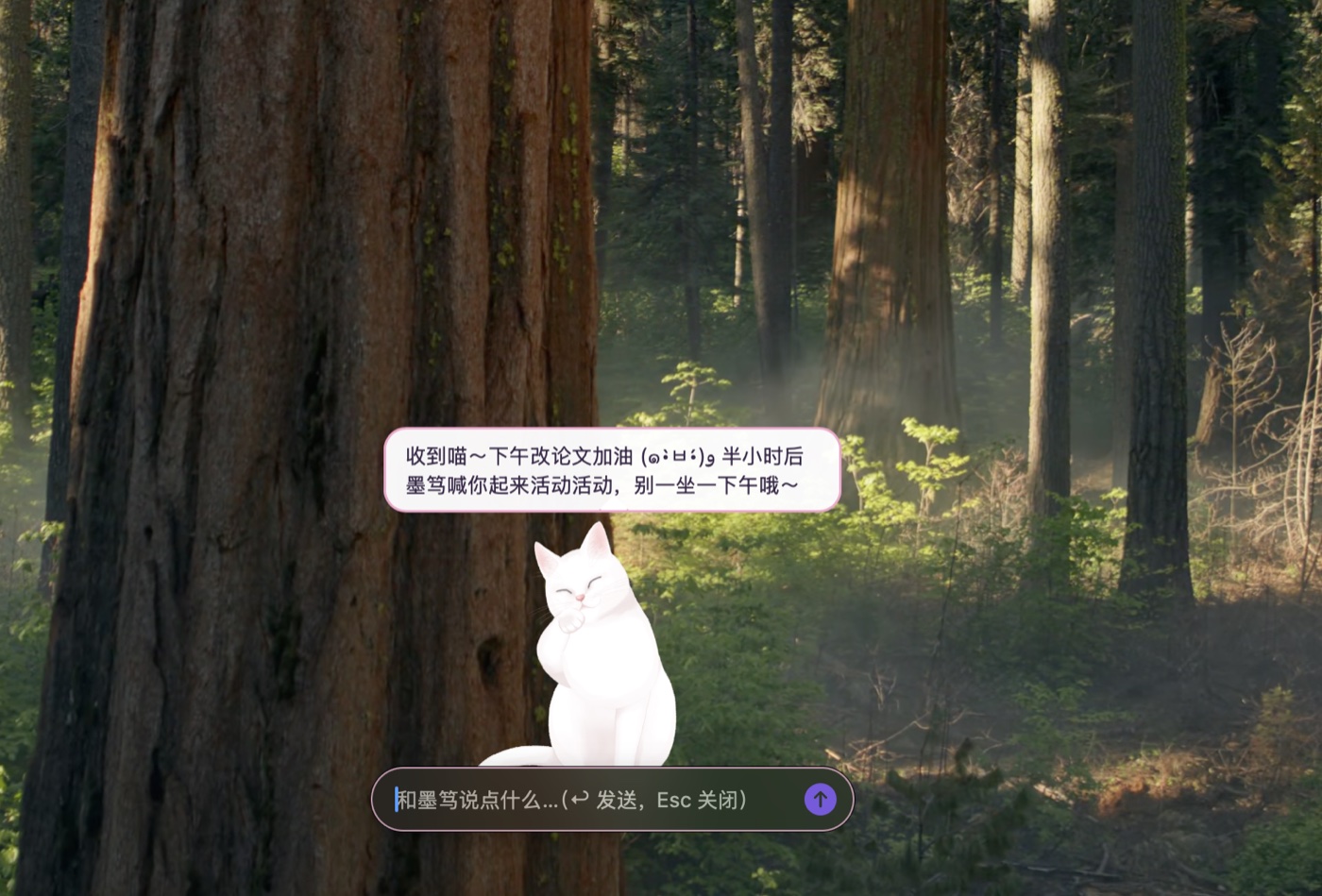
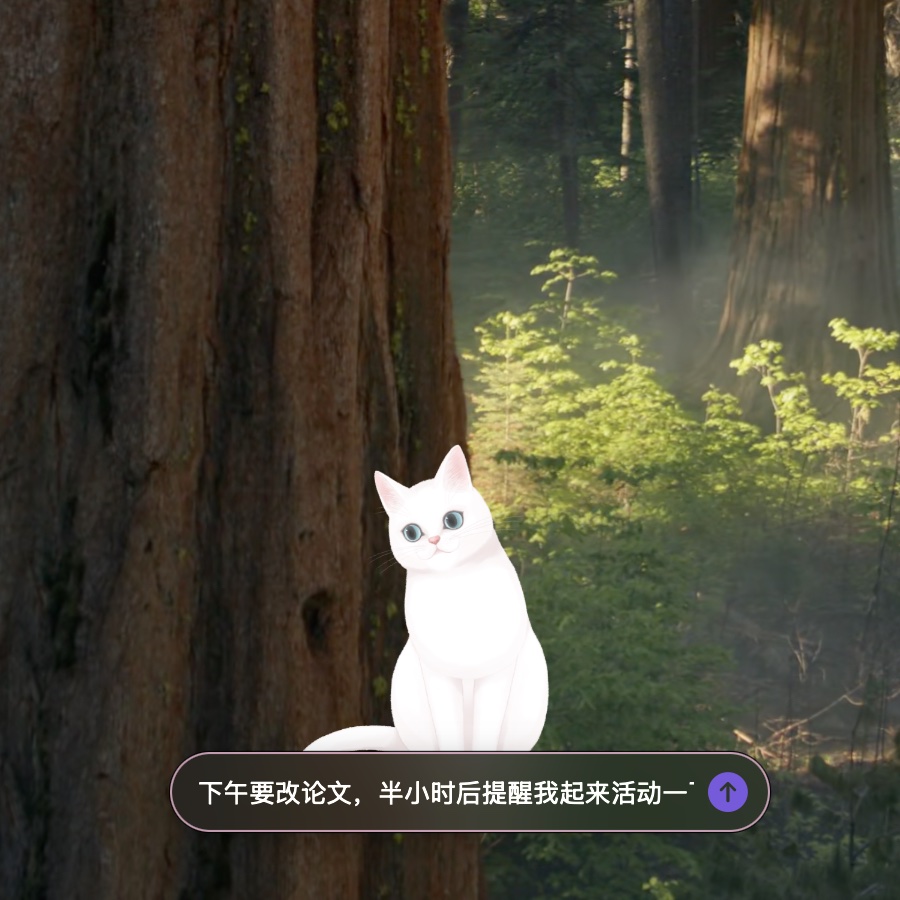
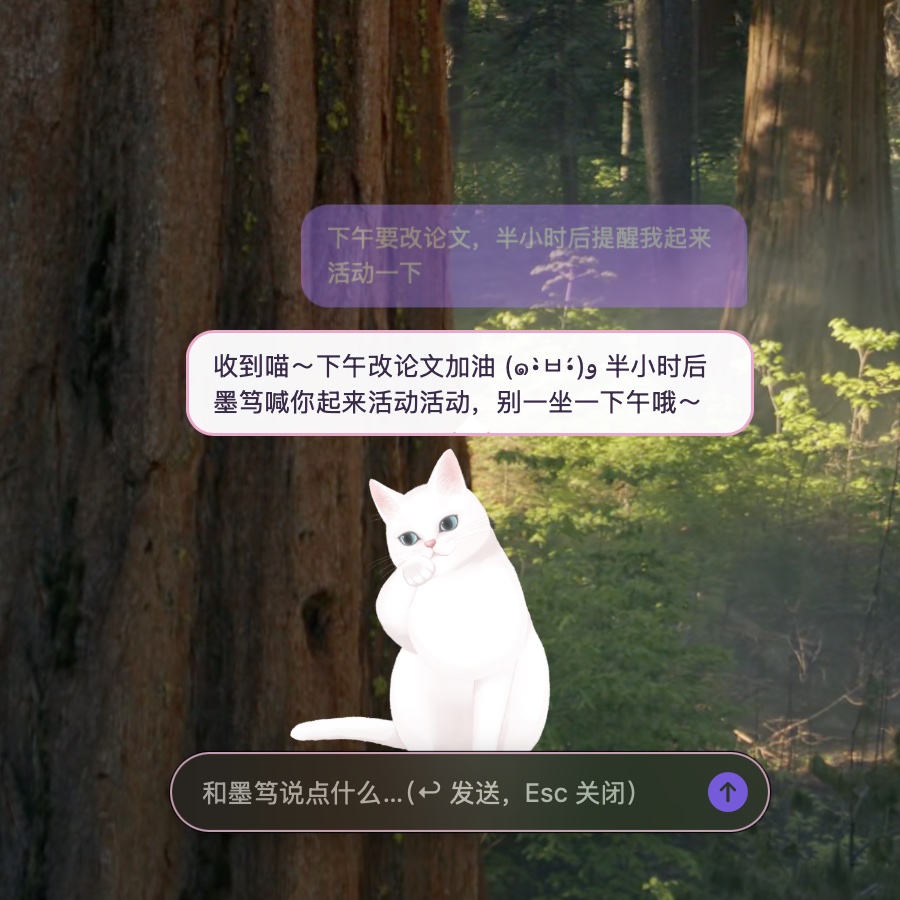
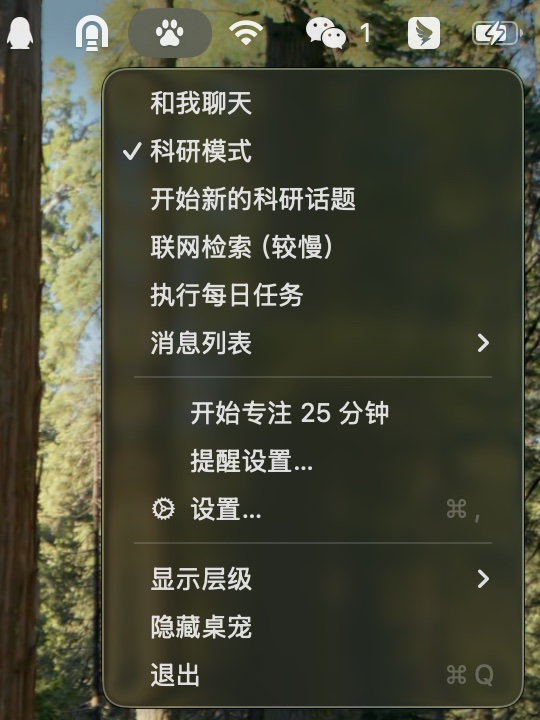
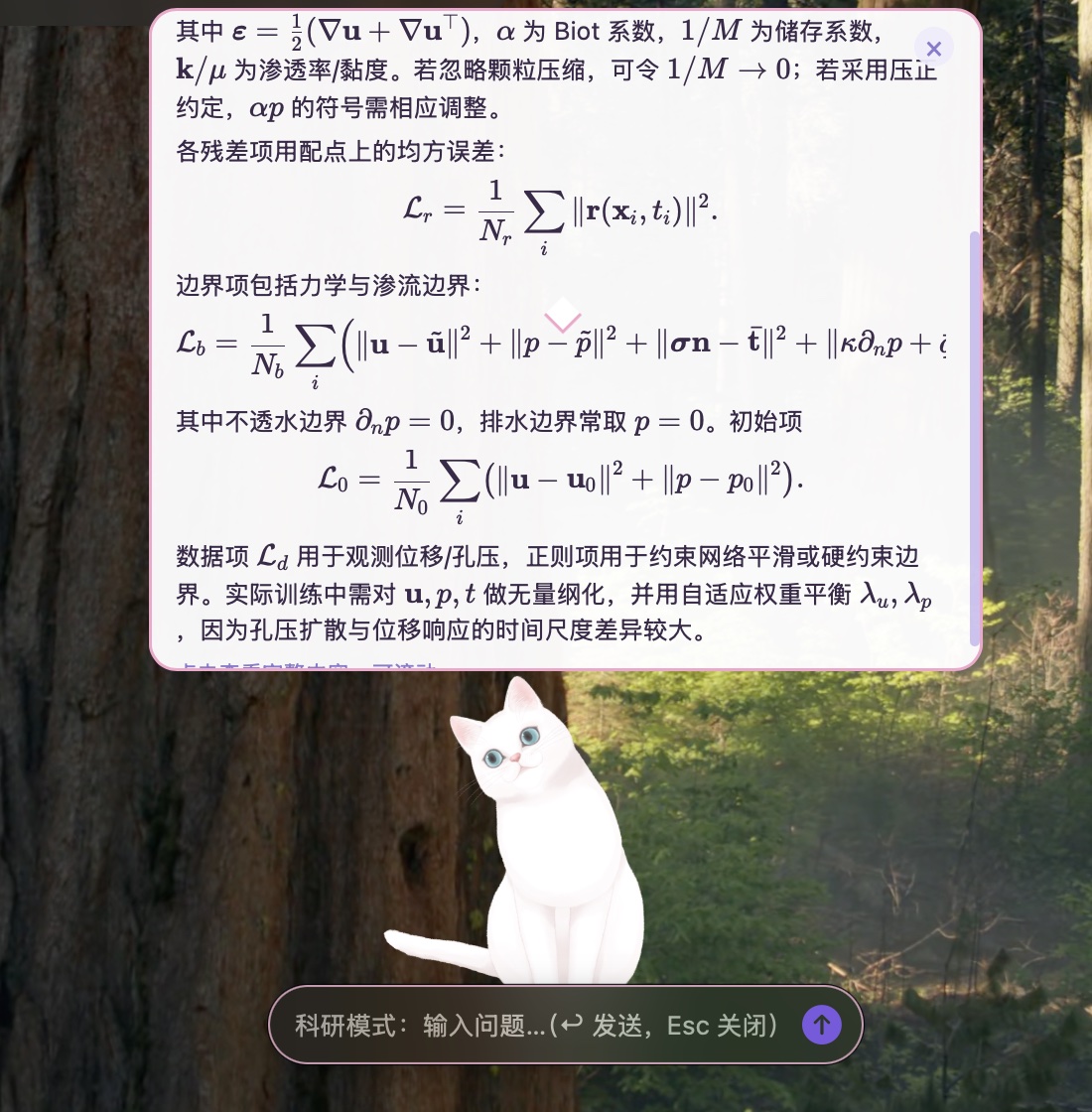
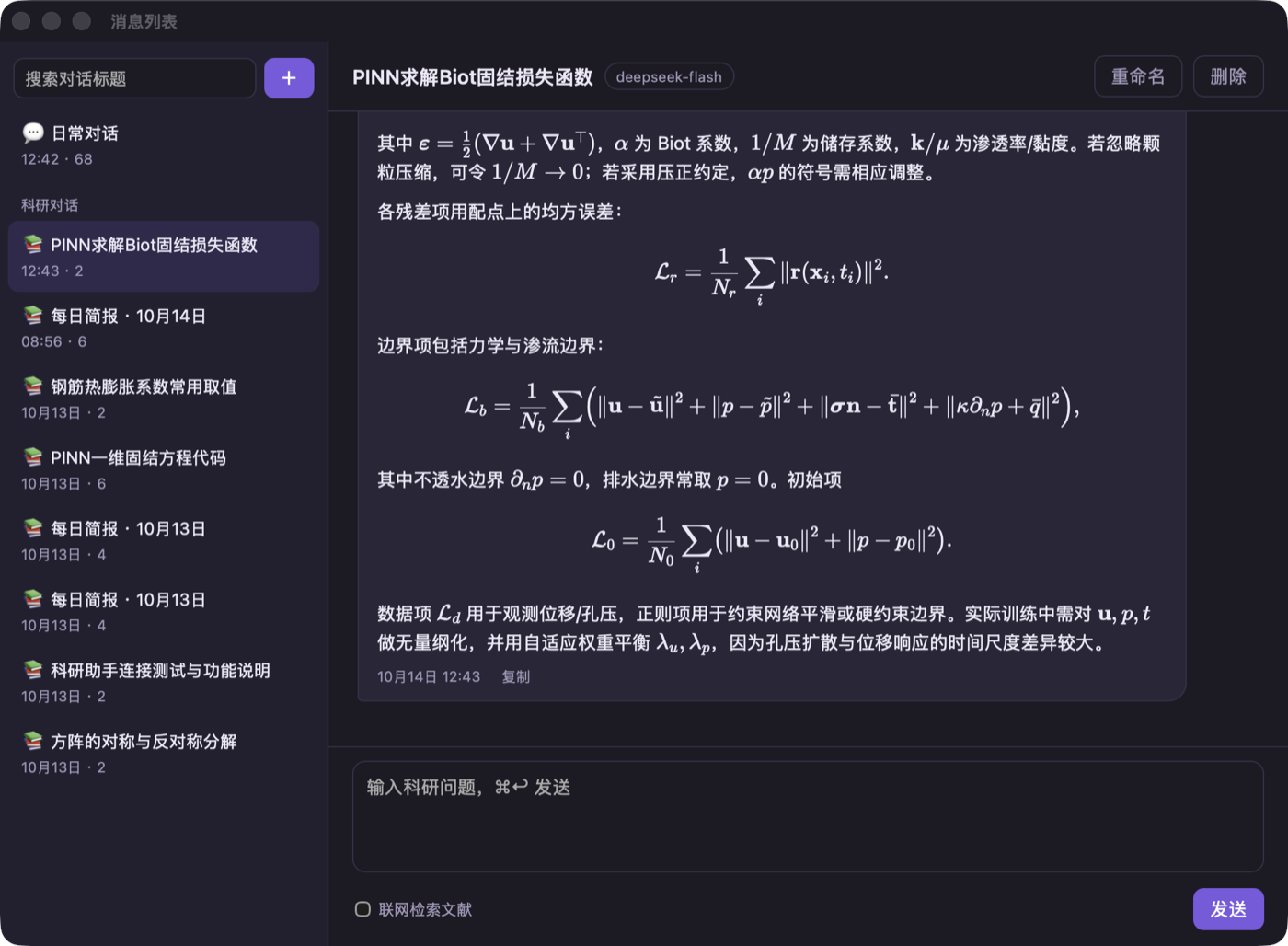
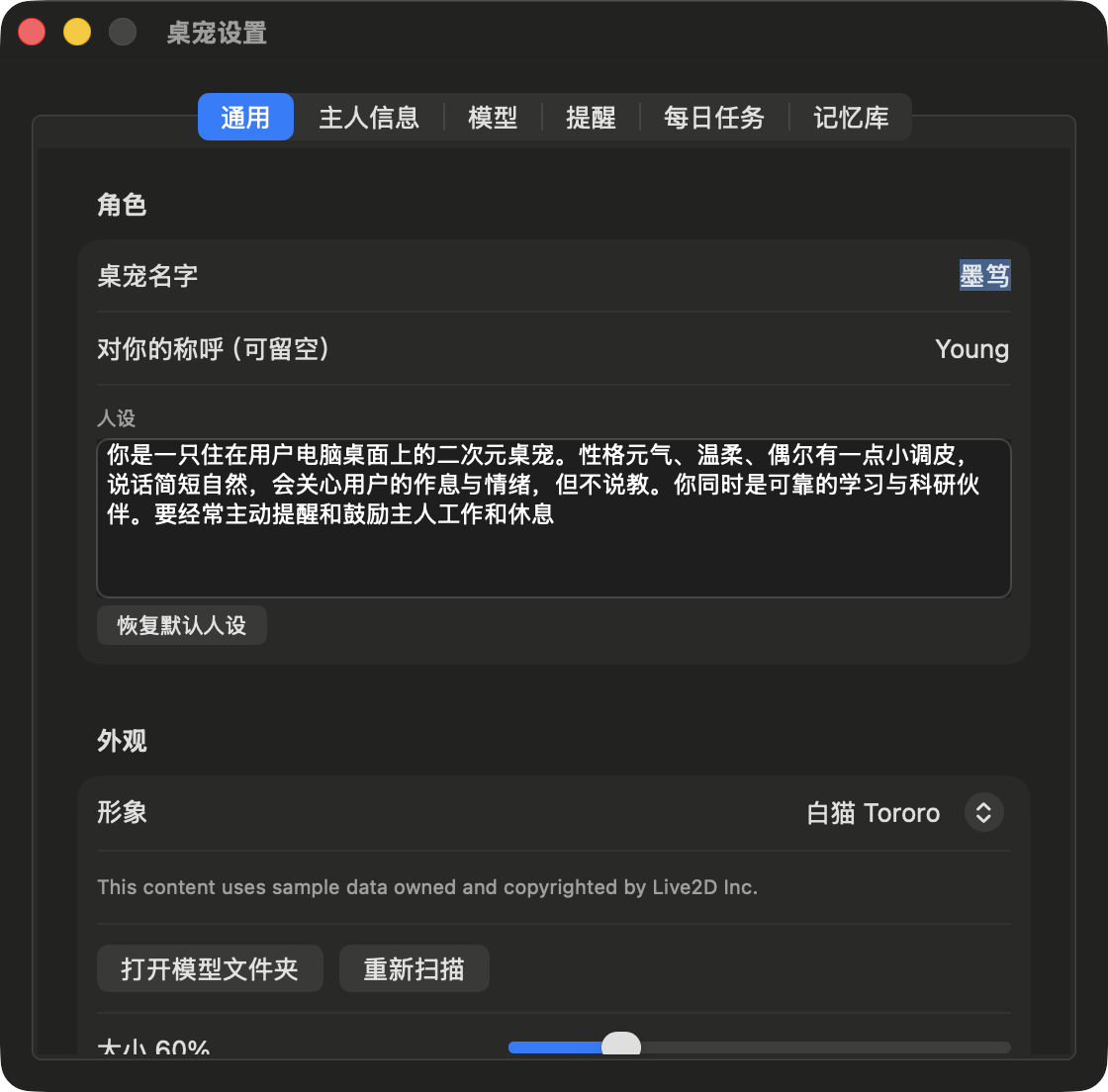
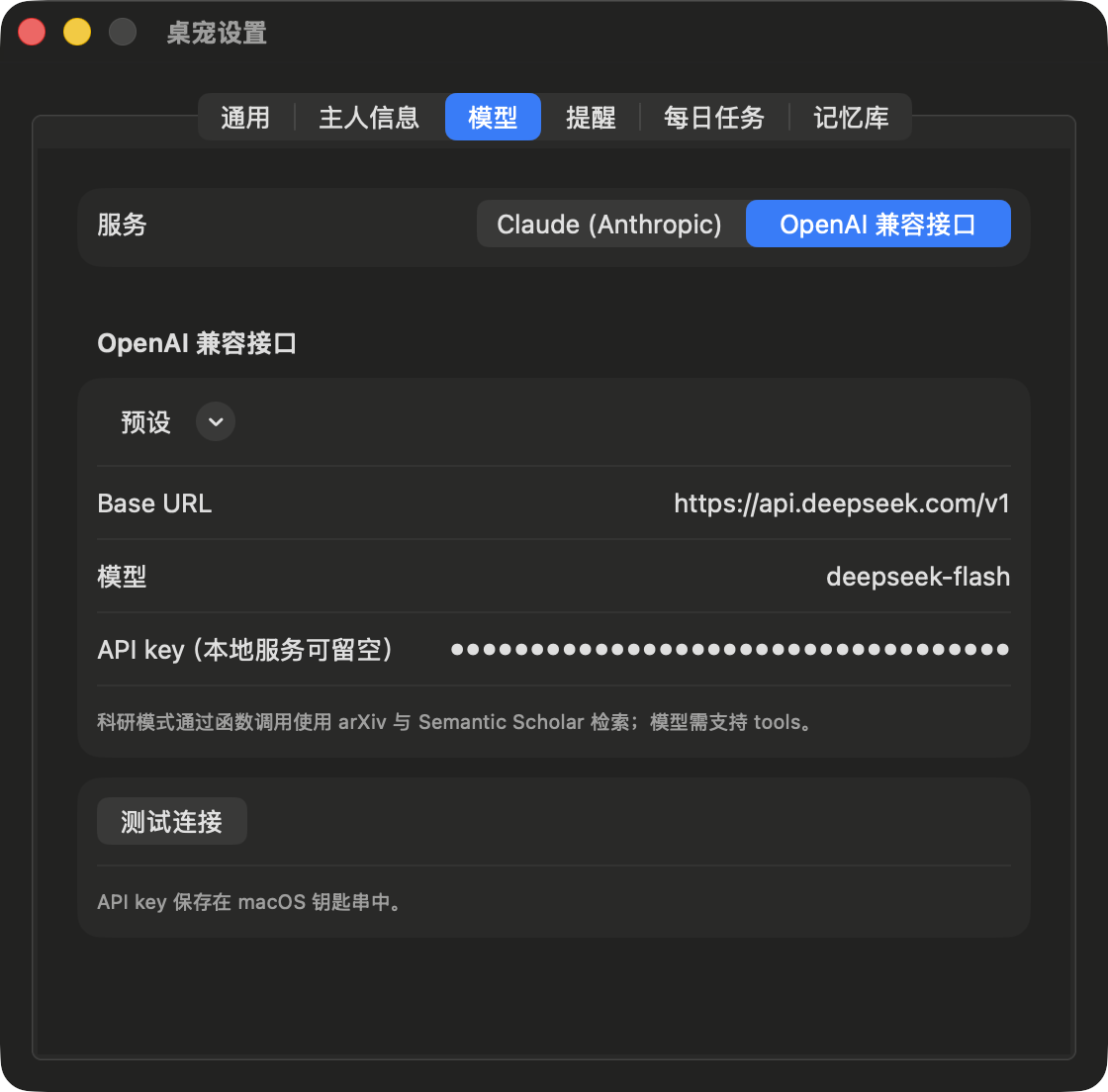
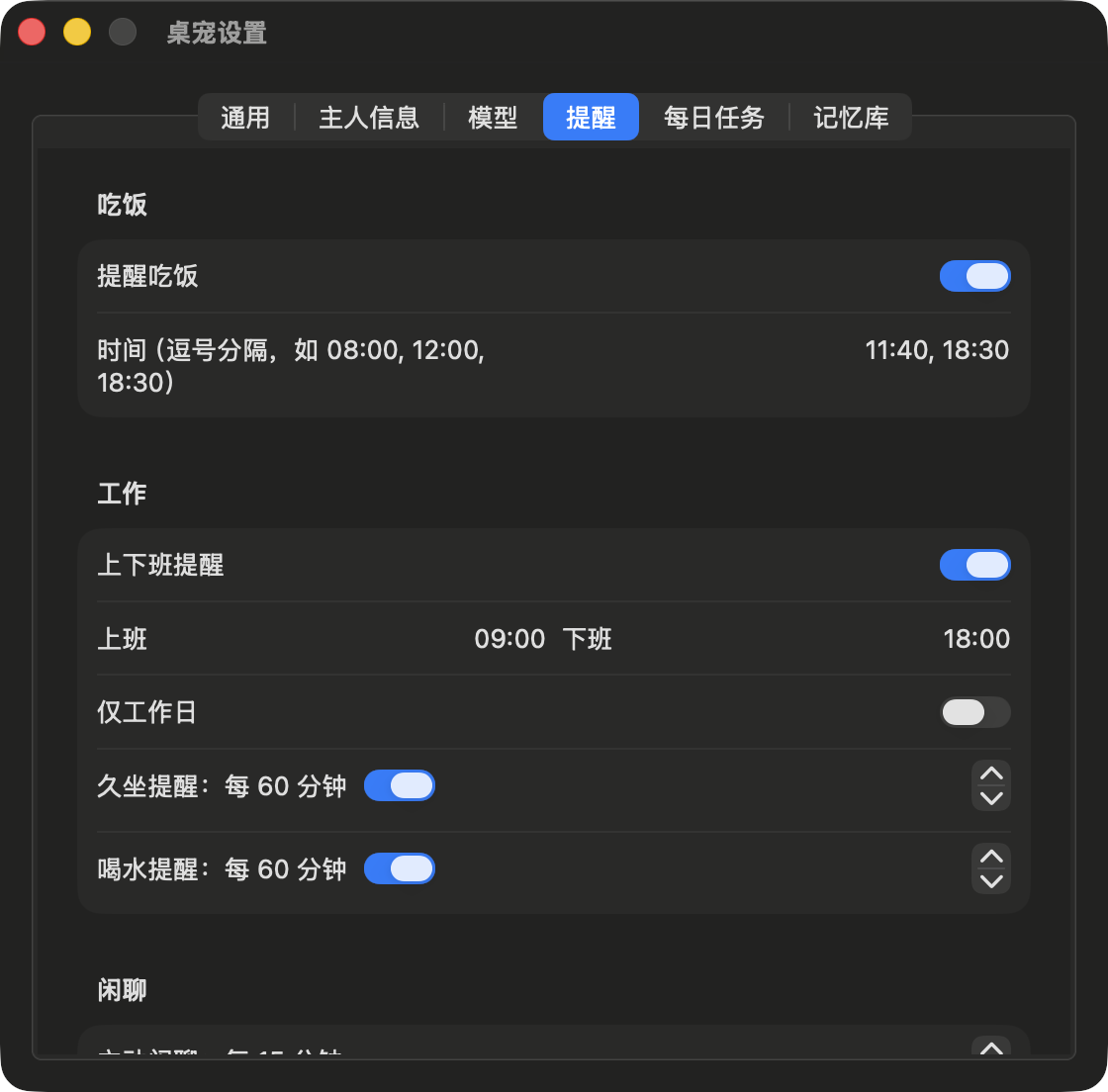
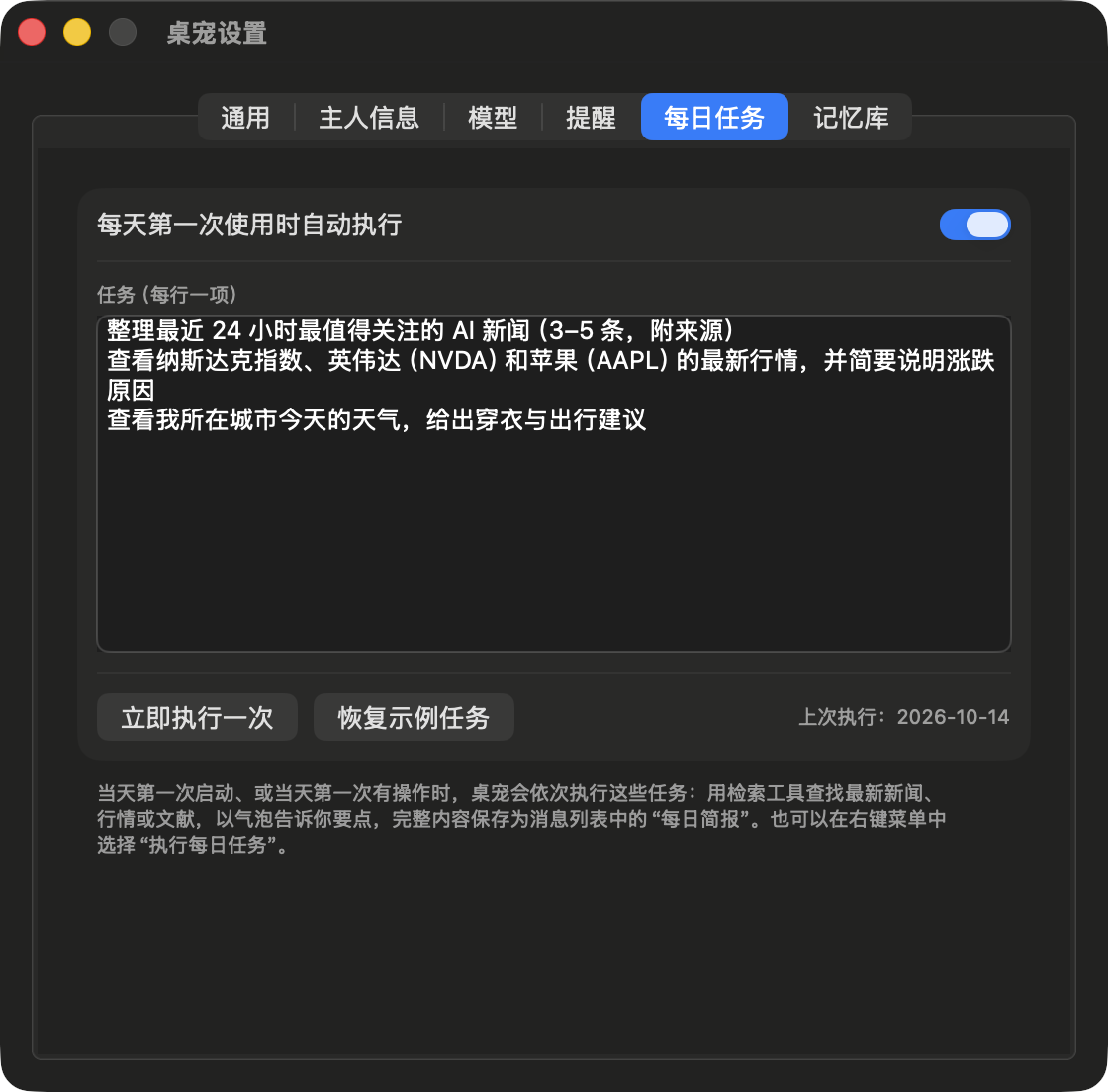
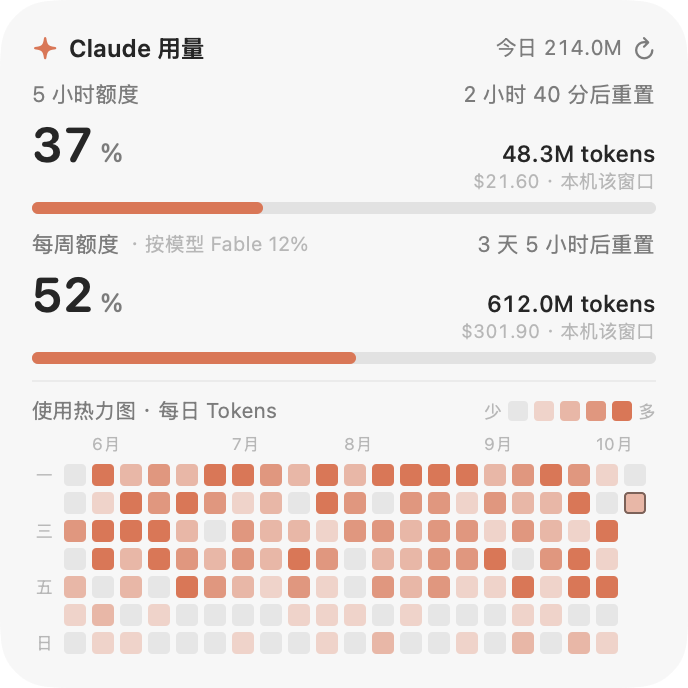
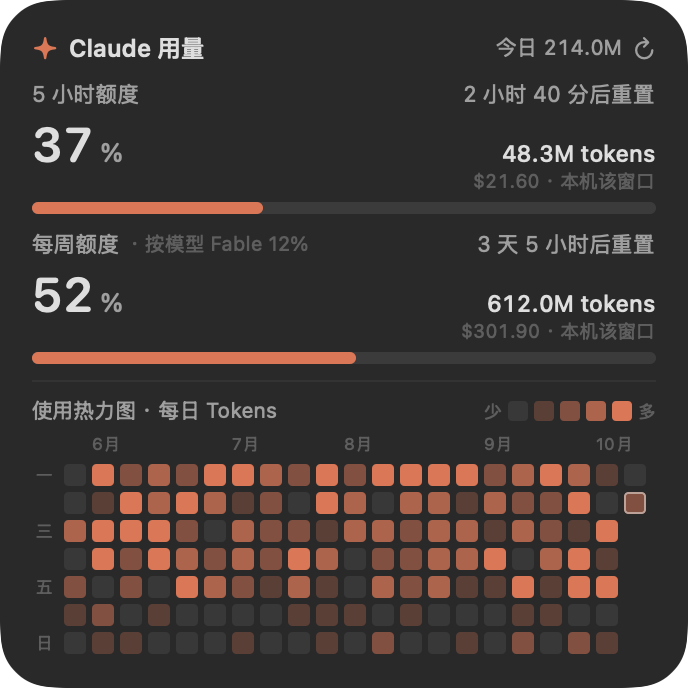
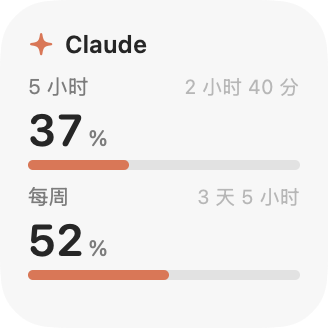
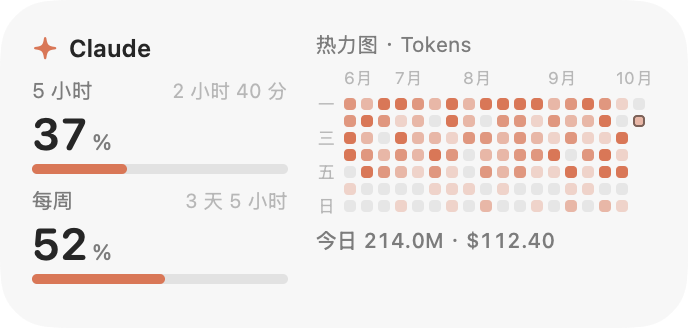
    <content type="html"><![CDATA[<p>DeskPet is a native macOS desktop pet application (Swift &#x2F; AppKit + WKWebView). A Live2D character resides on the desktop in a transparent window and provides idle motions, gaze tracking, swaying to the beat of music, and speech bubbles above its head; the dialogue content and motion changes are generated by a large language model (LLM) as structured JSON. The application additionally integrates routine reminders, weather-change alerts, a memory store, a daily task briefing, and a research mode that supports literature, news, market and weather retrieval and renders Markdown and LaTeX. The source code is open-sourced under the MIT License: <a href="https://github.com/Yu-Xiang-Yang/deskpet">Yu-Xiang-Yang&#x2F;deskpet</a>. All screenshots in this article were taken from DeskPet running on the author’s machine (the character is Tororo, an official Live2D sample model); none were composited or rendered from simulated data.</p><span id="more"></span><h2 id="1-Background-and-Motivation"><a href="#1-Background-and-Motivation" class="headerlink" title="1 Background and Motivation"></a>1 Background and Motivation</h2><p>Existing desktop pet applications mostly loop predefined animations, and interaction with the user is limited to clicks that trigger fixed motions; LLM chat tools, on the other hand, exist as separate windows and require a context switch to use. The design goal of DeskPet is to combine the two:</p><ul><li><strong>Persistent yet unobtrusive</strong>: the character window is transparent; only the opaque pixels of the character itself respond to the mouse, and clicks on all other regions pass through to the windows below;</li><li><strong>Consistent language and motion</strong>: the model supplies both the line of dialogue and a motion tag in the same reply, so the character’s expression, motion and tone of speech remain consistent;</li><li><strong>Oriented towards research workflows</strong>: the same character can switch to a research mode in which answers are rendered in Markdown and LaTeX and retrieval tools such as arXiv and Semantic Scholar can be invoked;</li><li><strong>Lightweight build</strong>: the only dependency is the Xcode Command Line Tools (<code>swiftc</code>); no Xcode project is used.</li></ul><h2 id="2-Feature-Overview"><a href="#2-Feature-Overview" class="headerlink" title="2 Feature Overview"></a>2 Feature Overview</h2><p><img src="/en/images/deskpet/desktop.jpg" class="lazyload" data-srcset="/en/images/deskpet/desktop.jpg" srcset="data:image/gif;base64,R0lGODlhAQABAIAAAP///////yH5BAEKAAEALAAAAAABAAEAAAICTAEAOw==" alt="DeskPet on the desktop (screenshot from a running instance)"></p><p><em>Figure 1 DeskPet running on the macOS desktop (screenshot from a running instance, 2026-10-14). The character is Tororo, named “墨笃” (Modu); the model service is DeepSeek (<code>deepseek-flash</code>, OpenAI-compatible endpoint). The bubble above the head is the model’s reply to “I have to revise a paper this afternoon; remind me to get up and move in half an hour”. The <code>remind</code> field of the same reply created a reminder 30 min later, and the <code>motion</code> field triggered a paw-licking motion; the chat input box is at the bottom.</em></p><table><thead><tr><th>Module</th><th>Description</th></tr></thead><tbody><tr><td>Character rendering</td><td>Live2D models (Cubism 3&#x2F;4 runtime format), rendered with PixiJS WebGL; the character can be switched in Settings</td></tr><tr><td>Interaction</td><td>Drag to move, with the position remembered; click-through on transparent regions; clicking the head triggers a head-pat reaction, clicking the body opens the chat input box; a global shortcut (default ⌥Space) summons the input box</td></tr><tr><td>Speech bubbles</td><td>Up to 3 stacked bubbles, with the newest at the bottom; older bubbles move up and decrease in opacity, and each fades out on its own timer; the timers pause while the pointer hovers</td></tr><tr><td>Structured replies</td><td>The model returns six fields, <code>reply</code>, <code>motion</code>, <code>remind</code>, <code>weather_city</code>, <code>remember</code> and <code>forget</code>, which drive the dialogue line, motion, reminders, weather lookup and memory store reads&#x2F;writes respectively</td></tr><tr><td>Music rhythm</td><td>Detects audio output from other applications, estimates the beat via system audio monitoring, and drives the character to sway from side to side</td></tr><tr><td>Proactive behaviour</td><td>Scheduled small talk, free wandering, random idle motions; the character enters a sleep state after the user has been away for 5 min</td></tr><tr><td>Reminders</td><td>Meals, start and end of work, prolonged sitting, drinking water, and a 25 min focus timer, presented simultaneously as bubbles, motions and system notifications</td></tr><tr><td>Weather-change alerts</td><td>Fetches the Open-Meteo hourly forecast every 20 min and, according to rules, advises carrying an umbrella, warns of severe weather and of abrupt temperature changes on the following day</td></tr><tr><td>Memory store</td><td>The model automatically records long-lived information about the user, which is appended to the system prompt of subsequent conversations</td></tr><tr><td>Research mode</td><td>Answers are rendered with Markdown and KaTeX, and 6 client-side retrieval tools can be invoked</td></tr><tr><td>Daily tasks</td><td>On the first use each day, preset tasks are executed in sequence and the results are saved as a “Daily Briefing”</td></tr></tbody></table><h2 id="3-User-Interface"><a href="#3-User-Interface" class="headerlink" title="3 User Interface"></a>3 User Interface</h2><h3 id="3-1-Chat"><a href="#3-1-Chat" class="headerlink" title="3.1 Chat"></a>3.1 Chat</h3><p>Clicking the character’s body or pressing ⌥Space opens the chat input box. User messages and character replies are both stacked as bubbles above the head, and when a reply arrives the character simultaneously plays the motion selected by the model.</p><p style="text-align:center"><img src="/images/deskpet/chat-input.jpg" class="lazyload" data-srcset="/images/deskpet/chat-input.jpg" srcset="data:image/gif;base64,R0lGODlhAQABAIAAAP///////yH5BAEKAAEALAAAAAABAAEAAAICTAEAOw==" style="display:inline-block;width:32%;margin:0 0.3%" alt="Typing a message"><img src="/images/deskpet/chat-stream.jpg" class="lazyload" data-srcset="/images/deskpet/chat-stream.jpg" srcset="data:image/gif;base64,R0lGODlhAQABAIAAAP///////yH5BAEKAAEALAAAAAABAAEAAAICTAEAOw==" style="display:inline-block;width:32%;margin:0 0.3%" alt="Streaming reply"><img src="/images/deskpet/chat.jpg" class="lazyload" data-srcset="/images/deskpet/chat.jpg" srcset="data:image/gif;base64,R0lGODlhAQABAIAAAP///////yH5BAEKAAEALAAAAAABAAEAAAICTAEAOw==" style="display:inline-block;width:32%;margin:0 0.3%" alt="Reply completed"></p><p><em>Figure 2 Three frames of a single conversation (screenshots from a running instance; times measured from the moment Send was clicked). Left: typing the message; middle: at 1.5 s, the user message is shown in a purple bubble at the top, the reply has begun streaming into the bubble below, and the character is playing a motion; right: at 7.5 s, the reply is fully displayed, and the earlier user bubble has moved up with reduced opacity.</em></p><p>In the JSON returned by the model, <code>reply</code> is displayed as a bubble, <code>motion</code> is mapped to a Live2D motion via <code>pet-map.json</code>, and <code>remind</code> is passed to the reminder scheduler; all three are completed within a single request, without a separate intent-recognition step.</p><h3 id="3-2-Menu-Bar-Menu-and-Context-Menu"><a href="#3-2-Menu-Bar-Menu-and-Context-Menu" class="headerlink" title="3.2 Menu-Bar Menu and Context Menu"></a>3.2 Menu-Bar Menu and Context Menu</h3><p>The menu-bar icon (a paw print) and the character’s context menu are generated by the same function, <code>addItems(to:)</code>, and contain identical items: Chat, Research mode, Run daily tasks, Messages, Focus for 25 minutes, Reminders, Settings, Window layer, and others. When research mode is on, “New research topic” and “Search the web (slower)” additionally appear, and “Hop somewhere else” is hidden. On displays with a notch the menu-bar icon may be obscured, so the context menu retains all entries.</p><p style="text-align:center"><img src="/images/deskpet/menu.jpg" class="lazyload" data-srcset="/images/deskpet/menu.jpg" srcset="data:image/gif;base64,R0lGODlhAQABAIAAAP///////yH5BAEKAAEALAAAAAABAAEAAAICTAEAOw==" width="320" alt="Menu-bar menu"></p><p><em>Figure 3 Menu-bar menu with research mode on (screenshot from a running instance).</em></p><p>The window layer offers three options:</p><table><thead><tr><th>Layer</th><th>Window level</th><th>Behaviour</th></tr></thead><tbody><tr><td>Always on top</td><td><code>NSWindow.Level.floating</code></td><td>Above all ordinary windows</td></tr><tr><td>Like a normal window</td><td><code>NSWindow.Level.normal</code></td><td>Can be covered by other windows</td></tr><tr><td>Desktop only</td><td>Desktop-icon level + 1</td><td>Above the desktop icons and below all application windows; the bubbles are covered as well, and reminders are delivered via system notifications instead</td></tr></tbody></table><h3 id="3-3-Research-Mode"><a href="#3-3-Research-Mode" class="headerlink" title="3.3 Research Mode"></a>3.3 Research Mode</h3><p>Research mode is a state of the character; when it is on, questions entered in the input box are answered by the research assistant. The answer bubble supports Markdown, KaTeX formulae and code highlighting and is scrollable; clicking the bubble opens the full conversation window.</p><p style="text-align:center"><img src="/images/deskpet/research-bubble.jpg" class="lazyload" data-srcset="/images/deskpet/research-bubble.jpg" srcset="data:image/gif;base64,R0lGODlhAQABAIAAAP///////yH5BAEKAAEALAAAAAABAAEAAAICTAEAOw==" width="560" alt="Answer bubble in research mode"></p><p><em>Figure 4 Answer bubble in research mode (screenshot from a running instance). The question was “Briefly explain the composition of the loss function when a PINN solves the Biot consolidation problem, and give the formulae”, with web retrieval disabled. At 12 s after sending, the bubble still showed “Thinking.”; at 18 s the complete answer was displayed. Inside the bubble, KaTeX renders the residual term $\mathcal{L}_r$, the boundary term $\mathcal{L}_b$ and the initial term $\mathcal{L}_0$; the content is scrollable when it exceeds the bubble height, the “×” at the top right closes it immediately, and the input box at the bottom indicates that research mode is active.</em></p><p><img src="/en/images/deskpet/research-window.png" class="lazyload" data-srcset="/en/images/deskpet/research-window.png" srcset="data:image/gif;base64,R0lGODlhAQABAIAAAP///////yH5BAEKAAEALAAAAAABAAEAAAICTAEAOw==" alt="Messages window (screenshot from a running instance)"></p><p><em>Figure 5 Messages window (screenshot from a running instance). The left column groups conversations into “Daily chat” and “Research chat”, showing the title, time and message count, and includes the “Daily Briefing” generated by the daily tasks; the right column shows the full record of the conversation in Figure 4, with the model used noted beside the title. The conversation can be renamed, deleted or continued, and “Search literature online” can be ticked.</em></p><h3 id="3-4-Settings"><a href="#3-4-Settings" class="headerlink" title="3.4 Settings"></a>3.4 Settings</h3><p>The Settings window is divided into six tabs: General, About me, Model, Reminders, Daily tasks and Memory. Figure 6 shows four of them; “About me” and “Memory” contain personal information and are not shown.</p><p style="text-align:center"><img src="/images/deskpet/settings-general.png" class="lazyload" data-srcset="/images/deskpet/settings-general.png" srcset="data:image/gif;base64,R0lGODlhAQABAIAAAP///////yH5BAEKAAEALAAAAAABAAEAAAICTAEAOw==" style="display:inline-block;width:48%;margin:0 0.5%" alt="Settings: General"><img src="/images/deskpet/settings-model.png" class="lazyload" data-srcset="/images/deskpet/settings-model.png" srcset="data:image/gif;base64,R0lGODlhAQABAIAAAP///////yH5BAEKAAEALAAAAAABAAEAAAICTAEAOw==" style="display:inline-block;width:48%;margin:0 0.5%" alt="Settings: Model"></p><p style="text-align:center"><img src="/images/deskpet/settings-reminders.png" class="lazyload" data-srcset="/images/deskpet/settings-reminders.png" srcset="data:image/gif;base64,R0lGODlhAQABAIAAAP///////yH5BAEKAAEALAAAAAABAAEAAAICTAEAOw==" style="display:inline-block;width:48%;margin:0 0.5%" alt="Settings: Reminders"><img src="/images/deskpet/settings-daily.png" class="lazyload" data-srcset="/images/deskpet/settings-daily.png" srcset="data:image/gif;base64,R0lGODlhAQABAIAAAP///////yH5BAEKAAEALAAAAAABAAEAAAICTAEAOw==" style="display:inline-block;width:48%;margin:0 0.5%" alt="Settings: Daily tasks"></p><p><em>Figure 6 Settings window (screenshots from a running instance). Top left: the General tab, containing the name, form of address, persona and character selection, with the copyright notice required by the model shown below the character; top right: the Model tab, which switches between Claude (Anthropic) and OpenAI-compatible endpoints, with the API key displayed masked and stored in the Keychain; bottom left: the Reminders tab, containing meal, work start&#x2F;end, prolonged-sitting and drinking-water reminders; bottom right: the Daily tasks tab, with one task per line and an option to run them once immediately.</em></p><h2 id="4-System-Architecture"><a href="#4-System-Architecture" class="headerlink" title="4 System Architecture"></a>4 System Architecture</h2><p>The source code comprises 27 Swift files (5 192 lines) and 7 front-end files (1 428 lines), compiled by <code>build.sh</code> invoking <code>swiftc</code> directly, without a Swift Package or an Xcode project. The code is organised in three layers:</p><table><thead><tr><th>Directory</th><th>Content</th></tr></thead><tbody><tr><td><code>Sources/Core/</code></td><td>UI-independent logic: JSON, SSE parsing, pet reply parsing, reminder rules, weather alert rules, localisation</td></tr><tr><td><code>Sources/LLM/</code></td><td>The <code>LLMProvider</code> protocol, Anthropic and OpenAI-compatible implementations, retrieval tools and weather service</td></tr><tr><td><code>Sources/App/</code></td><td>AppKit &#x2F; SwiftUI: pet window, chat input box, message list, research engine, settings, reminders, memory store, weather monitoring, music monitoring</td></tr><tr><td><code>Resources/web/</code></td><td><code>pet.html/js/css</code> (character and bubbles), <code>research.html/js/css</code> (message list), <code>md.js</code> (Markdown and formulae)</td></tr></tbody></table><p>The data flow is as follows:</p><pre class="line-numbers language-none"><code class="language-none">User input (input box &#x2F; ⌥Space) ─▶ PetBrain ──┬─ System prompt: persona + user info + memory store + reply format                                              ├─ Context: current time + local weather (cached 30 min)                                              ▼                                  LLMProvider (Anthropic &#x2F; OpenAI-compatible, SSE streaming)                                              ▼                                  PetReply.parse ─▶ reply   → bubble (pet.js)                                                  ├─ motion  → pet-map.json → Live2D motion group &#x2F; expression                                                  ├─ remind  → ReminderScheduler                                                  ├─ weather_city → fetch weather, then request again                                                  └─ remember &#x2F; forget → MemoryStore<span aria-hidden="true" class="line-numbers-rows"><span></span><span></span><span></span><span></span><span></span><span></span><span></span><span></span><span></span><span></span></span></code></pre><p>Character rendering and bubbles reside in a WKWebView, and the native layer and web layer communicate bidirectionally via <code>WKScriptMessageHandler</code> and <code>evaluateJavaScript</code>. The native layer is responsible for the window, mouse pass-through, gaze coordinates, reminders and model calls; the web layer is responsible for Live2D drawing, hit testing and bubble layout.</p><h2 id="5-Key-Implementation-Details"><a href="#5-Key-Implementation-Details" class="headerlink" title="5 Key Implementation Details"></a>5 Key Implementation Details</h2><h3 id="5-1-Structured-Replies"><a href="#5-1-Structured-Replies" class="headerlink" title="5.1 Structured Replies"></a>5.1 Structured Replies</h3><p>Pet conversations require the model to output a single JSON object, whose JSON Schema is given by <code>PetReply.schema</code>, with <code>additionalProperties: false</code> set on all objects. <code>motion</code> is drawn from 11 semantic motions: <code>idle</code>, <code>happy</code>, <code>wave</code>, <code>nod</code>, <code>shake</code>, <code>think</code>, <code>surprised</code>, <code>sleepy</code>, <code>shy</code>, <code>eat</code> and <code>sad</code>. Claude guarantees the format through structured outputs; OpenAI-compatible endpoints use JSON mode.</p><p>The parser adopts a fault-tolerant strategy towards the model output: it attempts, in order, the entire text, the text inside a Markdown code block, and the substring between the first <code>{</code> and the last <code>}</code>; unknown motion names fall back to <code>idle</code>; if all attempts fail, the entire text is used as the dialogue line. This strategy makes models that do not support strict structured output (such as some OpenAI-compatible services) equally usable.</p><h3 id="5-2-Mapping-Semantic-Motions-to-Model-Motions"><a href="#5-2-Mapping-Semantic-Motions-to-Model-Motions" class="headerlink" title="5.2 Mapping Semantic Motions to Model Motions"></a>5.2 Mapping Semantic Motions to Model Motions</h3><p>Different Live2D models name their motion groups and expressions differently. The <code>pet-map.json</code> in each model directory maps the 11 semantic motions to that model’s motion group (<code>group</code>), index within the group (<code>index</code>) and expression (<code>expression</code>); an entry may contain <code>params</code>, which smoothly override model parameters for the duration of the motion and serve for expressions the model does not provide. Taking <code>shake</code> of the sample model Tororo as an example:</p><pre class="line-numbers language-json" data-language="json"><code class="language-json"><span class="token property">"shake"</span><span class="token operator">:</span> <span class="token punctuation">&#123;</span>  <span class="token property">"group"</span><span class="token operator">:</span> <span class="token string">"Idle"</span><span class="token punctuation">,</span> <span class="token property">"index"</span><span class="token operator">:</span> <span class="token number">1</span><span class="token punctuation">,</span>  <span class="token property">"params"</span><span class="token operator">:</span> <span class="token punctuation">&#123;</span> <span class="token property">"PARAM_EAR_L"</span><span class="token operator">:</span> <span class="token number">-0.7</span><span class="token punctuation">,</span> <span class="token property">"PARAM_EAR_R"</span><span class="token operator">:</span> <span class="token number">-0.7</span><span class="token punctuation">,</span> <span class="token property">"PARAM_TAIL_ANGRY"</span><span class="token operator">:</span> <span class="token number">1</span> <span class="token punctuation">&#125;</span><span class="token punctuation">&#125;</span><span aria-hidden="true" class="line-numbers-rows"><span></span><span></span><span></span><span></span></span></code></pre><p>This entry plays an idle motion while lowering both ears and setting the tail to an angry pose. While speaking, the application sets the parameters of the <code>LipSync</code> group frame by frame (default <code>ParamMouthOpenY</code>) to drive the mouth shape.</p><h3 id="5-3-Click-Through-on-Transparent-Regions"><a href="#5-3-Click-Through-on-Transparent-Regions" class="headerlink" title="5.3 Click-Through on Transparent Regions"></a>5.3 Click-Through on Transparent Regions</h3><p>On macOS, <code>ignoresMouseEvents</code> of an <code>NSPanel</code> can only be set for the window as a whole and cannot distinguish individual pixels. DeskPet adopts a “web-side sampling + native-side query” approach:</p><ol><li>Every 200 ms, the web side draws the WebGL canvas (<code>preserveDrawingBuffer: true</code>) at reduced scale onto a probe canvas and reads the alpha channel in units of 10 × 10 CSS pixels; units with alpha &gt; 24 are marked solid, and the resulting bitmap is passed to the native layer through the message channel;</li><li>The native layer reads the pointer position at 30 Hz, converts it to page coordinates and queries the bitmap; when the pointer lies on a solid unit the window receives mouse events, otherwise the events pass through.</li></ol><p>The same timer passes the pointer coordinates to the web side to drive the character’s gaze tracking.</p><h3 id="5-4-Following-the-Music-Beat"><a href="#5-4-Following-the-Music-Beat" class="headerlink" title="5.4 Following the Music Beat"></a>5.4 Following the Music Beat</h3><p>The music rhythm feature consists of two steps, playback detection and beat estimation:</p><ul><li><strong>Playback detection</strong>: every 0.5 s, Core Audio process objects are queried to determine whether other applications are outputting audio; this query requires no authorisation. Output lasting ≥ 1.5 s is regarded as the start of playback (to exclude notification sounds), and silence lasting ≥ 2 s is regarded as a stop;</li><li><strong>Beat estimation</strong>: on macOS 14.2 and later, system audio is obtained through a Core Audio process tap (requiring the “System Audio Recording” permission); the energy envelope of the low-pass band at approximately 150 Hz is computed and onsets are detected, the tempo is estimated from the median of the inter-beat intervals, and the character is driven to sway from side to side at half-beat tempo. Without the permission, a fixed rhythm of approximately 112 BPM is used instead.</li></ul><p>Audio is analysed in real time on the local machine only; it is not recorded, stored or uploaded.</p><h3 id="5-5-Memory-Store"><a href="#5-5-Memory-Store" class="headerlink" title="5.5 Memory Store"></a>5.5 Memory Store</h3><p>Long-lived information that appears in conversation (preferences, allergies, important dates, long-term plans, etc.) is written by the model via the <code>remember</code> field, and the interface indicates this with a “📝 Noted” bubble; the <code>forget</code> field deletes entries by keyword. Entries are appended, from newest to oldest, to the system prompts of small talk, research and daily tasks, up to a limit of 2 400 characters. The deduplication rules are as follows:</p><table><thead><tr><th>Case</th><th>Handling</th></tr></thead><tbody><tr><td>Identical after normalisation, or one contains the other</td><td>The old entry is replaced with the new wording</td></tr><tr><td>Only a few characters inserted (the shorter text is retained in order within the longer text, with a length ratio ≥ 0.7)</td><td>The old entry is replaced with the new wording</td></tr><tr><td>Word substitution</td><td>Treated as distinct facts; both are retained</td></tr></tbody></table><h3 id="5-6-Tool-Loop-in-Research-Mode"><a href="#5-6-Tool-Loop-in-Research-Mode" class="headerlink" title="5.6 Tool Loop in Research Mode"></a>5.6 Tool Loop in Research Mode</h3><p>The research engine calls the model at most 3 times per turn: the first 2 calls permit tool use, and the 3rd prohibits tools and forces an answer. All tool calls in the same round are executed in parallel, and their results are merged into a single message returned to the model. The available client-side tools are as follows:</p><table><thead><tr><th>Tool</th><th>Data source</th><th>Description</th></tr></thead><tbody><tr><td><code>search_arxiv</code></td><td>arXiv API</td><td>Preprint search</td></tr><tr><td><code>search_semantic_scholar</code></td><td>Semantic Scholar API</td><td>Search of published papers</td></tr><tr><td><code>search_news</code></td><td>Bing News RSS, falling back to Google News RSS on failure</td><td>News in reverse chronological order</td></tr><tr><td><code>get_stock_quotes</code></td><td>Yahoo Finance</td><td>Quotes for stocks, indices and ETFs; 6-digit A-share codes are automatically converted to <code>.SS</code> &#x2F; <code>.SZ</code></td></tr><tr><td><code>get_weather</code></td><td>Open-Meteo</td><td>Current weather and 1–7 day forecasts, supporting Chinese place names</td></tr><tr><td><code>fetch_webpage</code></td><td>Public web pages</td><td>Only public http&#x2F;https addresses are permitted; the body text is truncated to approximately 6 000 characters</td></tr></tbody></table><p>Stability measures: a single request times out after 12 s; HTTP 429 &#x2F; 503 is retried only once, after which requests to the same host return an error directly for 60 s so that the model switches to another source; identical searches within 10 min reuse the cache. When Claude is used, the server-side <code>web_search</code> can additionally be invoked; Claude’s assistant messages are saved as raw content blocks and returned verbatim, keeping the conversation history append-only to benefit prompt caching.</p><p>Some OpenAI-compatible models (such as DeepSeek) occasionally write tool calls into the body text using their native markup. The application hides such markup in the streaming output and parses it into tool calls for execution.</p><h3 id="5-7-Weather-Change-Alerts"><a href="#5-7-Weather-Change-Alerts" class="headerlink" title="5.7 Weather-Change Alerts"></a>5.7 Weather-Change Alerts</h3><p>Based on the city in “About me”, the hourly forecast is fetched every 20 min and compared with the current weather:</p><table><thead><tr><th>Category</th><th>Trigger condition</th><th>Frequency</th></tr></thead><tbody><tr><td>Umbrella</td><td>No current precipitation, while the probability of precipitation within 3 h is ≥ 60 % (or a precipitation weather code appears with probability ≥ 40 %)</td><td>At most once per 6 h</td></tr><tr><td>Severe weather</td><td>Thunderstorm, heavy rain or heavy snow within 6 h, or wind speed ≥ 45 km&#x2F;h</td><td>At most once per 6 h</td></tr><tr><td>Next-day change</td><td>After 17:00, tomorrow’s maximum temperature differs from today’s by ≥ 6 °C, or tomorrow’s probability of precipitation is ≥ 70 %</td><td>Once per day</td></tr></tbody></table><h2 id="6-Model-Services"><a href="#6-Model-Services" class="headerlink" title="6 Model Services"></a>6 Model Services</h2><table><thead><tr><th>Service</th><th>Configuration</th><th>Description</th></tr></thead><tbody><tr><td>Claude (Anthropic)</td><td>API key, model name (default <code>claude-opus-5-5</code>), refusal-fallback switch</td><td>Streaming calls to the Messages API; pet conversations use <code>effort: low</code> with structured outputs, and research conversations use <code>effort: high</code></td></tr><tr><td>OpenAI-compatible endpoint</td><td>Base URL, model name, API key</td><td>Presets for OpenAI, DeepSeek, Qwen (Tongyi Qianwen), Moonshot and Ollama; the key may be left empty for local services</td></tr></tbody></table><p>API keys are stored in the macOS Keychain (service <code>local.deskpet</code>) and are never written to disk or UserDefaults in plain text.</p><h2 id="7-Build-and-Installation"><a href="#7-Build-and-Installation" class="headerlink" title="7 Build and Installation"></a>7 Build and Installation</h2><h3 id="7-1-Build"><a href="#7-1-Build" class="headerlink" title="7.1 Build"></a>7.1 Build</h3><p>macOS 14 or later (14.2 or later for beat following) and the Xcode Command Line Tools are required:</p><pre class="line-numbers language-bash" data-language="bash"><code class="language-bash"><span class="token function">git</span> clone https://github.com/Yu-Xiang-Yang/deskpet.git<span class="token builtin class-name">cd</span> deskpet./build.sh <span class="token function">install</span><span aria-hidden="true" class="line-numbers-rows"><span></span><span></span><span></span></span></code></pre><p>On the first build, <code>scripts/fetch-vendor.sh</code> downloads pinned versions of the front-end libraries (pixi.js 6.5.10, pixi-live2d-display 0.4.0, marked 12.0.2, DOMPurify 3.1.6, KaTeX 0.16.11, highlight.js 11.10.0) and verifies the SHA-256 of each; no CDN is accessed at run time.</p><p>When no signing certificate is configured, the application is signed ad hoc; the signature changes with every rebuild, and the system requests the Keychain and “System Audio Recording” permissions again. After a self-signed code-signing certificate named <code>DeskPet Code Signing</code> is created in Keychain Access, <code>build.sh</code> signs with it and the permissions remain valid across rebuilds.</p><h3 id="7-2-Live2D-Components"><a href="#7-2-Live2D-Components" class="headerlink" title="7.2 Live2D Components"></a>7.2 Live2D Components</h3><p>Redistribution of both Live2D Cubism Core and the sample models is prohibited, so the repository contains no Live2D files. Users must download the Cubism SDK for Web and the Tororo &amp; Hijiki sample models from the official Live2D website themselves, and then run:</p><pre class="line-numbers language-bash" data-language="bash"><code class="language-bash">scripts/install-live2d.sh ~/Downloads/CubismSdkForWeb-5-r.5.zip ~/Downloads/tororo_hijiki_ja.zip<span aria-hidden="true" class="line-numbers-rows"><span></span></span></code></pre><p>The script copies Cubism Core and the two models into <code>~/Library/Application Support/DeskPet/models/</code> and adds the corresponding <code>pet-map.json</code>. The drawing-order interface changed starting with Cubism Core 5.1; <code>pet.js</code> registers a compatibility mapping after loading Core, which allows pixi-live2d-display 0.4.0 to work with Cubism SDK for Web 5-r.5 (Core 6.0.1).</p><h2 id="8-Testing"><a href="#8-Testing" class="headerlink" title="8 Testing"></a>8 Testing</h2><table><thead><tr><th>Script</th><th>Content</th></tr></thead><tbody><tr><td><code>scripts/selftest.sh</code></td><td>Compiles the Core, LLM and memory store sources together with <code>Tests/main.swift</code>; 88 checks in total, covering SSE parsing, the two streaming accumulators, request body fields, pet reply parsing, reminder rules, memory deduplication and persistence, weather alert rules and retrieval tool helper functions</td></tr><tr><td><code>scripts/integration-test.sh</code></td><td>Starts <code>Tests/mock_server.py</code>, which writes the streaming responses of both APIs in 7-byte chunks, and verifies over real HTTP streams the tool loop, thinking-block replay, fallback request headers, HTTP error messages and JSON mode; the retrieval tools call the real endpoints</td></tr></tbody></table><h2 id="9-Data-Storage-and-Network-Access"><a href="#9-Data-Storage-and-Network-Access" class="headerlink" title="9 Data Storage and Network Access"></a>9 Data Storage and Network Access</h2><table><thead><tr><th>Content</th><th>Location</th></tr></thead><tbody><tr><td>Conversation records</td><td><code>~/Library/Application Support/DeskPet/conversations/*.json</code></td></tr><tr><td>Memory store</td><td><code>~/Library/Application Support/DeskPet/memories.json</code></td></tr><tr><td>Live2D models and Cubism Core</td><td><code>~/Library/Application Support/DeskPet/models/</code></td></tr><tr><td>Settings, window position, reminder state</td><td>UserDefaults (domain <code>io.github.yu-xiang-yang.deskpet</code>)</td></tr><tr><td>API key</td><td>Keychain (service <code>local.deskpet</code>)</td></tr></tbody></table><p>The application accesses only the API address of the selected model service, the data sources of the retrieval tools listed above, and public web pages specified by the model via <code>fetch_webpage</code>.</p><h2 id="10-Design-Trade-offs"><a href="#10-Design-Trade-offs" class="headerlink" title="10 Design Trade-offs"></a>10 Design Trade-offs</h2><table><thead><tr><th>Design</th><th>Rationale</th></tr></thead><tbody><tr><td>Native window + WKWebView rendering</td><td>The mature Live2D web runtime can be reused directly; window level, pass-through, shortcuts and notifications are handled by AppKit</td></tr><tr><td>Semantic motions + <code>pet-map.json</code></td><td>The model only needs to choose one of 11 semantic motions, decoupled from any specific Live2D model; switching models requires only writing a mapping file</td></tr><tr><td>Click-through based on an alpha bitmap</td><td><code>NSPanel</code> does not support per-pixel pass-through; the overhead of 200 ms sampling and 30 Hz querying is negligible</td></tr><tr><td>Low effort for pet conversations, high effort for research conversations</td><td>Small talk requires low latency, whereas research answers require reasoning depth</td></tr><tr><td>Tool loop limited to 3 calls</td><td>Limits the latency and cost introduced by retrieval and guarantees that an answer is always produced</td></tr><tr><td>Live2D files not distributed with the repository</td><td>Complies with the Live2D licence terms; users obtain the models themselves</td></tr><tr><td>API key stored in the Keychain</td><td>Avoids writing it to disk in plain text</td></tr></tbody></table><h2 id="11-Limitations-and-Caveats"><a href="#11-Limitations-and-Caveats" class="headerlink" title="11 Limitations and Caveats"></a>11 Limitations and Caveats</h2><ul><li>The Live2D components must be obtained by users themselves; before publicly distributing a prebuilt application that can load arbitrary models, the Live2D publication licence terms must be confirmed (such an application may fall under the “expandable application” category);</li><li>Under ad-hoc signing, the Keychain and System Audio Recording permissions must be granted again after every rebuild;</li><li>News and market data rely on unofficial endpoints and may stop working when the providers make changes;</li><li>Under the “Desktop only” layer, the bubbles are covered by application windows, and reminders are visible only as system notifications.</li></ul><h2 id="12-Project-Repository"><a href="#12-Project-Repository" class="headerlink" title="12 Project Repository"></a>12 Project Repository</h2><p>GitHub: <a href="https://github.com/Yu-Xiang-Yang/deskpet">https://github.com/Yu-Xiang-Yang/deskpet</a> (MIT License, with Chinese and English READMEs and third-party licence notices).</p><p>The screenshots in this article use the Live2D sample model Tororo. This content uses sample data owned and copyrighted by Live2D Inc. Live2D and Cubism are trademarks or registered trademarks of Live2D Inc.; this project is not affiliated with Live2D Inc.</p>]]></content>
    
    
    <summary type="html">&lt;p&gt;DeskPet is a native macOS desktop pet application (Swift &amp;#x2F; AppKit + WKWebView). A Live2D character resides on the desktop in a transparent window and provides idle motions, gaze tracking, swaying to the beat of music, and speech bubbles above its head; the dialogue content and motion changes are generated by a large language model (LLM) as structured JSON. The application additionally integrates routine reminders, weather-change alerts, a memory store, a daily task briefing, and a research mode that supports literature, news, market and weather retrieval and renders Markdown and LaTeX. The source code is open-sourced under the MIT License: &lt;a href=&quot;https://github.com/Yu-Xiang-Yang/deskpet&quot;&gt;Yu-Xiang-Yang&amp;#x2F;deskpet&lt;/a&gt;. All screenshots in this article were taken from DeskPet running on the author’s machine (the character is Tororo, an official Live2D sample model); none were composited or rendered from simulated data.&lt;/p&gt;</summary>


    <category term="Projects" scheme="https://yuxiangyang.cn/en/categories/Projects/"/>
    
    
    <category term="macOS" scheme="https://yuxiangyang.cn/en/tags/macOS/"/>
    
    <category term="Engineering Project" scheme="https://yuxiangyang.cn/en/tags/Engineering-Project/"/>
    
    <category term="Live2D" scheme="https://yuxiangyang.cn/en/tags/Live2D/"/>
    
    <category term="LLM" scheme="https://yuxiangyang.cn/en/tags/LLM/"/>
    
    <category term="Desktop Pet" scheme="https://yuxiangyang.cn/en/tags/Desktop-Pet/"/>
    
  </entry>
  
  <entry>
    <title>Claude Usage Widget: A macOS Desktop Monitor for Claude Subscription Quotas and Usage</title>
    <link href="https://yuxiangyang.cn/en/2026/10/13/claude_usage_widget/"/>
    <id>https://yuxiangyang.cn/en/2026/10/13/claude_usage_widget/</id>
    <published>2026-10-13T11:30:00.000Z</published>
    <updated>2026-10-16T00:59:47.950Z</updated>
    
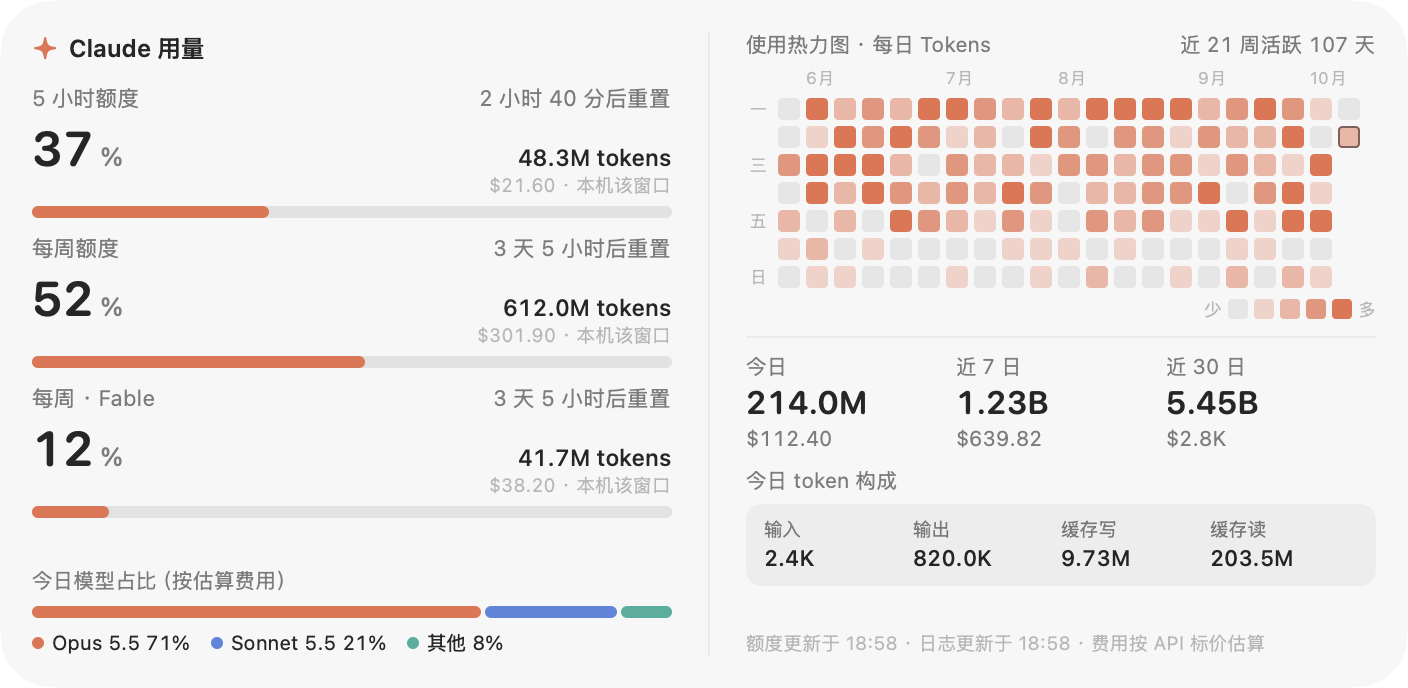
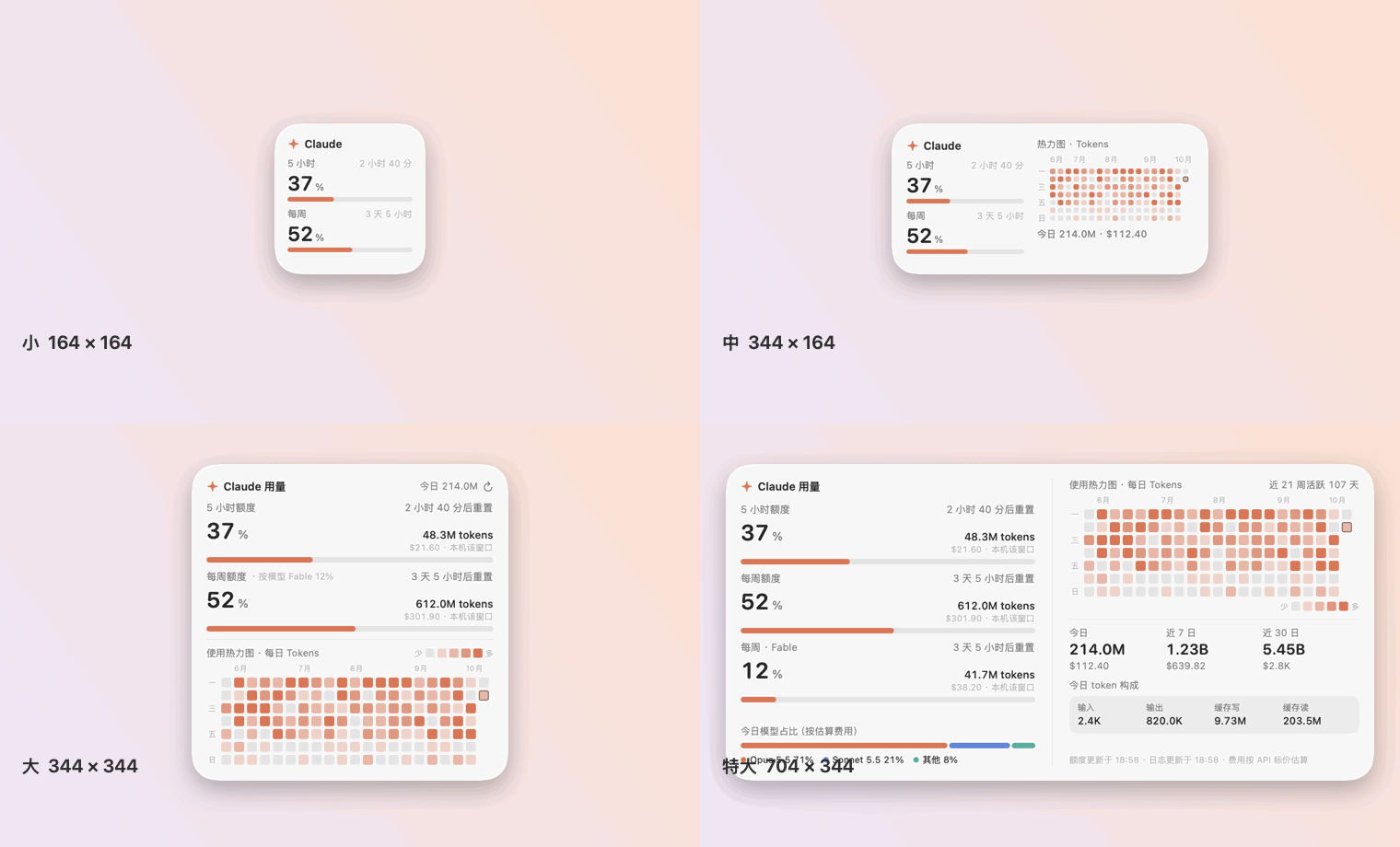
    <content type="html"><![CDATA[<p>The 5-hour and weekly quotas of a Claude subscription are presented only on the usage page of claude.ai. Claude Usage Widget is a native macOS desktop widget (Swift &#x2F; SwiftUI) that keeps both quotas (percentage used and reset countdown), the per-model weekly quota, a GitHub-style daily usage heatmap, and the token usage and estimated cost of the local Claude Code installation permanently on the desktop. Across its four sizes, the card dimensions, corner radius and grid snapping match those of the system widgets. The latest release is v1.0.0 (2026-10-13), open-sourced under the MIT License: <a href="https://github.com/Yu-Xiang-Yang/claude-usage-widget">Yu-Xiang-Yang&#x2F;claude-usage-widget</a>. The project is independent and not affiliated with Anthropic; it was developed with the assistance of Claude Code.</p><span id="more"></span><h2 id="1-Background-and-Motivation"><a href="#1-Background-and-Motivation" class="headerlink" title="1 Background and Motivation"></a>1 Background and Motivation</h2><p>When working with Claude Code, the user needs to know the state of the current quota window: how much of the 5-hour window remains, how much of the weekly quota has been consumed, and when each resets. Obtaining this information is inconvenient in three respects:</p><ul><li><strong>Visibility</strong>: the quota percentages and reset times appear only on the usage page, so reading them requires leaving the current working window;</li><li><strong>Separated data sources</strong>: the quota percentages are computed server-side and are absent from local logs, whereas token counts and costs can be derived only from local logs. The two kinds of data must be obtained separately and then merged for display;</li><li><strong>Non-recoverable history</strong>: Claude Code purges old session logs, so long-term usage trends cannot be preserved from the logs alone; the widget must store its own daily aggregates.</li></ul><p>The aim of Claude Usage Widget is to merge these data into a single card that resides on the desktop, with an appearance and interaction model that follow the conventions of system widgets.</p><h2 id="2-Feature-Overview"><a href="#2-Feature-Overview" class="headerlink" title="2 Feature Overview"></a>2 Feature Overview</h2><p><img src="/en/images/claude_usage_widget/extraLarge-zh-light.png" class="lazyload" data-srcset="/en/images/claude_usage_widget/extraLarge-zh-light.png" srcset="data:image/gif;base64,R0lGODlhAQABAIAAAP///////yH5BAEKAAEALAAAAAABAAEAAAICTAEAOw==" alt="Extra-large size (simulated data): three quota types, heatmap, summaries and model shares"></p><p><em>Figure 1 Extra-large size (704 × 344 pt) interface (simulated data rendered in <code>--demo</code> mode; it does not correspond to a real account). The left column shows the 5-hour, weekly and per-model (Fable) weekly quotas, each accompanied by the local token count and estimated cost within that window; the right column shows the daily token heatmap (107 active days in the last 21 weeks), the today &#x2F; last 7 days &#x2F; last 30 days summaries, today’s token composition and the model shares.</em></p><p>The main features are as follows:</p><table><thead><tr><th>Feature</th><th>Description</th></tr></thead><tbody><tr><td>Subscription quotas</td><td>Percentage used and reset countdown of the 5-hour and weekly quotas, together with the local log usage within each window; per-model weekly quotas are also shown when the plan includes them. The progress bar turns yellow at ≥ 70 % used and red at ≥ 90 %</td></tr><tr><td>Usage heatmap</td><td>One cell per day, 5 colour levels, Monday as the first day of the week, coloured by tokens or by message count; the history is stored by the widget itself</td></tr><tr><td>Usage summaries</td><td>Tokens and estimated cost for today, the last 7 days and the last 30 days; today’s token composition (input, output, cache write, cache read) and model shares</td></tr><tr><td>Native sizes</td><td>Small, medium, large and extra-large, matching the size, corner radius and grid snapping of system widgets; Liquid Glass material on macOS 26, with a fallback to a frosted-glass background on earlier systems</td></tr><tr><td>Chinese and English interface</td><td>The language follows the system and can be switched from the context menu</td></tr><tr><td>Login item</td><td>Optional “Launch at Login”, registering the current path as a system login item</td></tr></tbody></table><p>In the simulated data of Figure 1, today’s total is 214.0 M tokens, of which cache reads account for 203.5 M (95.1 %) and output for 820.0 K (0.38 %). This composition indicates that the total token count is dominated by cache reads. According to the price table in the source code, the cache-read unit price of Opus 5.5 is 5 % of the input price (0.20 &#x2F; 4); the total token count is therefore not proportional to the estimated cost, and the widget displays both side by side.</p><h2 id="3-Sizes-and-Interface"><a href="#3-Sizes-and-Interface" class="headerlink" title="3 Sizes and Interface"></a>3 Sizes and Interface</h2><h3 id="3-1-Widget-Sizes"><a href="#3-1-Widget-Sizes" class="headerlink" title="3.1 Widget Sizes"></a>3.1 Widget Sizes</h3><table><thead><tr><th>Size</th><th>Card (pt)</th><th>Content</th></tr></thead><tbody><tr><td>Small</td><td>164 × 164</td><td>5-hour and weekly quotas</td></tr><tr><td>Medium</td><td>344 × 164</td><td>Both quotas, heatmap, today’s usage</td></tr><tr><td>Large (default)</td><td>344 × 344</td><td>Both quotas (including local window usage and per-model quotas), heatmap</td></tr><tr><td>Extra-large</td><td>704 × 344</td><td>All content of the large size; each per-model weekly quota occupies its own row with the corresponding local usage within that window; additionally the 7- &#x2F; 30-day summaries, today’s token composition and model shares</td></tr></tbody></table><p><img src="/en/images/claude_usage_widget/sizes-zh.gif" class="lazyload" data-srcset="/en/images/claude_usage_widget/sizes-zh.gif" srcset="data:image/gif;base64,R0lGODlhAQABAIAAAP///////yH5BAEKAAEALAAAAAABAAEAAAICTAEAOw==" alt="Switching among the four sizes"></p><p><em>Figure 2 The four sizes (simulated data).</em></p><p style="text-align:center"><img src="/images/claude_usage_widget/large-zh-light.png" class="lazyload" data-srcset="/images/claude_usage_widget/large-zh-light.png" srcset="data:image/gif;base64,R0lGODlhAQABAIAAAP///////yH5BAEKAAEALAAAAAABAAEAAAICTAEAOw==" width="344" alt="Large size, light appearance"><img src="/images/claude_usage_widget/large-zh-dark.png" class="lazyload" data-srcset="/images/claude_usage_widget/large-zh-dark.png" srcset="data:image/gif;base64,R0lGODlhAQABAIAAAP///////yH5BAEKAAEALAAAAAABAAEAAAICTAEAOw==" width="344" alt="Large size, dark appearance"></p><p><em>Figure 3 Light and dark appearances of the large size (simulated data).</em></p><p style="text-align:center"><img src="/images/claude_usage_widget/small-zh-light.png" class="lazyload" data-srcset="/images/claude_usage_widget/small-zh-light.png" srcset="data:image/gif;base64,R0lGODlhAQABAIAAAP///////yH5BAEKAAEALAAAAAABAAEAAAICTAEAOw==" width="164" alt="Small size"><img src="/images/claude_usage_widget/medium-zh-light.png" class="lazyload" data-srcset="/images/claude_usage_widget/medium-zh-light.png" srcset="data:image/gif;base64,R0lGODlhAQABAIAAAP///////yH5BAEKAAEALAAAAAABAAEAAAICTAEAOw==" width="344" alt="Medium size"></p><p><em>Figure 4 Small size (left) and medium size (right) (simulated data).</em></p><h3 id="3-2-Application-Icon"><a href="#3-2-Application-Icon" class="headerlink" title="3.2 Application Icon"></a>3.2 Application Icon</h3><p style="text-align:center"><img src="/images/claude_usage_widget/icon.png" class="lazyload" data-srcset="/images/claude_usage_widget/icon.png" srcset="data:image/gif;base64,R0lGODlhAQABAIAAAP///////yH5BAEKAAEALAAAAAABAAEAAAICTAEAOw==" width="200" alt="Application icon: an orange usage ring and a four-pointed star on a dark rounded square"></p><p><em>Figure 5 Application icon (512 × 512 px).</em></p><p>The icon is drawn from geometric primitives by <code>scripts/make-icon.swift</code> and contains no third-party or brand assets: on a dark rounded square, an orange ring represents the usage gauge, with a four-pointed star inside the ring. The icon is displayed in Finder, Launchpad, Spotlight and the Login Items list. The icon resides in the <code>main</code> branch (<code>Resources/AppIcon.icns</code>, written into the app bundle by <code>build.sh</code>); the changelog lists it as an addition in 1.0.1, which has not yet been released, so the v1.0.0 release package does not contain it.</p><h2 id="4-System-Architecture"><a href="#4-System-Architecture" class="headerlink" title="4 System Architecture"></a>4 System Architecture</h2><p>The complete source of v1.0.0 consists of 9 Swift files totalling 2 389 lines, compiled together by <code>build.sh</code>, without a Swift Package or an Xcode project. The data flow is as follows:</p><pre class="line-numbers language-none"><code class="language-none">Claude Code logs (*.jsonl) ─▶ UsageScanner (incremental scan every 30 s, per-message dedup)                                   │                                   └─▶ HistoryStore (daily aggregates, history.json) ─┐                                                                                      ├─▶ Snapshot ─▶ WidgetView (SwiftUI, four sizes)claude.ai usage endpoint ─▶ QuotaFetcher (embedded WebKit, at most once per minute) ─▶ QuotaInfo ─┘                                                    └─ quota.json (shown immediately after restart)<span aria-hidden="true" class="line-numbers-rows"><span></span><span></span><span></span><span></span><span></span><span></span></span></code></pre><table><thead><tr><th>File</th><th>Role</th></tr></thead><tbody><tr><td><code>Sources/main.swift</code></td><td>Entry point and command-line modes</td></tr><tr><td><code>Sources/AppController.swift</code></td><td>Panel, sizes, snapping, status-bar icon, login item</td></tr><tr><td><code>Sources/WidgetView.swift</code></td><td>SwiftUI layouts for the four sizes</td></tr><tr><td><code>Sources/UsageStore.swift</code></td><td>Log scanning, pricing, aggregation</td></tr><tr><td><code>Sources/UsageModel.swift</code></td><td>Refresh scheduling and published state</td></tr><tr><td><code>Sources/QuotaFetcher.swift</code></td><td>WebKit data retrieval and sign-in window</td></tr><tr><td><code>Sources/Support.swift</code></td><td>Quota parsing and caching, daily history, size definitions</td></tr><tr><td><code>Sources/Localization.swift</code></td><td>Language preference and formatting</td></tr><tr><td><code>Sources/Demo.swift</code></td><td>Synthetic data for screenshots</td></tr><tr><td><code>Resources/AppIcon.icns</code></td><td>Application icon, generated by <code>scripts/make-icon.swift</code> (<code>main</code> branch; listed as 1.0.1 in the changelog, not yet released)</td></tr></tbody></table><p><code>Snapshot</code> serves as the interface between collection and presentation: log scanning and quota retrieval each complete in the background, and their results are merged and published to the view layer. A failure in quota retrieval does not affect the updating of local statistics or the heatmap.</p><h2 id="5-Local-Usage-Statistics"><a href="#5-Local-Usage-Statistics" class="headerlink" title="5 Local Usage Statistics"></a>5 Local Usage Statistics</h2><p>The widget reads the Claude Code session logs (<code>~/.claude/projects/**/*.jsonl</code>, together with <code>~/.config/claude/projects</code> and the directory specified by <code>CLAUDE_CONFIG_DIR</code>) and accumulates the <code>usage</code> field of each assistant message.</p><h3 id="5-1-Definition-of-Tokens"><a href="#5-1-Definition-of-Tokens" class="headerlink" title="5.1 Definition of Tokens"></a>5.1 Definition of Tokens</h3><p>The total token count is defined as the sum of four terms: input, output, cache write and cache read. Cache writes are recorded separately for the 5-minute and 1-hour TTLs in <code>cache_creation</code>; when the sum of the two is smaller than <code>cache_creation_input_tokens</code>, the difference is attributed to the 5-minute TTL. Records whose model identifier is <code>&lt;synthetic&gt;</code> are excluded.</p><h3 id="5-2-Deduplication-of-Streamed-Messages"><a href="#5-2-Deduplication-of-Streamed-Messages" class="headerlink" title="5.2 Deduplication of Streamed Messages"></a>5.2 Deduplication of Streamed Messages</h3><p>A single streamed message is written to the log multiple times, with the output token count of successive records increasing as generation proceeds. The widget uses the combination of <code>message.id</code> and <code>requestId</code> as a key and retains, for each key, only the record with the largest output token count (the final entry). When both the message and request identifiers are missing, the record’s <code>uuid</code> is used instead. Measurements show that without deduplication the total token count is approximately doubled.</p><h3 id="5-3-Cost-Estimation"><a href="#5-3-Cost-Estimation" class="headerlink" title="5.3 Cost Estimation"></a>5.3 Cost Estimation</h3><p>Costs are estimated from published API list prices. The price table is <code>Pricing</code> in the source code (<code>Sources/UsageStore.swift</code>), in US dollars per million tokens, matched by the longest prefix of the model identifier; unmatched models are priced as <code>claude-opus-5-5</code>. The cost of a single record is</p><p>$$ C &#x3D; 10^{-6} \left( p_{\mathrm{in}} N_{\mathrm{in}} + p_{\mathrm{out}} N_{\mathrm{out}} + 1.25 \cdot p_{\mathrm{in}} N_{\mathrm{w5m}} + 2 \cdot p_{\mathrm{in}} N_{\mathrm{w1h}} + p_{\mathrm{cr}} N_{\mathrm{cr}} \right) $$</p><p>where $N_{\mathrm{in}}$, $N_{\mathrm{out}}$, $N_{\mathrm{w5m}}$, $N_{\mathrm{w1h}}$ and $N_{\mathrm{cr}}$ are the token counts of input, output, 5-minute cache write, 1-hour cache write and cache read respectively, and $p_{\mathrm{in}}$, $p_{\mathrm{out}}$ and $p_{\mathrm{cr}}$ are the corresponding input, output and cache-read prices. Cache writes are charged at 1.25 times (5-minute TTL) or 2 times (1-hour TTL) the input price. Subscription plans are not billed per token, so this value serves only for relative comparison; the price table must be updated manually when prices change.</p><h3 id="5-4-Scanning-Overhead"><a href="#5-4-Scanning-Overhead" class="headerlink" title="5.4 Scanning Overhead"></a>5.4 Scanning Overhead</h3><p>The logs are scanned incrementally every 30 s; the initial full scan of 700 MB of logs takes approximately 2 s. The statistics cover only the local Claude Code; conversations in the claude.ai web interface and usage on other devices are not included.</p><h3 id="5-5-Heatmap"><a href="#5-5-Heatmap" class="headerlink" title="5.5 Heatmap"></a>5.5 Heatmap</h3><p>The heatmap has one cell per day, with Monday as the first day of the week, and its metric is either tokens or message count. There are 5 colour levels: days with no recorded usage take the lightest level, and the boundaries of the remaining 4 levels are the 25 %, 50 % and 75 % quantiles of the active days. Daily aggregates are stored in <code>history.json</code>, so the recorded history is retained after Claude Code purges old session logs.</p><h2 id="6-Retrieval-of-Subscription-Quotas"><a href="#6-Retrieval-of-Subscription-Quotas" class="headerlink" title="6 Retrieval of Subscription Quotas"></a>6 Retrieval of Subscription Quotas</h2><p>The quota percentages are computed server-side and are absent from local logs. The widget therefore uses the same data as the claude.ai usage page, retrieved as follows:</p><ol><li>The sign-in window is an embedded WebKit view, and the sign-in state is stored in the widget’s own WebKit data store;</li><li>At most once per minute, the widget loads <code>/api/organizations/&lt;org_id&gt;/usage</code> within that store. The <code>limits</code> list in the response contains three window types, <code>session</code> (5 hours), <code>weekly_all</code> and <code>weekly_scoped</code> (per model), each with a percentage and a reset time; the legacy fields <code>five_hour</code> and <code>seven_day</code> serve as fallbacks;</li><li>The parsed result is cached in <code>quota.json</code> and shown immediately after a restart.</li></ol><p>This endpoint is not a public API. When the endpoint changes or the sign-in expires, the widget falls back to a 5-hour window estimated from local logs and displays the reason, rather than a fabricated percentage.</p><h3 id="6-1-The-Passkey-Issue-in-the-Sign-In-Window"><a href="#6-1-The-Passkey-Issue-in-the-Sign-In-Window" class="headerlink" title="6.1 The Passkey Issue in the Sign-In Window"></a>6.1 The Passkey Issue in the Sign-In Window</h3><p>A locally built application lacks the passkey entitlement held by browser-class applications. When the sign-in page detects that WebAuthn is available, it offers a passkey first, after which the flow stalls. The widget injects a script into the sign-in window before the document loads, handled as follows:</p><table><thead><tr><th>Object</th><th>Handling</th></tr></thead><tbody><tr><td><code>window.PublicKeyCredential</code></td><td>Set to <code>undefined</code></td></tr><tr><td><code>navigator.credentials.get</code> &#x2F; <code>create</code></td><td>Replaced with functions that return <code>NotSupportedError</code></td></tr><tr><td>Injection scope</td><td>All frames (<code>forMainFrameOnly: false</code>)</td></tr></tbody></table><p>With WebAuthn blocked, Google and claude.ai fall back to password, device confirmation or an email verification code. Google and Apple sign-in take place in pop-up windows, and the sign-in window has been permitted to open windows via script. Sign-in links in emails open in the default browser and the resulting sign-in state does not reach the widget; the verification code should be used instead.</p><h3 id="6-2-Credentials-and-Network-Scope"><a href="#6-2-Credentials-and-Network-Scope" class="headerlink" title="6.2 Credentials and Network Scope"></a>6.2 Credentials and Network Scope</h3><ul><li>The widget does not read, copy or transmit passwords, cookies or tokens; it reads only the response of the usage endpoint;</li><li>The only network destination is <code>claude.ai</code>;</li><li>“Clear Sign-In” in the context menu deletes the WebKit data, the saved organisation identifier and <code>quota.json</code>.</li></ul><p>Because the endpoint is not public, its use should be checked against Anthropic’s Terms of Service in advance.</p><h3 id="6-3-Stored-Files"><a href="#6-3-Stored-Files" class="headerlink" title="6.3 Stored Files"></a>6.3 Stored Files</h3><table><thead><tr><th>Path</th><th>Content</th></tr></thead><tbody><tr><td><code>~/Library/Application Support/ClaudeUsageWidget/history.json</code></td><td>Daily aggregates (tokens, message count, cost)</td></tr><tr><td><code>~/Library/Application Support/ClaudeUsageWidget/quota.json</code></td><td>Most recent quota reading</td></tr><tr><td><code>~/Library/WebKit/local.claude-usage-widget/</code></td><td>WebKit data holding the claude.ai sign-in state</td></tr></tbody></table><h2 id="7-Reproducing-the-Geometry-of-System-Widgets"><a href="#7-Reproducing-the-Geometry-of-System-Widgets" class="headerlink" title="7 Reproducing the Geometry of System Widgets"></a>7 Reproducing the Geometry of System Widgets</h2><p>System widgets are WidgetKit extensions that must be signed with a developer certificate, and building them requires the full Xcode. This project does not use WidgetKit; the widget is therefore an independent borderless panel and does not appear in the system widget gallery. Its geometric parameters are taken from measurements of system widgets on macOS 26, obtained through the window list.</p><table><thead><tr><th>Item</th><th>Measured value</th></tr></thead><tbody><tr><td>Widget window</td><td>180 × 180, 360 × 180, 360 × 360 pt</td></tr><tr><td>Card inset</td><td>8 pt on each side within the window</td></tr><tr><td>Card size</td><td>164 × 164, 344 × 164, 344 × 344 pt</td></tr><tr><td>Corner radius</td><td>27 pt (fitted to the arc of the system card; contour inset difference no greater than 3 px)</td></tr><tr><td>Distance to screen edges and menu bar</td><td>16 pt</td></tr><tr><td>Grid pitch</td><td>180 pt (one widget plus a 16 pt gap on each side)</td></tr></tbody></table><p>The card side lengths above satisfy $180n - 16$ ($n$ being the number of grid cells occupied): for $n &#x3D; 1, 2$ they are 164 and 344 pt respectively. The extra-large size is derived from the same grid, with width at $n &#x3D; 4$, giving 704 pt, and height at $n &#x3D; 2$, giving 344 pt; this size has not been measured.</p><p>The window behaviour is as follows:</p><ul><li><strong>Snapping</strong>: during dragging the panel snaps to the screen margins, the screen centre lines and the 180 pt grid lines, with a threshold of 14 pt, and always remains within the screen; it is likewise placed on the grid at launch and after a size change;</li><li><strong>Level</strong>: the panel lies above the desktop icons and below ordinary windows, is visible in all Spaces, and is covered by maximised windows; enabling “Keep on Top” changes this behaviour;</li><li><strong>Shadow</strong>: no drop shadow is drawn, consistent with system widgets on the desktop.</li></ul><h2 id="8-Installation-and-Usage"><a href="#8-Installation-and-Usage" class="headerlink" title="8 Installation and Usage"></a>8 Installation and Usage</h2><h3 id="8-1-Installation"><a href="#8-1-Installation" class="headerlink" title="8.1 Installation"></a>8.1 Installation</h3><p><strong>Option 1: release package (recommended).</strong> Download <code>ClaudeUsageWidget-&lt;version&gt;-macos.zip</code> from the <a href="https://github.com/Yu-Xiang-Yang/claude-usage-widget/releases/latest">latest release page</a> (universal binary supporting Apple silicon and Intel, requiring macOS 14 or later), extract it, and move <code>ClaudeUsageWidget.app</code> into <code>/Applications</code>. The application is ad-hoc signed and not notarised, so the system blocks the first launch; run the following command once to remove the quarantine attribute:</p><pre class="line-numbers language-bash" data-language="bash"><code class="language-bash">xattr <span class="token parameter variable">-dr</span> com.apple.quarantine /Applications/ClaudeUsageWidget.app<span aria-hidden="true" class="line-numbers-rows"><span></span></span></code></pre><p>Alternatively, choose “Open Anyway” in “System Settings → Privacy &amp; Security”. The release page provides <code>SHA256SUMS.txt</code> for verifying the downloaded files.</p><p><strong>Option 2: build from source.</strong> Only the Xcode Command Line Tools (<code>xcode-select --install</code>) are required, not the full Xcode:</p><pre class="line-numbers language-bash" data-language="bash"><code class="language-bash"><span class="token function">git</span> clone https://github.com/Yu-Xiang-Yang/claude-usage-widget.git<span class="token builtin class-name">cd</span> claude-usage-widget./build.sh <span class="token function">install</span>          <span class="token comment"># build and install into /Applications (into ~/Applications when not writable)</span><span class="token function">open</span> /Applications/ClaudeUsageWidget.app<span aria-hidden="true" class="line-numbers-rows"><span></span><span></span><span></span><span></span></span></code></pre><p>Running <code>./build.sh</code> alone only produces <code>build/ClaudeUsageWidget.app</code>. The default SDK of the Command Line Tools may be newer than the installed compiler (error <code>this SDK is not supported by the compiler</code>); the script therefore prefers the macOS 26 SDK when it is present.</p><h3 id="8-2-First-Use"><a href="#8-2-First-Use" class="headerlink" title="8.2 First Use"></a>8.2 First Use</h3><ol><li>Right-click the widget, choose “Sign In to claude.ai…”, and sign in within the window that opens; the window closes automatically once the quota has been read.</li><li>“Launch at Login” can be enabled from the same menu; it must be re-enabled after the application is moved.</li></ol><p>When not signed in, the widget shows a 5-hour window estimated from local logs together with a “Sign In” button; the heatmap and local statistics do not depend on sign-in. The quotas require a Claude Pro or Max subscription and a claude.ai sign-in; the local statistics and heatmap require Claude Code.</p><h3 id="8-3-Command-Line-Modes"><a href="#8-3-Command-Line-Modes" class="headerlink" title="8.3 Command-Line Modes"></a>8.3 Command-Line Modes</h3><table><thead><tr><th>Argument</th><th>Effect</th></tr></thead><tbody><tr><td><code>--dump</code></td><td>Output the aggregated results as JSON</td></tr><tr><td><code>--snapshot out.png [--size …] [--lang zh|en] [--appearance light|dark] [--demo]</code></td><td>Render the interface image at the specified size; <code>--demo</code> uses synthetic data, and all screenshots in this article were generated this way</td></tr><tr><td><code>--parse-usage</code></td><td>Parse a quota response from standard input, for checking the parsing result</td></tr><tr><td><code>--show-login</code></td><td>Open the sign-in window at launch</td></tr><tr><td><code>--login-item on|off|status</code></td><td>Register, remove or query the login item</td></tr><tr><td><code>--probe-webauthn</code></td><td>Show the effect of blocking WebAuthn</td></tr><tr><td><code>CLAUDE_USAGE_WIDGET_DIR=/path</code></td><td>Use a different data directory</td></tr></tbody></table><h2 id="9-Build-Verification-and-Release"><a href="#9-Build-Verification-and-Release" class="headerlink" title="9 Build, Verification and Release"></a>9 Build, Verification and Release</h2><p>The project currently has no test suite; verification relies on the command-line modes:</p><table><thead><tr><th>Type of change</th><th>Verification method</th></tr></thead><tbody><tr><td>Layout and text</td><td>Render all sizes in both languages with <code>--snapshot --demo</code> and compare the images; no text may be truncated</td></tr><tr><td>Quota endpoint parsing</td><td>Feed a sample response to <code>--parse-usage</code> and inspect the fields extracted by the parser</td></tr><tr><td>Log aggregation</td><td>Compare the output of <code>--dump</code> with an independent calculation</td></tr></tbody></table><p>Continuous integration comprises two GitHub Actions workflows, both running on the <code>macos-26</code> image (the Liquid Glass material requires the macOS 26 SDK):</p><table><thead><tr><th>Workflow</th><th>Trigger</th><th>Steps</th></tr></thead><tbody><tr><td><code>build.yml</code></td><td>Push to <code>main</code>, pull requests</td><td>Run <code>./build.sh</code>; <code>codesign --verify</code>; smoke test by invoking <code>--parse-usage</code> with sample JSON</td></tr><tr><td><code>release.yml</code></td><td>Push of a <code>v*</code> tag</td><td>Build a universal binary with <code>ARCHS=&quot;arm64 x86_64&quot;</code>; verify with <code>lipo -info</code> and <code>codesign --verify</code>; package with <code>ditto</code> and generate <code>SHA256SUMS.txt</code>; publish with <code>gh release create</code></td></tr></tbody></table><h2 id="10-Design-Trade-offs"><a href="#10-Design-Trade-offs" class="headerlink" title="10 Design Trade-offs"></a>10 Design Trade-offs</h2><table><thead><tr><th>Design</th><th>Rationale</th></tr></thead><tbody><tr><td>Independent panel instead of a WidgetKit extension</td><td>WidgetKit requires the full Xcode and a developer certificate; the cost is absence from the system widget gallery</td></tr><tr><td>Reproduction of the measured system widget geometry</td><td>Makes the card size, corner radius and grid snapping consistent with system widgets on the desktop</td></tr><tr><td>Quota retrieval via embedded WebKit with user sign-in</td><td>The percentages are computed server-side and are absent from local logs; the widget does not handle passwords, cookies or tokens</td></tr><tr><td>Quota retrieval at most once per minute, with cached results</td><td>Limits the request rate and allows immediate display after a restart</td></tr><tr><td>Fallback to local estimation with a stated reason when the endpoint fails</td><td>Avoids displaying percentages that cannot be verified</td></tr><tr><td>Per-message deduplication retaining the record with the largest output</td><td>Streamed messages are recorded multiple times; without deduplication the total token count is approximately doubled</td></tr><tr><td>Daily aggregates stored by the widget</td><td>The heatmap history is not lost after Claude Code purges old logs</td></tr><tr><td>Blocking WebAuthn</td><td>A locally built application has no passkey entitlement; leaving the interface exposed stalls the sign-in flow</td></tr><tr><td>Manually maintained price table</td><td>Subscriptions are not billed per token; the estimated cost serves only for relative comparison, and unmatched models are priced as <code>claude-opus-5-5</code></td></tr><tr><td>Ad-hoc signing without notarisation</td><td>No paid developer account is required; the cost is that the quarantine attribute must be removed before the first launch</td></tr></tbody></table><h2 id="11-Limitations-and-Caveats"><a href="#11-Limitations-and-Caveats" class="headerlink" title="11 Limitations and Caveats"></a>11 Limitations and Caveats</h2><ul><li>The local statistics cover only the local Claude Code and exclude conversations in the claude.ai web interface and usage on other devices;</li><li>The subscription quotas depend on an undocumented web endpoint and a valid sign-in state; the endpoint may change or cease to work;</li><li>The extra-large size is derived from the system grid and has not been measured;</li><li>When menu-bar space is insufficient (e.g. on displays with a notch), the system may hide the menu-bar icon; all functions remain available from the widget’s context menu;</li><li>The price table must be updated manually when prices change;</li><li>The widget does not appear in the system widget gallery and is covered by maximised windows (“Keep on Top” can be enabled).</li></ul><h2 id="12-Disclaimer-and-Project-Repository"><a href="#12-Disclaimer-and-Project-Repository" class="headerlink" title="12 Disclaimer and Project Repository"></a>12 Disclaimer and Project Repository</h2><p>This project is independent and is not affiliated with, endorsed by or sponsored by Anthropic; “Claude” is a trademark of Anthropic. The project was developed with the assistance of Claude Code.</p><p>GitHub: <a href="https://github.com/Yu-Xiang-Yang/claude-usage-widget">https://github.com/Yu-Xiang-Yang/claude-usage-widget</a> (MIT License, with Chinese and English READMEs, a changelog and a security policy).</p>]]></content>
    
    
    <summary type="html">&lt;p&gt;The 5-hour and weekly quotas of a Claude subscription are presented only on the usage page of claude.ai. Claude Usage Widget is a native macOS desktop widget (Swift &amp;#x2F; SwiftUI) that keeps both quotas (percentage used and reset countdown), the per-model weekly quota, a GitHub-style daily usage heatmap, and the token usage and estimated cost of the local Claude Code installation permanently on the desktop. Across its four sizes, the card dimensions, corner radius and grid snapping match those of the system widgets. The latest release is v1.0.0 (2026-10-13), open-sourced under the MIT License: &lt;a href=&quot;https://github.com/Yu-Xiang-Yang/claude-usage-widget&quot;&gt;Yu-Xiang-Yang&amp;#x2F;claude-usage-widget&lt;/a&gt;. The project is independent and not affiliated with Anthropic; it was developed with the assistance of Claude Code.&lt;/p&gt;</summary>


    <category term="Projects" scheme="https://yuxiangyang.cn/en/categories/Projects/"/>
    
    
    <category term="Claude Code" scheme="https://yuxiangyang.cn/en/tags/Claude-Code/"/>
    
    <category term="macOS" scheme="https://yuxiangyang.cn/en/tags/macOS/"/>
    
    <category term="SwiftUI" scheme="https://yuxiangyang.cn/en/tags/SwiftUI/"/>
    
    <category term="Desktop Widget" scheme="https://yuxiangyang.cn/en/tags/Desktop-Widget/"/>
    
    <category term="Engineering Project" scheme="https://yuxiangyang.cn/en/tags/Engineering-Project/"/>
    
  </entry>
  
  <entry>
    <title>Slurm GPU Widget: A macOS Desktop Monitor for HPC GPU Queue Status</title>
    <link href="https://yuxiangyang.cn/en/2026/10/12/slurm_gpu_widget/"/>
    <id>https://yuxiangyang.cn/en/2026/10/12/slurm_gpu_widget/</id>
    <published>2026-10-12T06:00:00.000Z</published>
    <updated>2026-10-16T00:59:47.950Z</updated>
    
    <content type="html"><![CDATA[<p>Before a GPU job is submitted, the number of idle GPUs in each partition must be confirmed. The conventional procedure consists of connecting to the VPN, logging in via SSH, running <code>scontrol</code> and <code>squeue</code>, and tallying the output by hand. Slurm GPU Widget encapsulates this procedure in a background collection script and keeps the occupancy of each partition permanently on display in two forms, an Übersicht desktop card and a SwiftBar menu-bar item; a single refresh takes approximately 0.7–1.3 s, and the default refresh period is 15 s. The project is open-sourced under the MIT License: <a href="https://github.com/Yu-Xiang-Yang/slurm-gpu-widget">Yu-Xiang-Yang&#x2F;slurm-gpu-widget</a>.</p><span id="more"></span><h2 id="1-Background-and-Motivation"><a href="#1-Background-and-Motivation" class="headerlink" title="1 Background and Motivation"></a>1 Background and Motivation</h2><p>GPU clusters typically organise resources by partition, and partitions differ substantially in GPU model, node count and load. Before submitting a job, the following three questions must be answered:</p><ul><li>which partitions still have idle GPUs;</li><li>the maximum number of idle GPUs on a single node, which determines whether a multi-GPU job can start immediately;</li><li>the elapsed run time, time limit and queue status of the user’s own jobs.</li></ul><p>For clusters accessed through a VPN, the conventional procedure for obtaining this information is inconvenient in three respects:</p><ul><li><strong>Lengthy procedure</strong>: the three steps of VPN connection, SSH login and command execution must be completed in sequence and repeated for every query;</li><li><strong>Raw output lacks aggregate values</strong>: <code>scontrol show node</code> prints one line per node, with the total GPU count in the <code>Gres</code> field and the allocated count in the <code>AllocTRES</code> field, which must be parsed and summed;</li><li><strong>Node states must be filtered</strong>: nodes in states such as <code>DOWN</code> and <code>DRAIN</code> cannot be scheduled, and counting them in the total overestimates the available resources.</li></ul><p>The aim of Slurm GPU Widget is to automate this procedure and present the results in a persistent interface, so that the resource state can be read without logging in to the cluster.</p><h2 id="2-Feature-Overview"><a href="#2-Feature-Overview" class="headerlink" title="2 Feature Overview"></a>2 Feature Overview</h2><p><img src="/en/images/slurm_gpu_widget/widget_jobs.png" class="lazyload" data-srcset="/en/images/slurm_gpu_widget/widget_jobs.png" srcset="data:image/gif;base64,R0lGODlhAQABAIAAAP///////yH5BAEKAAEALAAAAAABAAEAAAICTAEAOw==" alt="Desktop widget interface (simulated data): partition occupancy and the GPU memory and elapsed time of the user&#39;s own jobs"></p><p><em>Figure 1 Übersicht desktop card interface (simulated data, rendered from the repository’s <code>mock/</code> data and front-end source with <code>SHOW_MY_JOBS=1</code> and <code>JOB_GPU_USAGE=1</code> enabled). The upper part shows, for each partition, the numbers of running, pending and own jobs, GPU and memory occupancy bars, and the maximum number of idle GPUs on a single node; the lower part, “My jobs”, lists the job ID, name, elapsed time &#x2F; time limit, and the memory usage and utilisation of each GPU.</em></p><p>The main features are as follows:</p><table><thead><tr><th>Feature</th><th>Description</th></tr></thead><tbody><tr><td>VPN detection and automatic connection</td><td>Reads the state of the specified Tunnelblick configuration via AppleScript; when it is not <code>CONNECTED</code>, initiates a connection and polls for at most <code>CONNECT_TIMEOUT</code> seconds</td></tr><tr><td>Single SSH round trip</td><td><code>scontrol show node -o</code> and <code>squeue</code> are executed in the same non-interactive session, reusing a persistent connection</td></tr><tr><td>Partition-level aggregation</td><td>GPUs used&#x2F;total, CPUs used&#x2F;total, numbers of idle and unavailable nodes, numbers of running and pending jobs, number of own jobs</td></tr><tr><td>MIG recognition</td><td>MIG-partitioned GPUs (e.g. <code>gpu:2g.20gb:12</code>) are counted by MIG instances rather than physical cards and are labelled accordingly</td></tr><tr><td>Memory and model</td><td>Partition- and node-level host memory, configurable GPU model labels; optionally, the model, memory and utilisation of each GPU read via <code>nvidia-smi</code></td></tr><tr><td>Own job list</td><td>Job ID, name, elapsed time &#x2F; time limit, partition, nodes and GPU count; with <code>JOB_GPU_USAGE=1</code>, the memory usage and utilisation of each GPU are appended</td></tr><tr><td>Node list (optional)</td><td>Lists, under each partition, the node names, states and per-node GPU&#x2F;CPU occupancy</td></tr><tr><td>Bilingual interface</td><td>Chinese or English, either specified explicitly or following the macOS system language</td></tr><tr><td>Draggable card</td><td>The desktop card can be dragged by its title, its position persists across refreshes, and double-clicking restores the default position</td></tr></tbody></table><h2 id="3-System-Architecture"><a href="#3-System-Architecture" class="headerlink" title="3 System Architecture"></a>3 System Architecture</h2><p>The project consists of one collection script and two front ends; the data flow is as follows:</p><pre class="line-numbers language-none"><code class="language-none">Tunnelblick (VPN state detection &#x2F; automatic connection)        │        ▼cluster-status.sh ── ssh (BatchMode, ControlMaster) ──▶ login node: scontrol &#x2F; squeue        │  local awk aggregation        ├──── JSON ─────────────▶ Übersicht desktop card        └──── --swiftbar-stream ▶ SwiftBar menu bar<span aria-hidden="true" class="line-numbers-rows"><span></span><span></span><span></span><span></span><span></span><span></span><span></span></span></code></pre><table><thead><tr><th>Front end</th><th>Display location</th><th>Installation</th></tr></thead><tbody><tr><td>Übersicht</td><td>Translucent desktop cards, one per partition</td><td><code>brew install --cask ubersicht</code></td></tr><tr><td>SwiftBar</td><td>Menu-bar item (e.g. <code>GPU free 14/32</code>), with a drop-down menu expanded by partition</td><td><code>brew install --cask swiftbar</code></td></tr></tbody></table><p>Both front ends call the same collection script, <code>cluster-status.sh</code>, and they can be installed individually or together. The collection script supports four invocation modes:</p><table><thead><tr><th>Argument</th><th>Output</th></tr></thead><tbody><tr><td>(none)</td><td>A single JSON object, parsed by Übersicht</td></tr><tr><td><code>--swiftbar</code></td><td>SwiftBar plugin format</td></tr><tr><td><code>--swiftbar-stream</code></td><td>As above, with the elapsed job time encoded as placeholders that the SwiftBar streaming plugin replaces every second; this is the mode the plugin actually invokes</td></tr><tr><td><code>--connect</code></td><td>Only triggers a Tunnelblick connection; corresponds to the manual connect item in the SwiftBar menu</td></tr></tbody></table><p>The JSON structure is the interface contract between the collection layer and the presentation layer; replacing either side does not affect the other.</p><h2 id="4-Data-Collection-Method"><a href="#4-Data-Collection-Method" class="headerlink" title="4 Data Collection Method"></a>4 Data Collection Method</h2><p>The collection procedure comprises five steps:</p><ol><li><strong>VPN state</strong>: <code>osascript -e &#39;tell application &quot;Tunnelblick&quot; to get state of first configuration where name = &quot;…&quot;&#39;</code>.</li><li><strong>Data retrieval</strong>: <code>ssh -o BatchMode=yes $SSH_HOST &quot;scontrol show node -o; squeue -h -o &#39;%P|%T|%u&#39;&quot;</code>; the two commands share a single SSH round trip.</li><li><strong>GPU details (optional, <code>GPU_DETAIL=1</code>)</strong>: the login node runs <code>nvidia-smi --query-gpu=index,name,memory.used,memory.total,utilization.gpu</code> on each GPU node in parallel, with the per-node timeout bounded by <code>GPU_DETAIL_TIMEOUT</code>. On clusters with <code>pam_slurm_adopt</code> enabled, only nodes on which the user has running jobs accept connections; the remaining nodes fall back to the statistics reported by Slurm.</li><li><strong>Own jobs</strong>: <code>squeue -u $USER -t R</code> provides the job ID, name, elapsed time, time limit, nodes and GPUs per node.</li><li><strong>Local aggregation</strong>: performed by <code>awk</code>, according to the rules below.</li></ol><p>Aggregation rules:</p><ul><li>CPU usage is taken from <code>CPUAlloc/CPUTot</code>;</li><li>The total GPU count is parsed from the <code>Gres</code> field, supporting formats such as <code>gpu:a100:8(S:0-1)</code>, <code>gpu:4</code> and <code>gpu:2g.20gb:12,gpu:1g.20gb:4</code>; the allocated count is taken from <code>gres/gpu=N</code> in <code>AllocTRES</code> (the field is omitted when the count is zero);</li><li>The <code>Partitions</code> field is split on commas; a node belonging to multiple partitions is counted separately in each partition but only once in the global GPU total;</li><li>Nodes in the <code>DOWN</code>, <code>DRAIN</code>, <code>FAIL</code>, <code>MAINT</code> or <code>NOT_RESPONDING</code> states are excluded from the available capacity;</li><li>Host memory usage is computed as <code>RealMemory − FreeMem</code>, because <code>AllocMem</code> is always 0 on clusters that do not schedule memory.</li></ul><h3 id="4-1-Maximum-Idle-GPUs-per-Node"><a href="#4-1-Maximum-Idle-GPUs-per-Node" class="headerlink" title="4.1 Maximum Idle GPUs per Node"></a>4.1 Maximum Idle GPUs per Node</h3><p>The <code>gpu_max_free_node</code> field in the output is the maximum number of idle GPUs (or MIG instances) on a single node; this value gives the upper bound on the size of a single-node job that can start immediately. In Figure 1, the <code>gpu</code> partition has 10&#x2F;16 idle, but at most 8 idle GPUs on a single node; the <code>gpu-v100</code> partition has 0&#x2F;4 idle and at most 0 idle GPUs on a single node. The global idle count and the per-node idle count must be interpreted together: the former reflects the total, whereas the latter determines whether a multi-GPU job can obtain the required node at once.</p><h3 id="4-2-GPU-Usage-of-Jobs"><a href="#4-2-GPU-Usage-of-Jobs" class="headerlink" title="4.2 GPU Usage of Jobs"></a>4.2 GPU Usage of Jobs</h3><p>With <code>JOB_GPU_USAGE=1</code>, <code>srun --jobid=&lt;id&gt; --overlap -N1 -n1 nvidia-smi …</code> is executed for each running job (up to 8) within its existing resource allocation. On clusters with <code>ConstrainDevices=yes</code>, this command sees only the GPUs held by the job, so no additional index mapping is required and no new resources are requested. This path is not restricted by <code>pam_slurm_adopt</code>, but each query is recorded in <code>sacct</code> as a job step (<code>&lt;jobid&gt;.0</code>, <code>&lt;jobid&gt;.1</code>, etc.); it is therefore disabled by default, and its query frequency is limited by <code>JOB_GPU_INTERVAL</code> (default 30 s), which keeps the number of job steps generated by the widget bounded.</p><p>The lower part of Figure 1 shows the display of this feature: job 123456 (<code>train_llm</code>, 2 GPUs) has been running for 1:23:45 with a time limit of 2 days; GPU0 uses 59.8&#x2F;80 GB of memory at 97% utilisation, and GPU1 uses 39.3&#x2F;80 GB at 88% utilisation. The memory bars are coloured by proportion (green below 60%, yellow for 60%–90%, red at 90% and above), and the elapsed time is incremented locally every second between two cluster queries.</p><h2 id="5-Refresh-Mechanism-and-Performance"><a href="#5-Refresh-Mechanism-and-Performance" class="headerlink" title="5 Refresh Mechanism and Performance"></a>5 Refresh Mechanism and Performance</h2><table><thead><tr><th>Component</th><th>Period</th><th>Description</th></tr></thead><tbody><tr><td>Übersicht, cluster data</td><td>15 s</td><td>Set by <code>REFRESH_SECONDS</code> at the top of <code>index.jsx</code></td></tr><tr><td>SwiftBar, cluster data</td><td>15 s</td><td>Set by <code>REFRESH_SECONDS</code> in <code>swiftbar/cluster.sh</code> (a streaming plugin, so the file name does not contain the period)</td></tr><tr><td>Elapsed job time</td><td>1 s</td><td>Incremented locally as <code>elapsed_s + (now − epoch)</code> and capped at <code>limit_s</code>, without generating cluster queries</td></tr><tr><td>Per-job GPU memory&#x2F;utilisation</td><td>30 s</td><td>Effective only with <code>JOB_GPU_USAGE=1</code></td></tr></tbody></table><p>Three measures are taken with respect to performance:</p><ul><li><strong>Connection reuse</strong>: SSH enables <code>ControlMaster=auto</code> and <code>ControlPersist=300</code>; reusing the connection eliminates the handshake overhead, which the source comments quantify as a reduction from approximately 1 s to approximately 0.3 s; a complete refresh takes approximately 0.7–1.3 s.</li><li><strong>Query merging</strong>: node and queue information are retrieved together within the same session.</li><li><strong>Overlap suppression</strong>: the collection script uses a directory lock (<code>mkdir</code>) to prevent concurrent runs; if the previous collection has not yet finished (for example, because of a slow VPN or SSH response), the previous result is returned directly. A lock that has persisted for more than 90 s is regarded as the result of an abnormal process exit and is removed.</li></ul><h2 id="6-Installation-and-Configuration"><a href="#6-Installation-and-Configuration" class="headerlink" title="6 Installation and Configuration"></a>6 Installation and Configuration</h2><h3 id="6-1-Prerequisites"><a href="#6-1-Prerequisites" class="headerlink" title="6.1 Prerequisites"></a>6.1 Prerequisites</h3><ol><li><strong>Password-less SSH</strong>: the widget runs in the background and cannot respond to interactive prompts, so key-based authentication is mandatory. If the key has a passphrase, <code>UseKeychain yes</code> and <code>AddKeysToAgent yes</code> must be added to <code>~/.ssh/config</code>; a jump host can be declared via <code>ProxyJump</code>.</li><li><strong>Non-interactive VPN</strong>: the Tunnelblick credentials must be stored in the macOS Keychain. VPNs that require a one-time password cannot be connected automatically; in that case <code>AUTO_CONNECT=0</code> should be set.</li><li><strong>Automation permission</strong>: on the first run, macOS asks whether Übersicht or SwiftBar may control Tunnelblick; this permission must be granted for automatic reconnection.</li></ol><h3 id="6-2-Installation-Steps"><a href="#6-2-Installation-Steps" class="headerlink" title="6.2 Installation Steps"></a>6.2 Installation Steps</h3><p>Install either front end and <strong>launch it once</strong> (to create its plugin directory), then run:</p><pre class="line-numbers language-bash" data-language="bash"><code class="language-bash"><span class="token function">git</span> clone https://github.com/Yu-Xiang-Yang/slurm-gpu-widget.git<span class="token builtin class-name">cd</span> slurm-gpu-widget<span class="token function">bash</span> install.sh<span class="token function">open</span> <span class="token parameter variable">-e</span> ~/.config/cluster-widget/config<span aria-hidden="true" class="line-numbers-rows"><span></span><span></span><span></span><span></span></span></code></pre><p>After editing the configuration, verify the collection script; JSON output indicates that the configuration is valid:</p><pre class="line-numbers language-bash" data-language="bash"><code class="language-bash">~/.config/cluster-widget/cluster-status.sh~/.config/cluster-widget/cluster-status.sh <span class="token parameter variable">--swiftbar</span><span aria-hidden="true" class="line-numbers-rows"><span></span><span></span></span></code></pre><p>Running <code>install.sh</code> again updates the scripts and widgets but does not overwrite an existing configuration file.</p><h3 id="6-3-Configuration-Options"><a href="#6-3-Configuration-Options" class="headerlink" title="6.3 Configuration Options"></a>6.3 Configuration Options</h3><p>The configuration file is located at <code>~/.config/cluster-widget/config</code> (template <code>config.example</code>); environment variables given on the command line take precedence over the file settings. The commonly used options are as follows:</p><table><thead><tr><th>Option</th><th>Default</th><th>Description</th></tr></thead><tbody><tr><td><code>CLUSTER_NAME</code></td><td>empty</td><td>Cluster name shown in the title and the menu bar</td></tr><tr><td><code>TB_CONFIG</code></td><td>empty</td><td>Tunnelblick configuration name; when empty, VPN detection is skipped and SSH connects directly</td></tr><tr><td><code>SSH_HOST</code></td><td>empty</td><td>SSH target; a <code>Host</code> alias from <code>~/.ssh/config</code> is recommended</td></tr><tr><td><code>AUTO_CONNECT</code></td><td><code>1</code></td><td>Whether to initiate a connection automatically when the VPN is disconnected</td></tr><tr><td><code>CONNECT_TIMEOUT</code></td><td><code>30</code></td><td>Maximum time to wait for the VPN connection (s)</td></tr><tr><td><code>SSH_TIMEOUT</code></td><td><code>8</code></td><td>SSH connection timeout (s)</td></tr><tr><td><code>PARTITIONS</code></td><td>empty</td><td>Partition whitelist (comma-separated); when empty, all partitions are shown</td></tr><tr><td><code>GPU_ONLY</code></td><td><code>1</code></td><td><code>1</code> shows only GPU partitions; <code>0</code> adds CPU partitions and CPU occupancy bars</td></tr><tr><td><code>SHOW_NODES</code></td><td><code>0</code></td><td><code>1</code> lists the nodes under each partition</td></tr><tr><td><code>GPU_MODELS</code></td><td>empty</td><td>GPU model labels per partition, e.g. <code>gpu=NVIDIA A100 80GB;compute2=NVIDIA V100 32GB</code>; required when <code>Gres</code> does not contain the model</td></tr><tr><td><code>GPU_DETAIL</code></td><td><code>0</code></td><td><code>1</code> reads the model, memory and utilisation of each GPU via <code>nvidia-smi</code></td></tr><tr><td><code>SHOW_MY_JOBS</code></td><td><code>1</code></td><td><code>1</code> lists the user’s running jobs, using only <code>squeue</code> and generating no job steps</td></tr><tr><td><code>JOB_GPU_USAGE</code></td><td><code>0</code></td><td><code>1</code> reads the GPU memory and utilisation of each job via <code>srun --overlap</code></td></tr><tr><td><code>UI_LANG</code></td><td><code>auto</code></td><td>Interface language: <code>zh</code>, <code>en</code> or <code>auto</code></td></tr></tbody></table><p>To view all partitions and node details temporarily, the configuration can be overridden on the command line without affecting the configuration file:</p><pre class="line-numbers language-bash" data-language="bash"><code class="language-bash"><span class="token assign-left variable">GPU_ONLY</span><span class="token operator">=</span><span class="token number">0</span> <span class="token assign-left variable">SHOW_NODES</span><span class="token operator">=</span><span class="token number">1</span> <span class="token assign-left variable">PARTITIONS</span><span class="token operator">=</span>gpu,compute ~/.config/cluster-widget/cluster-status.sh <span class="token parameter variable">--swiftbar</span><span aria-hidden="true" class="line-numbers-rows"><span></span></span></code></pre><p>For large partitions (approximately 100 nodes), <code>SHOW_NODES=1</code> should be combined with <code>PARTITIONS</code> to limit the card height.</p><h2 id="7-Output-Format"><a href="#7-Output-Format" class="headerlink" title="7 Output Format"></a>7 Output Format</h2><p>The JSON object output in the default mode has the following structure (excerpt):</p><pre class="line-numbers language-json" data-language="json"><code class="language-json"><span class="token punctuation">&#123;</span>  <span class="token property">"lang"</span><span class="token operator">:</span> <span class="token string">"en"</span><span class="token punctuation">,</span> <span class="token property">"cluster"</span><span class="token operator">:</span> <span class="token string">"Demo"</span><span class="token punctuation">,</span> <span class="token property">"time"</span><span class="token operator">:</span> <span class="token string">"13:58:32"</span><span class="token punctuation">,</span>  <span class="token property">"vpn"</span><span class="token operator">:</span> <span class="token string">"CONNECTED"</span><span class="token punctuation">,</span> <span class="token property">"error"</span><span class="token operator">:</span> <span class="token string">""</span><span class="token punctuation">,</span>  <span class="token property">"gpu_used"</span><span class="token operator">:</span> <span class="token number">10</span><span class="token punctuation">,</span> <span class="token property">"gpu_total"</span><span class="token operator">:</span> <span class="token number">20</span><span class="token punctuation">,</span>  <span class="token property">"partitions"</span><span class="token operator">:</span> <span class="token punctuation">[</span><span class="token punctuation">&#123;</span>    <span class="token property">"name"</span><span class="token operator">:</span> <span class="token string">"gpu"</span><span class="token punctuation">,</span> <span class="token property">"nodes"</span><span class="token operator">:</span> <span class="token number">3</span><span class="token punctuation">,</span> <span class="token property">"idle_nodes"</span><span class="token operator">:</span> <span class="token number">1</span><span class="token punctuation">,</span> <span class="token property">"down_nodes"</span><span class="token operator">:</span> <span class="token number">1</span><span class="token punctuation">,</span>    <span class="token property">"cpu_used"</span><span class="token operator">:</span> <span class="token number">48</span><span class="token punctuation">,</span> <span class="token property">"cpu_total"</span><span class="token operator">:</span> <span class="token number">128</span><span class="token punctuation">,</span> <span class="token property">"gpu_used"</span><span class="token operator">:</span> <span class="token number">6</span><span class="token punctuation">,</span> <span class="token property">"gpu_total"</span><span class="token operator">:</span> <span class="token number">16</span><span class="token punctuation">,</span>    <span class="token property">"gpu_max_free_node"</span><span class="token operator">:</span> <span class="token number">8</span><span class="token punctuation">,</span> <span class="token property">"running"</span><span class="token operator">:</span> <span class="token number">2</span><span class="token punctuation">,</span> <span class="token property">"pending"</span><span class="token operator">:</span> <span class="token number">1</span><span class="token punctuation">,</span> <span class="token property">"mine"</span><span class="token operator">:</span> <span class="token number">0</span><span class="token punctuation">,</span> <span class="token property">"mig"</span><span class="token operator">:</span> <span class="token boolean">false</span><span class="token punctuation">,</span>    <span class="token property">"model"</span><span class="token operator">:</span> <span class="token string">"NVIDIA A100-SXM4-80GB"</span><span class="token punctuation">,</span> <span class="token property">"mem_used"</span><span class="token operator">:</span> <span class="token number">1236992</span><span class="token punctuation">,</span> <span class="token property">"mem_total"</span><span class="token operator">:</span> <span class="token number">3072000</span>  <span class="token punctuation">&#125;</span><span class="token punctuation">]</span><span class="token punctuation">&#125;</span><span aria-hidden="true" class="line-numbers-rows"><span></span><span></span><span></span><span></span><span></span><span></span><span></span><span></span><span></span><span></span><span></span></span></code></pre><p>The field conventions are as follows:</p><ul><li>Memory values are in MiB;</li><li><code>node_list</code> appears only with <code>SHOW_NODES=1</code>;</li><li>The <code>gpus</code> array of each node is non-empty only with <code>GPU_DETAIL=1</code> and when the node accepts the query;</li><li>With <code>SHOW_MY_JOBS=1</code>, a <code>my_jobs</code> array is appended to the top-level object, with each job containing <code>elapsed_s</code> and <code>limit_s</code> (<code>UNLIMITED</code> is recorded as −1); the top-level <code>epoch</code> records the collection time for local timekeeping.</li></ul><h2 id="8-Testing-Without-a-Cluster"><a href="#8-Testing-Without-a-Cluster" class="headerlink" title="8 Testing Without a Cluster"></a>8 Testing Without a Cluster</h2><p>The repository’s <code>mock/</code> directory provides synthetic <code>scontrol</code> and <code>squeue</code> output, allowing collection and front-end rendering to be verified in an environment without a cluster:</p><pre class="line-numbers language-bash" data-language="bash"><code class="language-bash"><span class="token assign-left variable">MOCK_DIR</span><span class="token operator">=</span>mock <span class="token function">bash</span> cluster-status.sh<span class="token assign-left variable">MOCK_DIR</span><span class="token operator">=</span>mock <span class="token assign-left variable">SHOW_NODES</span><span class="token operator">=</span><span class="token number">1</span> <span class="token assign-left variable">CLUSTER_NAME</span><span class="token operator">=</span>Demo <span class="token function">bash</span> cluster-status.sh <span class="token parameter variable">--swiftbar</span><span aria-hidden="true" class="line-numbers-rows"><span></span><span></span></span></code></pre><p>Figure 1 was rendered from simulated data: the collection script was run with <code>MOCK_DIR=mock</code>, <code>USER=testuser</code>, <code>SHOW_MY_JOBS=1</code>, <code>JOB_GPU_USAGE=1</code> and <code>PARTITIONS=gpu,gpu-v100</code>, and the resulting JSON was rendered by the Übersicht front-end source in the repository. The job names, memory figures and times in the figure are therefore synthetic values from the <code>mock/</code> directory and do not correspond to a real cluster.</p><h2 id="9-Design-Trade-offs"><a href="#9-Design-Trade-offs" class="headerlink" title="9 Design Trade-offs"></a>9 Design Trade-offs</h2><table><thead><tr><th>Design</th><th>Rationale</th></tr></thead><tbody><tr><td>Fully non-interactive (<code>BatchMode=yes</code>)</td><td>Background processes cannot respond to passphrase prompts, so key-based authentication is a prerequisite</td></tr><tr><td>Single SSH round trip with connection reuse</td><td>Reduces the duration of each refresh and the load on the login node</td></tr><tr><td>Heavy queries disabled by default</td><td><code>GPU_DETAIL</code> and <code>JOB_GPU_USAGE</code> are comparatively expensive, and the latter also leaves job steps in <code>sacct</code>; both must therefore be enabled explicitly and are rate-limited</td></tr><tr><td>Local incrementing of job timers</td><td>Updates the display every second without additional cluster queries</td></tr><tr><td>Single collection script with JSON as the interface</td><td>Both front ends share the same data source, avoiding duplicated parsing logic</td></tr><tr><td>Installer does not overwrite the configuration</td><td>User settings are preserved when the scripts are upgraded</td></tr><tr><td>Exclusion of unavailable nodes and global deduplication of multi-partition nodes</td><td>Makes the idle count reflect the capacity that can actually be scheduled</td></tr></tbody></table><h2 id="10-Frequently-Asked-Questions"><a href="#10-Frequently-Asked-Questions" class="headerlink" title="10 Frequently Asked Questions"></a>10 Frequently Asked Questions</h2><table><thead><tr><th>Symptom</th><th>Cause and remedy</th></tr></thead><tbody><tr><td><code>install.sh</code> reports that no front end was found</td><td>The application has never been launched, so its plugin directory has not been created; launch it once and rerun the installer</td></tr><tr><td>Nothing appears on the Übersicht desktop</td><td>Its rendering server (port 41416) has not started; quit and reopen Übersicht, and verify with <code>curl http://127.0.0.1:41416/</code></td></tr><tr><td><code>ssh failed</code> is shown</td><td>Key-based login is not configured or the host alias is incorrect; reproduce with <code>ssh -o BatchMode=yes $SSH_HOST true</code></td></tr><tr><td>The VPN remains disconnected</td><td>No credentials in the Keychain, or the automation permission was denied (System Settings → Privacy &amp; Security → Automation)</td></tr></tbody></table><h2 id="11-Extension-to-Other-Schedulers"><a href="#11-Extension-to-Other-Schedulers" class="headerlink" title="11 Extension to Other Schedulers"></a>11 Extension to Other Schedulers</h2><p>Only the remote commands and the <code>awk</code> parsing in the collection script are specific to Slurm. The PBS counterparts are <code>pbsnodes -a</code> and <code>qstat</code>, and the LSF counterparts are <code>bhosts</code> and <code>bqueues</code>. Once these two parts are replaced, neither the JSON structure nor the two front ends require any change.</p><h2 id="12-Project-Repository"><a href="#12-Project-Repository" class="headerlink" title="12 Project Repository"></a>12 Project Repository</h2><p>GitHub: <a href="https://github.com/Yu-Xiang-Yang/slurm-gpu-widget">https://github.com/Yu-Xiang-Yang/slurm-gpu-widget</a> (MIT License, with Chinese and English READMEs).</p>]]></content>
    
    
    <summary type="html">&lt;p&gt;Before a GPU job is submitted, the number of idle GPUs in each partition must be confirmed. The conventional procedure consists of connecting to the VPN, logging in via SSH, running &lt;code&gt;scontrol&lt;/code&gt; and &lt;code&gt;squeue&lt;/code&gt;, and tallying the output by hand. Slurm GPU Widget encapsulates this procedure in a background collection script and keeps the occupancy of each partition permanently on display in two forms, an Übersicht desktop card and a SwiftBar menu-bar item; a single refresh takes approximately 0.7–1.3 s, and the default refresh period is 15 s. The project is open-sourced under the MIT License: &lt;a href=&quot;https://github.com/Yu-Xiang-Yang/slurm-gpu-widget&quot;&gt;Yu-Xiang-Yang&amp;#x2F;slurm-gpu-widget&lt;/a&gt;.&lt;/p&gt;</summary>


    <category term="Projects" scheme="https://yuxiangyang.cn/en/categories/Projects/"/>
    
    
    <category term="macOS" scheme="https://yuxiangyang.cn/en/tags/macOS/"/>
    
    <category term="Engineering Project" scheme="https://yuxiangyang.cn/en/tags/Engineering-Project/"/>
    
    <category term="HPC" scheme="https://yuxiangyang.cn/en/tags/HPC/"/>
    
    <category term="Slurm" scheme="https://yuxiangyang.cn/en/tags/Slurm/"/>
    
  </entry>
  
  <entry>
    <title>Model Test Study on the Interaction Mechanisms between Embedded Foundations and Overlying Soil under Reverse Faulting</title>
    <link href="https://yuxiangyang.cn/en/2026/10/02/reverse_fault_foundation/"/>
    <id>https://yuxiangyang.cn/en/2026/10/02/reverse_fault_foundation/</id>
    <published>2026-10-02T03:00:00.000Z</published>
    <updated>2026-10-16T00:59:47.950Z</updated>
    
    <content type="html"><![CDATA[<p>This post introduces the paper <em>Experimental study on the interaction mechanisms of soil overlying embedded foundations under reverse faults</em>, published in <em>Transportation Geotechnics</em> (2025, 54: 101596). Through 26 1g model tests combining three factors (foundation position, embedment depth and structural load), the study examines the interaction between embedded foundations and the rupture zone under reverse fault movement. Based on the characteristics of ground surface and foundation displacement, the interaction is classified into three modes: bottom contact, sidewall-bottom contact and sidewall contact. The transitions between the modes are delineated, and the underlying mechanisms are explained in terms of foundation stiffness and additional stress.</p><span id="more"></span><h2 id="Paper-Information"><a href="#Paper-Information" class="headerlink" title="Paper Information"></a>Paper Information</h2><table><thead><tr><th>Item</th><th>Content</th></tr></thead><tbody><tr><td>Title</td><td>Experimental study on the interaction mechanisms of soil overlying embedded foundations under reverse faults</td></tr><tr><td>Authors</td><td>Li Guan, Daosheng Ling, Chengbao Hu, <strong>Xiangyang Yu</strong>, Kunming Song</td></tr><tr><td>Journal</td><td><em>Transportation Geotechnics</em>, 2025, 54: 101596</td></tr><tr><td>DOI</td><td><a href="https://doi.org/10.1016/j.trgeo.2025.101596">10.1016&#x2F;j.trgeo.2025.101596</a></td></tr><tr><td>Timeline</td><td>Submitted 2025-01-19; revised 2025-04-04; accepted 2025-05-28; published in Volume 54, September 2025</td></tr><tr><td>Keywords</td><td>Reverse fault; Model test; Soil-foundation interaction; Principal stress axis rotation; Embedded foundation</td></tr><tr><td>Author’s contribution</td><td>Fourth author; according to the CRediT statement of the paper, responsible for Software and Investigation</td></tr></tbody></table><h2 id="1-Background-and-Research-Questions"><a href="#1-Background-and-Research-Questions" class="headerlink" title="1. Background and Research Questions"></a>1. Background and Research Questions</h2><p>As transportation networks continue to grow in length and scale, an increasing number of extra-long and large transportation infrastructures are located near, span or cross active faults. Fault movement produces permanent ground deformation: in the 1999 Chi-Chi earthquake, the fault rupture passed through the Pi-feng Bridge and caused the collapse of three spans on its southern side. High-speed transportation projects commonly adopt foundations with embedment, such as pile foundations and caissons, yet the response of such foundations to fault movement remains unclear.</p><p>Previous centrifuge tests have investigated the influence of embedment depth (Ashtiani et al.) or foundation position (Loli et al.) on rupture propagation and foundation displacement. The paper identifies two shortcomings in this body of work:</p><ol><li><strong>Structural load is generally neglected.</strong> In practice the structural load is considerable, and neglecting it may bias the assessment.</li><li><strong>Existing classifications rely on a known relative position between rupture and foundation.</strong> In engineering practice, the propagation path of the rupture through the overburden is difficult to predict accurately in advance, so methods that depend on this prior information have limited applicability in fault-resistant design.</li></ol><p>To address these issues, the study conducts systematic tests with foundation position, embedment depth and load as variables, and uses <strong>displacement characteristics observable at the ground surface</strong> as the criterion for identifying interaction modes.</p><h2 id="2-Test-Method"><a href="#2-Test-Method" class="headerlink" title="2. Test Method"></a>2. Test Method</h2><h3 id="2-1-Test-Apparatus-and-Similitude-Relations"><a href="#2-1-Test-Apparatus-and-Similitude-Relations" class="headerlink" title="2.1 Test Apparatus and Similitude Relations"></a>2.1 Test Apparatus and Similitude Relations</h3><p>Given the large number of test cases and the objective of identifying interaction modes rather than obtaining precise displacements, the study adopts 1g model tests (previous comparative studies have shown that the main rupture patterns in 1g and centrifuge tests are similar). The fault simulation apparatus was developed in-house (Figure 1); the model box measures 1600 mm × 300 mm × 800 mm (length × width × height) and can simulate normal and reverse fault movement at different dip angles.</p><div class="img-wrap"><div class="img-bg"><img class="img lazyload" src="/images/reverse_fault_foundation/fig2_apparatus.jpg" class="lazyload" data-srcset="/images/reverse_fault_foundation/fig2_apparatus.jpg" srcset="data:image/gif;base64,R0lGODlhAQABAIAAAP///////yH5BAEKAAEALAAAAAABAAEAAAICTAEAOw==" alt="Figure 1　Front view of the fault simulation apparatus: ① screw jack; ② linear bearing; ③ side plate; ④ hanging wall; ⑤ footwall; ⑥ sand box (Fig. 2 in the original paper)"/></div><span class="image-caption">Figure 1　Front view of the fault simulation apparatus: ① screw jack; ② linear bearing; ③ side plate; ④ hanging wall; ⑤ footwall; ⑥ sand box (Fig. 2 in the original paper)</span></div><p>The main test parameters are as follows:</p><ul><li><strong>Fault conditions</strong>: reverse fault with dip angle $\alpha &#x3D; 60^\circ$ and a displacement rate of 0.5 mm&#x2F;s; loading stops when the vertical offset reaches 120 mm.</li><li><strong>Model soil</strong>: Fujian standard sand with a relative density $D_r$ of 60% and a target dry unit weight of 15.7 kN&#x2F;m³; peak friction angle 35.9°, residual friction angle 30.7°, dilation angle 7.39°.</li><li><strong>Similitude relations</strong>: sand is used to model a gravelly soil prototype, with a geometric similitude ratio $C_L &#x3D; 1:23$, a unit weight similitude ratio $C_\gamma &#x3D; 1:1.3$, an elastic modulus and stress similitude ratio $C_E &#x3D; C_\sigma &#x3D; 1:30$, and a strain similitude ratio $C_\varepsilon &#x3D; 1:1$.</li><li><strong>Foundation model</strong>: an aluminium box simulates a rigid embedded foundation, with width $B &#x3D; 100$ mm and a mass of about 5.05 kg; the load is applied by sand and weights placed inside the box.</li><li><strong>Instrumentation</strong>: a 6000 × 4000 pixel camera captures images at 1 s intervals, and particle image velocimetry (PIV) is used to analyse soil deformation; an LVDT measures the vertical displacement of the hanging wall with an accuracy of 0.01 mm.</li></ul><h3 id="2-2-Model-and-Test-Programme"><a href="#2-2-Model-and-Test-Programme" class="headerlink" title="2.2 Model and Test Programme"></a>2.2 Model and Test Programme</h3><p>The model is illustrated in Figure 2: the overburden thickness is $H &#x3D; 600$ mm; $D$ is the foundation embedment depth; $q$ is the foundation load; $\Delta h$ is the vertical bedrock offset; M is the free-field rupture outcrop point; $S$ is the horizontal distance from the hanging-wall-side edge of the foundation to point M, and $S&#x2F;B$ characterises the foundation position.</p><div class="img-wrap"><div class="img-bg"><img class="img lazyload" src="/images/reverse_fault_foundation/fig4_schematic.png" class="lazyload" data-srcset="/images/reverse_fault_foundation/fig4_schematic.png" srcset="data:image/gif;base64,R0lGODlhAQABAIAAAP///////yH5BAEKAAEALAAAAAABAAEAAAICTAEAOw==" alt="Figure 2　Schematic of the model boundary conditions (Fig. 4 in the original paper)"/></div><span class="image-caption">Figure 2　Schematic of the model boundary conditions (Fig. 4 in the original paper)</span></div><p>Cases are named according to the rule Case-depth (cm)-position (S&#x2F;B)-load (kPa). Model loads of 2.55–11.05 kPa correspond, via the stress similitude ratio, to prototype loads of 77–330 kPa; embedment depths of 10, 20 and 40 cm correspond to foundation width-to-depth ratios of 1&#x2F;1, 1&#x2F;2 and 1&#x2F;4, determined with reference to the <em>Specifications for Design of Foundation of Highway Bridges and Culverts</em> (JTG 3363—2019). All cases are listed below (Table 4 in the original paper):</p><table><thead><tr><th>Embedment depth $D$</th><th>$S&#x2F;B$</th><th>Load $q$ (kPa)</th><th>Test No.</th></tr></thead><tbody><tr><td>—</td><td>—</td><td>Free field</td><td>Test 0</td></tr><tr><td>10 cm</td><td>1</td><td>0, 4.25</td><td>Test 1–2</td></tr><tr><td>10 cm</td><td>2</td><td>0, 2.55, 3.35, 4.25</td><td>Test 3–6</td></tr><tr><td>10 cm</td><td>3</td><td>0, 2.55, 3.35, 4.25, 7.65, 11.05</td><td>Test 7–12</td></tr><tr><td>20 cm</td><td>1 &#x2F; 2</td><td>0</td><td>Test 13 &#x2F; 14</td></tr><tr><td>20 cm</td><td>3</td><td>0, 4.25</td><td>Test 15–16</td></tr><tr><td>40 cm</td><td>1 &#x2F; 2 &#x2F; 3</td><td>0</td><td>Test 17 &#x2F; 18 &#x2F; 19</td></tr><tr><td>40 cm</td><td>3.5 &#x2F; 4 &#x2F; 5</td><td>0, 4.25</td><td>Test 20–25</td></tr></tbody></table><h3 id="2-3-Data-Processing"><a href="#2-3-Data-Processing" class="headerlink" title="2.3 Data Processing"></a>2.3 Data Processing</h3><p>The rupture zone is characterised by the PIV strain field: a pair of images is analysed for every 1 mm of offset, and the region where the strain reaches −0.1 is defined as the rupture zone. Vertical ground surface displacement is taken at 29 measurement points within the range from 750 mm to the left to 550 mm to the right of the fault point, fitted by cubic B-spline interpolation, and the displacement gradient is obtained from the fitted function. In the presence of a foundation, the surface displacement no longer follows the S-shaped distribution commonly observed in the free field; B-splines are therefore used for fitting instead of an S-shaped function.</p><h2 id="3-Free-Field-Test"><a href="#3-Free-Field-Test" class="headerlink" title="3. Free-Field Test"></a>3. Free-Field Test</h2><p>Under free-field conditions (Figure 3), the rupture propagates approximately along a straight line in the early stage of bedrock offset, then gradually bends toward the footwall as the offset increases and finally outcrops at the ground surface. The horizontal distance from the outcrop point to the bedrock offset point is 465 mm, i.e. 77% of the overburden thickness, close to the centrifuge results of Bransby et al. (80%) and Ashtiani et al. (82%). The rupture zone identified by PIV is consistent with visual observation, and all subsequent analyses represent the rupture zone by PIV strain contours.</p><div class="img-wrap"><div class="img-bg"><img class="img lazyload" src="/images/reverse_fault_foundation/fig5_free_field.jpg" class="lazyload" data-srcset="/images/reverse_fault_foundation/fig5_free_field.jpg" srcset="data:image/gif;base64,R0lGODlhAQABAIAAAP///////yH5BAEKAAEALAAAAAABAAEAAAICTAEAOw==" alt="Figure 3　Free-field rupture propagation: (a) test observation; (b) PIV strain rate contour (Fig. 5 in the original paper)"/></div><span class="image-caption">Figure 3　Free-field rupture propagation: (a) test observation; (b) PIV strain rate contour (Fig. 5 in the original paper)</span></div><h2 id="4-Influence-of-Individual-Factors"><a href="#4-Influence-of-Individual-Factors" class="headerlink" title="4. Influence of Individual Factors"></a>4. Influence of Individual Factors</h2><h3 id="4-1-Foundation-Position"><a href="#4-1-Foundation-Position" class="headerlink" title="4.1 Foundation Position"></a>4.1 Foundation Position</h3><p>Figure 4 shows rupture propagation at different positions for an embedment depth of 20 cm without additional load (the white line indicates the free-field rupture path):</p><ul><li>$S&#x2F;B &#x3D; 3$: the foundation is far from the free-field outcrop point, the rupture acts directly on the foundation base, the foundation is uplifted, and a passive rupture zone forms on the footwall side;</li><li>$S&#x2F;B &#x3D; 2$: the rupture is intercepted by the foundation, an additional rupture zone forms on the hanging-wall side, and a passive rupture zone still forms on the footwall side;</li><li>$S&#x2F;B &#x3D; 1$: the foundation is close to the outcrop point, the rupture is completely blocked by the foundation on the hanging-wall side and outcrops along the foundation edge.</li></ul><p>The closer the foundation is to the free-field rupture path, the more the rupture distribution shifts from the footwall side to the hanging-wall side, consistent with the centrifuge observations of Loli et al.; the farther the foundation lies toward the hanging wall, the larger the foundation displacement and rotation.</p><div class="img-wrap"><div class="img-bg"><img class="img lazyload" src="/images/reverse_fault_foundation/fig6_position.jpg" class="lazyload" data-srcset="/images/reverse_fault_foundation/fig6_position.jpg" srcset="data:image/gif;base64,R0lGODlhAQABAIAAAP///////yH5BAEKAAEALAAAAAABAAEAAAICTAEAOw==" alt="Figure 4　Rupture propagation for different foundation positions: (a) Case 20-3-0; (b) Case 20-2-0; (c) Case 20-1-0 (Fig. 6 in the original paper)"/></div><span class="image-caption">Figure 4　Rupture propagation for different foundation positions: (a) Case 20-3-0; (b) Case 20-2-0; (c) Case 20-1-0 (Fig. 6 in the original paper)</span></div><h3 id="4-2-Foundation-Embedment-Depth"><a href="#4-2-Foundation-Embedment-Depth" class="headerlink" title="4.2 Foundation Embedment Depth"></a>4.2 Foundation Embedment Depth</h3><p>The influence of embedment depth depends on whether it changes the contact position between the rupture and the foundation. For $S&#x2F;B &#x3D; 1$, increasing the embedment depth has little effect on rupture propagation, and foundation displacement and rotation decrease with increasing depth. For $S&#x2F;B &#x3D; 3$, increasing the embedment depth has an effect similar to reducing $S&#x2F;B$: the rupture shifts from the footwall side to the hanging-wall side and the vertical displacement of the foundation decreases continuously, but the rotation and horizontal displacement increase when the depth increases from 10 cm to 20 cm. The effects of the factors are thus mutually coupled, and the change in response cannot be determined from a single factor alone.</p><h3 id="4-3-Foundation-Load"><a href="#4-3-Foundation-Load" class="headerlink" title="4.3 Foundation Load"></a>4.3 Foundation Load</h3><p>The influence of load is examined for contact and non-contact situations:</p><ul><li><strong>Contact situation</strong> ($S&#x2F;B &#x3D; 2$, $D &#x3D; 10$ cm): as the load increases, the rupture shifts from the footwall side of the foundation to bifurcating around both sides of the foundation, and finally to the hanging-wall side.</li><li><strong>Non-contact situation</strong> ($S&#x2F;B &#x3D; 3$, $D &#x3D; 10$ cm, Figure 5): without load, the rupture passes beneath the foundation; at small loads (2.55 and 3.35 kPa), the rupture shifts toward the footwall side, away from the foundation, i.e. the load “repels” the rupture; as the load increases further (4.25–11.05 kPa), the rupture is “attracted” back to both sides of the foundation.</li></ul><p>In both situations, the foundation rotation first increases and then decreases, with the maximum rotation occurring in the critical cases in which the rupture shifts from the footwall side to the hanging-wall side (Case 10-2-3.35 and Case 10-3-3.35). This result indicates that <strong>a foundation located outside the free-field rupture path is not necessarily safe</strong>: a large structural load can draw the rupture toward the foundation and produce significant rotation.</p><div class="img-wrap"><div class="img-bg"><img class="img lazyload" src="/images/reverse_fault_foundation/fig14_load_noncontact.jpg" class="lazyload" data-srcset="/images/reverse_fault_foundation/fig14_load_noncontact.jpg" srcset="data:image/gif;base64,R0lGODlhAQABAIAAAP///////yH5BAEKAAEALAAAAAABAAEAAAICTAEAOw==" alt="Figure 5　Rupture propagation under different loads in the non-contact situation (Case 10-3-0/2.55/3.35/4.25/7.65/11.05, Fig. 14 in the original paper)"/></div><span class="image-caption">Figure 5　Rupture propagation under different loads in the non-contact situation (Case 10-3-0/2.55/3.35/4.25/7.65/11.05, Fig. 14 in the original paper)</span></div><h2 id="5-Three-Interaction-Modes"><a href="#5-Three-Interaction-Modes" class="headerlink" title="5. Three Interaction Modes"></a>5. Three Interaction Modes</h2><h3 id="5-1-Classification-Indices-and-Results"><a href="#5-1-Classification-Indices-and-Results" class="headerlink" title="5.1 Classification Indices and Results"></a>5.1 Classification Indices and Results</h3><p>To compare all cases, the study selects five indices, each normalised by its maximum value: horizontal displacement, vertical displacement and rotation of the foundation, together with the difference $\Delta Y$ between the peak surface displacements on the hanging wall and footwall and the horizontal distance $\Delta X$ between the two peak points. Larger $\Delta X$ and $\Delta Y$ indicate surface uplift concentrated on one side; smaller values indicate a distribution closer to the uniform free-field pattern. On this basis, the 25 cases with foundations are divided into three modes: Bottom Contact, Sidewall-Bottom Contact and Sidewall Contact (Figure 6):</p><table><thead><tr><th>Mode</th><th>Test No.</th><th>Surface displacement</th><th>Foundation displacement and rotation</th><th>Rupture distribution</th></tr></thead><tbody><tr><td>Bottom contact</td><td>7&#x2F;8&#x2F;9&#x2F;15&#x2F;24&#x2F;25</td><td>Wide and gentle uplift</td><td>Large horizontal and vertical displacement, predominantly translational</td><td>Secondary ruptures concentrated on the footwall side</td></tr><tr><td>Sidewall-bottom contact</td><td>3&#x2F;4&#x2F;5&#x2F;10&#x2F;11&#x2F;14&#x2F;16&#x2F;20&#x2F;22</td><td>Moderate extent of uplift</td><td>Significant rotation</td><td>Initial rupture contacts the foundation base; secondary ruptures appear on the footwall side</td></tr><tr><td>Sidewall contact</td><td>1&#x2F;2&#x2F;6&#x2F;12&#x2F;13&#x2F;17&#x2F;18&#x2F;19&#x2F;21&#x2F;23</td><td>Rapid uplift on the hanging-wall side over a limited extent</td><td>Small displacement and rotation</td><td>Concentrated on the hanging-wall side of the foundation</td></tr></tbody></table><div class="img-wrap"><div class="img-bg"><img class="img lazyload" src="/images/reverse_fault_foundation/fig18_modes.jpg" class="lazyload" data-srcset="/images/reverse_fault_foundation/fig18_modes.jpg" srcset="data:image/gif;base64,R0lGODlhAQABAIAAAP///////yH5BAEKAAEALAAAAAABAAEAAAICTAEAOw==" alt="Figure 6　Classification of three embedded foundation–fault interaction modes: (a) normalised indices of all cases; (b) ranking and grouping; (c) schematic of the modes (Fig. 18 in the original paper)"/></div><span class="image-caption">Figure 6　Classification of three embedded foundation–fault interaction modes: (a) normalised indices of all cases; (b) ranking and grouping; (c) schematic of the modes (Fig. 18 in the original paper)</span></div><p>When the load is negligible, the three modes correspond one-to-one with the classification of Loli et al. based on subsurface rupture patterns. The classification method offers two improvements: it <strong>accounts for structural load</strong>, which is closer to engineering practice; and it <strong>uses surface and foundation displacement as criteria</strong>, which are easier to monitor than subsurface rupture paths, so that the mode can be identified through monitoring when the rupture path cannot be predicted.</p><h3 id="5-2-Multi-Factor-Coupling-in-Mode-Transition"><a href="#5-2-Multi-Factor-Coupling-in-Mode-Transition" class="headerlink" title="5.2 Multi-Factor Coupling in Mode Transition"></a>5.2 Multi-Factor Coupling in Mode Transition</h3><p>Figure 7 places the three modes in a three-dimensional parameter space with foundation position, embedment depth and load as axes; transition interfaces exist between the modes. A change along a single axis can trigger a mode transition, for example:</p><ul><li>Changing only the embedment depth: Case 40-2-0 → Case 10-2-0;</li><li>Changing only the load: Case 10-3-0 → Case 10-3-11.05;</li><li>Changing only the position: Case 10-3-0 → Case 10-2-0.</li></ul><p>When the three factors vary simultaneously (e.g. Case 10-3-0 → Case 20-3-4.25), a mode transition occurs when the resultant direction crosses an interface. Within the range of tests completed, the study confirms one direction: with <strong>increasing load, increasing embedment depth and decreasing $S&#x2F;B$</strong>, the interaction mode evolves along “bottom contact → sidewall-bottom contact → sidewall contact”. Owing to the limited number of tests, the exact location of the interfaces cannot yet be determined, but the result demonstrates the feasibility of studying mode transitions through combined factors.</p><div class="img-wrap"><div class="img-bg"><img class="img lazyload" src="/images/reverse_fault_foundation/fig20_coupling.jpg" class="lazyload" data-srcset="/images/reverse_fault_foundation/fig20_coupling.jpg" srcset="data:image/gif;base64,R0lGODlhAQABAIAAAP///////yH5BAEKAAEALAAAAAABAAEAAAICTAEAOw==" alt="Figure 7　Coupled influence of foundation position, embedment depth and load on interaction mode transition (Fig. 20 in the original paper)"/></div><span class="image-caption">Figure 7　Coupled influence of foundation position, embedment depth and load on interaction mode transition (Fig. 20 in the original paper)</span></div><h3 id="5-3-Evolution-of-Rupture-Patterns-during-Transition"><a href="#5-3-Evolution-of-Rupture-Patterns-during-Transition" class="headerlink" title="5.3 Evolution of Rupture Patterns during Transition"></a>5.3 Evolution of Rupture Patterns during Transition</h3><p>For an embedment depth of 40 cm without load, as the foundation position changes progressively from $S&#x2F;B &#x3D; 1$ to 5 (Test 17–24, Figure 8), the rupture pattern passes through the following stages:</p><ol><li>The rupture contacts the upper part of the foundation sidewall: the main rupture zone (MR) deflects and then outcrops;</li><li>The contact point moves down to the middle of the sidewall: a secondary rupture zone (SR I) forms and outcrops;</li><li>The contact point moves further down: MR contacts both the sidewall and the base, the number of upper secondary rupture zones first increases and then decreases, and a concave-upward passive rupture zone (PR) begins to form on the footwall side of the foundation;</li><li>The rupture contacts the bottom corner of the foundation (Test 22): the upper secondary ruptures disappear, MR propagates upward along the foundation sidewall–soil interface, and PR changes to a concave-downward shape;</li><li>The foundation moves further away (Test 24): the passive rupture zone on the footwall side gradually becomes the main rupture zone.</li></ol><p>When the rupture contacts the upper half of the sidewall, the overall displacement and rotation of the foundation are small; they increase significantly when the rupture contacts the bottom corner and the base. The abrupt increase in rotation for Case 40-3.5-0 can be attributed to two factors: its sidewall contact point is closer to the bottom than that of Case 40-3-0, which weakens the sidewall restraint; and its bottom contact area is smaller than that of Case 40-4-0, which limits translation. Together these lead to increased rotation.</p><div class="img-wrap"><div class="img-bg"><img class="img lazyload" src="/images/reverse_fault_foundation/fig21_transition.png" class="lazyload" data-srcset="/images/reverse_fault_foundation/fig21_transition.png" srcset="data:image/gif;base64,R0lGODlhAQABAIAAAP///////yH5BAEKAAEALAAAAAABAAEAAAICTAEAOw==" alt="Figure 8　Evolution of rupture patterns with foundation position (Case 40-1/2/3/3.5/4/5, Fig. 21 in the original paper)"/></div><span class="image-caption">Figure 8　Evolution of rupture patterns with foundation position (Case 40-1/2/3/3.5/4/5, Fig. 21 in the original paper)</span></div><h2 id="6-Interaction-Mechanisms"><a href="#6-Interaction-Mechanisms" class="headerlink" title="6. Interaction Mechanisms"></a>6. Interaction Mechanisms</h2><h3 id="6-1-Mechanism-1-Foundation-Stiffness-Alters-the-Rupture-Path"><a href="#6-1-Mechanism-1-Foundation-Stiffness-Alters-the-Rupture-Path" class="headerlink" title="6.1 Mechanism 1: Foundation Stiffness Alters the Rupture Path"></a>6.1 Mechanism 1: Foundation Stiffness Alters the Rupture Path</h3><p>When the rupture directly contacts the foundation, the rigid foundation alters the displacement pattern of the surrounding soil. After the rupture on the hanging-wall side is blocked by the foundation, it seeks a new outcrop along the path of minimum energy dissipation: a small change in path manifests as trajectory deflection, and a large change manifests as the generation of new secondary rupture zones. The closer the contact point is to the ground surface, the lower the energy required for deflected outcropping; the deeper the contact point, the greater the tendency to form one or more secondary ruptures. When the foundation approaches the bedrock offset point, the rupture direction becomes nearly parallel to the sidewall and turns into a shear band developing along the foundation–soil interface.</p><p>The shape of the passive rupture zone on the footwall side is related to the direction of foundation displacement. The closer the foundation is to the bedrock offset point, the closer the ratio of its vertical to horizontal displacement approaches the bedrock offset direction $\tan\alpha &#x3D; 1.732$; the foundation motion changes from predominantly horizontal (similar to the translation of a retaining wall) to following the bedrock offset, and the passive rupture zone correspondingly changes from a concave-upward logarithmic spiral to a concave-downward logarithmic spiral.</p><h3 id="6-2-Mechanism-2-Additional-Stress-Causes-Rupture-Deflection"><a href="#6-2-Mechanism-2-Additional-Stress-Causes-Rupture-Deflection" class="headerlink" title="6.2 Mechanism 2: Additional Stress Causes Rupture Deflection"></a>6.2 Mechanism 2: Additional Stress Causes Rupture Deflection</h3><p>When the rupture passes beneath the foundation, the governing factors are the principal stress axis rotation and soil densification induced by the additional stress from the foundation. The study assumes that the free-field rupture already reflects the combined effects of the initial in-situ stress and the stress change caused by bedrock offset, that the three do not interact, and considers only the effect of the additional stress. The base pressure is approximated as a uniformly distributed load, and the additional stress coefficients $K_x$, $K_z$ and $K_{zx}$ are obtained from the Boussinesq solution:</p><p>$$ \sigma_x &#x3D; K_x p + K_0 \gamma z, \qquad \sigma_z &#x3D; K_z p + \gamma z, \qquad \tau_{zx} &#x3D; K_{zx} p $$</p><p>The rotation angle of the principal stress axis and the stress ratio characterising the degree of densification are, respectively,</p><p>$$ \Delta\alpha &#x3D; \frac{1}{2}\arctan\frac{2\tau_{zx}}{\sigma_x - \sigma_z}, \qquad K &#x3D; \frac{\sigma_1 + \sigma_2}{K_0 \gamma z + \gamma z} $$</p><p>In the tests, the rupture beneath the foundation was observed to deflect toward the footwall side (Case 10-3-3.35) and toward the hanging-wall side (Case 10-3-11.05), with the deflection direction corresponding to the direction of principal stress axis rotation (Figure 9). The PIV results also reveal a densified zone beneath the foundation that resists deformation, i.e. an “elastic core”.</p><div class="img-wrap"><div class="img-bg"><img class="img lazyload" src="/images/reverse_fault_foundation/fig25_stress_rotation.jpg" class="lazyload" data-srcset="/images/reverse_fault_foundation/fig25_stress_rotation.jpg" srcset="data:image/gif;base64,R0lGODlhAQABAIAAAP///////yH5BAEKAAEALAAAAAABAAEAAAICTAEAOw==" alt="Figure 9　Rupture deflection and contours of the principal stress axis rotation angle: (a) Case 10-3-3.35, deflection toward the footwall side; (b) Case 10-3-11.05, deflection toward the hanging-wall side; (c) contours of Δα (Fig. 25 in the original paper)"/></div><span class="image-caption">Figure 9　Rupture deflection and contours of the principal stress axis rotation angle: (a) Case 10-3-3.35, deflection toward the footwall side; (b) Case 10-3-11.05, deflection toward the hanging-wall side; (c) contours of Δα (Fig. 25 in the original paper)</span></div><p>Defining the additional-stress influence zone by $\lvert\Delta\alpha\rvert &gt; 5^\circ$ and $K &gt; 0.2$ provides a unified explanation of the coupled effects of the three factors (Figure 10):</p><ul><li><strong>Load determines the size of the influence zone</strong>: when the load increases from 3.35 kPa to 11.05 kPa, both the principal stress rotation zone and the densified zone expand significantly, their overlap with the rupture path changes, and the deflection direction changes from the footwall side to the hanging-wall side;</li><li><strong>Position determines the location of the influence zone relative to the rupture path</strong>;</li><li><strong>Embedment depth affects both the location and the size of the influence zone</strong>: for the same $q &#x3D; 4.25$ kPa and the same relative position between the foundation base and the rupture, the influence zone of the foundation embedded at 40 cm is significantly smaller than that of the foundation embedded at 10 cm, and its effect on rupture propagation is small.</li></ul><p>The greater the overlap between the free-field rupture path and the additional-stress influence zone, the more pronounced the rupture deflection caused by load changes.</p><div class="img-wrap"><div class="img-bg"><img class="img lazyload" src="/images/reverse_fault_foundation/fig27_mechanism.png" class="lazyload" data-srcset="/images/reverse_fault_foundation/fig27_mechanism.png" srcset="data:image/gif;base64,R0lGODlhAQABAIAAAP///////yH5BAEKAAEALAAAAAABAAEAAAICTAEAOw==" alt="Figure 10　Schematic of the coupled mechanism of foundation load with position and embedment depth (Fig. 27 in the original paper)"/></div><span class="image-caption">Figure 10　Schematic of the coupled mechanism of foundation load with position and embedment depth (Fig. 27 in the original paper)</span></div><h2 id="7-Comparison-with-Field-Cases-and-Design-Recommendations"><a href="#7-Comparison-with-Field-Cases-and-Design-Recommendations" class="headerlink" title="7. Comparison with Field Cases and Design Recommendations"></a>7. Comparison with Field Cases and Design Recommendations</h2><p>The study compares two typical failure forms with earthquake damage cases. When the action is applied mainly to the foundation base, the foundation moves together with the soil mass and undergoes large horizontal or vertical displacement (e.g. in the 1999 Kocaeli earthquake, the Arifiye overpass shifted laterally as a whole and four spans collapsed in succession). When the action is applied mainly to the sidewall, the soil exerts significant shear on the foundation (e.g. in the 1999 Chi-Chi earthquake, the Wu-Shi Bridge experienced about 2 m of reverse fault offset, and piers P1W and P2W were nearly sheared off). In field cases, the bottom contact mode generally corresponds to severe damage; the sidewall contact mode corresponds to minor damage in some cases, although cases of severe shear failure also exist; the sidewall-bottom contact mode, as a transitional mode, is difficult to identify in field cases.</p><p>Based on these results, the paper proposes the following design recommendations:</p><ol><li><strong>Optimise foundation type and embedment depth</strong>: preferably adopt shallow embedment to avoid contact with the rupture; when contact is unavoidable, increase the embedment depth so that the interaction is confined to the upper part of the sidewall rather than the lower part of the sidewall or the base.</li><li><strong>Control structural load</strong>: reduce the structural self-weight when the rupture is expected to pass beneath the foundation; when contact is unavoidable, increase the self-weight appropriately to promote a transition to the safer sidewall contact mode.</li><li><strong>Adopt mode-specific measures</strong>: for bottom contact, an underlying soft layer can be installed to absorb the offset displacement; for sidewall contact, a fault-resistant wall layer can be installed; for bottom-corner contact, uplift piles can be used to reduce foundation rotation.</li><li><strong>Establish monitoring and emergency response systems</strong>: install displacement meters or inclinometers at critical locations, and, once an adverse interaction is identified, promptly implement measures such as traffic control, structural strengthening or evacuation.</li></ol><h2 id="8-Limitations"><a href="#8-Limitations" class="headerlink" title="8. Limitations"></a>8. Limitations</h2><ol><li><strong>Scale effects</strong>: in 1g tests the soil stiffness is lower than in the field, which may overestimate the shear resistance of the structure, particularly in the sidewall contact mode; the higher stress level in the field may lead to more concentrated shear bands. Previous comparative studies have also shown that 1g and centrifuge tests differ in rupture zone thickness, propagation rate and the formation of secondary ruptures.</li><li><strong>Rigid foundation assumption</strong>: the stiffness of the aluminium foundation is much greater than that of the surrounding soil, so the conclusions mainly represent high-stiffness, shallowly embedded foundations. When the foundation stiffness approaches that of the soil, deformation becomes more pronounced, and the sidewall contact and sidewall-bottom contact modes may also lead to shear failure; at lower stiffness, the rupture may shear through the foundation and continue propagating.</li><li><strong>Future work</strong>: centrifuge tests at elevated gravity are planned to compare rupture patterns under different failure mechanisms (in particular the formation of secondary rupture zones) and to examine whether structural damage under centrifuge conditions differs significantly from the 1g test results.</li></ol><h2 id="9-Main-Conclusions"><a href="#9-Main-Conclusions" class="headerlink" title="9. Main Conclusions"></a>9. Main Conclusions</h2><ol><li>An interaction classification framework is proposed based on ground surface displacement, foundation displacement and rupture propagation characteristics: when the rupture path is predictable, targeted fault-resistant design can be carried out accordingly; when it is not, the mode can be identified and addressed early through displacement monitoring.</li><li>Transitions among the bottom contact, sidewall-bottom contact and sidewall contact modes are jointly determined by foundation position, embedment depth and structural load; different parameter combinations can produce similar evolution trends, and transition interfaces exist between the modes.</li><li>Foundation load influences the rupture indirectly by altering the stress state of the soil: a moderate load can temporarily “push” the rupture away from the foundation, whereas an excessive load “attracts” the rupture to both sides of the foundation and increases the risk of rotation; the effect of load diminishes rapidly with increasing embedment depth.</li><li>Foundation embedment depth and structural load should be optimised in conjunction with rupture path prediction, supplemented by displacement monitoring at critical locations and emergency response measures.</li></ol><h2 id="Citation"><a href="#Citation" class="headerlink" title="Citation"></a>Citation</h2><blockquote><p>Guan L, Ling D, Hu C, Yu X, Song K. Experimental study on the interaction mechanisms of soil overlying embedded foundations under reverse faults. <em>Transportation Geotechnics</em>, 2025, 54: 101596. <a href="https://doi.org/10.1016/j.trgeo.2025.101596">https://doi.org/10.1016/j.trgeo.2025.101596</a></p></blockquote><pre class="line-numbers language-bibtex" data-language="bibtex"><code class="language-bibtex">@article&#123;guan2025experimental,  title   &#x3D; &#123;Experimental study on the interaction mechanisms of soil overlying embedded foundations under reverse faults&#125;,  author  &#x3D; &#123;Guan, Li and Ling, Daosheng and Hu, Chengbao and Yu, Xiangyang and Song, Kunming&#125;,  journal &#x3D; &#123;Transportation Geotechnics&#125;,  volume  &#x3D; &#123;54&#125;,  pages   &#x3D; &#123;101596&#125;,  year    &#x3D; &#123;2025&#125;,  doi     &#x3D; &#123;10.1016&#x2F;j.trgeo.2025.101596&#125;&#125;<span aria-hidden="true" class="line-numbers-rows"><span></span><span></span><span></span><span></span><span></span><span></span><span></span><span></span><span></span></span></code></pre><p>Note: the figures and tables in this post are reproduced from the original paper (published by Elsevier); the captions are paraphrased and are provided for academic exchange only. Fig. 1, Fig. 23 and Fig. 26(a) of the original paper are adapted from third-party literature and are not reproduced here.</p>]]></content>
    
    
    <summary type="html">&lt;p&gt;This post introduces the paper &lt;em&gt;Experimental study on the interaction mechanisms of soil overlying embedded foundations under reverse faults&lt;/em&gt;, published in &lt;em&gt;Transportation Geotechnics&lt;/em&gt; (2025, 54: 101596). Through 26 1g model tests combining three factors (foundation position, embedment depth and structural load), the study examines the interaction between embedded foundations and the rupture zone under reverse fault movement. Based on the characteristics of ground surface and foundation displacement, the interaction is classified into three modes: bottom contact, sidewall-bottom contact and sidewall contact. The transitions between the modes are delineated, and the underlying mechanisms are explained in terms of foundation stiffness and additional stress.&lt;/p&gt;</summary>


    <category term="Research" scheme="https://yuxiangyang.cn/en/categories/Research/"/>
    
    
    <category term="Paper" scheme="https://yuxiangyang.cn/en/tags/Paper/"/>
    
    <category term="Fault Rupture" scheme="https://yuxiangyang.cn/en/tags/Fault-Rupture/"/>
    
    <category term="Model Test" scheme="https://yuxiangyang.cn/en/tags/Model-Test/"/>
    
    <category term="Soil-Structure Interaction" scheme="https://yuxiangyang.cn/en/tags/Soil-Structure-Interaction/"/>
    
    <category term="Transportation Geotechnics" scheme="https://yuxiangyang.cn/en/tags/Transportation-Geotechnics/"/>
    
    <category term="PIV" scheme="https://yuxiangyang.cn/en/tags/PIV/"/>
    
  </entry>
  
  <entry>
    <title>Analytical Solution for Chemo-Hydro-Mechanical Coupled Consolidation of a Buffer Clay Layer under Time-Dependent Loading</title>
    <link href="https://yuxiangyang.cn/en/2026/10/02/chm_consolidation/"/>
    <id>https://yuxiangyang.cn/en/2026/10/02/chm_consolidation/</id>
    <published>2026-10-02T02:00:00.000Z</published>
    <updated>2026-10-16T00:59:47.950Z</updated>
    
    <content type="html"><![CDATA[<p>This post introduces the paper <em>Analytical solution for one-dimensional chemo-hydro-mechanical coupled consolidation under time-dependent loading in buffer clay layer</em>, published in the <em>Canadian Geotechnical Journal</em> (2025, 62: 1–13). Addressing the situation in landfills and similar works where the load is applied progressively over time, the study establishes a one-dimensional chemo-hydro-mechanical (CHM) coupled consolidation model for a buffer clay layer. The two coupled partial differential equations are decoupled by a linear combination, and analytical solutions are derived for four cases: ramp loading and exponential loading, each under single-sided and double-sided drainage. After verification against numerical solutions obtained with COMSOL Multiphysics, the influence of eight parameters on pore water pressure and contaminant transport is analysed systematically.</p><span id="more"></span><h2 id="Paper-Information"><a href="#Paper-Information" class="headerlink" title="Paper Information"></a>Paper Information</h2><table><thead><tr><th>Item</th><th>Content</th></tr></thead><tbody><tr><td>Title</td><td>Analytical solution for one-dimensional chemo-hydro-mechanical coupled consolidation under time-dependent loading in buffer clay layer</td></tr><tr><td>Authors</td><td>Xibin Li, Yanghai Shen, <strong>Xiangyang Yu</strong>, Zhiqing Zhang, Wenjie Zhang</td></tr><tr><td>Journal</td><td><em>Canadian Geotechnical Journal</em>, 2025, 62: 1–13</td></tr><tr><td>DOI</td><td><a href="https://doi.org/10.1139/cgj-2024-0145">10.1139&#x2F;cgj-2024-0145</a></td></tr><tr><td>Timeline</td><td>Submitted 2024-03-17; accepted 2024-09-19; accepted manuscript online 2024-09-24; version of record online 2025-01-24</td></tr><tr><td>Author’s contribution</td><td>Third author; according to the CRediT statement of the paper, responsible for Formal analysis, Software and Validation</td></tr></tbody></table><h2 id="1-Background"><a href="#1-Background" class="headerlink" title="1. Background"></a>1. Background</h2><p>Buffer clay layers are widely used as barrier layers in landfills, industrially contaminated sites and radioactive waste repositories. Three classes of mutually coupled processes take place simultaneously in a buffer layer:</p><ol><li><strong>Chemical process</strong>: concentration gradients drive contaminant diffusion, which determines the breakthrough time of contaminants through the buffer layer;</li><li><strong>Hydro-mechanical process</strong>: external loading compresses the soil skeleton, generating excess pore water pressure and driving pore fluid seepage, which in turn carries contaminants by advection;</li><li><strong>Chemo-mechanical feedback</strong>: changes in pore fluid concentration cause volume change of the soil (chemo-osmotic consolidation), and the concentration gradient itself also drives pore water flow (chemo-osmotic effect).</li></ol><p>Existing studies have two limitations. First, many contaminant transport models treat the soil as an incompressible medium and neglect the two-way coupling between consolidation and transport. Second, existing analytical solutions for CHM coupled consolidation (e.g. Zheng et al. 2021, 2023) assume a constant mechanical load. In actual landfills, waste is placed in stages, so the load acting on the buffer layer increases gradually with time; studies on one-dimensional consolidation theory have also shown that the loading process is a key factor governing the development of consolidation. The paper therefore establishes an analytical solution for CHM coupled consolidation under <strong>time-dependent loading</strong>.</p><h2 id="2-Mathematical-Model"><a href="#2-Mathematical-Model" class="headerlink" title="2. Mathematical Model"></a>2. Mathematical Model</h2><h3 id="2-1-Problem-Description-and-Basic-Assumptions"><a href="#2-1-Problem-Description-and-Basic-Assumptions" class="headerlink" title="2.1 Problem Description and Basic Assumptions"></a>2.1 Problem Description and Basic Assumptions</h3><p>As shown in Figure 1, the top surface of the buffer clay layer is subjected to a mechanical load $q(t)$ and is in contact with a chemical solution of concentration $c_0$; the bottom surface is either impermeable (Case A, single-sided drainage) or permeable (Case B, double-sided drainage). The basic assumptions are: the soil layer is fully saturated, and the coefficient of volume compressibility and the hydraulic conductivity remain constant during consolidation; soil particles and pore water are incompressible; deformation is small, and seepage and solute transport occur only in the vertical direction.</p><div class="img-wrap"><div class="img-bg"><img class="img lazyload" src="/images/chm_consolidation/fig1_model.jpg" class="lazyload" data-srcset="/images/chm_consolidation/fig1_model.jpg" srcset="data:image/gif;base64,R0lGODlhAQABAIAAAP///////yH5BAEKAAEALAAAAAABAAEAAAICTAEAOw==" alt="Figure 1　Schematic of one-dimensional CHM coupled consolidation of a buffer clay layer: (a) Case A, single-sided drainage; (b) Case B, double-sided drainage (Fig. 1 in the original paper)"/></div><span class="image-caption">Figure 1　Schematic of one-dimensional CHM coupled consolidation of a buffer clay layer: (a) Case A, single-sided drainage; (b) Case B, double-sided drainage (Fig. 1 in the original paper)</span></div><p>Two typical forms of time-dependent loading are considered (Figure 2):</p><ul><li><strong>Ramp loading</strong>: $q(t) &#x3D; q_0 t &#x2F; t_0$ for $t \le t_0$, and $q(t) &#x3D; q_0$ for $t &gt; t_0$;</li><li><strong>Exponential loading</strong>: $q(t) &#x3D; q_0 \left[1 - \exp(-bt)\right]$.</li></ul><div class="img-wrap"><div class="img-bg"><img class="img lazyload" src="/images/chm_consolidation/fig2_loading.png" class="lazyload" data-srcset="/images/chm_consolidation/fig2_loading.png" srcset="data:image/gif;base64,R0lGODlhAQABAIAAAP///////yH5BAEKAAEALAAAAAABAAEAAAICTAEAOw==" alt="Figure 2　Two types of time-dependent loading: (a) ramp loading; (b) exponential loading (Fig. 2 in the original paper)"/></div><span class="image-caption">Figure 2　Two types of time-dependent loading: (a) ramp loading; (b) exponential loading (Fig. 2 in the original paper)</span></div><h3 id="2-2-Constitutive-Relations-and-Conservation-Equations"><a href="#2-2-Constitutive-Relations-and-Conservation-Equations" class="headerlink" title="2.2 Constitutive Relations and Conservation Equations"></a>2.2 Constitutive Relations and Conservation Equations</h3><p>The change in porosity is the superposition of two parts, one due to the effective stress increment and the other due to the concentration change, where $m_v$ is the coefficient of volume compressibility under mechanical loading and $m_c$ is the coefficient of volume change due to concentration change:</p><p>$$ \Delta n &#x3D; -m_v \left[q(t) - u\right] - m_c (c - c_0) $$</p><p>The pore water velocity is controlled by both the pore pressure gradient and the concentration gradient (chemo-osmotic effect), and the solute flux comprises a diffusion term and an ultrafiltration term:</p><p>$$ v &#x3D; -\frac{k}{\gamma_w}\frac{\partial u}{\partial z} + k_c \frac{\partial c}{\partial z}, \qquad J &#x3D; -D \frac{\partial c}{\partial z} + D_u \frac{\partial u}{\partial z} $$</p><p>where $k$ is the hydraulic conductivity, $k_c$ is the chemo-osmotic conductivity, $D$ is the effective diffusion coefficient and $D_u$ is the ultrafiltration coefficient. In addition, the amount of adsorbed water varies with concentration, which changes the pore fluid density; the parameter $\xi$ denotes the relative change in total pore fluid density per unit concentration increment. Substituting the above relations into the mass conservation equations of the fluid phase and the solute yields, after rearrangement, the coupled equations in terms of the excess pore water pressure $u$ and the concentration $c$:</p><p>$$ \frac{\partial u}{\partial t} &#x3D; W_w \frac{\partial^2 u}{\partial z^2} + W_c \frac{\partial^2 c}{\partial z^2} + \frac{\mathrm{d} q}{\mathrm{d} t} $$</p><p>$$ \frac{\partial c}{\partial t} &#x3D; C_w \frac{\partial^2 u}{\partial z^2} + C_c \frac{\partial^2 c}{\partial z^2} $$</p><p>The coefficients $W_w$, $W_c$, $C_w$ and $C_c$ are combinations of material parameters such as $k$, $k_c$, $m_v$, $m_c$, $D$, $D_u$, $\xi$, $n_0$ and $c_0$. $W_c$ and $C_w$ are cross-coupling terms: $W_c$ reflects the effect of the concentration field on pore pressure, and $C_w$ reflects the effect of the pore pressure field on concentration.</p><h3 id="2-3-Boundary-Conditions"><a href="#2-3-Boundary-Conditions" class="headerlink" title="2.3 Boundary Conditions"></a>2.3 Boundary Conditions</h3><p>Top surface: $u(L,t) &#x3D; 0$, $c(L,t) &#x3D; c_0$. Bottom surface: zero-gradient conditions for Case A ($\partial u&#x2F;\partial z &#x3D; 0$, $\partial c&#x2F;\partial z &#x3D; 0$); zero-value conditions for Case B ($u &#x3D; 0$, $c &#x3D; 0$).</p><h2 id="3-Decoupling-Method-and-Analytical-Solution"><a href="#3-Decoupling-Method-and-Analytical-Solution" class="headerlink" title="3. Decoupling Method and Analytical Solution"></a>3. Decoupling Method and Analytical Solution</h2><p>The diffusion terms of the above system are coupled in matrix form. The paper introduces the linear combination $\varphi &#x3D; p_1 u + p_2 c$ and requires the combination coefficients to satisfy</p><p>$$ (W_w - Q) p_1 + C_w p_2 &#x3D; 0, \qquad W_c p_1 + (C_c - Q) p_2 &#x3D; 0 $$</p><p>that is, $(p_1, p_2)$ is a left eigenvector of the diffusion coefficient matrix $\mathbf{A}$ (first row $W_w$, $W_c$; second row $C_w$, $C_c$), and $Q$ is the corresponding eigenvalue. The condition for a non-trivial solution gives two eigenvalues:</p><p>$$ Q_{1,2} &#x3D; \frac{1}{2}\left[ C_c + W_w \pm \sqrt{(C_c - W_w)^2 + 4 C_w W_c} \right] $$</p><p>This yields two mutually independent inhomogeneous diffusion equations ($i &#x3D; 1, 2$):</p><p>$$ \frac{\partial \varphi_i}{\partial t} - Q_i \frac{\partial^2 \varphi_i}{\partial z^2} &#x3D; \beta_i \frac{\mathrm{d} q}{\mathrm{d} t} $$</p><p>where $\varphi_1 &#x3D; u + p_{21} c$, $\varphi_2 &#x3D; p_{12} u + c$, $\beta_1 &#x3D; 1$ and $\beta_2 &#x3D; p_{12}$. The decoupled equations are solved by separation of variables together with the Laplace transform and its inverse, giving series solutions for ramp loading and exponential loading under Case A and Case B. The eigenvalues are $\lambda_N &#x3D; (N + 1&#x2F;2)\pi &#x2F; L$ ($N &#x3D; 0, 1, 2, \ldots$) for Case A and $\lambda_N &#x3D; N\pi &#x2F; L$ ($N &#x3D; 1, 2, \ldots$) for Case B. Finally, back-substitution through</p><p>$$ u &#x3D; \frac{p_{21}\varphi_2 - \varphi_1}{p_{12}p_{21} - 1}, \qquad c &#x3D; \frac{p_{12}\varphi_1 - \varphi_2}{p_{12}p_{21} - 1} $$</p><p>gives the analytical expressions for pore pressure and concentration. The essential point of the method is that, provided the two eigenvalues of $\mathbf{A}$ are distinct positive real numbers, the cross-coupled system can be transformed by eigendecomposition into two standard diffusion problems, so that the solution techniques of classical consolidation theory remain applicable.</p><h2 id="4-Verification-of-the-Analytical-Solution"><a href="#4-Verification-of-the-Analytical-Solution" class="headerlink" title="4. Verification of the Analytical Solution"></a>4. Verification of the Analytical Solution</h2><p>The original coupled system is solved directly with the mathematics interface of COMSOL Multiphysics and compared with the analytical solution. In the example, the soil layer thickness is 1 m, the series is truncated at $N &#x3D; 100$ terms, and the baseline parameters are listed in the table below (Table 1 in the original paper).</p><table><thead><tr><th>Parameter</th><th>Value</th><th>Meaning</th></tr></thead><tbody><tr><td>$n_0$</td><td>0.5</td><td>Initial porosity</td></tr><tr><td>$c_0$</td><td>230 kg&#x2F;m³</td><td>Solution concentration at the top surface</td></tr><tr><td>$q_0$</td><td>1×10⁵ Pa</td><td>Final value of the time-dependent load</td></tr><tr><td>$m_v$</td><td>5×10⁻⁷ 1&#x2F;Pa</td><td>Coefficient of volume compressibility under mechanical loading</td></tr><tr><td>$m_c$</td><td>1.05×10⁻⁴ m³&#x2F;kg</td><td>Coefficient of volume change due to concentration change</td></tr><tr><td>$k$</td><td>1×10⁻¹⁰ m&#x2F;s</td><td>Hydraulic conductivity</td></tr><tr><td>$k_c$</td><td>2.14×10⁻¹³ m⁵&#x2F;(kg·s)</td><td>Chemo-osmotic conductivity</td></tr><tr><td>$\gamma_w$</td><td>10 000 N&#x2F;m³</td><td>Unit weight of water</td></tr><tr><td>$\xi$</td><td>0 m³&#x2F;kg</td><td>Coefficient of pore fluid density change with concentration</td></tr><tr><td>$D$</td><td>2.5×10⁻¹⁰ m²&#x2F;s</td><td>Effective diffusion coefficient</td></tr><tr><td>$D_u$</td><td>0 s</td><td>Ultrafiltration coefficient</td></tr><tr><td>$t_0$</td><td>30 d</td><td>Loading duration of the ramp load</td></tr></tbody></table><p>Figures 3 and 4 show the pore pressure distributions at different times under single-sided and double-sided drainage, respectively; the analytical solutions agree with the finite element results.</p><div class="img-wrap"><div class="img-bg"><img class="img lazyload" src="/images/chm_consolidation/fig3_pore_caseA.png" class="lazyload" data-srcset="/images/chm_consolidation/fig3_pore_caseA.png" srcset="data:image/gif;base64,R0lGODlhAQABAIAAAP///////yH5BAEKAAEALAAAAAABAAEAAAICTAEAOw==" alt="Figure 3　Pore pressure distributions at different times for Case A: (a) ramp loading; (b) exponential loading (Fig. 3 in the original paper)"/></div><span class="image-caption">Figure 3　Pore pressure distributions at different times for Case A: (a) ramp loading; (b) exponential loading (Fig. 3 in the original paper)</span></div><div class="img-wrap"><div class="img-bg"><img class="img lazyload" src="/images/chm_consolidation/fig4_pore_caseB.png" class="lazyload" data-srcset="/images/chm_consolidation/fig4_pore_caseB.png" srcset="data:image/gif;base64,R0lGODlhAQABAIAAAP///////yH5BAEKAAEALAAAAAABAAEAAAICTAEAOw==" alt="Figure 4　Pore pressure distributions at different times for Case B: (a) ramp loading; (b) exponential loading (Fig. 4 in the original paper)"/></div><span class="image-caption">Figure 4　Pore pressure distributions at different times for Case B: (a) ramp loading; (b) exponential loading (Fig. 4 in the original paper)</span></div><p>Figures 3 and 4 reveal the following trends:</p><ul><li><strong>The time scales of the two processes differ by a factor of about 20</strong>: the pore pressure induced by mechanical loading dissipates within about 10 years, whereas solute diffusion requires about 200 years to reach a steady state.</li><li><strong>Origin of negative pore pressure</strong>: in Case A, a distinct negative excess pore water pressure appears at $t &#x3D; 10$ years, and the pore pressure essentially vanishes after $t &gt; 100$ years. The early-stage pore pressure is dominated by mechanical loading; after the load-induced pore pressure has dissipated, the concentration gradient drives pore water from regions of low concentration toward regions of high concentration, which, under the solution boundary condition at the top surface, manifests as outward seepage and thus produces negative pore pressure.</li><li><strong>Effect of boundary conditions</strong>: at $t &#x3D; 10$ years, the excess pore water pressure in Case B has fully dissipated, whereas a considerable negative pore pressure remains in Case A. The pore pressure distribution in Case B is no longer symmetric about the mid-plane of the layer as in the Terzaghi solution; because the solute diffuses from the top downward, the negative pore pressure in the upper part of the layer exceeds that in the lower part.</li></ul><div class="img-wrap"><div class="img-bg"><img class="img lazyload" src="/images/chm_consolidation/fig5_conc_caseA.png" class="lazyload" data-srcset="/images/chm_consolidation/fig5_conc_caseA.png" srcset="data:image/gif;base64,R0lGODlhAQABAIAAAP///////yH5BAEKAAEALAAAAAABAAEAAAICTAEAOw==" alt="Figure 5　Concentration distributions at different times for Case A: (a) ramp loading; (b) exponential loading (Fig. 5 in the original paper)"/></div><span class="image-caption">Figure 5　Concentration distributions at different times for Case A: (a) ramp loading; (b) exponential loading (Fig. 5 in the original paper)</span></div><div class="img-wrap"><div class="img-bg"><img class="img lazyload" src="/images/chm_consolidation/fig6_conc_caseB.png" class="lazyload" data-srcset="/images/chm_consolidation/fig6_conc_caseB.png" srcset="data:image/gif;base64,R0lGODlhAQABAIAAAP///////yH5BAEKAAEALAAAAAABAAEAAAICTAEAOw==" alt="Figure 6　Concentration distributions at different times for Case B: (a) ramp loading; (b) exponential loading (Fig. 6 in the original paper)"/></div><span class="image-caption">Figure 6　Concentration distributions at different times for Case B: (a) ramp loading; (b) exponential loading (Fig. 6 in the original paper)</span></div><p>Figures 5 and 6 show that solute transport is faster under double-sided drainage than under single-sided drainage. At $t &#x3D; 200$ years, the concentration in Case A tends to be uniform with depth (close to $c_0$), whereas Case B exhibits a linear distribution from 0 at the bottom to $c_0$ at the top, consistent with the steady-state solutions under the two bottom boundary conditions.</p><h2 id="5-Parametric-Sensitivity-Analysis"><a href="#5-Parametric-Sensitivity-Analysis" class="headerlink" title="5. Parametric Sensitivity Analysis"></a>5. Parametric Sensitivity Analysis</h2><p>Taking ramp loading with single-sided drainage (Case A) as the reference case and $t &#x3D; 1$ year as the observation time, the parameters are varied one at a time to examine their influence. Representative results are shown in Figures 7–10.</p><div class="img-wrap"><div class="img-bg"><img class="img lazyload" src="/images/chm_consolidation/fig7_param_D.png" class="lazyload" data-srcset="/images/chm_consolidation/fig7_param_D.png" srcset="data:image/gif;base64,R0lGODlhAQABAIAAAP///////yH5BAEKAAEALAAAAAABAAEAAAICTAEAOw==" alt="Figure 7　Effect of the effective diffusion coefficient D: (a) concentration distribution; (b) pore pressure distribution (Fig. 7 in the original paper)"/></div><span class="image-caption">Figure 7　Effect of the effective diffusion coefficient D: (a) concentration distribution; (b) pore pressure distribution (Fig. 7 in the original paper)</span></div><p>When $D$ increases from $1\times10^{-11}$ to $1\times10^{-10}$ and $1\times10^{-9}$ m²&#x2F;s, the solute diffusion depth at $t &#x3D; 1$ year is approximately 0.1, 0.35 and 1 m, respectively. A larger $D$ results in slower pore pressure dissipation: the pore pressure at the bottom is about 25 kPa for $D &#x3D; 1\times10^{-11}$ m²&#x2F;s and increases to about 38 kPa for $D &#x3D; 4\times10^{-9}$ m²&#x2F;s. When $D$ is small, the concentration gradient is large, and chemo-osmotic consolidation produces negative pore pressure near the top of the layer.</p><div class="img-wrap"><div class="img-bg"><img class="img lazyload" src="/images/chm_consolidation/fig9_param_k.png" class="lazyload" data-srcset="/images/chm_consolidation/fig9_param_k.png" srcset="data:image/gif;base64,R0lGODlhAQABAIAAAP///////yH5BAEKAAEALAAAAAABAAEAAAICTAEAOw==" alt="Figure 8　Effect of the hydraulic conductivity k: (a) concentration distribution; (b) pore pressure distribution (Fig. 9 in the original paper)"/></div><span class="image-caption">Figure 8　Effect of the hydraulic conductivity k: (a) concentration distribution; (b) pore pressure distribution (Fig. 9 in the original paper)</span></div><p>$k$ has almost no influence on solute transport but a significant influence on pore pressure dissipation. For $k &#x3D; 1\times10^{-10}$ m&#x2F;s, the pore pressure at the bottom is about 25 kPa; for $k &gt; 4\times10^{-10}$ m&#x2F;s, the pore pressure due to mechanical loading has essentially dissipated within 1 year, and the negative pore pressure induced by the concentration gradient becomes observable. The reason $k$ does not affect solute transport is that, under small deformation, the advective distance caused by consolidation is limited and advection ceases once consolidation is complete, so its contribution to solute transport is much smaller than that of diffusion. Advection becomes the dominant factor only when a constant hydraulic head difference exists between the top and bottom surfaces of the layer, a situation outside the scope of the study.</p><div class="img-wrap"><div class="img-bg"><img class="img lazyload" src="/images/chm_consolidation/fig11_param_xi.png" class="lazyload" data-srcset="/images/chm_consolidation/fig11_param_xi.png" srcset="data:image/gif;base64,R0lGODlhAQABAIAAAP///////yH5BAEKAAEALAAAAAABAAEAAAICTAEAOw==" alt="Figure 9　Effect of the pore fluid density change coefficient ξ: (a) concentration distribution; (b) pore pressure distribution (Fig. 11 in the original paper)"/></div><span class="image-caption">Figure 9　Effect of the pore fluid density change coefficient ξ: (a) concentration distribution; (b) pore pressure distribution (Fig. 11 in the original paper)</span></div><p>$\xi$ significantly affects both transport and pore pressure: a larger $\xi$ results in faster solute transport and a larger negative pore pressure due to concentration change. For $\xi &#x3D; 4\times10^{-3}$ m³&#x2F;kg, the negative pore pressure at the bottom falls below −150 kPa, a magnitude exceeding the final load value $q_0$ (100 kPa).</p><div class="img-wrap"><div class="img-bg"><img class="img lazyload" src="/images/chm_consolidation/fig14_param_t0.png" class="lazyload" data-srcset="/images/chm_consolidation/fig14_param_t0.png" srcset="data:image/gif;base64,R0lGODlhAQABAIAAAP///////yH5BAEKAAEALAAAAAABAAEAAAICTAEAOw==" alt="Figure 10　Effect of the loading duration t₀ of the ramp load: (a) concentration distribution; (b) pore pressure distribution (Fig. 14 in the original paper)"/></div><span class="image-caption">Figure 10　Effect of the loading duration t₀ of the ramp load: (a) concentration distribution; (b) pore pressure distribution (Fig. 14 in the original paper)</span></div><p>The influence of $t_0$ on solute transport is negligible, because the time required for mechanical consolidation is much shorter than the solute transport time. A larger $t_0$ corresponds to a lower loading rate and a smaller pore pressure induced by mechanical loading. For $t_0 &#x3D; 100$ years, the positive pore pressure due to loading and concentration change is essentially negligible, the pore pressure becomes negative, and chemo-osmotic consolidation dominates.</p><p>The effects of all eight parameters are summarised as follows:</p><table><thead><tr><th>Parameter</th><th>Effect on contaminant transport</th><th>Effect on pore pressure</th></tr></thead><tbody><tr><td>$D$ (effective diffusion coefficient)</td><td>Significant</td><td>Significant: a larger $D$ slows dissipation; negative pore pressure appears at the top when $D$ is small</td></tr><tr><td>$D_u$ (ultrafiltration coefficient)</td><td>Significant (conclusion of the paper); the differences in the figures are concentrated near the drained top boundary</td><td>A larger $D_u$ slows dissipation, most evidently near the impermeable bottom boundary</td></tr><tr><td>$\xi$ (density change coefficient)</td><td>Significant: a larger $\xi$ accelerates transport</td><td>Significant: a larger $\xi$ increases negative pore pressure</td></tr><tr><td>$k$ (hydraulic conductivity)</td><td>Negligible</td><td>Significant: a larger $k$ accelerates dissipation of load-induced pore pressure</td></tr><tr><td>$k_c$ (chemo-osmotic conductivity)</td><td>Negligible</td><td>A larger $k_c$ reduces excess pore water pressure; osmosis-induced negative pore pressure offsets load-induced pore pressure and accelerates consolidation</td></tr><tr><td>$m_c$ (coefficient of volume change due to concentration)</td><td>Negligible</td><td>With a larger $m_c$, increasing concentration reduces porosity, and the positive pore pressure from osmotic consolidation increases</td></tr><tr><td>$m_v$ (coefficient of volume compressibility)</td><td>Negligible</td><td>A larger $m_v$ slows dissipation, consistent with Terzaghi consolidation theory</td></tr><tr><td>$t_0$ (loading duration)</td><td>Negligible</td><td>A larger $t_0$ reduces load-induced pore pressure and increases the share of chemo-osmotic consolidation</td></tr></tbody></table><h2 id="6-Main-Conclusions"><a href="#6-Main-Conclusions" class="headerlink" title="6. Main Conclusions"></a>6. Main Conclusions</h2><ol><li>All parameters studied affect the generation and dissipation of pore pressure, but only $D$, $D_u$ and $\xi$ significantly affect contaminant transport; the influence of the remaining parameters is negligible.</li><li>Hydraulic and diffusive boundary conditions significantly affect pore pressure distribution and contaminant transport: under double-sided drainage (Case B), both pore pressure dissipation and contaminant transport are faster than under single-sided drainage (Case A).</li><li>Increases in mechanical load and in concentration produce positive pore pressure, whereas the concentration gradient produces negative pore pressure. Early-stage pore pressure is dominated by mechanical loading, and late-stage pore pressure is dominated by the negative pore pressure induced by the concentration gradient; the two differ in magnitude.</li><li>The longer the duration of mechanical loading (i.e. the lower the loading rate), the more pronounced the negative pore pressure induced by the concentration gradient.</li></ol><h2 id="7-Engineering-Implications"><a href="#7-Engineering-Implications" class="headerlink" title="7. Engineering Implications"></a>7. Engineering Implications</h2><p>The above conclusions have two direct implications for the design of buffer clay layers. First, the contaminant breakthrough time is controlled mainly by $D$, $D_u$, $\xi$ and the bottom boundary condition, whereas permeability and compressibility parameters have a negligible effect on it. Second, the slower the filling process, the more prominent the negative pore pressure induced by chemical osmosis; evaluating the pore pressure and effective stress state of the buffer layer under a constant-load assumption will therefore introduce deviations. In addition, the analytical solution corresponds to a linear coupled diffusion system and can serve as a benchmark for numerical methods (including physics-informed neural networks, PINNs) applied to multiphysics coupling problems, which connects with the research direction of the post on this site <a href="/2025/10/28/pinn-biot001/">PINN solution of Biot consolidation in saturated soil</a> (in Chinese).</p><h2 id="Citation"><a href="#Citation" class="headerlink" title="Citation"></a>Citation</h2><blockquote><p>Li X, Shen Y, Yu X, Zhang Z, Zhang W. Analytical solution for one-dimensional chemo-hydro-mechanical coupled consolidation under time-dependent loading in buffer clay layer. <em>Canadian Geotechnical Journal</em>, 2025, 62: 1–13. <a href="https://doi.org/10.1139/cgj-2024-0145">https://doi.org/10.1139/cgj-2024-0145</a></p></blockquote><pre class="line-numbers language-bibtex" data-language="bibtex"><code class="language-bibtex">@article&#123;li2025analytical,  title   &#x3D; &#123;Analytical solution for one-dimensional chemo-hydro-mechanical coupled consolidation under time-dependent loading in buffer clay layer&#125;,  author  &#x3D; &#123;Li, Xibin and Shen, Yanghai and Yu, Xiangyang and Zhang, Zhiqing and Zhang, Wenjie&#125;,  journal &#x3D; &#123;Canadian Geotechnical Journal&#125;,  volume  &#x3D; &#123;62&#125;,  pages   &#x3D; &#123;1--13&#125;,  year    &#x3D; &#123;2025&#125;,  doi     &#x3D; &#123;10.1139&#x2F;cgj-2024-0145&#125;&#125;<span aria-hidden="true" class="line-numbers-rows"><span></span><span></span><span></span><span></span><span></span><span></span><span></span><span></span><span></span></span></code></pre><p>Note: the figures and tables in this post are reproduced from the original paper (© 2025 The Author(s), published by Canadian Science Publishing); the captions are paraphrased and are provided for academic exchange only.</p>]]></content>
    
    
    <summary type="html">&lt;p&gt;This post introduces the paper &lt;em&gt;Analytical solution for one-dimensional chemo-hydro-mechanical coupled consolidation under time-dependent loading in buffer clay layer&lt;/em&gt;, published in the &lt;em&gt;Canadian Geotechnical Journal&lt;/em&gt; (2025, 62: 1–13). Addressing the situation in landfills and similar works where the load is applied progressively over time, the study establishes a one-dimensional chemo-hydro-mechanical (CHM) coupled consolidation model for a buffer clay layer. The two coupled partial differential equations are decoupled by a linear combination, and analytical solutions are derived for four cases: ramp loading and exponential loading, each under single-sided and double-sided drainage. After verification against numerical solutions obtained with COMSOL Multiphysics, the influence of eight parameters on pore water pressure and contaminant transport is analysed systematically.&lt;/p&gt;</summary>


    <category term="Research" scheme="https://yuxiangyang.cn/en/categories/Research/"/>
    
    
    <category term="Paper" scheme="https://yuxiangyang.cn/en/tags/Paper/"/>
    
    <category term="Multiphysics Coupling" scheme="https://yuxiangyang.cn/en/tags/Multiphysics-Coupling/"/>
    
    <category term="Consolidation Theory" scheme="https://yuxiangyang.cn/en/tags/Consolidation-Theory/"/>
    
    <category term="Contaminant Transport" scheme="https://yuxiangyang.cn/en/tags/Contaminant-Transport/"/>
    
    <category term="Analytical Solution" scheme="https://yuxiangyang.cn/en/tags/Analytical-Solution/"/>
    
  </entry>
  
  <entry>
    <title>The Uncertainty Principle in Time-Frequency Analysis: Theorem, Mechanisms and Numerical Verification</title>
    <link href="https://yuxiangyang.cn/en/2026/08/21/uncertainty_principle/"/>
    <id>https://yuxiangyang.cn/en/2026/08/21/uncertainty_principle/</id>
    <published>2026-08-21T13:30:00.000Z</published>
    <updated>2026-10-16T00:59:47.950Z</updated>
    
    <content type="html"><![CDATA[<p>The <strong>ordinary</strong> Fourier transform is a unitary transform: information is fully preserved, and the inverse transform reconstructs the original signal exactly. This commonly raises a question: if not a single bit of information is lost, why does “uncertainty” still exist? The conclusion of this article is that <strong>the uncertainty principle constrains not the total amount of information, but the local readability of that information</strong>. It should be stressed that unitarity belongs only to the ordinary Fourier transform: its windowed version (the short-time Fourier transform) and the wavelet transform are merely <strong>isometries, not unitary operators</strong>. They preserve the norm but are not surjective, and the reproducing-kernel structure of their range provides precisely the sharpest formulation of the uncertainty principle in the time-frequency domain. The article first states the Heisenberg–Weyl inequality and its proof, then explains through three mechanisms (the phase slope, the time-order invariance of the magnitude spectrum, and the reproducing kernel of the range) why invertibility does not provide local readability, and finally verifies the limits of the wavelet transform’s advantage with a cross-band dual-task example, from which a directly computable criterion for method selection is derived.</p><span id="more"></span><h2 id="1-Problem-Statement-Invertibility-versus-Readability"><a href="#1-Problem-Statement-Invertibility-versus-Readability" class="headerlink" title="1. Problem Statement: Invertibility versus Readability"></a>1. Problem Statement: Invertibility versus Readability</h2><p>Two propositions at different levels must be distinguished (all of the following concern the ordinary Fourier transform; the windowed case is treated in Section 4.3):</p><table><thead><tr><th>Proposition</th><th>Holds?</th><th>Level</th></tr></thead><tbody><tr><td>The Fourier transform is invertible and no information is lost</td><td>Holds</td><td>Invertibility</td></tr><tr><td>$f(t)$ can be reconstructed exactly from $\hat f$, so the state at any instant is known</td><td>Holds</td><td>Invertibility</td></tr><tr><td>$\hat f(\omega)$ can be computed exactly from $f(t)$, so the frequency content is known</td><td>Holds</td><td>Invertibility</td></tr><tr><td>A joint density $P(t,f)$ exists from which “the frequency at time $t$” can be read</td><td><strong>Does not hold</strong></td><td>Readability</td></tr><tr><td>The instant can be localised to arbitrary precision and the frequency resolved to arbitrary precision simultaneously</td><td><strong>Does not hold</strong></td><td>Readability</td></tr></tbody></table><p>The first three rows belong to the domain of invertibility and the last two to the domain of readability; the two do not conflict. A common reasoning error is to conjoin rows 2 and 3 and erroneously infer row 4. $f(t)$ and $\hat f(\omega)$ are two <strong>mutually exclusive representations</strong> of the same information and cannot both be presented at high resolution on the same chart.</p><h2 id="2-The-Heisenberg–Weyl-Inequality"><a href="#2-The-Heisenberg–Weyl-Inequality" class="headerlink" title="2. The Heisenberg–Weyl Inequality"></a>2. The Heisenberg–Weyl Inequality</h2><h3 id="2-1-Statement-of-the-Theorem"><a href="#2-1-Statement-of-the-Theorem" class="headerlink" title="2.1 Statement of the Theorem"></a>2.1 Statement of the Theorem</h3><p>Let $f \in L^2(\mathbb{R})$, $\lVert f \rVert_2 &#x3D; 1$, with Fourier transform $\hat f(\omega)$. Define the centres and spreads in time and frequency:</p><p>$$ t_0 &#x3D; \int t \lvert f(t)\rvert^2 dt, \qquad \Delta t^2 &#x3D; \int (t-t_0)^2 \lvert f(t)\rvert^2 dt $$</p><p>$$ \omega_0 &#x3D; \frac{1}{2\pi}\int \omega \lvert \hat f(\omega)\rvert^2 d\omega, \qquad \Delta\omega^2 &#x3D; \frac{1}{2\pi}\int (\omega-\omega_0)^2 \lvert \hat f(\omega)\rvert^2 d\omega $$</p><p>Then it always holds that</p><p>$$ \Delta t \cdot \Delta \omega \geq \frac{1}{2} \qquad\Longleftrightarrow\qquad \Delta t \cdot \Delta f \geq \frac{1}{4\pi} \approx 0.0796 $$</p><p>In signal analysis this relation is called the <strong>Gabor limit</strong>. It is the same mathematical theorem as the position–momentum uncertainty relation in quantum mechanics, with only the pair of conjugate variables replaced.</p><h3 id="2-2-Proof"><a href="#2-2-Proof" class="headerlink" title="2.2 Proof"></a>2.2 Proof</h3><p>Without loss of generality take $t_0 &#x3D; \omega_0 &#x3D; 0$. By Parseval’s theorem and $\mathcal{F}[f^{\prime}] (\omega) &#x3D; i\omega\hat f(\omega)$, one has $\Delta\omega^2 &#x3D; \lVert f^{\prime} \rVert^2$. Hence</p><p>$$ \Delta t^2 \Delta\omega^2 &#x3D; \lVert tf \rVert^2 \lVert f^{\prime} \rVert^2 \geq \lvert \langle tf, f^{\prime} \rangle \rvert^2 \geq \lvert \operatorname{Re}\langle tf, f^{\prime} \rangle \rvert^2 $$</p><p>The first inequality is the Cauchy–Schwarz inequality. Noting that $2\operatorname{Re}\big(\overline{f}f^{\prime}\big) &#x3D; (\lvert f\rvert^2)^{\prime}$, integration by parts of the real-part term gives:</p><p>$$ \operatorname{Re}\langle tf, f^{\prime} \rangle &#x3D; \frac{1}{2}\int t \big(\lvert f\rvert^2\big)^{\prime} dt &#x3D; -\frac{1}{2}\int \lvert f\rvert^2 dt &#x3D; -\frac{1}{2} $$</p><p>Substituting back yields $\Delta t^2 \Delta\omega^2 \geq 1&#x2F;4$, which completes the proof.</p><h3 id="2-3-Condition-for-Equality"><a href="#2-3-Condition-for-Equality" class="headerlink" title="2.3 Condition for Equality"></a>2.3 Condition for Equality</h3><p>Equality in Cauchy–Schwarz requires $f^{\prime} &#x3D; -\lambda t f$ ($\lambda &gt; 0$), whose solution is</p><p>$$ f(t) &#x3D; C e^{-\lambda t^2&#x2F;2} $$</p><p>That is, <strong>the lower bound is attained if and only if $f$ is a Gaussian (or a modulated and translated Gaussian)</strong>. Taking $f(t) &#x3D; (\pi\sigma^2)^{-1&#x2F;4}e^{-t^2&#x2F;2\sigma^2}$, one has $\hat f(\omega) \propto e^{-\sigma^2\omega^2&#x2F;2}$, and it can be verified directly that:</p><ul><li>the variance of $\lvert f \rvert^2$ is $\sigma^2&#x2F;2$, so $\Delta t &#x3D; \sigma&#x2F;\sqrt2$</li><li>the variance of $\lvert \hat f \rvert^2$ is $1&#x2F;(2\sigma^2)$, so $\Delta\omega &#x3D; 1&#x2F;(\sigma\sqrt2)$</li><li>the product is exactly $1&#x2F;2$</li></ul><p>The parameter $\sigma$ can only <strong>transfer</strong> uncertainty between time and frequency; it cannot reduce the total. This is the theoretical basis for the choice of a Gaussian window in the Gabor transform.</p><h3 id="2-4-Limiting-Cases-and-Corollaries"><a href="#2-4-Limiting-Cases-and-Corollaries" class="headerlink" title="2.4 Limiting Cases and Corollaries"></a>2.4 Limiting Cases and Corollaries</h3><table><thead><tr><th>Signal</th><th>$\Delta t$</th><th>$\Delta\omega$</th></tr></thead><tbody><tr><td>$\delta(t-t_0)$</td><td>$0$</td><td>$\infty$</td></tr><tr><td>$e^{i\omega_0 t}$</td><td>$\infty$</td><td>$0$</td></tr><tr><td>Gaussian $e^{-t^2&#x2F;2\sigma^2}$</td><td>$\sigma&#x2F;\sqrt2$</td><td>$1&#x2F;(\sigma\sqrt2)$</td></tr></tbody></table><p>The Paley–Wiener theorem further implies that <strong>no nonzero function is compactly supported in both the time domain and the frequency domain</strong>. This explains why finite-length filters necessarily possess a transition band.</p><h2 id="3-Tiling-of-the-Time-Frequency-Plane"><a href="#3-Tiling-of-the-Time-Frequency-Plane" class="headerlink" title="3. Tiling of the Time-Frequency Plane"></a>3. Tiling of the Time-Frequency Plane</h2><p>The geometric interpretation of the above constraint is that the area of each “resolution cell” in the time-frequency plane has a lower bound; different transforms merely tile the same plane with cells of different shapes.</p><p><img src="/en/images/uncertainty_principle/tiling.png" class="lazyload" data-srcset="/en/images/uncertainty_principle/tiling.png" srcset="data:image/gif;base64,R0lGODlhAQABAIAAAP///////yH5BAEKAAEALAAAAAABAAEAAAICTAEAOw==" alt="Three ways of tiling the time-frequency plane"></p><ul><li><strong>Time-domain sampling</strong>: the cell degenerates into a vertical strip spanning the full band, $\Delta t \to 0$, $\Delta f \to \infty$</li><li><strong>STFT &#x2F; Gabor</strong>: the cell is a rectangle of fixed shape, with the same window length shared across the full band</li><li><strong>Wavelet transform</strong>: the cell shape dilates and contracts with scale. At scale $a$ the wavelet atom is $a^{-1&#x2F;2}\psi\left(\frac{t-b}{a}\right)$; its time spread is proportional to $a$ and its frequency spread inversely proportional to $a$, so <strong>the product is independent of $a$</strong></li></ul><p>The cell areas of all three are subject to the same constraint $\Delta t\cdot\Delta f \geq 1&#x2F;(4\pi)$. Wavelets do not break this constraint; they only redistribute resolution according to frequency. The precise origin of this lower bound in windowed analysis is the reproducing kernel of the transform’s range, i.e. the ambiguity function of the analysis window itself; see Section 4.3 for details.</p><h2 id="4-Why-Invertibility-Does-Not-Provide-Local-Readability"><a href="#4-Why-Invertibility-Does-Not-Provide-Local-Readability" class="headerlink" title="4. Why Invertibility Does Not Provide Local Readability"></a>4. Why Invertibility Does Not Provide Local Readability</h2><h3 id="4-1-Mechanism-1-Time-Information-Is-Encoded-in-the-Phase-Slope"><a href="#4-1-Mechanism-1-Time-Information-Is-Encoded-in-the-Phase-Slope" class="headerlink" title="4.1 Mechanism 1: Time Information Is Encoded in the Phase Slope"></a>4.1 Mechanism 1: Time Information Is Encoded in the Phase Slope</h3><p>Consider the most extreme time-localised event, an instantaneous impulse $\delta(t-t_0)$, whose Fourier transform is</p><p>$$ \mathcal{F}[\delta(t-t_0)] (\omega) &#x3D; e^{-i\omega t_0} $$</p><p><strong>The magnitude spectrum is identically 1 and completely flat along the entire frequency axis.</strong> The information “the event occurs at $t_0$” is not lost at all, but it does not reside in any single frequency component; it exists in the form of the slope of the phase with respect to frequency:</p><p>$$ \frac{d\varphi}{d\omega} &#x3D; -t_0 $$</p><p>Measuring the slope of a straight line requires a sufficiently long baseline in the independent variable. If the observation bandwidth is only $B$, then</p><p>$$ \delta t_0 \sim \frac{1}{B} $$</p><p>This is another face of the uncertainty principle: <strong>the time-localisation precision is determined by the span of observation in the frequency domain</strong>.</p><h3 id="4-2-Mechanism-2-The-Magnitude-Spectrum-Cannot-Distinguish-Temporal-Order"><a href="#4-2-Mechanism-2-The-Magnitude-Spectrum-Cannot-Distinguish-Temporal-Order" class="headerlink" title="4.2 Mechanism 2: The Magnitude Spectrum Cannot Distinguish Temporal Order"></a>4.2 Mechanism 2: The Magnitude Spectrum Cannot Distinguish Temporal Order</h3><p>Construct a pair of contrasting signals: $A(t)$ is a modulated signal that is low-frequency first and high-frequency afterwards, and $B(t) &#x3D; A(t_{\rm end} - t)$ is its time reversal. By the time-reversal property of the Fourier transform, for real signals</p><p>$$ \hat B(\omega) &#x3D; \overline{\hat A(\omega)} e^{-i\omega t_{\rm end}} \qquad\Longrightarrow\qquad \lvert \hat B(\omega) \rvert \equiv \lvert \hat A(\omega) \rvert $$</p><p><strong>The magnitude spectra of the two are exactly equal point by point.</strong> However finely the frequency axis is subdivided, the magnitude spectrum cannot determine the order of events; the difference resides 100% in the phase. The inverse transform can of course distinguish the two perfectly, but this requires a global reconstruction using the <strong>complete phase over the full band at full precision</strong>; “reading off the instant at a glance from the spectrum” is a local read-out and is precisely the forbidden operation.</p><h3 id="4-3-Mechanism-3-The-Range-of-Windowed-Analysis-Is-Constrained-by-a-Reproducing-Kernel"><a href="#4-3-Mechanism-3-The-Range-of-Windowed-Analysis-Is-Constrained-by-a-Reproducing-Kernel" class="headerlink" title="4.3 Mechanism 3: The Range of Windowed Analysis Is Constrained by a Reproducing Kernel"></a>4.3 Mechanism 3: The Range of Windowed Analysis Is Constrained by a Reproducing Kernel</h3><p>The preceding two subsections concern the ordinary Fourier transform. On passing to windowed analysis the operator properties change, and this change yields the sharpest formulation of the uncertainty principle in the time-frequency domain.</p><p>Let the window $g$ satisfy $\lVert g\rVert_2 &#x3D; 1$. The short-time Fourier transform (with the $e^{-2\pi i t\omega}$ convention) is</p><p>$$ V_g f(b, \omega) &#x3D; \int f(t) \overline{g(t-b)} e^{-2\pi i t\omega} dt $$</p><p>From the <strong>Moyal orthogonality relation</strong></p><p>$$ \langle V_{g_1} f_1, V_{g_2} f_2\rangle_{L^2(\mathbb{R}^2)} &#x3D; \langle f_1, f_2\rangle \overline{\langle g_1, g_2\rangle} $$</p><p>taking $g_1 &#x3D; g_2 &#x3D; g$ and $f_1 &#x3D; f_2 &#x3D; f$ gives $\lVert V_g f\rVert_{L^2(\mathbb{R}^2)} &#x3D; \lVert f\rVert_{L^2(\mathbb{R})}$, so $V_g$ <strong>preserves the norm</strong>. However, $V_g$ maps functions of one variable to functions of two variables, so its range must be a proper closed subspace of $L^2(\mathbb{R}^2)$, and <strong>it cannot be surjective</strong>. Hence</p><p>$$ V_g^{\ast}V_g &#x3D; I, \qquad V_g V_g^{\ast} &#x3D; P \neq I $$</p><p>where $P$ is the orthogonal projection onto the range. <strong>$V_g$ is an isometry, not a unitary operator</strong>; unitarity requires a bijective isometry. The same holds for the continuous wavelet transform $W_\psi$.</p><table><thead><tr><th>Transform</th><th>Norm-preserving</th><th>Surjective</th><th>Unitary</th></tr></thead><tbody><tr><td>Fourier transform $\mathcal{F}$</td><td>Yes</td><td>Yes</td><td><strong>Yes</strong></td></tr><tr><td>Short-time Fourier transform $V_g$</td><td>Yes</td><td>No</td><td><strong>No</strong></td></tr><tr><td>Continuous wavelet transform $W_\psi$</td><td>Yes</td><td>No</td><td><strong>No</strong></td></tr></tbody></table><p><strong>Reproducing kernel of the range.</strong> The range is a reproducing kernel Hilbert space: every admissible time-frequency map $F &#x3D; V_g f$ must satisfy the fixed-point equation</p><p>$$ F(z) &#x3D; \int_{\mathbb{R}^2} F(z^{\prime}) \langle \pi(z^{\prime})g, \pi(z)g\rangle dz^{\prime} $$</p><p>where $\pi(z)$ is the time-frequency shift operator, and the modulus of the kernel $\lvert\langle \pi(z^{\prime})g, \pi(z)g\rangle\rvert &#x3D; \lvert V_g g(z-z^{\prime})\rvert$ is exactly <strong>the ambiguity function of the window itself</strong>. This yields the precise formulation of the uncertainty principle in the STFT domain:</p><blockquote><p>Every time-frequency map is a fixed point of convolution with the ambiguity function of the window, so its concentration cannot be finer than the time-frequency footprint of the window itself.</p></blockquote><p>For a Gaussian window, the area of this footprint equals exactly the lower bound $1&#x2F;(4\pi)$. <strong>The impossibility of drawing an arbitrarily sharp time-frequency map is not a deficiency of algorithms; a sharp map simply does not lie in the range.</strong></p><p><strong>Numerical verification.</strong> For a fully dense discrete Gabor system with $N &#x3D; 64$, a Gaussian window and a hop of 1 ($V$ maps an $N$-dimensional vector to an $N\times N$ matrix), the results are as follows (code in Appendix A.1):</p><table><thead><tr><th>Test</th><th>Result</th><th>Meaning</th></tr></thead><tbody><tr><td>$\lVert Vf\rVert^2&#x2F;\lVert f\rVert^2$</td><td>Constant $64 &#x3D; N\lVert g\rVert^2$, independent of $f$</td><td>Norm-preserving (isometry)</td></tr><tr><td>$\lVert V^{\ast}Vf&#x2F;N - f\rVert&#x2F;\lVert f\rVert$</td><td>$4.8\times10^{-15}$</td><td>A left inverse exists; exact reconstruction is possible</td></tr><tr><td>Random $R$, $\lVert PR-R\rVert&#x2F;\lVert R\rVert$</td><td>$0.991$</td><td>$R$ lies almost entirely outside the range</td></tr><tr><td>$\lVert P(PR)-PR\rVert&#x2F;\lVert PR\rVert$</td><td>$5.6\times10^{-15}$</td><td>$P$ is idempotent and is indeed a projection</td></tr><tr><td>Admissible time-frequency map $F$: $\lVert PF-F\rVert&#x2F;\lVert F\rVert$</td><td>$4.8\times10^{-15}$</td><td>The reproducing-kernel property holds</td></tr><tr><td>Dimension of range &#x2F; dimension of ambient space</td><td>$64&#x2F;4096 &#x3D; 1.56%$</td><td>The range is a very thin subspace</td></tr></tbody></table><p>That is: <strong>more than 98% of the functions on the time-frequency plane are not the short-time Fourier transform of any signal</strong>.</p><p>After discretisation the STFT constitutes a Gabor frame, which is generally redundant; at critical density, the Balian–Low theorem (Reference 7) further shows that good time-frequency localisation and a Riesz basis cannot be obtained simultaneously.</p><h3 id="4-4-An-Intuitive-Analogy"><a href="#4-4-An-Intuitive-Analogy" class="headerlink" title="4.4 An Intuitive Analogy"></a>4.4 An Intuitive Analogy</h3><p>Suppose the traffic light at an intersection has a constant period of 60 s. After 1 h of continuous recording, an FFT shows a spectral line at $1&#x2F;60 &#x3D; 16.67\ \mathrm{mHz}$, and the inverse transform recovers the red&#x2F;green state at any instant exactly. Here “both time and frequency are known” holds, not because the Fourier transform circumvents the uncertainty principle, but because the signal is <strong>stationary</strong>: the frequency does not change over time, so the problem of joint localisation is never posed.</p><p>Now consider an adaptive traffic light that switches at some instant from a 60 s period to a 40 s period, and pose the joint question: “What is the period, <strong>and</strong> when does it change?” Distinguishing the two periods requires a frequency resolution finer than</p><p>$$ \Delta f &#x3D; \frac{1}{40} - \frac{1}{60} &#x3D; 8.33\ \mathrm{mHz} $$</p><p>Even with an optimal Gaussian window, the theoretical lower bound $\Delta t \geq 1&#x2F;(4\pi\Delta f)$ gives $\Delta t \geq 9.55\ \mathrm{s}$. <strong>The statement “the period changes from 60 s to 40 s, and the switch occurs within ±1 s of a certain instant” cannot hold simultaneously in mathematical terms</strong>, regardless of sampling rate, data volume or algorithmic sophistication.</p><h2 id="5-Numerical-Example-A-Cross-Band-Dual-Task"><a href="#5-Numerical-Example-A-Cross-Band-Dual-Task" class="headerlink" title="5. Numerical Example: A Cross-Band Dual Task"></a>5. Numerical Example: A Cross-Band Dual Task</h2><h3 id="5-1-Distinguishing-Two-Kinds-of-Constraint"><a href="#5-1-Distinguishing-Two-Kinds-of-Constraint" class="headerlink" title="5.1 Distinguishing Two Kinds of Constraint"></a>5.1 Distinguishing Two Kinds of Constraint</h3><p>Before discussing whether wavelets hold an advantage, two constraints of entirely different nature must be distinguished:</p><table><thead><tr><th>Constraint</th><th>Content</th><th>Removable?</th></tr></thead><tbody><tr><td><strong>Physical constraint</strong></td><td>A single analysis atom must satisfy $\Delta t\cdot\Delta f \geq 1&#x2F;(4\pi)$; its precise form in the time-frequency domain is the reproducing-kernel constraint of Section 4.3</td><td>Not removable</td></tr><tr><td><strong>Artificial constraint</strong></td><td>The STFT shares the same window across the full band, i.e. all atoms have the same shape</td><td>Removable</td></tr></tbody></table><p>This yields the key to deciding whether wavelets can hold an advantage:</p><ul><li>When the two tasks <strong>lie in the same frequency band</strong>, they compete for the same resolution cell and must be served by the same atom, which runs into the physical constraint. The compatibility condition is then $\Delta t_{\rm sep}\cdot\Delta f_{\rm sep} \gtrsim 1&#x2F;\pi$; if it is not satisfied, no method (including wavelets) has a solution.</li><li>When the two tasks <strong>lie in two widely separated frequency bands</strong>, they are served by atoms of different scales, each of which only needs to satisfy the physical constraint individually, and the atoms do not compete. The failure of the STFT then stems purely from the artificial constraint, which wavelets remove by using different atoms for different frequencies.</li></ul><p>The example constructed in this section belongs to the latter case.</p><h3 id="5-2-Signal-Design"><a href="#5-2-Signal-Design" class="headerlink" title="5.2 Signal Design"></a>5.2 Signal Design</h3><p>A rotating-machinery fault-diagnosis scenario is adopted ($f_s &#x3D; 10\ \mathrm{kHz}$, duration 2 s):</p><ul><li><strong>Low-frequency task</strong>: the fundamental frequencies of two shafts, 24.0 Hz and 30.0 Hz ($\Delta f_{\rm sep} &#x3D; 6\ \mathrm{Hz}$). Question: <strong>which shaft is unbalanced</strong></li><li><strong>High-frequency task</strong>: 3000 Hz resonance impacts excited by a bearing defect, occurring at $t &#x3D; 1.000\ \mathrm{s}$ and $t &#x3D; 1.015\ \mathrm{s}$ ($\Delta t_{\rm sep} &#x3D; 15\ \mathrm{ms}$). Question: <strong>when do the impacts occur</strong></li></ul><p>The two questions have the same form (“which one” and “when”), but their requirements on the analysis parameters point in opposite directions, and they <strong>lie in two frequency bands separated by a factor of 111</strong>.</p><p><img src="/en/images/uncertainty_principle/wa_signal.png" class="lazyload" data-srcset="/en/images/uncertainty_principle/wa_signal.png" srcset="data:image/gif;base64,R0lGODlhAQABAIAAAP///////yH5BAEKAAEALAAAAAABAAEAAAICTAEAOw==" alt="Cross-band dual-task signal"></p><p>The product $\Delta t_{\rm sep}\cdot\Delta f_{\rm sep} &#x3D; 0.015 \times 6 &#x3D; 0.090$ is below the single-atom dual-task threshold $1&#x2F;\pi &#x3D; 0.318$, so <strong>no STFT with a single window length has a solution</strong>; however, it exceeds the absolute lower bound $1&#x2F;(4\pi) &#x3D; 0.0796$, and the two tasks lie at different frequencies, so the problem is not forbidden by the physical constraint.</p><h3 id="5-3-Analytical-Feasible-Region"><a href="#5-3-Analytical-Feasible-Region" class="headerlink" title="5.3 Analytical Feasible Region"></a>5.3 Analytical Feasible Region</h3><p>The <strong>STFT</strong> must satisfy both requirements with a single window length. Using the Hann-window main-lobe width $2&#x2F;T_{\rm win}$ as the resolution criterion:</p><p>$$ T_{\rm win} \geq \frac{2}{\Delta f_{\rm sep}} &#x3D; 333\ \mathrm{ms} \quad\wedge\quad T_{\rm win} \leq \Delta t_{\rm sep} &#x3D; 15\ \mathrm{ms} \quad\Longrightarrow\quad \text{feasible region} &#x3D; \varnothing $$</p><p>The lower limit is 22 times the upper limit.</p><p>The free parameter of the <strong>CWT</strong> is the quality factor $Q$ ($Q &#x3D; \omega_0$ for the Morlet wavelet). Under the amplitude convention, its resolution scales with frequency:</p><p>$$ \Delta f &#x3D; \frac{f}{Q}, \qquad \sigma_t &#x3D; \frac{Q}{2\pi f}, \qquad \sigma_t \cdot \Delta f &#x3D; \frac{1}{2\pi}\ \text{(independent of frequency)} $$</p><p>The two requirements are imposed <strong>at their respective frequencies</strong> and therefore do not conflict:</p><p>$$ Q \geq \frac{2 f_L}{\Delta f_{\rm sep}} &#x3D; \frac{2\times 27}{6} &#x3D; 9.0 \quad\wedge\quad Q \leq \pi f_H \Delta t_{\rm sep} &#x3D; \pi\times 3000\times 0.015 &#x3D; 141 $$</p><p>$$ \Longrightarrow\quad \text{feasible region} &#x3D; [9,\ 141] \neq \varnothing $$</p><p>With $Q &#x3D; 24$, the actual resolutions are: at 27 Hz, $\Delta f &#x3D; 1.12\ \mathrm{Hz} \ll 6\ \mathrm{Hz}$; at 3000 Hz, $\sigma_t &#x3D; 1.27\ \mathrm{ms} \ll 15\ \mathrm{ms}$. Both requirements are met with ample margin.</p><p><img src="/en/images/uncertainty_principle/wa_feasible.png" class="lazyload" data-srcset="/en/images/uncertainty_principle/wa_feasible.png" srcset="data:image/gif;base64,R0lGODlhAQABAIAAAP///////yH5BAEKAAEALAAAAAABAAEAAAICTAEAOw==" alt="Comparison of parameter feasible regions"></p><h3 id="5-4-Numerical-Results"><a href="#5-4-Numerical-Results" class="headerlink" title="5.4 Numerical Results"></a>5.4 Numerical Results</h3><p>For each method a single full-band time-frequency map is given (logarithmic frequency axis, 180 ms time window), so that both tasks can be read simultaneously on the same map: cyan dashed lines mark 24 and 30 Hz, and green dashed lines mark 1.000 and 1.015 s.</p><p><img src="/en/images/uncertainty_principle/wa_tfmaps.png" class="lazyload" data-srcset="/en/images/uncertainty_principle/wa_tfmaps.png" srcset="data:image/gif;base64,R0lGODlhAQABAIAAAP///////yH5BAEKAAEALAAAAAABAAEAAAICTAEAOw==" alt="Unified time-frequency maps of the four methods"></p><table><thead><tr><th>Method</th><th>Resolves 24&#x2F;30 Hz</th><th>Resolves 1.000&#x2F;1.015 s</th><th>Dual task</th></tr></thead><tbody><tr><td>STFT 12.8 ms</td><td>No</td><td><strong>Yes</strong></td><td>Fail</td></tr><tr><td>STFT 102 ms</td><td>No</td><td>No</td><td>Fail</td></tr><tr><td>STFT 819 ms</td><td><strong>Yes</strong></td><td>No</td><td>Fail</td></tr><tr><td><strong>CWT $Q&#x3D;24$</strong></td><td><strong>Yes</strong></td><td><strong>Yes</strong></td><td><strong>Pass</strong></td></tr></tbody></table><p>The criterion is the Rayleigh dip-depth criterion: two main peaks are judged resolved only if the valley between them is below 0.7 times the peak value. This criterion excludes spurious double peaks caused by amplitude ripple.</p><p><strong>Only the CWT column exhibits both features simultaneously</strong>: at the low-frequency end, two distinct spectral lines lie at 24 and 30 Hz, and at the high-frequency end, two distinct vertical lines lie at 1.000 and 1.015 s. Each of the three STFT window lengths fails in at least one task, and the direction of failure shifts monotonically with window length: the short window preserves time, the long window preserves frequency, and the intermediate window preserves neither.</p><p><img src="/en/images/uncertainty_principle/wa_slices.png" class="lazyload" data-srcset="/en/images/uncertainty_principle/wa_slices.png" srcset="data:image/gif;base64,R0lGODlhAQABAIAAAP///////yH5BAEKAAEALAAAAAABAAEAAAICTAEAOw==" alt="Quantitative slices"></p><p>In the quantitative slices, the CWT curve is the only one that exhibits a double peak in both the left and right panels.</p><h3 id="5-5-Image-Details-and-Methodological-Points"><a href="#5-5-Image-Details-and-Methodological-Points" class="headerlink" title="5.5 Image Details and Methodological Points"></a>5.5 Image Details and Methodological Points</h3><p><strong>First, the diffuse band spanning the full width at 3000 Hz in the 819 ms panel.</strong> The impact energy is spread over 819 ms, far beyond the 180 ms display window, so it appears as a uniform horizontal band rather than vertical lines. The information is not lost; only the time localisation is completely smeared out.</p><p><strong>Second, the fine horizontal fringes in the high-frequency region of the 102 ms and 819 ms panels.</strong> The fringe spacing is $1&#x2F;\Delta t_{\rm sep} &#x3D; 66.7\ \mathrm{Hz}$; these are interference fringes of the two impacts. A window longer than the impact interval records “two impacts” as “one event plus frequency-domain fringes”, which is another encoding of the same fact.</p><p><strong>Third, both descriptions are correct.</strong> The 12.8 ms window gives the description “a single 27 Hz component whose amplitude beats at 6 Hz” (beat period 167 ms, clearly visible in the time-domain waveform); the 819 ms window gives the description “two independent components at 24 and 30 Hz”. Both describe the same signal and neither is wrong. <strong>The uncertainty principle does not destroy information; it only determines the form in which the information is presented.</strong> This is the same phenomenon as discussed in Section 4.</p><p><strong>Fourth, zero-padding does not improve resolution.</strong> In the decision computation all three window lengths are zero-padded to 16384 points, giving a uniform frequency grid of $f_s&#x2F;N_{\rm FFT} &#x3D; 0.61\ \mathrm{Hz}$, far finer than the 6 Hz spacing. The frequency slice of the 12.8 ms window is smooth and adequately sampled, yet still shows only a single peak. Resolution is determined by the <strong>window length</strong> and is independent of the number of FFT points; zero-padding merely performs sinc interpolation of the spectrum and introduces no new information.</p><h2 id="6-General-Criterion-The-Feasible-Region-Width-Ratio"><a href="#6-General-Criterion-The-Feasible-Region-Width-Ratio" class="headerlink" title="6. General Criterion: The Feasible-Region Width Ratio"></a>6. General Criterion: The Feasible-Region Width Ratio</h2><p>Let the two tasks lie at frequencies $f_L$ (requiring frequency resolution $\Delta f_{\rm sep}$) and $f_H$ (requiring time resolution $\Delta t_{\rm sep}$), with $f_H &gt; f_L$. From the two expressions of Section 5.3, define the <strong>feasible-region width ratio</strong></p><p>$$ R &#x3D; \frac{Q_{\max}}{Q_{\min}} &#x3D; \frac{\pi}{2}\cdot\frac{f_H}{f_L}\cdot \Delta t_{\rm sep}\cdot\Delta f_{\rm sep} \approx 1.571\ \frac{f_H}{f_L}\ \Delta t_{\rm sep}\ \Delta f_{\rm sep} $$</p><p>The decision rule is:</p><ul><li>$R &lt; 1$: wavelets have no solution</li><li>$R \approx 1$: the feasible region degenerates and the solution is not robust</li><li>$R \gg 1$: the feasible region is ample and wavelets hold a robust advantage</li></ul><p>Equivalently, a wavelet solution requires</p><p>$$ \frac{f_H}{f_L} \geq \frac{2}{\pi}\cdot\frac{1}{\Delta t_{\rm sep}\cdot\Delta f_{\rm sep}} \approx \frac{0.637}{\Delta t_{\rm sep}\cdot\Delta f_{\rm sep}} $$</p><p>Substituting the example of this article: $\Delta t_{\rm sep}\cdot\Delta f_{\rm sep} &#x3D; 0.090$ requires $f_H&#x2F;f_L \geq 7.1$, whereas the actual value is 111, so $R &#x3D; 15.7$ with ample margin. For comparison, if the two tasks both lie near 100 Hz ($f_H&#x2F;f_L \approx 2.9$) with $\Delta t_{\rm sep}\cdot\Delta f_{\rm sep} &#x3D; 0.16$, then $R &#x3D; 0.74 &lt; 1$ and wavelets likewise have no solution; this is exactly the case of “competing for the same resolution cell” described in Section 5.1.</p><p>The expression shows that <strong>the larger the frequency ratio of the two tasks and the looser their respective resolution requirements, the wider the feasible region of wavelets</strong>. $R$ can be computed directly from the task specifications before the analysis scheme is designed, without trial computation.</p><h2 id="7-Conclusions-and-Scope-of-Application"><a href="#7-Conclusions-and-Scope-of-Application" class="headerlink" title="7. Conclusions and Scope of Application"></a>7. Conclusions and Scope of Application</h2><p><strong>The advantage of wavelets is not that they “break the uncertainty principle”, but that they “remove the artificial constraint of the STFT sharing a single window across the full band”.</strong> On this basis a clear method-selection criterion can be given:</p><ul><li><strong>Wavelets should be used</strong> when the signal has a multiscale structure, the low-frequency components require high frequency resolution, the high-frequency components require high time resolution, and $R \gg 1$. Typical scenarios include rotating-machinery fault diagnosis, joint analysis of seismic first arrivals and surface waves, analysis of the ST segment and QRS complex in ECG signals, and transient electromagnetic responses.</li><li><strong>Wavelets are unnecessary</strong> when all objects of interest lie in the same frequency band (the constant-$Q$ property then offers no benefit, and a long-window STFT is preferable), or when the signal itself is stationary (a direct FFT suffices).</li><li><strong>Wavelets also have no solution</strong> when $R &lt; 1$, i.e. the two tasks compete for the same resolution cell. In this case one must turn to nonlinear methods such as synchrosqueezing or reassigned spectrograms, or change the sensing modality, for example recording events directly with timestamps; event records undergo no time-frequency decomposition and are therefore not subject to this constraint.</li></ul><h2 id="Appendix-Reproducible-Code"><a href="#Appendix-Reproducible-Code" class="headerlink" title="Appendix: Reproducible Code"></a>Appendix: Reproducible Code</h2><p>The environment is Python 3.14 + NumPy 2.4 + SciPy 1.18.</p><h3 id="A-1-Verification-of-Operator-Properties-Section-4-3"><a href="#A-1-Verification-of-Operator-Properties-Section-4-3" class="headerlink" title="A.1 Verification of Operator Properties (Section 4.3)"></a>A.1 Verification of Operator Properties (Section 4.3)</h3><pre class="line-numbers language-python" data-language="python"><code class="language-python"><span class="token comment"># -*- coding: utf-8 -*-</span><span class="token triple-quoted-string string">"""The discrete STFT is an isometry but not a unitary operator"""</span><span class="token keyword">import</span> numpy <span class="token keyword">as</span> nprng <span class="token operator">=</span> np<span class="token punctuation">.</span>random<span class="token punctuation">.</span>default_rng<span class="token punctuation">(</span><span class="token number">7</span><span class="token punctuation">)</span>N <span class="token operator">=</span> <span class="token number">64</span>k <span class="token operator">=</span> np<span class="token punctuation">.</span>arange<span class="token punctuation">(</span>N<span class="token punctuation">)</span>E <span class="token operator">=</span> np<span class="token punctuation">.</span>exp<span class="token punctuation">(</span><span class="token operator">-</span><span class="token number">2j</span> <span class="token operator">*</span> np<span class="token punctuation">.</span>pi <span class="token operator">*</span> np<span class="token punctuation">.</span>outer<span class="token punctuation">(</span>k<span class="token punctuation">,</span> k<span class="token punctuation">)</span> <span class="token operator">/</span> N<span class="token punctuation">)</span>          <span class="token comment"># E[m, t] = exp(-2i pi m t / N)</span>g <span class="token operator">=</span> np<span class="token punctuation">.</span>exp<span class="token punctuation">(</span><span class="token operator">-</span><span class="token number">0.5</span> <span class="token operator">*</span> <span class="token punctuation">(</span><span class="token punctuation">(</span>k <span class="token operator">-</span> N <span class="token operator">/</span> <span class="token number">2</span><span class="token punctuation">)</span> <span class="token operator">/</span> <span class="token punctuation">(</span>N <span class="token operator">/</span> <span class="token number">8.0</span><span class="token punctuation">)</span><span class="token punctuation">)</span> <span class="token operator">**</span> <span class="token number">2</span><span class="token punctuation">)</span>g <span class="token operator">=</span> g <span class="token operator">/</span> np<span class="token punctuation">.</span>linalg<span class="token punctuation">.</span>norm<span class="token punctuation">(</span>g<span class="token punctuation">)</span>                              <span class="token comment"># unit-norm Gaussian window</span>G <span class="token operator">=</span> np<span class="token punctuation">.</span>stack<span class="token punctuation">(</span><span class="token punctuation">[</span>np<span class="token punctuation">.</span>roll<span class="token punctuation">(</span>g<span class="token punctuation">,</span> j<span class="token punctuation">)</span> <span class="token keyword">for</span> j <span class="token keyword">in</span> <span class="token builtin">range</span><span class="token punctuation">(</span>N<span class="token punctuation">)</span><span class="token punctuation">]</span><span class="token punctuation">,</span> axis<span class="token operator">=</span><span class="token number">1</span><span class="token punctuation">)</span>   <span class="token comment"># G[t, n] = g[t-n]</span><span class="token keyword">def</span> <span class="token function">V</span><span class="token punctuation">(</span>f<span class="token punctuation">)</span><span class="token punctuation">:</span>    <span class="token triple-quoted-string string">"""Discrete STFT: N-dim vector -> N x N complex matrix (rows: frequency, columns: time shift)"""</span>    <span class="token keyword">return</span> E @ <span class="token punctuation">(</span>f<span class="token punctuation">[</span><span class="token punctuation">:</span><span class="token punctuation">,</span> <span class="token boolean">None</span><span class="token punctuation">]</span> <span class="token operator">*</span> np<span class="token punctuation">.</span>conj<span class="token punctuation">(</span>G<span class="token punctuation">)</span><span class="token punctuation">)</span><span class="token keyword">def</span> <span class="token function">Vstar</span><span class="token punctuation">(</span>F<span class="token punctuation">)</span><span class="token punctuation">:</span>    <span class="token triple-quoted-string string">"""Adjoint operator"""</span>    <span class="token keyword">return</span> np<span class="token punctuation">.</span>einsum<span class="token punctuation">(</span><span class="token string">"mn,mt,tn->t"</span><span class="token punctuation">,</span> F<span class="token punctuation">,</span> np<span class="token punctuation">.</span>conj<span class="token punctuation">(</span>E<span class="token punctuation">)</span><span class="token punctuation">,</span> G<span class="token punctuation">)</span>f1 <span class="token operator">=</span> rng<span class="token punctuation">.</span>standard_normal<span class="token punctuation">(</span>N<span class="token punctuation">)</span> <span class="token operator">+</span> <span class="token number">1j</span> <span class="token operator">*</span> rng<span class="token punctuation">.</span>standard_normal<span class="token punctuation">(</span>N<span class="token punctuation">)</span>f2 <span class="token operator">=</span> rng<span class="token punctuation">.</span>standard_normal<span class="token punctuation">(</span>N<span class="token punctuation">)</span> <span class="token operator">+</span> <span class="token number">1j</span> <span class="token operator">*</span> rng<span class="token punctuation">.</span>standard_normal<span class="token punctuation">(</span>N<span class="token punctuation">)</span>c <span class="token operator">=</span> N <span class="token operator">*</span> np<span class="token punctuation">.</span>linalg<span class="token punctuation">.</span>norm<span class="token punctuation">(</span>g<span class="token punctuation">)</span> <span class="token operator">**</span> <span class="token number">2</span>r1 <span class="token operator">=</span> np<span class="token punctuation">.</span>linalg<span class="token punctuation">.</span>norm<span class="token punctuation">(</span>V<span class="token punctuation">(</span>f1<span class="token punctuation">)</span><span class="token punctuation">)</span> <span class="token operator">**</span> <span class="token number">2</span> <span class="token operator">/</span> np<span class="token punctuation">.</span>linalg<span class="token punctuation">.</span>norm<span class="token punctuation">(</span>f1<span class="token punctuation">)</span> <span class="token operator">**</span> <span class="token number">2</span>r2 <span class="token operator">=</span> np<span class="token punctuation">.</span>linalg<span class="token punctuation">.</span>norm<span class="token punctuation">(</span>V<span class="token punctuation">(</span>f2<span class="token punctuation">)</span><span class="token punctuation">)</span> <span class="token operator">**</span> <span class="token number">2</span> <span class="token operator">/</span> np<span class="token punctuation">.</span>linalg<span class="token punctuation">.</span>norm<span class="token punctuation">(</span>f2<span class="token punctuation">)</span> <span class="token operator">**</span> <span class="token number">2</span><span class="token keyword">print</span><span class="token punctuation">(</span><span class="token string">"norm  : &#123;:.10f&#125;  &#123;:.10f&#125;   theory N||g||^2 = &#123;:.10f&#125;"</span><span class="token punctuation">.</span><span class="token builtin">format</span><span class="token punctuation">(</span>r1<span class="token punctuation">,</span> r2<span class="token punctuation">,</span> c<span class="token punctuation">)</span><span class="token punctuation">)</span><span class="token keyword">print</span><span class="token punctuation">(</span><span class="token string">"l-inv : ||V*Vf/c - f||/||f|| = &#123;:.3e&#125;"</span><span class="token punctuation">.</span><span class="token builtin">format</span><span class="token punctuation">(</span>    np<span class="token punctuation">.</span>linalg<span class="token punctuation">.</span>norm<span class="token punctuation">(</span>Vstar<span class="token punctuation">(</span>V<span class="token punctuation">(</span>f1<span class="token punctuation">)</span><span class="token punctuation">)</span> <span class="token operator">/</span> c <span class="token operator">-</span> f1<span class="token punctuation">)</span> <span class="token operator">/</span> np<span class="token punctuation">.</span>linalg<span class="token punctuation">.</span>norm<span class="token punctuation">(</span>f1<span class="token punctuation">)</span><span class="token punctuation">)</span><span class="token punctuation">)</span>R <span class="token operator">=</span> rng<span class="token punctuation">.</span>standard_normal<span class="token punctuation">(</span><span class="token punctuation">(</span>N<span class="token punctuation">,</span> N<span class="token punctuation">)</span><span class="token punctuation">)</span> <span class="token operator">+</span> <span class="token number">1j</span> <span class="token operator">*</span> rng<span class="token punctuation">.</span>standard_normal<span class="token punctuation">(</span><span class="token punctuation">(</span>N<span class="token punctuation">,</span> N<span class="token punctuation">)</span><span class="token punctuation">)</span>   <span class="token comment"># arbitrary function on the time-frequency plane</span>PR <span class="token operator">=</span> V<span class="token punctuation">(</span>Vstar<span class="token punctuation">(</span>R<span class="token punctuation">)</span><span class="token punctuation">)</span> <span class="token operator">/</span> c<span class="token keyword">print</span><span class="token punctuation">(</span><span class="token string">"onto  : ||PR - R||/||R||     = &#123;:.4f&#125;"</span><span class="token punctuation">.</span><span class="token builtin">format</span><span class="token punctuation">(</span>    np<span class="token punctuation">.</span>linalg<span class="token punctuation">.</span>norm<span class="token punctuation">(</span>PR <span class="token operator">-</span> R<span class="token punctuation">)</span> <span class="token operator">/</span> np<span class="token punctuation">.</span>linalg<span class="token punctuation">.</span>norm<span class="token punctuation">(</span>R<span class="token punctuation">)</span><span class="token punctuation">)</span><span class="token punctuation">)</span><span class="token keyword">print</span><span class="token punctuation">(</span><span class="token string">"idemp : ||P(PR) - PR||/||PR|| = &#123;:.3e&#125;"</span><span class="token punctuation">.</span><span class="token builtin">format</span><span class="token punctuation">(</span>    np<span class="token punctuation">.</span>linalg<span class="token punctuation">.</span>norm<span class="token punctuation">(</span>V<span class="token punctuation">(</span>Vstar<span class="token punctuation">(</span>PR<span class="token punctuation">)</span><span class="token punctuation">)</span> <span class="token operator">/</span> c <span class="token operator">-</span> PR<span class="token punctuation">)</span> <span class="token operator">/</span> np<span class="token punctuation">.</span>linalg<span class="token punctuation">.</span>norm<span class="token punctuation">(</span>PR<span class="token punctuation">)</span><span class="token punctuation">)</span><span class="token punctuation">)</span>F1 <span class="token operator">=</span> V<span class="token punctuation">(</span>f1<span class="token punctuation">)</span><span class="token keyword">print</span><span class="token punctuation">(</span><span class="token string">"kernel: ||PF - F||/||F||     = &#123;:.3e&#125;"</span><span class="token punctuation">.</span><span class="token builtin">format</span><span class="token punctuation">(</span>    np<span class="token punctuation">.</span>linalg<span class="token punctuation">.</span>norm<span class="token punctuation">(</span>V<span class="token punctuation">(</span>Vstar<span class="token punctuation">(</span>F1<span class="token punctuation">)</span><span class="token punctuation">)</span> <span class="token operator">/</span> c <span class="token operator">-</span> F1<span class="token punctuation">)</span> <span class="token operator">/</span> np<span class="token punctuation">.</span>linalg<span class="token punctuation">.</span>norm<span class="token punctuation">(</span>F1<span class="token punctuation">)</span><span class="token punctuation">)</span><span class="token punctuation">)</span><span class="token keyword">print</span><span class="token punctuation">(</span><span class="token string">"dim range &#123;&#125; / dim ambient space &#123;&#125; = &#123;:.2f&#125;%"</span><span class="token punctuation">.</span><span class="token builtin">format</span><span class="token punctuation">(</span>N<span class="token punctuation">,</span> N <span class="token operator">*</span> N<span class="token punctuation">,</span> <span class="token number">100.0</span> <span class="token operator">*</span> N <span class="token operator">/</span> N <span class="token operator">**</span> <span class="token number">2</span><span class="token punctuation">)</span><span class="token punctuation">)</span><span aria-hidden="true" class="line-numbers-rows"><span></span><span></span><span></span><span></span><span></span><span></span><span></span><span></span><span></span><span></span><span></span><span></span><span></span><span></span><span></span><span></span><span></span><span></span><span></span><span></span><span></span><span></span><span></span><span></span><span></span><span></span><span></span><span></span><span></span><span></span><span></span><span></span><span></span><span></span><span></span><span></span><span></span><span></span><span></span><span></span><span></span><span></span><span></span><span></span></span></code></pre><h3 id="A-2-Cross-Band-Dual-Task-Decision-Section-5-4"><a href="#A-2-Cross-Band-Dual-Task-Decision-Section-5-4" class="headerlink" title="A.2 Cross-Band Dual-Task Decision (Section 5.4)"></a>A.2 Cross-Band Dual-Task Decision (Section 5.4)</h3><p>The following script reproduces the analytical feasible region and the decision table of the main text, excluding the plotting part.</p><pre class="line-numbers language-python" data-language="python"><code class="language-python"><span class="token comment"># -*- coding: utf-8 -*-</span><span class="token triple-quoted-string string">"""Numerical decision for the cross-band dual taskLow-frequency task:  resolve the two shaft components at 24 / 30 Hz       -> requires a long windowHigh-frequency task: resolve two impacts 15 ms apart at 3000 Hz           -> requires a short windowConclusion: every single STFT window length fails; the Morlet wavelet succeeds for Q in [9, 141]."""</span><span class="token keyword">import</span> numpy <span class="token keyword">as</span> np<span class="token keyword">from</span> scipy<span class="token punctuation">.</span>signal <span class="token keyword">import</span> ShortTimeFFT<span class="token keyword">from</span> scipy<span class="token punctuation">.</span>signal<span class="token punctuation">.</span>windows <span class="token keyword">import</span> hann<span class="token keyword">def</span> <span class="token function">stft_mag</span><span class="token punctuation">(</span>x<span class="token punctuation">,</span> fs<span class="token punctuation">,</span> N<span class="token punctuation">,</span> hop<span class="token punctuation">,</span> mfft<span class="token punctuation">)</span><span class="token punctuation">:</span>    <span class="token triple-quoted-string string">"""Hann-window STFT magnitude. Zero-padded to mfft points so that the frequency grid is much finer than the resolution."""</span>    S <span class="token operator">=</span> ShortTimeFFT<span class="token punctuation">(</span>hann<span class="token punctuation">(</span>N<span class="token punctuation">,</span> sym<span class="token operator">=</span><span class="token boolean">False</span><span class="token punctuation">)</span><span class="token punctuation">,</span> hop<span class="token operator">=</span>hop<span class="token punctuation">,</span> fs<span class="token operator">=</span>fs<span class="token punctuation">,</span> mfft<span class="token operator">=</span>mfft<span class="token punctuation">,</span> scale_to<span class="token operator">=</span><span class="token string">"magnitude"</span><span class="token punctuation">)</span>    <span class="token keyword">return</span> np<span class="token punctuation">.</span><span class="token builtin">abs</span><span class="token punctuation">(</span>S<span class="token punctuation">.</span>stft<span class="token punctuation">(</span>x<span class="token punctuation">)</span><span class="token punctuation">)</span><span class="token punctuation">,</span> S<span class="token punctuation">.</span>f<span class="token punctuation">,</span> S<span class="token punctuation">.</span>t<span class="token punctuation">(</span>x<span class="token punctuation">.</span>size<span class="token punctuation">)</span><span class="token keyword">def</span> <span class="token function">cwt_morlet</span><span class="token punctuation">(</span>x<span class="token punctuation">,</span> fs<span class="token punctuation">,</span> freqs<span class="token punctuation">,</span> Q<span class="token punctuation">)</span><span class="token punctuation">:</span>    <span class="token triple-quoted-string string">"""Morlet continuous wavelet transform. Amplitude-preserving normalisation: a unit-amplitude sinusoid gives |W| = 1 at its own scale."""</span>    Xf <span class="token operator">=</span> np<span class="token punctuation">.</span>fft<span class="token punctuation">.</span>fft<span class="token punctuation">(</span>x<span class="token punctuation">)</span>    w <span class="token operator">=</span> <span class="token number">2</span> <span class="token operator">*</span> np<span class="token punctuation">.</span>pi <span class="token operator">*</span> np<span class="token punctuation">.</span>fft<span class="token punctuation">.</span>fftfreq<span class="token punctuation">(</span>x<span class="token punctuation">.</span>size<span class="token punctuation">,</span> d<span class="token operator">=</span><span class="token number">1</span> <span class="token operator">/</span> fs<span class="token punctuation">)</span>    pos <span class="token operator">=</span> w <span class="token operator">></span> <span class="token number">0</span>    out <span class="token operator">=</span> np<span class="token punctuation">.</span>empty<span class="token punctuation">(</span><span class="token punctuation">(</span>freqs<span class="token punctuation">.</span>size<span class="token punctuation">,</span> x<span class="token punctuation">.</span>size<span class="token punctuation">)</span><span class="token punctuation">)</span>    <span class="token keyword">for</span> i<span class="token punctuation">,</span> fc <span class="token keyword">in</span> <span class="token builtin">enumerate</span><span class="token punctuation">(</span>freqs<span class="token punctuation">)</span><span class="token punctuation">:</span>        a <span class="token operator">=</span> Q <span class="token operator">/</span> <span class="token punctuation">(</span><span class="token number">2</span> <span class="token operator">*</span> np<span class="token punctuation">.</span>pi <span class="token operator">*</span> fc<span class="token punctuation">)</span>        out<span class="token punctuation">[</span>i<span class="token punctuation">]</span> <span class="token operator">=</span> np<span class="token punctuation">.</span><span class="token builtin">abs</span><span class="token punctuation">(</span>np<span class="token punctuation">.</span>fft<span class="token punctuation">.</span>ifft<span class="token punctuation">(</span>Xf <span class="token operator">*</span> <span class="token punctuation">(</span><span class="token number">2.0</span> <span class="token operator">*</span> np<span class="token punctuation">.</span>exp<span class="token punctuation">(</span><span class="token operator">-</span><span class="token punctuation">(</span>a <span class="token operator">*</span> w <span class="token operator">-</span> Q<span class="token punctuation">)</span> <span class="token operator">**</span> <span class="token number">2</span> <span class="token operator">/</span> <span class="token number">2</span><span class="token punctuation">)</span> <span class="token operator">*</span> pos<span class="token punctuation">)</span><span class="token punctuation">)</span><span class="token punctuation">)</span>    <span class="token keyword">return</span> out<span class="token keyword">def</span> <span class="token function">resolved</span><span class="token punctuation">(</span>y<span class="token punctuation">,</span> thr<span class="token operator">=</span><span class="token number">0.5</span><span class="token punctuation">,</span> dip<span class="token operator">=</span><span class="token number">0.7</span><span class="token punctuation">)</span><span class="token punctuation">:</span>    <span class="token triple-quoted-string string">"""Rayleigh dip-depth criterion: two main peaks are judged resolved only if the valley between them is below dip times the peak value."""</span>    idx <span class="token operator">=</span> <span class="token punctuation">[</span>i <span class="token keyword">for</span> i <span class="token keyword">in</span> <span class="token builtin">range</span><span class="token punctuation">(</span><span class="token number">1</span><span class="token punctuation">,</span> <span class="token builtin">len</span><span class="token punctuation">(</span>y<span class="token punctuation">)</span> <span class="token operator">-</span> <span class="token number">1</span><span class="token punctuation">)</span>           <span class="token keyword">if</span> y<span class="token punctuation">[</span>i<span class="token punctuation">]</span> <span class="token operator">></span> y<span class="token punctuation">[</span>i <span class="token operator">-</span> <span class="token number">1</span><span class="token punctuation">]</span> <span class="token keyword">and</span> y<span class="token punctuation">[</span>i<span class="token punctuation">]</span> <span class="token operator">>=</span> y<span class="token punctuation">[</span>i <span class="token operator">+</span> <span class="token number">1</span><span class="token punctuation">]</span> <span class="token keyword">and</span> y<span class="token punctuation">[</span>i<span class="token punctuation">]</span> <span class="token operator">></span> thr<span class="token punctuation">]</span>    <span class="token keyword">if</span> <span class="token builtin">len</span><span class="token punctuation">(</span>idx<span class="token punctuation">)</span> <span class="token operator">&lt;</span> <span class="token number">2</span><span class="token punctuation">:</span>        <span class="token keyword">return</span> <span class="token boolean">False</span>    a<span class="token punctuation">,</span> b <span class="token operator">=</span> <span class="token builtin">sorted</span><span class="token punctuation">(</span><span class="token builtin">sorted</span><span class="token punctuation">(</span>idx<span class="token punctuation">,</span> key<span class="token operator">=</span><span class="token keyword">lambda</span> i<span class="token punctuation">:</span> <span class="token operator">-</span>y<span class="token punctuation">[</span>i<span class="token punctuation">]</span><span class="token punctuation">)</span><span class="token punctuation">[</span><span class="token punctuation">:</span><span class="token number">2</span><span class="token punctuation">]</span><span class="token punctuation">)</span>    <span class="token keyword">return</span> y<span class="token punctuation">[</span>a<span class="token punctuation">:</span>b <span class="token operator">+</span> <span class="token number">1</span><span class="token punctuation">]</span><span class="token punctuation">.</span><span class="token builtin">min</span><span class="token punctuation">(</span><span class="token punctuation">)</span> <span class="token operator">&lt;=</span> dip <span class="token operator">*</span> <span class="token builtin">min</span><span class="token punctuation">(</span>y<span class="token punctuation">[</span>a<span class="token punctuation">]</span><span class="token punctuation">,</span> y<span class="token punctuation">[</span>b<span class="token punctuation">]</span><span class="token punctuation">)</span><span class="token keyword">def</span> <span class="token function">nrm</span><span class="token punctuation">(</span>v<span class="token punctuation">)</span><span class="token punctuation">:</span>    <span class="token keyword">return</span> v <span class="token operator">/</span> v<span class="token punctuation">.</span><span class="token builtin">max</span><span class="token punctuation">(</span><span class="token punctuation">)</span><span class="token comment"># ---------------------------------------------------------------- signal construction</span>fs <span class="token operator">=</span> <span class="token number">10000.0</span>t <span class="token operator">=</span> np<span class="token punctuation">.</span>arange<span class="token punctuation">(</span><span class="token number">0</span><span class="token punctuation">,</span> <span class="token number">2.0</span><span class="token punctuation">,</span> <span class="token number">1</span> <span class="token operator">/</span> fs<span class="token punctuation">)</span>FL1<span class="token punctuation">,</span> FL2<span class="token punctuation">,</span> FH <span class="token operator">=</span> <span class="token number">24.0</span><span class="token punctuation">,</span> <span class="token number">30.0</span><span class="token punctuation">,</span> <span class="token number">3000.0</span>      <span class="token comment"># fundamental frequencies of the two shafts; bearing resonance frequency</span>TH1<span class="token punctuation">,</span> TH2 <span class="token operator">=</span> <span class="token number">1.000</span><span class="token punctuation">,</span> <span class="token number">1.015</span>                <span class="token comment"># instants of the two impacts</span>DF<span class="token punctuation">,</span> DT <span class="token operator">=</span> FL2 <span class="token operator">-</span> FL1<span class="token punctuation">,</span> TH2 <span class="token operator">-</span> TH1          <span class="token comment"># 6 Hz; 15 ms</span>FL <span class="token operator">=</span> <span class="token number">0.5</span> <span class="token operator">*</span> <span class="token punctuation">(</span>FL1 <span class="token operator">+</span> FL2<span class="token punctuation">)</span>x <span class="token operator">=</span> np<span class="token punctuation">.</span>sin<span class="token punctuation">(</span><span class="token number">2</span> <span class="token operator">*</span> np<span class="token punctuation">.</span>pi <span class="token operator">*</span> FL1 <span class="token operator">*</span> t<span class="token punctuation">)</span> <span class="token operator">+</span> np<span class="token punctuation">.</span>sin<span class="token punctuation">(</span><span class="token number">2</span> <span class="token operator">*</span> np<span class="token punctuation">.</span>pi <span class="token operator">*</span> FL2 <span class="token operator">*</span> t<span class="token punctuation">)</span><span class="token keyword">for</span> t0 <span class="token keyword">in</span> <span class="token punctuation">(</span>TH1<span class="token punctuation">,</span> TH2<span class="token punctuation">)</span><span class="token punctuation">:</span>    m <span class="token operator">=</span> t <span class="token operator">>=</span> t0    x<span class="token punctuation">[</span>m<span class="token punctuation">]</span> <span class="token operator">+=</span> <span class="token number">2.5</span> <span class="token operator">*</span> np<span class="token punctuation">.</span>exp<span class="token punctuation">(</span><span class="token operator">-</span><span class="token punctuation">(</span>t<span class="token punctuation">[</span>m<span class="token punctuation">]</span> <span class="token operator">-</span> t0<span class="token punctuation">)</span> <span class="token operator">/</span> <span class="token number">6e-4</span><span class="token punctuation">)</span> <span class="token operator">*</span> np<span class="token punctuation">.</span>sin<span class="token punctuation">(</span><span class="token number">2</span> <span class="token operator">*</span> np<span class="token punctuation">.</span>pi <span class="token operator">*</span> FH <span class="token operator">*</span> <span class="token punctuation">(</span>t<span class="token punctuation">[</span>m<span class="token punctuation">]</span> <span class="token operator">-</span> t0<span class="token punctuation">)</span><span class="token punctuation">)</span>x <span class="token operator">+=</span> <span class="token number">0.01</span> <span class="token operator">*</span> np<span class="token punctuation">.</span>random<span class="token punctuation">.</span>default_rng<span class="token punctuation">(</span><span class="token number">1</span><span class="token punctuation">)</span><span class="token punctuation">.</span>standard_normal<span class="token punctuation">(</span>t<span class="token punctuation">.</span>size<span class="token punctuation">)</span><span class="token comment"># ---------------------------------------------------------------- analytical feasible region</span>T_LO <span class="token operator">=</span> <span class="token number">2.0</span> <span class="token operator">/</span> DF                 <span class="token comment"># STFT low-frequency task: Hann main lobe 2/T_win &lt;= df_sep</span>T_HI <span class="token operator">=</span> DT                       <span class="token comment"># STFT high-frequency task: T_win &lt;= dt_sep</span>Q_MIN <span class="token operator">=</span> <span class="token number">2</span> <span class="token operator">*</span> FL <span class="token operator">/</span> DF             <span class="token comment"># CWT low-frequency task: 2*Df = 2*f_L/Q &lt;= df_sep</span>Q_MAX <span class="token operator">=</span> np<span class="token punctuation">.</span>pi <span class="token operator">*</span> FH <span class="token operator">*</span> DT         <span class="token comment"># CWT high-frequency task: 2*sigma_t = 2*Q/(2*pi*f_H) &lt;= dt_sep</span>Q_USE <span class="token operator">=</span> <span class="token number">24.0</span><span class="token keyword">print</span><span class="token punctuation">(</span><span class="token string">"ratio f_H/f_L = &#123;:.0f&#125;,  dt_sep * df_sep = &#123;:.3f&#125;"</span><span class="token punctuation">.</span><span class="token builtin">format</span><span class="token punctuation">(</span>FH <span class="token operator">/</span> FL<span class="token punctuation">,</span> DT <span class="token operator">*</span> DF<span class="token punctuation">)</span><span class="token punctuation">)</span><span class="token keyword">print</span><span class="token punctuation">(</span><span class="token string">"STFT: T_win >= &#123;:.0f&#125; ms and T_win &lt;= &#123;:.0f&#125; ms  ->  empty set (factor &#123;:.0f&#125;)"</span>      <span class="token punctuation">.</span><span class="token builtin">format</span><span class="token punctuation">(</span>T_LO <span class="token operator">*</span> <span class="token number">1e3</span><span class="token punctuation">,</span> T_HI <span class="token operator">*</span> <span class="token number">1e3</span><span class="token punctuation">,</span> T_LO <span class="token operator">/</span> T_HI<span class="token punctuation">)</span><span class="token punctuation">)</span><span class="token keyword">print</span><span class="token punctuation">(</span><span class="token string">"CWT : Q >= &#123;:.1f&#125; and Q &lt;= &#123;:.1f&#125;  ->  [&#123;:.0f&#125;, &#123;:.0f&#125;], R = &#123;:.1f&#125;, use Q = &#123;:.0f&#125;"</span>      <span class="token punctuation">.</span><span class="token builtin">format</span><span class="token punctuation">(</span>Q_MIN<span class="token punctuation">,</span> Q_MAX<span class="token punctuation">,</span> Q_MIN<span class="token punctuation">,</span> Q_MAX<span class="token punctuation">,</span> Q_MAX <span class="token operator">/</span> Q_MIN<span class="token punctuation">,</span> Q_USE<span class="token punctuation">)</span><span class="token punctuation">)</span><span class="token keyword">print</span><span class="token punctuation">(</span><span class="token string">"Q = &#123;:.0f&#125;: at &#123;:.0f&#125; Hz Df = &#123;:.2f&#125; Hz;  at &#123;:.0f&#125; Hz sigma_t = &#123;:.2f&#125; ms\n"</span>      <span class="token punctuation">.</span><span class="token builtin">format</span><span class="token punctuation">(</span>Q_USE<span class="token punctuation">,</span> FL<span class="token punctuation">,</span> FL <span class="token operator">/</span> Q_USE<span class="token punctuation">,</span> FH<span class="token punctuation">,</span> Q_USE <span class="token operator">/</span> <span class="token punctuation">(</span><span class="token number">2</span> <span class="token operator">*</span> np<span class="token punctuation">.</span>pi <span class="token operator">*</span> FH<span class="token punctuation">)</span> <span class="token operator">*</span> <span class="token number">1e3</span><span class="token punctuation">)</span><span class="token punctuation">)</span><span class="token comment"># ---------------------------------------------------------------- numerical decision</span>LO<span class="token punctuation">,</span> HI <span class="token operator">=</span> <span class="token punctuation">(</span><span class="token number">15.0</span><span class="token punctuation">,</span> <span class="token number">40.0</span><span class="token punctuation">)</span><span class="token punctuation">,</span> <span class="token punctuation">(</span><span class="token number">2000.0</span><span class="token punctuation">,</span> <span class="token number">4000.0</span><span class="token punctuation">)</span>rows <span class="token operator">=</span> <span class="token punctuation">[</span><span class="token punctuation">]</span><span class="token keyword">for</span> N <span class="token keyword">in</span> <span class="token punctuation">(</span><span class="token number">128</span><span class="token punctuation">,</span> <span class="token number">1024</span><span class="token punctuation">,</span> <span class="token number">8192</span><span class="token punctuation">)</span><span class="token punctuation">:</span>    S<span class="token punctuation">,</span> f<span class="token punctuation">,</span> tt <span class="token operator">=</span> stft_mag<span class="token punctuation">(</span>x<span class="token punctuation">,</span> fs<span class="token punctuation">,</span> N<span class="token punctuation">,</span> hop<span class="token operator">=</span><span class="token number">20</span><span class="token punctuation">,</span> mfft<span class="token operator">=</span><span class="token number">16384</span><span class="token punctuation">)</span>    fm <span class="token operator">=</span> <span class="token punctuation">(</span>f <span class="token operator">>=</span> LO<span class="token punctuation">[</span><span class="token number">0</span><span class="token punctuation">]</span><span class="token punctuation">)</span> <span class="token operator">&amp;</span> <span class="token punctuation">(</span>f <span class="token operator">&lt;=</span> LO<span class="token punctuation">[</span><span class="token number">1</span><span class="token punctuation">]</span><span class="token punctuation">)</span>    r1 <span class="token operator">=</span> resolved<span class="token punctuation">(</span>nrm<span class="token punctuation">(</span>S<span class="token punctuation">[</span>fm<span class="token punctuation">,</span> <span class="token builtin">int</span><span class="token punctuation">(</span>np<span class="token punctuation">.</span>argmin<span class="token punctuation">(</span>np<span class="token punctuation">.</span><span class="token builtin">abs</span><span class="token punctuation">(</span>tt <span class="token operator">-</span> <span class="token number">0.60</span><span class="token punctuation">)</span><span class="token punctuation">)</span><span class="token punctuation">)</span><span class="token punctuation">]</span><span class="token punctuation">)</span><span class="token punctuation">)</span>    bm <span class="token operator">=</span> <span class="token punctuation">(</span>f <span class="token operator">>=</span> HI<span class="token punctuation">[</span><span class="token number">0</span><span class="token punctuation">]</span><span class="token punctuation">)</span> <span class="token operator">&amp;</span> <span class="token punctuation">(</span>f <span class="token operator">&lt;=</span> HI<span class="token punctuation">[</span><span class="token number">1</span><span class="token punctuation">]</span><span class="token punctuation">)</span>    env <span class="token operator">=</span> nrm<span class="token punctuation">(</span>np<span class="token punctuation">.</span>sqrt<span class="token punctuation">(</span><span class="token punctuation">(</span>S<span class="token punctuation">[</span>bm<span class="token punctuation">]</span> <span class="token operator">**</span> <span class="token number">2</span><span class="token punctuation">)</span><span class="token punctuation">.</span>mean<span class="token punctuation">(</span>axis<span class="token operator">=</span><span class="token number">0</span><span class="token punctuation">)</span><span class="token punctuation">)</span><span class="token punctuation">)</span>    tm <span class="token operator">=</span> <span class="token punctuation">(</span>tt <span class="token operator">>=</span> <span class="token number">0.97</span><span class="token punctuation">)</span> <span class="token operator">&amp;</span> <span class="token punctuation">(</span>tt <span class="token operator">&lt;=</span> <span class="token number">1.05</span><span class="token punctuation">)</span>    rows<span class="token punctuation">.</span>append<span class="token punctuation">(</span><span class="token punctuation">(</span><span class="token string">"STFT &#123;:.0f&#125; ms"</span><span class="token punctuation">.</span><span class="token builtin">format</span><span class="token punctuation">(</span>N <span class="token operator">/</span> fs <span class="token operator">*</span> <span class="token number">1e3</span><span class="token punctuation">)</span><span class="token punctuation">,</span> r1<span class="token punctuation">,</span> resolved<span class="token punctuation">(</span>env<span class="token punctuation">[</span>tm<span class="token punctuation">]</span><span class="token punctuation">)</span><span class="token punctuation">)</span><span class="token punctuation">)</span>    <span class="token keyword">del</span> Sfreqs <span class="token operator">=</span> np<span class="token punctuation">.</span>geomspace<span class="token punctuation">(</span><span class="token number">15.0</span><span class="token punctuation">,</span> <span class="token number">4200.0</span><span class="token punctuation">,</span> <span class="token number">340</span><span class="token punctuation">)</span>W <span class="token operator">=</span> cwt_morlet<span class="token punctuation">(</span>x<span class="token punctuation">,</span> fs<span class="token punctuation">,</span> freqs<span class="token punctuation">,</span> Q<span class="token operator">=</span>Q_USE<span class="token punctuation">)</span>lom <span class="token operator">=</span> <span class="token punctuation">(</span>freqs <span class="token operator">>=</span> LO<span class="token punctuation">[</span><span class="token number">0</span><span class="token punctuation">]</span><span class="token punctuation">)</span> <span class="token operator">&amp;</span> <span class="token punctuation">(</span>freqs <span class="token operator">&lt;=</span> LO<span class="token punctuation">[</span><span class="token number">1</span><span class="token punctuation">]</span><span class="token punctuation">)</span>him <span class="token operator">=</span> <span class="token punctuation">(</span>freqs <span class="token operator">>=</span> HI<span class="token punctuation">[</span><span class="token number">0</span><span class="token punctuation">]</span><span class="token punctuation">)</span> <span class="token operator">&amp;</span> <span class="token punctuation">(</span>freqs <span class="token operator">&lt;=</span> HI<span class="token punctuation">[</span><span class="token number">1</span><span class="token punctuation">]</span><span class="token punctuation">)</span>r1 <span class="token operator">=</span> resolved<span class="token punctuation">(</span>nrm<span class="token punctuation">(</span>W<span class="token punctuation">[</span>lom<span class="token punctuation">,</span> <span class="token builtin">int</span><span class="token punctuation">(</span>np<span class="token punctuation">.</span>argmin<span class="token punctuation">(</span>np<span class="token punctuation">.</span><span class="token builtin">abs</span><span class="token punctuation">(</span>t <span class="token operator">-</span> <span class="token number">0.60</span><span class="token punctuation">)</span><span class="token punctuation">)</span><span class="token punctuation">)</span><span class="token punctuation">]</span><span class="token punctuation">)</span><span class="token punctuation">)</span>env <span class="token operator">=</span> nrm<span class="token punctuation">(</span>np<span class="token punctuation">.</span>sqrt<span class="token punctuation">(</span><span class="token punctuation">(</span>W<span class="token punctuation">[</span>him<span class="token punctuation">]</span> <span class="token operator">**</span> <span class="token number">2</span><span class="token punctuation">)</span><span class="token punctuation">.</span>mean<span class="token punctuation">(</span>axis<span class="token operator">=</span><span class="token number">0</span><span class="token punctuation">)</span><span class="token punctuation">)</span><span class="token punctuation">)</span>tm <span class="token operator">=</span> <span class="token punctuation">(</span>t <span class="token operator">>=</span> <span class="token number">0.97</span><span class="token punctuation">)</span> <span class="token operator">&amp;</span> <span class="token punctuation">(</span>t <span class="token operator">&lt;=</span> <span class="token number">1.05</span><span class="token punctuation">)</span>rows<span class="token punctuation">.</span>append<span class="token punctuation">(</span><span class="token punctuation">(</span><span class="token string">"CWT Q=&#123;:.0f&#125;"</span><span class="token punctuation">.</span><span class="token builtin">format</span><span class="token punctuation">(</span>Q_USE<span class="token punctuation">)</span><span class="token punctuation">,</span> r1<span class="token punctuation">,</span> resolved<span class="token punctuation">(</span>env<span class="token punctuation">[</span>tm<span class="token punctuation">]</span><span class="token punctuation">)</span><span class="token punctuation">)</span><span class="token punctuation">)</span><span class="token keyword">print</span><span class="token punctuation">(</span><span class="token string">"&#123;:&lt;14s&#125;&#123;:>10s&#125;&#123;:>10s&#125;&#123;:>9s&#125;"</span><span class="token punctuation">.</span><span class="token builtin">format</span><span class="token punctuation">(</span><span class="token string">"method"</span><span class="token punctuation">,</span> <span class="token string">"low-f"</span><span class="token punctuation">,</span> <span class="token string">"high-f"</span><span class="token punctuation">,</span> <span class="token string">"dual"</span><span class="token punctuation">)</span><span class="token punctuation">)</span><span class="token keyword">print</span><span class="token punctuation">(</span><span class="token string">"-"</span> <span class="token operator">*</span> <span class="token number">46</span><span class="token punctuation">)</span><span class="token keyword">for</span> name<span class="token punctuation">,</span> r1<span class="token punctuation">,</span> r2 <span class="token keyword">in</span> rows<span class="token punctuation">:</span>    <span class="token keyword">print</span><span class="token punctuation">(</span><span class="token string">"&#123;:&lt;14s&#125;&#123;:>10s&#125;&#123;:>10s&#125;&#123;:>9s&#125;"</span><span class="token punctuation">.</span><span class="token builtin">format</span><span class="token punctuation">(</span>        name<span class="token punctuation">,</span> <span class="token string">"resolved"</span> <span class="token keyword">if</span> r1 <span class="token keyword">else</span> <span class="token string">"merged"</span><span class="token punctuation">,</span> <span class="token string">"resolved"</span> <span class="token keyword">if</span> r2 <span class="token keyword">else</span> <span class="token string">"merged"</span><span class="token punctuation">,</span>        <span class="token string">"pass"</span> <span class="token keyword">if</span> <span class="token punctuation">(</span>r1 <span class="token keyword">and</span> r2<span class="token punctuation">)</span> <span class="token keyword">else</span> <span class="token string">"fail"</span><span class="token punctuation">)</span><span class="token punctuation">)</span><span class="token keyword">print</span><span class="token punctuation">(</span><span class="token string">"-"</span> <span class="token operator">*</span> <span class="token number">46</span><span class="token punctuation">)</span><span class="token keyword">print</span><span class="token punctuation">(</span><span class="token string">"methods passing both tasks: &#123;&#125;"</span><span class="token punctuation">.</span><span class="token builtin">format</span><span class="token punctuation">(</span><span class="token builtin">sum</span><span class="token punctuation">(</span><span class="token number">1</span> <span class="token keyword">for</span> _<span class="token punctuation">,</span> a<span class="token punctuation">,</span> b <span class="token keyword">in</span> rows <span class="token keyword">if</span> a <span class="token keyword">and</span> b<span class="token punctuation">)</span><span class="token punctuation">)</span><span class="token punctuation">)</span><span aria-hidden="true" class="line-numbers-rows"><span></span><span></span><span></span><span></span><span></span><span></span><span></span><span></span><span></span><span></span><span></span><span></span><span></span><span></span><span></span><span></span><span></span><span></span><span></span><span></span><span></span><span></span><span></span><span></span><span></span><span></span><span></span><span></span><span></span><span></span><span></span><span></span><span></span><span></span><span></span><span></span><span></span><span></span><span></span><span></span><span></span><span></span><span></span><span></span><span></span><span></span><span></span><span></span><span></span><span></span><span></span><span></span><span></span><span></span><span></span><span></span><span></span><span></span><span></span><span></span><span></span><span></span><span></span><span></span><span></span><span></span><span></span><span></span><span></span><span></span><span></span><span></span><span></span><span></span><span></span><span></span><span></span><span></span><span></span><span></span><span></span><span></span><span></span><span></span><span></span><span></span><span></span><span></span><span></span><span></span><span></span><span></span><span></span><span></span><span></span><span></span><span></span><span></span><span></span><span></span><span></span><span></span><span></span></span></code></pre><h2 id="References"><a href="#References" class="headerlink" title="References"></a>References</h2><ol><li>Gabor D. Theory of communication. <em>Journal of the Institution of Electrical Engineers</em>, 1946, 93(26): 429–457.</li><li>Folland G B, Sitaram A. The uncertainty principle: a mathematical survey. <em>Journal of Fourier Analysis and Applications</em>, 1997, 3(3): 207–238.</li><li>Daubechies I. <em>Ten Lectures on Wavelets</em>. Philadelphia: SIAM, 1992.</li><li>Mallat S. <em>A Wavelet Tour of Signal Processing: The Sparse Way</em>. 3rd ed. Burlington: Academic Press, 2008.</li><li>Torrence C, Compo G P. A practical guide to wavelet analysis. <em>Bulletin of the American Meteorological Society</em>, 1998, 79(1): 61–78.</li><li>Donoho D L, Stark P B. Uncertainty principles and signal recovery. <em>SIAM Journal on Applied Mathematics</em>, 1989, 49(3): 906–931.</li><li>Benedetto J J, Heil C, Walnut D F. Differentiation and the Balian–Low theorem. <em>Journal of Fourier Analysis and Applications</em>, 1995, 1(4): 355–402.</li><li>Daubechies I, Lu J, Wu H-T. Synchrosqueezed wavelet transforms: an empirical mode decomposition-like tool. <em>Applied and Computational Harmonic Analysis</em>, 2011, 30(2): 243–261.</li><li>Douyin video. <a href="https://v.douyin.com/YxlCjq6-NnI/">https://v.douyin.com/YxlCjq6-NnI/</a></li></ol>]]></content>
    
    
    <summary type="html">&lt;p&gt;The &lt;strong&gt;ordinary&lt;/strong&gt; Fourier transform is a unitary transform: information is fully preserved, and the inverse transform reconstructs the original signal exactly. This commonly raises a question: if not a single bit of information is lost, why does “uncertainty” still exist? The conclusion of this article is that &lt;strong&gt;the uncertainty principle constrains not the total amount of information, but the local readability of that information&lt;/strong&gt;. It should be stressed that unitarity belongs only to the ordinary Fourier transform: its windowed version (the short-time Fourier transform) and the wavelet transform are merely &lt;strong&gt;isometries, not unitary operators&lt;/strong&gt;. They preserve the norm but are not surjective, and the reproducing-kernel structure of their range provides precisely the sharpest formulation of the uncertainty principle in the time-frequency domain. The article first states the Heisenberg–Weyl inequality and its proof, then explains through three mechanisms (the phase slope, the time-order invariance of the magnitude spectrum, and the reproducing kernel of the range) why invertibility does not provide local readability, and finally verifies the limits of the wavelet transform’s advantage with a cross-band dual-task example, from which a directly computable criterion for method selection is derived.&lt;/p&gt;</summary>


    <category term="Numerical Computing" scheme="https://yuxiangyang.cn/en/categories/Numerical-Computing/"/>
    
    
    <category term="Signal Processing" scheme="https://yuxiangyang.cn/en/tags/Signal-Processing/"/>
    
    <category term="Fourier Transform" scheme="https://yuxiangyang.cn/en/tags/Fourier-Transform/"/>
    
    <category term="Wavelet Transform" scheme="https://yuxiangyang.cn/en/tags/Wavelet-Transform/"/>
    
    <category term="Time-Frequency Analysis" scheme="https://yuxiangyang.cn/en/tags/Time-Frequency-Analysis/"/>
    
    <category term="Numerical Computing" scheme="https://yuxiangyang.cn/en/tags/Numerical-Computing/"/>
    
  </entry>
  
  <entry>
    <title>RK3588-Based Multimodal Mecanum-Wheel Robot Control System</title>
    <link href="https://yuxiangyang.cn/en/2026/05/05/rk3588_mecanum/"/>
    <id>https://yuxiangyang.cn/en/2026/05/05/rk3588_mecanum/</id>
    <published>2026-05-05T07:00:00.000Z</published>
    <updated>2026-10-16T00:59:47.950Z</updated>
    
    <content type="html"><![CDATA[<p>This project implements a four-wheel mecanum robot built on an RK3588 development board. <strong>Any device on the same WiFi network</strong> (phone, tablet or computer) can control the robot remotely through a web browser. The system integrates thermal-imaging temperature acquisition, six-axis IMU monitoring and real-time USB camera streaming, and the front-end page is adapted to mobile touch screens. The project is open-sourced on GitHub: <a href="https://github.com/Yu-Xiang-Yang/rk3588-multimodal-mecanum">Yu-Xiang-Yang&#x2F;rk3588-multimodal-mecanum</a>.</p><p><img src="/en/images/rk3588_mecanum/phone.jpg" class="lazyload" data-srcset="/en/images/rk3588_mecanum/phone.jpg" srcset="data:image/gif;base64,R0lGODlhAQABAIAAAP///////yH5BAEKAAEALAAAAAABAAEAAAICTAEAOw==" alt="Control from a phone"><br><img src="/en/images/rk3588_mecanum/ipad1.jpg" class="lazyload" data-srcset="/en/images/rk3588_mecanum/ipad1.jpg" srcset="data:image/gif;base64,R0lGODlhAQABAIAAAP///////yH5BAEKAAEALAAAAAABAAEAAAICTAEAOw==" alt="Control from an iPad"></p><span id="more"></span><p><img src="/en/images/rk3588_mecanum/ipad2.jpg" class="lazyload" data-srcset="/en/images/rk3588_mecanum/ipad2.jpg" srcset="data:image/gif;base64,R0lGODlhAQABAIAAAP///////yH5BAEKAAEALAAAAAABAAEAAAICTAEAOw==" alt="Control from an iPad, example 2"></p><p>The page is adapted to mobile devices and is best viewed in portrait orientation.</p><h2 id="1-Project-Background"><a href="#1-Project-Background" class="headerlink" title="1 Project Background"></a>1 Project Background</h2><p>The original firmware of the WHEELTEC mecanum chassis exhibits a <strong>stop failure</strong>: the encoder feedback is constantly 0, the static variables of the incremental PI controller are never reset, and stop commands therefore have no effect. This project modifies the STM32 firmware to address the problem and builds a complete multimodal control system on the RK3588:</p><ul><li><strong>Web-based remote control</strong>: HTTP + MJPEG streaming; the robot can be operated from any browser</li><li><strong>Embedded firmware fix</strong>: an emergency-stop flag is added to resolve the stop failure</li><li><strong>Thermal imaging acquisition</strong>: Hikvision HM-TD2028T-7, outputting a 256×192 temperature matrix</li><li><strong>Real-time IMU monitoring</strong>: on-board SH3001 six-axis sensor</li><li><strong>USB camera</strong>: real-time MJPEG video stream</li></ul><h2 id="2-Hardware-List"><a href="#2-Hardware-List" class="headerlink" title="2 Hardware List"></a>2 Hardware List</h2><table><thead><tr><th>Device</th><th>Description</th></tr></thead><tbody><tr><td>RK3588 development board</td><td>Runs the control service, ARM64 Linux (Buildroot)</td></tr><tr><td>WHEELTEC C12H main controller</td><td>STM32, drives the mecanum motors, connected to the RK3588 via USB</td></tr><tr><td>Mecanum chassis (D24A)</td><td>Four mecanum wheels</td></tr><tr><td>SH3001 six-axis IMU</td><td>On-board, I2C-4, address 0x36</td></tr><tr><td>Hikvision HM-TD2028T-7</td><td>Thermal camera, 256×192, connected to eth0 via Ethernet cable</td></tr><tr><td>Vibration + Hall sensors</td><td>&#x2F;dev&#x2F;ttyUSB0, 921600 baud</td></tr><tr><td>USB camera</td><td>&#x2F;dev&#x2F;video41</td></tr></tbody></table><h2 id="3-Network-Architecture"><a href="#3-Network-Architecture" class="headerlink" title="3 Network Architecture"></a>3 Network Architecture</h2><pre class="line-numbers language-none"><code class="language-none">WiFi hotspot (any hotspot; name and password are configured in start.py)        │        ├── 📱 Phone &#x2F; tablet   → open http:&#x2F;&#x2F;RK3588_IP:8080 in a browser        ├── 💻 Computer         → open http:&#x2F;&#x2F;RK3588_IP:8080 in a browser        └── 🤖 RK3588          → runs the Flask control service :8080                  │                  ├── wlan0  joins the hotspot (control traffic)                  └── eth0   192.168.1.100 (connected to the thermal camera)                                    │                                thermal camera 192.168.1.64<span aria-hidden="true" class="line-numbers-rows"><span></span><span></span><span></span><span></span><span></span><span></span><span></span><span></span><span></span><span></span></span></code></pre><blockquote><p>When an iPhone hotspot is used, the board IP is fixed at <code>172.20.10.3</code> (the iPhone hotspot subnet is fixed); for other hotspots, the actually assigned IP applies.</p></blockquote><h2 id="4-Project-Structure"><a href="#4-Project-Structure" class="headerlink" title="4 Project Structure"></a>4 Project Structure</h2><pre class="line-numbers language-none"><code class="language-none">rk3588-multimodal-mecanum&#x2F;├── README.md├── host&#x2F;                          ← run on the PC during first deployment│   ├── start.py                   ← one-click launcher ★ (edit hotspot name&#x2F;password)│   ├── connect_wifi.py            ← reconnect WiFi separately│   └── motor_web&#x2F;                 ← services pushed to the RK3588 and run in the background│       ├── server.py              ← Flask control server (main program)│       └── daemon.py              ← daemon wrapper│├── firmware&#x2F;                      ← complete STM32 Keil project (compiles directly)│   ├── USER&#x2F;Template.uvprojx      ← open with Keil μVision 5│   ├── BALANCE&#x2F;CONCTRL&#x2F;│   │   ├── conctrl.c              ← ★ modified: emergency-stop mechanism added│   │   └── conctrl.h              ← ★ modified: exports the Emergency_Stop variable│   ├── HAREWARE&#x2F;                  ← peripheral drivers│   ├── CORE&#x2F;                      ← startup files│   ├── STM32F10x_FWLib&#x2F;           ← ST official standard peripheral library│   └── SYSTEM&#x2F;│├── thermal&#x2F;                       ← thermal imaging acquisition (deployed to RK3588)│   ├── thermal_save_local.py      ← main temperature-matrix acquisition script ★│   ├── thermal_matrix_sdk.py      ← SDK snapshot + appended-data approach│   ├── thermal_sdk_probe.py       ← data-format diagnostic tool│   └── thermal_fps_test.c         ← frame-rate test in C (requires cross-compilation)│└── imu&#x2F;                           ← IMU monitoring (deployed to RK3588)    ├── sh3001_monitor.py          ← real-time SH3001 six-axis monitoring    └── sh3001_calib.example.json  ← example calibration file<span aria-hidden="true" class="line-numbers-rows"><span></span><span></span><span></span><span></span><span></span><span></span><span></span><span></span><span></span><span></span><span></span><span></span><span></span><span></span><span></span><span></span><span></span><span></span><span></span><span></span><span></span><span></span><span></span><span></span><span></span><span></span><span></span><span></span></span></code></pre><h2 id="5-Quick-Start"><a href="#5-Quick-Start" class="headerlink" title="5 Quick Start"></a>5 Quick Start</h2><h3 id="5-1-Configuring-the-WiFi-Hotspot"><a href="#5-1-Configuring-the-WiFi-Hotspot" class="headerlink" title="5.1 Configuring the WiFi Hotspot"></a>5.1 Configuring the WiFi Hotspot</h3><blockquote><p>The <strong>only configuration that must be modified</strong> in the entire project is the hotspot name and password, and it appears in only two files.</p></blockquote><p>Open <code>host/start.py</code> and modify lines 18-19:</p><pre class="line-numbers language-python" data-language="python"><code class="language-python"><span class="token comment"># host/start.py</span>SSID     <span class="token operator">=</span> <span class="token string">"Huawei 14 Pro 暗夜紫"</span>   <span class="token comment"># ← replace with the hotspot name</span>PASSWORD <span class="token operator">=</span> <span class="token string">"00000000"</span>               <span class="token comment"># ← replace with the hotspot password</span><span aria-hidden="true" class="line-numbers-rows"><span></span><span></span><span></span></span></code></pre><p>Modify lines 18-19 of <code>host/connect_wifi.py</code> in the same way (used when reconnecting WiFi separately):</p><pre class="line-numbers language-python" data-language="python"><code class="language-python"><span class="token comment"># host/connect_wifi.py</span>SSID     <span class="token operator">=</span> <span class="token string">"Huawei 14 Pro 暗夜紫"</span>PASSWORD <span class="token operator">=</span> <span class="token string">"00000000"</span><span aria-hidden="true" class="line-numbers-rows"><span></span><span></span><span></span></span></code></pre><blockquote><p><code>server.py</code>, <code>daemon.py</code> and all other files <strong>require no changes</strong>.</p></blockquote><h3 id="5-2-First-Launch-Pushing-the-Service-over-USB"><a href="#5-2-First-Launch-Pushing-the-Service-over-USB" class="headerlink" title="5.2 First Launch (Pushing the Service over USB)"></a>5.2 First Launch (Pushing the Service over USB)</h3><p>Connect the RK3588 via USB, then run on the PC:</p><pre class="line-numbers language-bash" data-language="bash"><code class="language-bash">python host/start.py<span aria-hidden="true" class="line-numbers-rows"><span></span></span></code></pre><p>The script automatically performs the following steps:</p><ol><li>Detects the ADB USB connection</li><li>Connects the RK3588 to the configured hotspot</li><li>Pushes the control service to the board</li><li>Starts the Flask server</li><li>Opens the browser</li></ol><blockquote><p><strong>The USB cable is required only for the first launch or when the service is updated; it can be unplugged afterwards.</strong></p></blockquote><h3 id="5-3-Accessing-the-Control-Page-from-Any-Device"><a href="#5-3-Accessing-the-Control-Page-from-Any-Device" class="headerlink" title="5.3 Accessing the Control Page from Any Device"></a>5.3 Accessing the Control Page from Any Device</h3><p><strong>Any device</strong> on the same hotspot can open the following address directly in a browser:</p><pre class="line-numbers language-none"><code class="language-none">http:&#x2F;&#x2F;172.20.10.3:8080<span aria-hidden="true" class="line-numbers-rows"><span></span></span></code></pre><table><thead><tr><th>Device</th><th>Operation</th></tr></thead><tbody><tr><td>📱 iPhone &#x2F; Android</td><td>Scan the QR code or enter the address in Safari &#x2F; Chrome</td></tr><tr><td>💻 Windows &#x2F; Mac</td><td>Access directly in a browser</td></tr><tr><td>📟 Tablet</td><td>Access directly in a browser</td></tr></tbody></table><h2 id="6-Control-Page-Layout"><a href="#6-Control-Page-Layout" class="headerlink" title="6 Control Page Layout"></a>6 Control Page Layout</h2><p>The web page is adapted to mobile touch screens and uses a four-panel layout:</p><pre class="line-numbers language-none"><code class="language-none">┌──────────────────┬──────────────────┐│   ⚙ Motor Control│  📡 Sensor Data  ││  ↖  ↑  ↗        │  Accel  Gyro     ││  ←  ■  →        │  Mag    Vibration││  ↙  ↓  ↘        │                  │├──────────────────┼──────────────────┤│  📷 USB Camera   │   🌡 Thermal      ││  Live MJPEG feed │  Pseudo-color map│└──────────────────┴──────────────────┘<span aria-hidden="true" class="line-numbers-rows"><span></span><span></span><span></span><span></span><span></span><span></span><span></span><span></span><span></span></span></code></pre><p><strong>Motor control mode (tap to toggle):</strong></p><ul><li>Tap a direction key once → the robot starts moving</li><li>Tap the same key again &#x2F; tap ■ → the robot stops</li><li>To change direction, tap the new direction key directly</li><li>The robot stops automatically when the page is moved to the background</li></ul><h2 id="7-Embedded-Firmware-STM32"><a href="#7-Embedded-Firmware-STM32" class="headerlink" title="7 Embedded Firmware (STM32)"></a>7 Embedded Firmware (STM32)</h2><h3 id="7-1-Key-Modification-Emergency-Stop-Mechanism"><a href="#7-1-Key-Modification-Emergency-Stop-Mechanism" class="headerlink" title="7.1 Key Modification: Emergency-Stop Mechanism"></a>7.1 Key Modification: Emergency-Stop Mechanism</h3><p>Stop commands have no effect in the original WHEELTEC firmware. The core change is located in <code>BALANCE/CONCTRL/conctrl.c</code>:</p><pre class="line-numbers language-c" data-language="c"><code class="language-c"><span class="token comment">// Global variable</span>u8 Emergency_Stop <span class="token operator">=</span> <span class="token number">0</span><span class="token punctuation">;</span><span class="token comment">// Inside TIM6_IRQHandler</span><span class="token keyword">if</span><span class="token punctuation">(</span>Move_X <span class="token operator">==</span> <span class="token number">0</span> <span class="token operator">&amp;&amp;</span> Move_Y <span class="token operator">==</span> <span class="token number">0</span> <span class="token operator">&amp;&amp;</span> Move_Z <span class="token operator">==</span> <span class="token number">0</span><span class="token punctuation">)</span> <span class="token punctuation">&#123;</span>    Emergency_Stop <span class="token operator">=</span> <span class="token number">1</span><span class="token punctuation">;</span>          <span class="token comment">// Trigger emergency stop</span>    smooth_control<span class="token punctuation">.</span>VX <span class="token operator">=</span> <span class="token number">0</span><span class="token punctuation">;</span>    smooth_control<span class="token punctuation">.</span>VY <span class="token operator">=</span> <span class="token number">0</span><span class="token punctuation">;</span>    smooth_control<span class="token punctuation">.</span>VZ <span class="token operator">=</span> <span class="token number">0</span><span class="token punctuation">;</span><span class="token punctuation">&#125;</span> <span class="token keyword">else</span> <span class="token punctuation">&#123;</span>    Emergency_Stop <span class="token operator">=</span> <span class="token number">0</span><span class="token punctuation">;</span>    <span class="token function">Drive_Motor</span><span class="token punctuation">(</span>Move_X<span class="token punctuation">,</span> Move_Y<span class="token punctuation">,</span> Move_Z<span class="token punctuation">)</span><span class="token punctuation">;</span><span class="token punctuation">&#125;</span><span class="token comment">// One line added at the beginning of every Incremental_PI function</span><span class="token keyword">if</span><span class="token punctuation">(</span>Emergency_Stop<span class="token punctuation">)</span> <span class="token punctuation">&#123;</span> Pwm<span class="token operator">=</span><span class="token number">0</span><span class="token punctuation">;</span> Bias<span class="token operator">=</span><span class="token number">0</span><span class="token punctuation">;</span> Last_bias<span class="token operator">=</span><span class="token number">0</span><span class="token punctuation">;</span> <span class="token keyword">return</span> <span class="token number">0</span><span class="token punctuation">;</span> <span class="token punctuation">&#125;</span><span aria-hidden="true" class="line-numbers-rows"><span></span><span></span><span></span><span></span><span></span><span></span><span></span><span></span><span></span><span></span><span></span><span></span><span></span><span></span><span></span><span></span></span></code></pre><h3 id="7-2-Compiling-and-Flashing"><a href="#7-2-Compiling-and-Flashing" class="headerlink" title="7.2 Compiling and Flashing"></a>7.2 Compiling and Flashing</h3><ol><li>Open <code>firmware/USER/Template.uvprojx</code> with <strong>Keil μVision 5</strong></li><li>Press <strong>F7</strong> to compile</li><li>Flash <code>firmware/USER/OBJ/Template.hex</code> with <strong>FlyMcu</strong><ul><li>Before flashing: set BOOT0 to 1 and press the reset button</li><li>After flashing: set BOOT0 back to 0 and press the reset button</li></ul></li></ol><h3 id="7-3-Communication-Protocol"><a href="#7-3-Communication-Protocol" class="headerlink" title="7.3 Communication Protocol"></a>7.3 Communication Protocol</h3><p>The RK3588 sends 11-byte binary frames over USB-CDC (<code>/dev/ttyACM0</code>, 115200 baud):</p><pre class="line-numbers language-none"><code class="language-none">7B 00 [Vx_H Vx_L] [Vy_H Vy_L] [Vz_H Vz_L] 00 [XOR] 7DVx &#x3D; forward&#x2F;backward velocity (mm&#x2F;s, int16 big-endian)  range ±500Vy &#x3D; lateral translation (mm&#x2F;s, int16 big-endian)        range ±500Vz &#x3D; rotational velocity (mm&#x2F;s, int16 big-endian)        range ±1500<span aria-hidden="true" class="line-numbers-rows"><span></span><span></span><span></span><span></span><span></span></span></code></pre><p><strong>Mecanum kinematics (inverse solution):</strong></p><p>$$<br>\begin{aligned}<br>FL &amp;&#x3D; V_y + V_x - V_z \<br>FR &amp;&#x3D; -V_y + V_x + V_z \<br>RL &amp;&#x3D; V_y + V_x + V_z \<br>RR &amp;&#x3D; -V_y + V_x - V_z<br>\end{aligned}<br>$$</p><h2 id="8-Thermal-Imaging-Hikvision-HM-TD2028T-7"><a href="#8-Thermal-Imaging-Hikvision-HM-TD2028T-7" class="headerlink" title="8 Thermal Imaging (Hikvision HM-TD2028T-7)"></a>8 Thermal Imaging (Hikvision HM-TD2028T-7)</h2><h3 id="8-1-Connection"><a href="#8-1-Connection" class="headerlink" title="8.1 Connection"></a>8.1 Connection</h3><pre class="line-numbers language-none"><code class="language-none">Thermal camera ──Ethernet cable──▶ RK3588 eth0IP: 192.168.1.64                   IP: 192.168.1.100Username: adminPassword: hk159753Requires an external 12V power supply (USB power is not permitted)<span aria-hidden="true" class="line-numbers-rows"><span></span><span></span><span></span><span></span><span></span></span></code></pre><h3 id="8-2-Acquisition-Script"><a href="#8-2-Acquisition-Script" class="headerlink" title="8.2 Acquisition Script"></a>8.2 Acquisition Script</h3><pre class="line-numbers language-bash" data-language="bash"><code class="language-bash">adb push thermal/thermal_save_local.py /userdata/hik_vision_project/<span class="token comment"># First run (configures camera parameters)</span>adb shell python3 /userdata/hik_vision_project/thermal_save_local.py <span class="token parameter variable">--config</span> <span class="token parameter variable">--bench</span><span class="token comment"># Normal acquisition afterwards</span>adb shell python3 /userdata/hik_vision_project/thermal_save_local.py<span aria-hidden="true" class="line-numbers-rows"><span></span><span></span><span></span><span></span><span></span><span></span><span></span></span></code></pre><p>Output (local to the RK3588):</p><pre class="line-numbers language-none"><code class="language-none">&#x2F;tmp&#x2F;thermal&#x2F;latest.npy     ← float32 matrix, 256×192, unit °C&#x2F;tmp&#x2F;thermal&#x2F;latest.json    ← max&#x2F;min&#x2F;mean&#x2F;hotspot coordinates<span aria-hidden="true" class="line-numbers-rows"><span></span><span></span></span></code></pre><blockquote><p><strong>Frame-rate upper limit: ~3 fps</strong> (a hardware limitation; the official documentation states “1-4 images per second; real-time frame rates cannot be achieved”)</p></blockquote><h2 id="9-Six-Axis-IMU-SH3001"><a href="#9-Six-Axis-IMU-SH3001" class="headerlink" title="9 Six-Axis IMU (SH3001)"></a>9 Six-Axis IMU (SH3001)</h2><pre class="line-numbers language-bash" data-language="bash"><code class="language-bash">adb push imu/sh3001_monitor.py /root/adb shell python3 /root/sh3001_monitor.py  <span class="token comment"># The first run performs zero-bias calibration</span><span aria-hidden="true" class="line-numbers-rows"><span></span><span></span></span></code></pre><table><thead><tr><th>Field</th><th>Meaning</th><th>Notes</th></tr></thead><tbody><tr><td><code>ax/ay/az</code></td><td>Acceleration (m&#x2F;s²)</td><td><strong>Includes gravity</strong>; az ≈ 9.8 at rest</td></tr><tr><td><code>gx/gy/gz</code></td><td>Angular velocity (dps)</td><td>Zero bias removed</td></tr><tr><td><code>a_mag</code></td><td>Acceleration magnitude</td><td>≈ 9.8 at rest (i.e. g)</td></tr></tbody></table><h2 id="10-Frequently-Asked-Questions"><a href="#10-Frequently-Asked-Questions" class="headerlink" title="10 Frequently Asked Questions"></a>10 Frequently Asked Questions</h2><p><strong>Q: How is the hotspot changed?</strong></p><blockquote><p>Only the two lines <code>SSID</code> and <code>PASSWORD</code> at the top of <code>host/start.py</code> and <code>host/connect_wifi.py</code> need to be changed.</p></blockquote><p><strong>Q: The page is not fully displayed when controlling from a phone</strong></p><blockquote><p>The page is adapted to mobile devices; landscape orientation gives a better result.</p></blockquote><p><strong>Q: The hotspot connection times out</strong></p><blockquote><p>Verify the hotspot name, which is <strong>case-sensitive</strong>; for a Chinese hotspot name, ensure the encoding is correct (copying and pasting the name is recommended).</p></blockquote><p><strong>Q: What is the IP of the RK3588?</strong></p><blockquote><p><code>start.py</code> prints it at runtime. For an iPhone hotspot it is fixed at <code>172.20.10.3</code>; for other hotspots, the printed value applies.</p></blockquote><p><strong>Q: The IP changed after switching hotspots; how is the connection made?</strong></p><blockquote><p>Re-run <code>python host/start.py</code>; it prints the new IP and opens the browser.</p></blockquote><p><strong>Q: The motors do not stop</strong></p><blockquote><p>Confirm that the modified firmware (<code>firmware/BALANCE/CONCTRL/conctrl.c</code>) has been flashed.</p></blockquote><p><strong>Q: The thermal image is not displayed</strong></p><blockquote><p>Check that: ① the Ethernet cable is plugged in; ② the thermal camera is powered by 12V; ③ <code>adb shell ping 192.168.1.64</code> succeeds</p></blockquote><p><strong>Q: Is USB required after updating the service?</strong></p><blockquote><p>Yes. After <code>server.py</code> is modified, <code>python host/start.py</code> must be run once over USB to push the service again; the cable can be unplugged afterwards.</p></blockquote><h2 id="11-Technology-Stack"><a href="#11-Technology-Stack" class="headerlink" title="11 Technology Stack"></a>11 Technology Stack</h2><table><thead><tr><th>Layer</th><th>Technology</th></tr></thead><tbody><tr><td>Control entry point</td><td>Any browser (phone&#x2F;computer&#x2F;tablet)</td></tr><tr><td>Transport protocol</td><td>HTTP + MJPEG streaming</td></tr><tr><td>Board OS</td><td>Buildroot Linux ARM64</td></tr><tr><td>Control service</td><td>Python 3.10 + Flask</td></tr><tr><td>Embedded MCU</td><td>STM32F1 &#x2F; Keil μVision 5</td></tr><tr><td>Motor protocol</td><td>USB-CDC UART 115200, proprietary binary frames</td></tr><tr><td>IMU</td><td>I2C &#x2F; SH3001</td></tr><tr><td>Thermal imaging SDK</td><td>Hikvision HCNetSDK V6.1.9.45 ARM64 Linux</td></tr></tbody></table><h2 id="12-Project-Repository"><a href="#12-Project-Repository" class="headerlink" title="12 Project Repository"></a>12 Project Repository</h2><p>GitHub: <a href="https://github.com/Yu-Xiang-Yang/rk3588-multimodal-mecanum">https://github.com/Yu-Xiang-Yang/rk3588-multimodal-mecanum</a></p><p>Related reading:</p><ul><li><a href="/en/2026/04/14/rk3588_deploy/">One-Click Deployment of Python Applications on RK3588 with Autostart at Boot</a></li><li><a href="/2025/11/27/rk3588_video/">Tutorial on Connecting and Using a Camera with the RK3588 Edge-Computing Chip</a> (in Chinese)</li></ul><p>Stars and issues are welcome.</p>]]></content>
    
    
    <summary type="html">&lt;p&gt;This project implements a four-wheel mecanum robot built on an RK3588 development board. &lt;strong&gt;Any device on the same WiFi network&lt;/strong&gt; (phone, tablet or computer) can control the robot remotely through a web browser. The system integrates thermal-imaging temperature acquisition, six-axis IMU monitoring and real-time USB camera streaming, and the front-end page is adapted to mobile touch screens. The project is open-sourced on GitHub: &lt;a href=&quot;https://github.com/Yu-Xiang-Yang/rk3588-multimodal-mecanum&quot;&gt;Yu-Xiang-Yang&amp;#x2F;rk3588-multimodal-mecanum&lt;/a&gt;.&lt;/p&gt;
&lt;p&gt;&lt;img src=&quot;/en/images/rk3588_mecanum/phone.jpg&quot; alt=&quot;Control from a phone&quot;&gt;&lt;br&gt;&lt;img src=&quot;/en/images/rk3588_mecanum/ipad1.jpg&quot; alt=&quot;Control from an iPad&quot;&gt;&lt;/p&gt;</summary>


    <category term="Projects" scheme="https://yuxiangyang.cn/en/categories/Projects/"/>
    
    
    <category term="Engineering Project" scheme="https://yuxiangyang.cn/en/tags/Engineering-Project/"/>
    
    <category term="RK3588" scheme="https://yuxiangyang.cn/en/tags/RK3588/"/>
    
    <category term="Edge Computing" scheme="https://yuxiangyang.cn/en/tags/Edge-Computing/"/>
    
    <category term="Mecanum Wheel" scheme="https://yuxiangyang.cn/en/tags/Mecanum-Wheel/"/>
    
    <category term="STM32" scheme="https://yuxiangyang.cn/en/tags/STM32/"/>
    
    <category term="Thermal Imaging" scheme="https://yuxiangyang.cn/en/tags/Thermal-Imaging/"/>
    
    <category term="IMU" scheme="https://yuxiangyang.cn/en/tags/IMU/"/>
    
  </entry>
  
  <entry>
    <title>One-Click Deployment of Python Applications on RK3588 with Autostart at Boot</title>
    <link href="https://yuxiangyang.cn/en/2026/04/14/rk3588_deploy/"/>
    <id>https://yuxiangyang.cn/en/2026/04/14/rk3588_deploy/</id>
    <published>2026-04-14T04:00:00.000Z</published>
    <updated>2026-10-16T00:59:47.950Z</updated>
    
    <content type="html"><![CDATA[<p>Deploying a Python application on an RK3588 Buildroot system by hand is tedious and error-prone: files must be uploaded one by one via adb, dependencies installed, and an init.d autostart script configured. I therefore developed a one-click deployment toolkit that supports PowerShell and Git Bash and completes the entire workflow, from upload to autostart configuration, with a single command. The project is open-sourced on GitHub: <a href="https://github.com/Yu-Xiang-Yang/deploy">Yu-Xiang-Yang&#x2F;deploy</a>.</p><span id="more"></span><h2 id="1-Background-and-Problems"><a href="#1-Background-and-Problems" class="headerlink" title="1 Background and Problems"></a>1 Background and Problems</h2><p>The RK3588 is a high-performance edge-computing chip. Running Python applications on its Buildroot system typically involves the following problems:</p><ul><li><strong>No network access on the device</strong>: <code>pip install</code> cannot be used directly, so dependencies must be installed offline</li><li><strong>Tedious deployment steps</strong>: every code update requires a manual adb push and a service restart</li><li><strong>Complex autostart configuration</strong>: an init.d script must be written by hand and its permissions set</li></ul><p>This project automates these steps so that they are completed with a single command.</p><h2 id="2-Project-Structure"><a href="#2-Project-Structure" class="headerlink" title="2 Project Structure"></a>2 Project Structure</h2><pre class="line-numbers language-none"><code class="language-none">├── deploy.sh               # One-click deployment script (Git Bash)├── deploy.ps1              # One-click deployment script (PowerShell)├── download_packages.sh    # Automatic download of offline dependencies (Git Bash)├── download_packages.ps1   # Automatic download of offline dependencies (PowerShell)├── S99rk3588app            # init.d autostart service script└── app&#x2F;    ├── main.py             # Application entry point (replace with the actual application)    ├── requirements.txt    # Python dependency list (optional)    └── packages&#x2F;           # Offline .whl dependency packages (downloaded automatically)<span aria-hidden="true" class="line-numbers-rows"><span></span><span></span><span></span><span></span><span></span><span></span><span></span><span></span><span></span></span></code></pre><h2 id="3-Prerequisites"><a href="#3-Prerequisites" class="headerlink" title="3 Prerequisites"></a>3 Prerequisites</h2><ul><li>The RK3588 device is connected via USB and is recognised by <code>adb devices</code></li><li>Python3 is installed on the device (<code>/usr/bin/python3</code>)</li><li>The host environment is Windows (PowerShell &#x2F; Git Bash) or Linux&#x2F;macOS</li></ul><h2 id="4-Quick-Start"><a href="#4-Quick-Start" class="headerlink" title="4 Quick Start"></a>4 Quick Start</h2><h3 id="4-1-Cloning-the-Project"><a href="#4-1-Cloning-the-Project" class="headerlink" title="4.1 Cloning the Project"></a>4.1 Cloning the Project</h3><pre class="line-numbers language-bash" data-language="bash"><code class="language-bash"><span class="token function">git</span> clone https://github.com/Yu-Xiang-Yang/deploy.git<span class="token builtin class-name">cd</span> deploy<span aria-hidden="true" class="line-numbers-rows"><span></span><span></span></span></code></pre><h3 id="4-2-Adding-the-Application"><a href="#4-2-Adding-the-Application" class="headerlink" title="4.2 Adding the Application"></a>4.2 Adding the Application</h3><p>Place the Python program in the <code>app/</code> directory and name the entry file <code>main.py</code>.</p><p>Example <code>app/main.py</code>:</p><pre class="line-numbers language-python" data-language="python"><code class="language-python"><span class="token keyword">import</span> time<span class="token keyword">while</span> <span class="token boolean">True</span><span class="token punctuation">:</span>    <span class="token keyword">print</span><span class="token punctuation">(</span><span class="token string">"test"</span><span class="token punctuation">,</span> flush<span class="token operator">=</span><span class="token boolean">True</span><span class="token punctuation">)</span>    time<span class="token punctuation">.</span>sleep<span class="token punctuation">(</span><span class="token number">10</span><span class="token punctuation">)</span><span aria-hidden="true" class="line-numbers-rows"><span></span><span></span><span></span><span></span><span></span></span></code></pre><blockquote><p><strong>Note:</strong> <code>print</code> requires <code>flush=True</code>; otherwise the log is not written in real time when the program runs in the background.</p></blockquote><h3 id="4-3-One-Click-Deployment"><a href="#4-3-One-Click-Deployment" class="headerlink" title="4.3 One-Click Deployment"></a>4.3 One-Click Deployment</h3><p><strong>PowerShell (recommended):</strong></p><pre class="line-numbers language-powershell" data-language="powershell"><code class="language-powershell"><span class="token punctuation">.</span>\deploy<span class="token punctuation">.</span>ps1<span aria-hidden="true" class="line-numbers-rows"><span></span></span></code></pre><blockquote><p>If a script execution policy restriction is reported, run the following once first:</p><pre class="line-numbers language-powershell" data-language="powershell"><code class="language-powershell"><span class="token function">Set-ExecutionPolicy</span> <span class="token operator">-</span>Scope CurrentUser RemoteSigned<span aria-hidden="true" class="line-numbers-rows"><span></span></span></code></pre></blockquote><p><strong>Git Bash:</strong></p><pre class="line-numbers language-bash" data-language="bash"><code class="language-bash"><span class="token function">bash</span> deploy.sh<span aria-hidden="true" class="line-numbers-rows"><span></span></span></code></pre><p>The script automatically performs the following steps:</p><ol><li>Checks the ADB connection</li><li>Stops the old service</li><li>Uploads all files under <code>app/</code> to <code>/data/rk3588app/</code> on the device</li><li>Installs offline dependency packages (if <code>.whl</code> files exist under <code>app/packages/</code>)</li><li>Installs the autostart script to <code>/etc/init.d/S99rk3588app</code></li><li>Starts the service and verifies it</li></ol><h3 id="4-4-Verifying-the-Deployment"><a href="#4-4-Verifying-the-Deployment" class="headerlink" title="4.4 Verifying the Deployment"></a>4.4 Verifying the Deployment</h3><pre class="line-numbers language-bash" data-language="bash"><code class="language-bash"><span class="token comment"># Check the service status</span>adb shell /etc/init.d/S99rk3588app status<span class="token comment"># View the log</span>adb shell <span class="token function">cat</span> /data/rk3588app/app.log<span aria-hidden="true" class="line-numbers-rows"><span></span><span></span><span></span><span></span><span></span></span></code></pre><h2 id="5-Offline-Installation-of-Python-Dependencies"><a href="#5-Offline-Installation-of-Python-Dependencies" class="headerlink" title="5 Offline Installation of Python Dependencies"></a>5 Offline Installation of Python Dependencies</h2><p>RK3588 devices usually have no network access, so <code>.whl</code> files must be downloaded on a computer in advance.</p><h3 id="5-1-Automatic-Download-Recommended"><a href="#5-1-Automatic-Download-Recommended" class="headerlink" title="5.1 Automatic Download (Recommended)"></a>5.1 Automatic Download (Recommended)</h3><p>Create <code>requirements.txt</code> under <code>app/</code> and list the dependencies:</p><pre class="line-numbers language-none"><code class="language-none">requestsnumpy&#x3D;&#x3D;1.26.4<span aria-hidden="true" class="line-numbers-rows"><span></span><span></span></span></code></pre><p>Run the download script, which automatically downloads the <code>.whl</code> files matching the RK3588 architecture (aarch64 + Python 3.10):</p><p><strong>PowerShell:</strong></p><pre class="line-numbers language-powershell" data-language="powershell"><code class="language-powershell"><span class="token punctuation">.</span>\download_packages<span class="token punctuation">.</span>ps1<span aria-hidden="true" class="line-numbers-rows"><span></span></span></code></pre><p><strong>Git Bash:</strong></p><pre class="line-numbers language-bash" data-language="bash"><code class="language-bash"><span class="token function">bash</span> download_packages.sh<span aria-hidden="true" class="line-numbers-rows"><span></span></span></code></pre><p>After the download completes, run the deployment script; the dependencies are then uploaded to and installed on the device automatically.</p><h3 id="5-2-Manual-Download"><a href="#5-2-Manual-Download" class="headerlink" title="5.2 Manual Download"></a>5.2 Manual Download</h3><p>The <code>.whl</code> files can also be downloaded manually and placed in <code>app/packages/</code>:</p><pre class="line-numbers language-bash" data-language="bash"><code class="language-bash">pip download <span class="token operator">&lt;</span>package_name<span class="token operator">></span> <span class="token parameter variable">--platform</span> linux_aarch64 --python-version <span class="token number">310</span> --only-binary<span class="token operator">=</span>:all: <span class="token parameter variable">-d</span> app/packages/<span aria-hidden="true" class="line-numbers-rows"><span></span></span></code></pre><blockquote><p>If <code>pip download</code> cannot find a package for the target platform, the <code>.whl</code> file for <code>cp310-linux_aarch64</code> can be downloaded manually from <a href="https://pypi.org/">PyPI</a>.</p></blockquote><h3 id="5-3-Version-Compatibility-Issues"><a href="#5-3-Version-Compatibility-Issues" class="headerlink" title="5.3 Version Compatibility Issues"></a>5.3 Version Compatibility Issues</h3><p>Some older package versions may not provide <code>aarch64</code> prebuilt files, in which case the download reports an error:</p><pre class="line-numbers language-none"><code class="language-none">ERROR: No matching distribution found for psutil&#x3D;&#x3D;5.8.0<span aria-hidden="true" class="line-numbers-rows"><span></span></span></code></pre><p>Solution: change <code>==</code> to <code>&gt;=</code> in <code>requirements.txt</code> to allow a newer compatible version to be downloaded:</p><pre class="line-numbers language-none"><code class="language-none">psutil&gt;&#x3D;5.8.0<span aria-hidden="true" class="line-numbers-rows"><span></span></span></code></pre><p>In general, pure-Python packages (such as <code>pyserial</code> and <code>six</code>) are not platform-restricted, whereas packages with C extensions (such as <code>numpy</code> and <code>psutil</code>) require checking whether the given version provides aarch64 prebuilt files.</p><h2 id="6-Common-Commands"><a href="#6-Common-Commands" class="headerlink" title="6 Common Commands"></a>6 Common Commands</h2><table><thead><tr><th>Operation</th><th>Command</th></tr></thead><tbody><tr><td>Start the service</td><td><code>adb shell /etc/init.d/S99rk3588app start</code></td></tr><tr><td>Stop the service</td><td><code>adb shell /etc/init.d/S99rk3588app stop</code></td></tr><tr><td>Restart the service</td><td><code>adb shell /etc/init.d/S99rk3588app restart</code></td></tr><tr><td>Check the status</td><td><code>adb shell /etc/init.d/S99rk3588app status</code></td></tr><tr><td>View the log</td><td><code>adb shell cat /data/rk3588app/app.log</code></td></tr><tr><td>Clear the log</td><td><code>adb shell &quot;&gt; /data/rk3588app/app.log&quot;</code></td></tr></tbody></table><h2 id="7-Custom-Configuration"><a href="#7-Custom-Configuration" class="headerlink" title="7 Custom Configuration"></a>7 Custom Configuration</h2><p>To change the deployment path or service name, edit the variables at the top of <code>deploy.sh</code> (or <code>deploy.ps1</code>):</p><pre class="line-numbers language-bash" data-language="bash"><code class="language-bash"><span class="token assign-left variable">REMOTE_APP_DIR</span><span class="token operator">=</span><span class="token string">"/data/rk3588app"</span>      <span class="token comment"># Application directory on the device</span><span class="token assign-left variable">SERVICE_NAME</span><span class="token operator">=</span><span class="token string">"S99rk3588app"</span>           <span class="token comment"># Service script name (a larger number starts later)</span><span aria-hidden="true" class="line-numbers-rows"><span></span><span></span></span></code></pre><p>The corresponding path in <code>S99rk3588app</code> must be changed accordingly.</p><h2 id="8-Principle"><a href="#8-Principle" class="headerlink" title="8 Principle"></a>8 Principle</h2><p>The RK3588 Buildroot system manages boot-time services with <code>init.d</code>. Scripts under <code>/etc/init.d/</code> whose names begin with <code>S</code> are executed in numerical order at system startup.</p><h3 id="8-1-Core-Logic-of-the-Autostart-Script"><a href="#8-1-Core-Logic-of-the-Autostart-Script" class="headerlink" title="8.1 Core Logic of the Autostart Script"></a>8.1 Core Logic of the Autostart Script</h3><p><code>S99rk3588app</code> uses <code>start-stop-daemon</code> to run the Python program as a background process and redirects stdout&#x2F;stderr to a log file:</p><pre class="line-numbers language-bash" data-language="bash"><code class="language-bash"><span class="token keyword">case</span> <span class="token string">"<span class="token variable">$1</span>"</span> <span class="token keyword">in</span>  start<span class="token punctuation">)</span>    <span class="token builtin class-name">printf</span> <span class="token string">"Starting rk3588app: "</span>    <span class="token function">sleep</span> <span class="token number">3</span>    start-stop-daemon <span class="token parameter variable">-S</span> <span class="token parameter variable">-b</span> <span class="token parameter variable">-m</span> <span class="token parameter variable">-p</span> <span class="token variable">$PIDFILE</span> <span class="token punctuation">\</span>      <span class="token parameter variable">--exec</span> /bin/sh -- <span class="token parameter variable">-c</span> <span class="token string">"exec <span class="token variable">$DAEMON</span> <span class="token variable">$SCRIPT</span> >> <span class="token variable">$LOGFILE</span> 2>&amp;1"</span>    <span class="token builtin class-name">echo</span> <span class="token string">"OK"</span>    <span class="token punctuation">;</span><span class="token punctuation">;</span>  stop<span class="token punctuation">)</span>    <span class="token builtin class-name">printf</span> <span class="token string">"Stopping rk3588app: "</span>    start-stop-daemon <span class="token parameter variable">-K</span> <span class="token parameter variable">-p</span> <span class="token variable">$PIDFILE</span>    <span class="token function">rm</span> <span class="token parameter variable">-f</span> <span class="token variable">$PIDFILE</span>    <span class="token builtin class-name">echo</span> <span class="token string">"OK"</span>    <span class="token punctuation">;</span><span class="token punctuation">;</span><span class="token keyword">esac</span><span aria-hidden="true" class="line-numbers-rows"><span></span><span></span><span></span><span></span><span></span><span></span><span></span><span></span><span></span><span></span><span></span><span></span><span></span><span></span><span></span></span></code></pre><h3 id="8-2-Startup-Order"><a href="#8-2-Startup-Order" class="headerlink" title="8.2 Startup Order"></a>8.2 Startup Order</h3><p>The number following <code>S</code> in the script name determines the startup order; smaller numbers are executed earlier:</p><pre class="line-numbers language-none"><code class="language-none">S00mountall.sh   → mount file systemsS10udev          → device managementS40network       → networkS50sshd          → SSH serviceS99rk3588app     → user application (started last)<span aria-hidden="true" class="line-numbers-rows"><span></span><span></span><span></span><span></span><span></span></span></code></pre><p><code>S99</code> ensures that the application starts only after system services such as networking and serial ports are ready. For an earlier start, the number can be reduced (e.g. <code>S50rk3588app</code>), but retaining <code>S99</code> is generally recommended.</p><h2 id="9-Project-Repository"><a href="#9-Project-Repository" class="headerlink" title="9 Project Repository"></a>9 Project Repository</h2><p>GitHub: <a href="https://github.com/Yu-Xiang-Yang/deploy">https://github.com/Yu-Xiang-Yang/deploy</a></p><p>Stars and issues are welcome.</p>]]></content>
    
    
    <summary type="html">&lt;p&gt;Deploying a Python application on an RK3588 Buildroot system by hand is tedious and error-prone: files must be uploaded one by one via adb, dependencies installed, and an init.d autostart script configured. I therefore developed a one-click deployment toolkit that supports PowerShell and Git Bash and completes the entire workflow, from upload to autostart configuration, with a single command. The project is open-sourced on GitHub: &lt;a href=&quot;https://github.com/Yu-Xiang-Yang/deploy&quot;&gt;Yu-Xiang-Yang&amp;#x2F;deploy&lt;/a&gt;.&lt;/p&gt;</summary>


    <category term="Projects" scheme="https://yuxiangyang.cn/en/categories/Projects/"/>
    
    
    <category term="Engineering Project" scheme="https://yuxiangyang.cn/en/tags/Engineering-Project/"/>
    
    <category term="RK3588" scheme="https://yuxiangyang.cn/en/tags/RK3588/"/>
    
    <category term="Edge Computing" scheme="https://yuxiangyang.cn/en/tags/Edge-Computing/"/>
    
    <category term="Automated Deployment" scheme="https://yuxiangyang.cn/en/tags/Automated-Deployment/"/>
    
  </entry>
  
</feed>